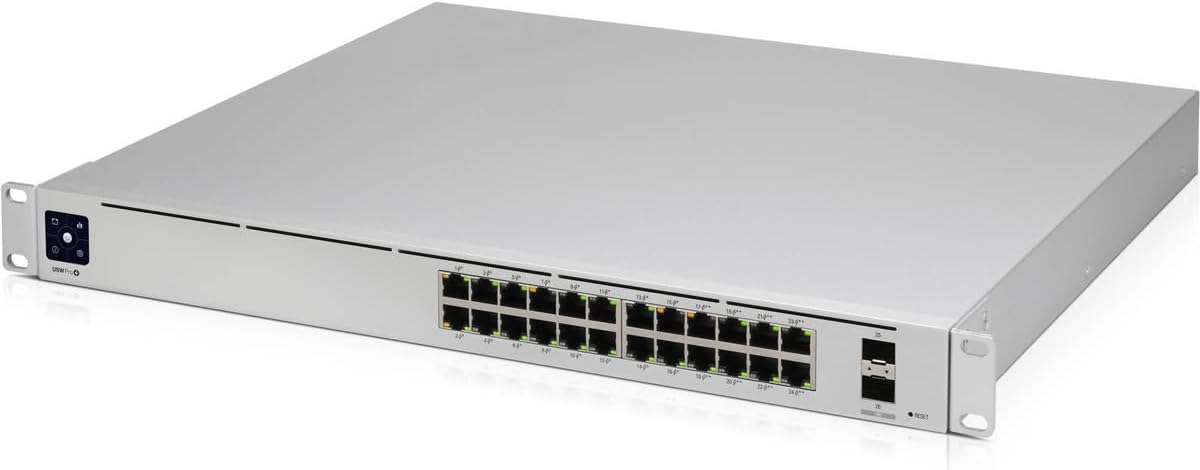
Ubiquiti USW-PRO-24-POE | Unifi Gen 2 10 Gigabit Switch
Want the best price and purchase timing?
Our AI advisor analyzes real-time pricing across all channels to find you the best deal.
AI Verdict
This is a 24-port PoE+ and PoE++ switch with 2x 10 Gigabit SFP+ uplinks and Layer 3 features, designed for expanding UniFi networks requiring high-speed connectivity and advanced routing.
This switch is a strong contender if your network demands 24 PoE ports, including higher-power PoE++, and requires 10 Gigabit SFP+ uplinks for high-bandwidth connections. Its Layer 3 features are a plus for complex network segmentation, but the reported fan noise means careful consideration of its placement is necessary.
If fan noise is a dealbreaker, look for fanless or passively cooled managed switches with similar port configurations and PoE budgets.
Regret Score™
Low RiskLower is better — measures purchase-regret risk from real buyer complaints, review credibility, and product maturity
Issues discovered after purchase
Critically weak dimension
Amazon rating vs actual quality
Chance this product isn't for you
Pros
- Features 24 RJ45 ports, with 16 supporting 802.3af/at (PoE+) and 8 supporting 802.3bt (PoE++).
- Includes 2 SFP+ ports for 10 Gigabit fiber or copper uplinks.
- Offers Layer 3 capabilities such as inter-VLAN routing and static routing.
- Provides a 450W total PoE power budget across its ports.
- Integrates with the UniFi controller for centralized network management.
- Equipped with a front touchscreen display for quick status checks and basic controls.
Cons
- Users report significant fan noise, with fans running at 44% and 4300 RPM at 52°C, despite 'near-silent' claims.
- Layer 3 features were initially described as 'coming soon' or having 'immature' software.
- The physical depth of the unit may not fit all wall-mounted network racks.
- Some specific older Ubiquiti devices, like the UVC-G3 camera, are not compatible.
Dimension Scores
It features 24 1 Gigabit RJ45 ports and 2 10 Gigabit SFP+ ports, providing high bandwidth for connected devices and uplinks.
Ubiquiti hardware is generally robust, but initial software maturity for Layer 3 features and recurring fan noise reports are user concerns.
Management through the UniFi controller is user-friendly, and the front display offers convenient at-a-glance information.
The inclusion of Layer 3 features like inter-VLAN routing enhances network segmentation and security capabilities.
Best For
- Expanding UniFi networks needing power delivery to 24 devices.
- Environments requiring 10 Gigabit uplinks to a core switch or server.
- Network administrators implementing inter-VLAN routing and static routing.
- Installations with a mix of PoE+ and higher-power PoE++ devices.
Not Recommended For
- Noise-sensitive home or office environments where the switch is not in a dedicated closet.
- Users who only need basic Layer 2 switching without advanced routing features.
- Installations with limited rack depth, as the unit is physically deep.
Watch Out For
- The fan noise is a recurring complaint, with reports of fan speeds reaching 4300 RPM and temperatures around 52°C, making it unsuitable for quiet spaces.
- Initial releases of the switch had Layer 3 features that were not fully implemented or had 'immature' software, potentially requiring firmware updates for full functionality.
- The physical dimensions, particularly its depth, can cause installation issues in shallower wall racks.
- Despite being a Ubiquiti product, it has shown incompatibility with certain older UniFi devices, such as the UVC-G3 camera.
Full Specifications
| UPC | 817882028349 |
| ASIN | B082NRZFSD |
| Brand | Ubiquiti Networks |
| Color | White |
| Voltage | 220 |
| Language | English, English, English, English, English |
| Batteries | 1 Lithium Ion batteries required. |
| Item Weight | 8.36 pounds |
| Manufacturer | Ubiquiti Networks |
| Interface Type | PoE |
| Number of Ports | 2 |
| Item model number | USW-PRO-24-POE |
| Compatible Devices | Desktop |
| Data Transfer Rate | 12 Gigabits Per Second |
| Product Dimensions | 19.69"L x 11.81"W x 1.77"H |
| Included Components | 24 Port Switch |
| Upper Temperature Rating | 40 Degrees Celsius |
| Is Discontinued By Manufacturer | No |
What Buyers Say
The most surprising finding is the consistent complaint about fan noise, with users reporting fan speeds up to 4300 RPM, directly contradicting Ubiquiti's 'near-silent' claim. Despite this, the switch is praised for its extensive PoE capabilities, including PoE++, and its 10 Gigabit SFP+ uplinks, making it a powerhouse for demanding networks. The Layer 3 features are a significant draw, though some early adopters found the software implementation to be a work in progress. Its integration with the UniFi controller is a key advantage for centralized management.
“Man, this thing is LOUD! I bought it for the 10G and all the PoE ports for my cameras and APs, but the fan noise is driving me nuts in my office. Seriously, Ubiquiti, 'near-silent' is a joke.”
Common Praise
- Provides 24 PoE ports, including 8 ports with higher-power PoE++.
- Offers 2 SFP+ ports for 10 Gigabit uplinks, enabling high-speed network backbone.
- Seamless integration and management within the UniFi ecosystem via the controller.
- Features Layer 3 capabilities like inter-VLAN routing for advanced network configurations.
- The front display provides useful real-time information about port status and throughput.
Common Complaints
- Significant fan noise, with reports of fans running at 44% and 4300 RPM, making it unsuitable for quiet spaces.
- Layer 3 features were not fully mature or stable in early firmware versions.
- The physical depth of the switch can be an issue for installation in some wall racks.
- Incompatibility with specific older UniFi devices, such as the UVC-G3 camera, caused user confusion.
Ownership Tips
- The fan noise is a constant factor; plan for its placement in a server closet or area where noise isn't an issue.
- Leveraging the Layer 3 features requires a solid understanding of networking concepts and UniFi's controller interface.
- To utilize the 10 Gigabit SFP+ ports, you'll need to invest in compatible SFP+ modules or direct attach cables.
- The UniFi controller is central to its operation; ensure you have a dedicated UniFi OS Console or a running controller instance.
Frequently Asked Questions
Is the Ubiquiti USW-PRO-24-POE switch silent?
No, users frequently report fan noise, with recorded fan speeds up to 4300 RPM and temperatures around 52°C, making it audible in quiet environments.
Does this switch support 10 Gigabit speeds?
Yes, it includes two SFP+ ports that support 10 Gigabit fiber or direct attach copper connections for high-speed uplinks.
What types of Power over Ethernet (PoE) does it offer?
It provides 16 ports with 802.3af/at (PoE+) and 8 ports with 802.3bt (PoE++), with a total PoE power budget of 450W.
Can this switch perform Layer 3 routing?
Yes, it supports Layer 3 features such as inter-VLAN routing, static routing, and DHCP server functionality.
Is the switch compatible with all Ubiquiti UniFi devices?
While it generally integrates well within the UniFi ecosystem, some users have noted specific incompatibilities, such as with the UVC-G3 camera.
Buying Guide
When looking at a switch like this, you need to think about how many devices you're powering directly from the network cable (that's PoE), how fast your main network connections need to be (those 10 Gigabit SFP+ ports), and if you need the switch to handle traffic between different parts of your network (Layer 3 routing). Don't just count ports; consider the power budget for your PoE devices and the speed of your uplinks.
PoE (Power over Ethernet)
This means the switch can send both data and electrical power over a single Ethernet cable. It's like having an electrical outlet and an internet jack combined into one for devices like security cameras, Wi-Fi access points, or VoIP phones, simplifying installation and reducing cable clutter.
SFP+ Ports
These are special slots for high-speed modules, typically used for 10 Gigabit connections. Think of them as express lanes for your network, allowing you to connect your switch to a server, another switch, or your main router at much faster speeds than standard Gigabit Ethernet, crucial for heavy data traffic.
Layer 3 Features
A Layer 3 switch can do more than just forward data within the same network segment; it can route traffic between different network segments (VLANs). This is like a traffic cop directing cars between different highways, which can improve network performance and security by isolating different types of traffic.
Alternatives
If the fan noise is a concern, search for fanless or passively cooled managed switches with 24 Gigabit Ethernet ports and a similar PoE power budget. If you don't need 10 Gigabit uplinks, look for switches with standard SFP ports or only Gigabit RJ45 ports to potentially save on cost.
You Might Also Like

Learning Resources TL-SF1005D TP-Link 5-Port Fast Ethernet Unmanaged Switch | Plug and Play | Desktop
A 5-port 10/100 Mbps unmanaged switch for expanding wired connections where 100 Mbps is sufficient.

TP-Link TL-SG105, 5 Port Gigabit Unmanaged Ethernet Switch, Network Hub, Ethernet Splitter, Plug & Play, Fanless Metal Design, Shielded Ports, Traffic Optimization
This 5-port 1000Mbps unmanaged switch expands your wired network with plug-and-play simplicity for basic device connections.

TP-Link 8 Port Gigabit Ethernet Network Switch - Ethernet Splitter | Plug & Play | Fanless | Sturdy Metal w/ Shielded Ports | Traffic Optimization | Unmanaged | Lifetime Protection (TL-SG108)
This unmanaged 8-port 1000Mbps switch with a metal casing is for expanding wired networks without complex setup.

NETGEAR 5-Port Gigabit Ethernet Unmanaged Essentials Switch (GS305) - Home Network Hub, Office Ethernet Splitter, Plug-and-Play, Silent Operation, Desktop or Wall Mount
A 5-port, 1000 Mbps unmanaged switch for expanding wired connections in homes or small offices.