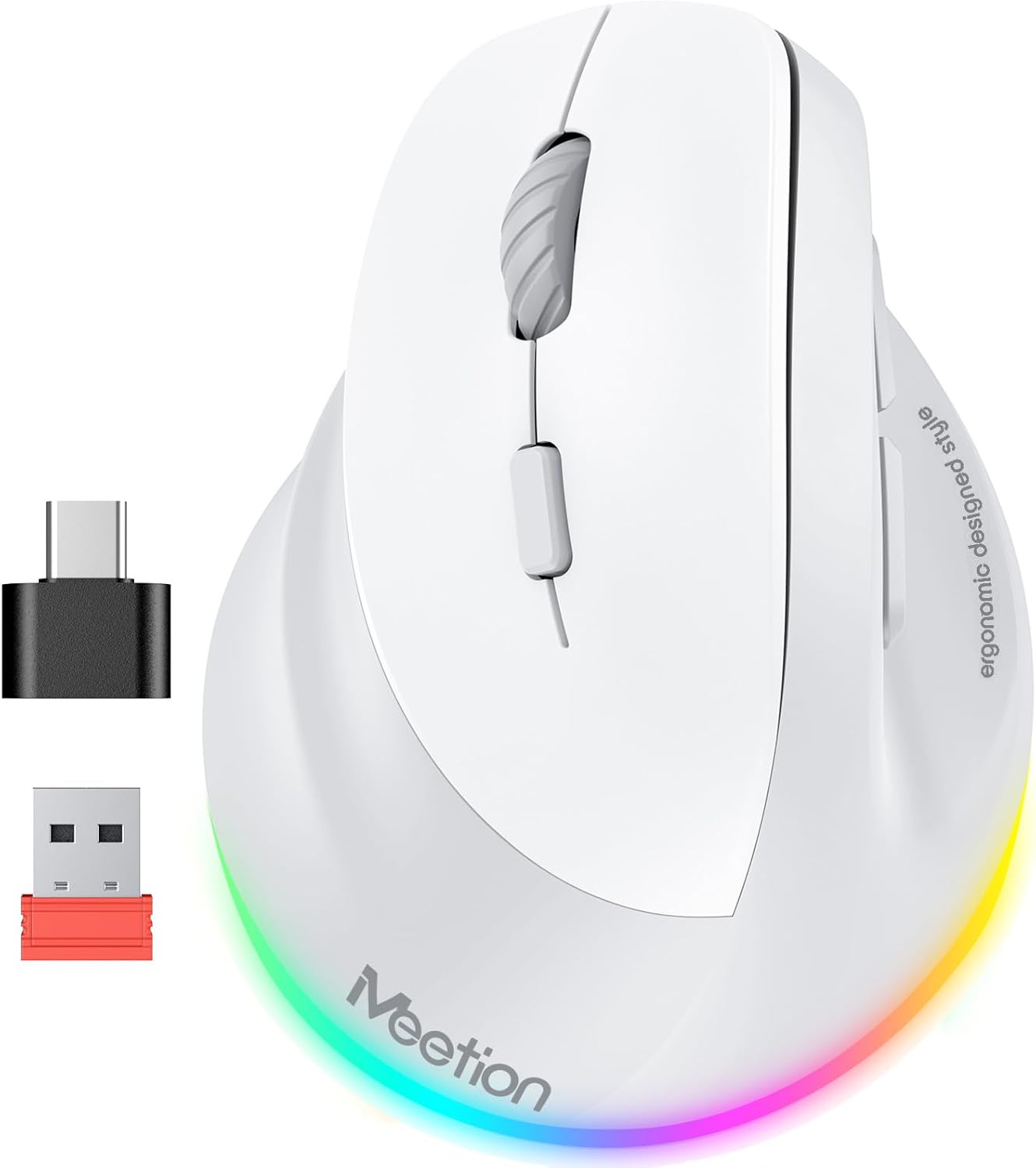
MEETION Left-Handed Mouse, Ergonomic Mouse Wireless Vertical Mouse, RGB Mice for Bluetooth(5.2 + 3.0) & USB-A with Type-c Adapter 4 Adjustable DPI for Mac/Windows/PC/Tablet/iPad Gray
Want the best price and purchase timing?
Our AI advisor analyzes real-time pricing across all channels to find you the best deal.
AI Verdict
A left-handed, 8.1-ounce vertical mouse with tri-mode Bluetooth 5.2/3.0 and 2.4G wireless, 800-2400 DPI, and RGB lighting, designed for budget-conscious lefties seeking wrist comfort.
This mouse is a strong fit for left-handed users prioritizing wrist comfort and multi-device connectivity on a budget, offering a vertical ergonomic design and tri-mode wireless. Its 8.1-ounce weight and 2400 max DPI might limit appeal for those needing a lighter mouse or higher precision.
If you need more precision or a lighter feel, look for mice with higher DPI ranges (e.g., 4000+ DPI) and weights under 4 ounces.
Regret Score™
Medium RiskLower is better — measures purchase-regret risk from real buyer complaints, review credibility, and product maturity
Issues discovered after purchase
Critically weak dimension
Amazon rating vs actual quality
Chance this product isn't for you
Pros
- Left-handed vertical ergonomic design aims to reduce wrist and forearm strain, promoting a natural grip.
- Tri-mode connectivity (Bluetooth 5.2, Bluetooth 3.0, and 2.4G wireless) allows connection to multiple devices.
- Includes both a USB-A receiver and a Type-C adapter for broad device compatibility.
- Features 4 adjustable DPI settings (800, 1200, 1800, 2400) for varied cursor speed.
- Equipped with a rechargeable battery, eliminating the need for disposable cells.
- "Mute Click Design" provides quieter operation, suitable for shared workspaces.
Cons
- Weighs 8.1 ounces, which is heavier than many wireless mice, potentially causing fatigue during extended use.
- RGB lighting cannot be manually adjusted for color; it cycles automatically, and can only be turned on or off.
- The USB-C adapter is not a standalone receiver; it requires the USB-A receiver to function for 2.4G wireless.
- DPI range tops out at 2400, which might be insufficient for high-precision design work or competitive gaming.
Dimension Scores
The optical sensor with 4 adjustable DPI settings up to 2400 is adequate for general use but lacks the precision and higher ranges found in mice for specialized tasks.
The dedicated left-handed vertical ergonomic design is specifically engineered to reduce wrist and forearm strain, accommodating large and medium-sized hands.
Offering Bluetooth 5.2, Bluetooth 3.0, and 2.4G wireless with both USB-A receiver and Type-C adapter provides extensive multi-device compatibility.
The 8.1-ounce weight suggests a substantial build, and the product claims 'high-quality materials' for durability, but specific material details are not provided.
Best For
- Left-handed users experiencing wrist discomfort from traditional mice.
- Individuals needing to switch between multiple devices (e.g., laptop, tablet, desktop) with different connectivity options.
- Users seeking a quieter mouse for shared workspaces due to its "Mute Click Design".
- Those on a budget looking for an ergonomic left-handed mouse.
Not Recommended For
- Right-handed individuals, as its design is specifically left-handed.
- Competitive gamers or graphic designers who require DPI settings above 2400 or highly customizable buttons.
- Users who prefer very lightweight mice, given its 8.1-ounce weight.
Watch Out For
- The 8.1-ounce weight might cause fatigue during extended, rapid mouse movements for some users.
- The RGB lighting's inability to manually adjust colors means you're limited to its default spectrum.
- The USB-C adapter is only an adapter, not a receiver, which could confuse users expecting direct USB-C wireless connectivity.
- The "mute click design" might result in a less tactile or "muddier" click feel compared to mice with crispier switches.
Full Specifications
| ASIN | B0FXLQ49PM |
| Brand | MEETION |
| Color | Gray (For Large Left hands) |
| Batteries | 1 12V batteries required. (included) |
| Item Weight | 8.1 ounces |
| Manufacturer | Meetion Direct |
| Special Feature | Ergonomic Design, left handed, vertical |
| Package Dimensions | 6.61 x 4.37 x 3.03 inches |
| Connectivity Technology | Bluetooth, USB |
| Movement Detection Technology | Optical |
What Buyers Say
Users frequently highlight the immediate comfort improvement from the vertical design, especially for those with wrist pain. The multi-device connectivity via Bluetooth and 2.4G is a recurring positive, allowing seamless switching between computers, tablets, and phones. However, the weight of 8.1 ounces is a point of concern for some, potentially leading to fatigue during prolonged use. The silent click feature is appreciated in quiet environments, but some report a less crisp button feel.
“Dude, my wrist was killing me with my old mouse, but this left-handed vertical thing actually feels way better, even if it's a bit chunky and the RGB just does its own thing.”
Common Praise
- Vertical design significantly reduces wrist and forearm strain for left-handed users.
- Ability to connect to three devices via Bluetooth 5.2, 3.0, and 2.4G wireless.
- "Mute Click Design" provides a quiet working environment.
- Rechargeable battery eliminates the need for frequent battery replacements.
- Forward and backward buttons are conveniently placed for web navigation.
Common Complaints
- The 8.1-ounce weight is heavier than many competing wireless mice, potentially causing hand fatigue.
- RGB lighting lacks manual color adjustment, only offering an on/off toggle.
- The click feel can be "muddier" compared to more premium mice.
- The USB-C adapter is not a direct receiver, requiring the USB-A dongle.
Ownership Tips
- The vertical orientation takes a few days to get used to, but then feels natural.
- The rechargeable battery holds a charge for a decent period, reducing battery anxiety.
- Switching between devices with the mode button is straightforward and works consistently.
- The silent clicks are genuinely quiet, making it suitable for late-night work without disturbing others.
- The plastic finish, while claiming "high-quality materials," might show wear over extended use, especially on high-contact areas.
Frequently Asked Questions
Can I use this mouse with a USB-C port directly for wireless connection?
No, the USB-C is an adapter for the USB-A receiver; you need to plug the USB-A receiver into the adapter for USB-C port use.
Is this mouse only for left-handed people?
Yes, its ergonomic design is specifically contoured for left-hand use to reduce strain.
How do I change the DPI settings?
There is a dedicated button to cycle through the 800, 1200, 1800, and 2400 DPI settings.
Does the RGB lighting have customizable colors?
No, the RGB lighting cycles through a spectrum of colors automatically; you can only turn it on or off by pressing the DPI button for 3 seconds.
Does this mouse require disposable batteries?
No, it features a built-in rechargeable battery.
Buying Guide
When buying a mouse, especially an ergonomic one, your hand size and how you hold the mouse are crucial. For left-handed vertical mice, the goal is to keep your wrist in a more natural, handshake-like position to prevent strain. Pay attention to connectivity options if you switch between devices, and consider the mouse's weight if you make many small, rapid movements.
DPI (Dots Per Inch)
This tells you how sensitive the mouse is. A higher DPI means the cursor moves further on screen with a smaller physical mouse movement. For general use, 800-2400 DPI is fine, but for detailed graphic work or fast-paced gaming, you might want higher numbers.
Ergonomic Design
This isn't just a buzzword; it refers to how the mouse is shaped to fit your hand and promote a natural posture. A vertical design, like this one, aims to reduce wrist pronation, which can alleviate discomfort over long periods.
Connectivity (Bluetooth vs. 2.4G Wireless)
Bluetooth connects directly to your device's built-in Bluetooth, freeing up USB ports. 2.4G wireless uses a small USB dongle for a dedicated, often more stable connection, but it uses a USB port. This mouse offers both, giving you flexibility.
Alternatives
If this mouse doesn't fit, look for left-handed vertical mice with higher DPI ranges (e.g., 3200+ DPI) for precision tasks, or models weighing under 4 ounces if you need a lighter feel for extensive movement.
You Might Also Like

Magnetic Charging Mouse Pad 31.5x15.75, 15W Fast Wireless Charging Desk Mat, XXL Desk Pad RGB Gaming Mousepad, Home Office Large Keyboard Pad with Ultra-Smooth Surface, Non-Slip Base
$50-$99This 31.5" x 15.75" RGB desk mat with 15W magnetic phone charging and a Qi headphone charging zone is for users wanting to declutter and illuminate their workstation.

Mouse Pad Desk Mat Full Moon Desk Pad Black Red Large Mouse Pad Gaming Mousepad Extended Laptop Computer Mouse Keyboard Mat-11.8 x 31.5 in
Price range unavailableThis is a 11.8 x 31.5 inch desk mat for users needing a large, undefined surface to cover their desk, but with no available product details or user feedback.

SteelSeries QcK Gaming Mouse Pad - Small Cloth - Optimized For Gaming Sensors
A 250 x 210 x 2mm cloth pad with a non-slip rubber base, ideal for high DPI users or those with limited desk space.

SteelSeries QcK Large Gaming Mousepad — Black — Non-Slip Silicone Rubber Base — Peak Tracking and Stability — Optimized for Gaming Sensors — 490 mm x 420 mm — FPS, MOBAs, RTS, MMO
A 450 mm x 400 mm x 2 mm cloth mousepad designed for precise control in gaming, especially for budget-conscious players.