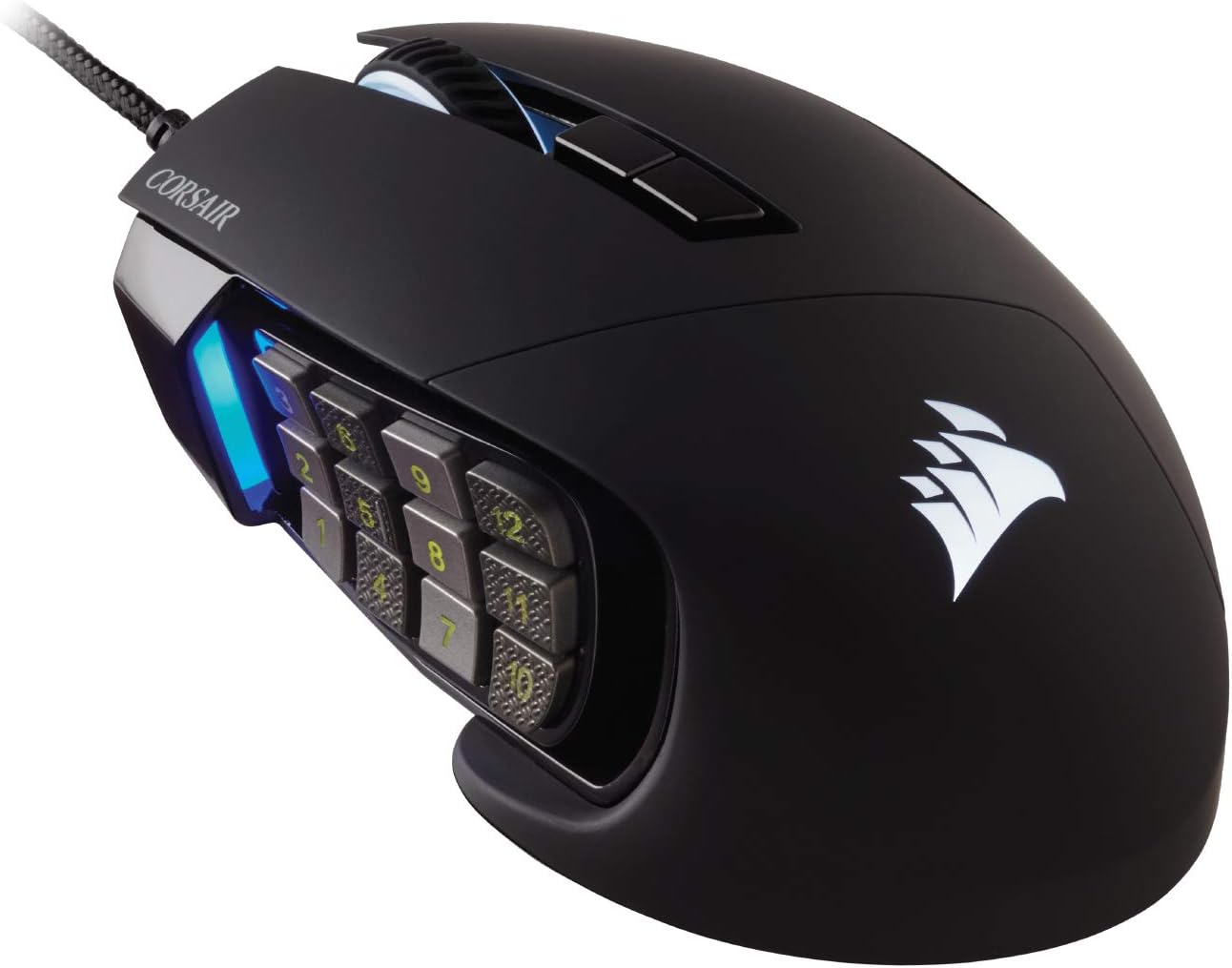
Corsair Scimitar RGB Elite Wired MOBA/MMO Gaming Mouse – 18,000 DPI – 17 Programmable Buttons – iCUE Compatible – PC, Mac, PS5, PS4, Xbox – Black
Want the best price and purchase timing?
Our AI advisor analyzes real-time pricing across all channels to find you the best deal.
AI Verdict
This 4.3-ounce wired mouse with 17 programmable buttons and an 18,000 DPI optical sensor is for MOBA/MMO players needing extensive macro control.
This mouse is a strong contender for MOBA/MMO players due to its 17 programmable buttons and adjustable side panel, which directly addresses the need for complex macros and personalized ergonomics. However, its 4.3-ounce weight and wide design make it less suitable for fast-paced FPS games or users who prefer lighter mice. The iCUE software, while powerful, presents a learning curve and occasional bugs that might deter some users.
If extensive macros aren't your top priority or you prefer a lighter mouse, look for models with fewer buttons and a weight under 3 ounces.
Regret Score™
Medium RiskLower is better — measures purchase-regret risk from real buyer complaints, review credibility, and product maturity
Issues discovered after purchase
Critically weak dimension
Amazon rating vs actual quality
Chance this product isn't for you
Pros
- 17 programmable buttons allow for extensive macro customization in games.
- Patented Key Slider system repositions the 12 side buttons to fit various grip styles.
- Native 18,000 DPI optical sensor, adjustable in 1 DPI steps, offers precise tracking.
- Omron switches rated for 50 million clicks and a braided cable contribute to durability.
- Comfortable contoured shape with a right-side finger rest supports palm grip.
Cons
- iCUE software can be clunky, unintuitive, and buggy for some users, especially on Mac.
- The mouse's 4.3-ounce weight and wide design (77mm) can feel heavy or cumbersome for some.
- Side buttons, particularly the bottom row, are too close to the base, making accidental presses common.
- Scroll wheel is shallow and lacks quick/infinite scroll functionality.
- No wireless connectivity option, limiting desk setup flexibility.
Dimension Scores
The native 18,000 DPI optical sensor, a custom PixArt PMW3391, is adjustable in 1 DPI resolution steps, providing highly accurate and customizable tracking.
The contoured shape with a right-side finger rest is sculpted for palm grip and includes a patented Key Slider system to reposition side buttons for comfort, though some find it wide.
It uses a standard USB wired connection, which is reliable but lacks the flexibility of wireless options found in many modern gaming mice.
The mouse features 50 million click-rated Omron switches, a sturdy scroll wheel, and a braided cable, indicating a focus on long-term durability.
Best For
- Players requiring extensive macro capabilities for MOBA and MMO titles.
- Users who prefer a palm grip and appreciate a dedicated finger rest.
- Gamers who value a high DPI optical sensor for precise cursor control.
- Individuals already invested in the Corsair iCUE ecosystem for synchronized RGB.
Not Recommended For
- FPS gamers who prioritize lightweight mice and minimal buttons.
- Users who prefer wireless peripherals for a clutter-free setup.
- Those sensitive to mouse weight or who prefer claw/fingertip grip styles.
- Anyone looking for a simple, plug-and-play mouse without extensive software configuration.
Watch Out For
- The iCUE software can be frustrating, with users reporting it's unintuitive for assigning keybinds and can crash frequently on Mac.
- The mechanical side buttons have been described as feeling wobbly by some users.
- The scroll wheel is shallow and lacks a quick-scroll feature, which can be a drawback for productivity or browsing.
- The bottom row of side buttons (1 and 4) are positioned too close to the mouse's base, leading to accidental presses.
- Some users report finger strain with frequent use due to the mouse's stiff feel.
Full Specifications
| ASIN | B0FWR3P1FT |
| Brand | Corsair |
| Color | Black |
| Series | SCIMITAR RGB ELITE |
| Item Weight | 4.3 ounces |
| Manufacturer | Corsair |
| Special Feature | LED Lights, Programmable Buttons |
| Operating System | Windows, Macos, Linux |
| Hardware Platform | PC |
| Item model number | CH-9304211-AS |
| Product Dimensions | 6.89 x 4.49 x 0.1 inches |
| Item Dimensions LxWxH | 6.89 x 4.49 x 0.1 inches |
| Connectivity Technology | USB |
| Movement Detection Technology | Optical |
What Buyers Say
The most surprising feedback is how polarizing the iCUE software is; some users find it powerful for customization, while others describe it as clunky, unintuitive, and prone to crashing, especially on Mac. Many users highlight the sheer number of programmable buttons as a game-changer for complex game inputs, but also mention the challenge of differentiating them without looking. The adjustable side panel is a frequently praised feature for adapting to different hand sizes and grip preferences. However, the mouse's weight and wide profile are recurring points of contention, making it less ideal for those who prefer lighter, more agile mice.
“Look, if you play FFXIV or something like that, this mouse is a must-have, but setting up those buttons in iCUE is a nightmare sometimes, and my thumb still hits the wrong one when things get crazy.”
Common Praise
- 17 programmable buttons are a game-changer for MMO/MOBA macros.
- Sliding side button panel allows for comfortable thumb placement.
- 18,000 DPI sensor offers precise and adjustable tracking.
- Comfortable shape with a ring finger rest for long gaming sessions.
- Durable construction with Omron switches and a braided cable.
Common Complaints
- iCUE software is often described as unintuitive, clunky, or buggy.
- Side buttons can be hard to differentiate by feel, leading to misclicks.
- Mouse feels heavy and wide, making it less suitable for some hand sizes or grip styles.
- Scroll wheel is shallow and lacks a quick/infinite scroll feature.
- Bottom row of side buttons is too close to the mouse base, causing accidental presses.
Ownership Tips
- You'll spend a significant amount of time in iCUE initially to get all 17 buttons mapped how you want them.
- The adjustable side panel is genuinely useful for finding a comfortable thumb position, but you might need a hex key to move it.
- Even with textured buttons, differentiating the 12 side buttons by feel takes serious practice.
- The mouse's weight and size are noticeable, especially if you're coming from a lighter mouse.
- The RGB lighting is customizable, but the light next to the side buttons is often tied to DPI settings, not general lighting effects.
Frequently Asked Questions
Is this mouse suitable for left-handed users?
No, the Corsair Scimitar RGB Elite features a contoured shape and right-side finger rest designed specifically for right-handed use.
Can I use this mouse without installing the iCUE software?
While the mouse will function for basic cursor movement, you need the iCUE software to program the 17 buttons, adjust DPI steps, and customize RGB lighting.
How do I adjust the side button panel?
The patented Key Slider control system allows you to reposition the 12 side buttons. This typically involves a hex key for adjustment.
Does this mouse have onboard memory for profiles?
Yes, the mouse has onboard profile storage, allowing you to save your settings directly to the mouse and use them on different computers without iCUE.
Is the braided cable durable?
Yes, the mouse features a braided cable designed for durability and to withstand extended gaming wear-and-tear.
Buying Guide
When buying a MOBA/MMO mouse like this, you're primarily paying for the sheer number of programmable buttons. Think about how many actions you need to map to your mouse, not just how many buttons it has. The sensor's DPI is important for precision, but don't get hung up on the highest number; what matters is if it's accurate and adjustable to your preferred sensitivity. Comfort is also huge for long gaming sessions, so consider the mouse's shape and weight relative to your hand size and grip style.
17 Programmable Buttons
This isn't just for show; it means you can assign complex macros or numerous in-game abilities directly to your mouse, reducing reliance on keyboard shortcuts and potentially speeding up your reactions in games like World of Warcraft or League of Legends.
18,000 DPI Optical Sensor
DPI (Dots Per Inch) dictates how far your cursor moves on screen for every inch you move the mouse. A high DPI like 18,000 means extreme sensitivity, allowing for very fine adjustments, but more importantly, a quality optical sensor ensures consistent and accurate tracking without acceleration or jitter.
Patented Key Slider Control System
This feature lets you physically move the entire block of 12 side buttons forward or backward. It's crucial for ergonomics, ensuring your thumb can comfortably reach all the buttons without straining, regardless of your hand size or how you grip the mouse.
Alternatives
If this mouse doesn't fit, look for models with fewer side buttons if you don't need extensive macros, or consider wireless options if you prioritize desk tidiness and freedom of movement. For competitive FPS play, prioritize lighter mice with a simpler button layout and a focus on low latency.
You Might Also Like

Magnetic Charging Mouse Pad 31.5x15.75, 15W Fast Wireless Charging Desk Mat, XXL Desk Pad RGB Gaming Mousepad, Home Office Large Keyboard Pad with Ultra-Smooth Surface, Non-Slip Base
$50-$99This 31.5" x 15.75" RGB desk mat with 15W magnetic phone charging and a Qi headphone charging zone is for users wanting to declutter and illuminate their workstation.

Mouse Pad Desk Mat Full Moon Desk Pad Black Red Large Mouse Pad Gaming Mousepad Extended Laptop Computer Mouse Keyboard Mat-11.8 x 31.5 in
Price range unavailableThis is a 11.8 x 31.5 inch desk mat for users needing a large, undefined surface to cover their desk, but with no available product details or user feedback.

SteelSeries QcK Gaming Mouse Pad - Small Cloth - Optimized For Gaming Sensors
A 250 x 210 x 2mm cloth pad with a non-slip rubber base, ideal for high DPI users or those with limited desk space.

SteelSeries QcK Large Gaming Mousepad — Black — Non-Slip Silicone Rubber Base — Peak Tracking and Stability — Optimized for Gaming Sensors — 490 mm x 420 mm — FPS, MOBAs, RTS, MMO
A 450 mm x 400 mm x 2 mm cloth mousepad designed for precise control in gaming, especially for budget-conscious players.