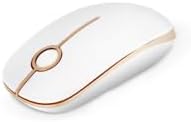
Unipows Wireless Mouse - 2.4G Slim Portable Computer Mouse with Nano Receiver, Less Noise Mobile Optical Mice for Notebook, PC, Laptop, Computer, Mac (White Gold)
Want the best price and purchase timing?
Our AI advisor analyzes real-time pricing across all channels to find you the best deal.
AI Verdict
This is a 2.4GHz wireless optical mouse with quiet clicks and a 2.89-ounce weight, suitable for basic, portable computing tasks.
This mouse is a situational fit for users prioritizing portability and quiet operation for basic computing tasks, especially given its 2.89-ounce weight and noiseless clicks. Its 2.4GHz wireless connection is straightforward, but the reliance on a single AA battery and lack of adjustable DPI limit its appeal for more demanding users or those with USB-C only devices.
If you need adjustable sensitivity or compatibility with USB-C only devices, look for mice with multiple DPI settings or Bluetooth connectivity.
Regret Score™
Medium RiskLower is better — measures purchase-regret risk from real buyer complaints, review credibility, and product maturity
Issues discovered after purchase
Critically weak dimension
Amazon rating vs actual quality
Chance this product isn't for you
Pros
- Provides a 2.4GHz stable wireless connection up to 15m (49 feet) via a nano receiver.
- Features responsive buttons with less noise, making clicks quiet.
- Weighs 2.89 ounces, making it lightweight and portable for travel.
- Includes a nano USB receiver that stows inside the mouse when not in use.
- Rated for 5 million comfortable clicks, indicating durability for its price point.
- Enters sleep mode after 8 minutes of inactivity to conserve battery life.
Cons
- Requires one AA battery, which is not included in the package.
- Drains battery quickly if not manually turned off after use.
- Does not feature adjustable sensitivity settings (DPI).
- Not compatible with MacBook Pro or other laptops that only have USB-C ports.
- Not recommended for competitive gaming due to potential lag and lack of advanced features.
Dimension Scores
The optical sensor provides 'high DPI movement resolution' and tracks on nearly any surface, but lacks adjustable sensitivity for precision tasks.
It features a slim, ergonomic design and smooth surface, but its smaller size might be less comfortable for users with larger hands during extended use.
Offers a stable 2.4GHz wireless connection via a USB-A nano receiver, but lacks Bluetooth and is incompatible with USB-C only devices.
Rated for 5 million clicks, suggesting average durability for a budget mouse, with no specific reports of premature failure.
Best For
- Users needing a portable mouse for travel or coffee shop work.
- Individuals seeking a quiet mouse for shared office environments or libraries.
- Basic office tasks like browsing, document editing, and email on Windows or older Mac OS devices.
Not Recommended For
- Gamers requiring high precision, rapid response, or customizable features.
- Graphic designers or professionals needing adjustable DPI and advanced customization.
- MacBook Pro users or those with laptops exclusively featuring USB-C ports.
- Users who prefer rechargeable mice or do not want to manage AA battery replacements.
Watch Out For
- The mouse requires a single AA battery, which is not included, and users report it drains quickly if not turned off manually.
- It lacks adjustable DPI settings, meaning sensitivity cannot be changed for different tasks.
- Incompatible with modern MacBooks or other laptops that only have USB-C ports, as it connects via a standard USB-A nano receiver.
- The slim, ambidextrous design might feel small for users with larger hands.
Full Specifications
| ASIN | B0FWQXTZM2 |
| Brand | Unipows |
| Color | White and Gold |
| Batteries | 1 AA batteries required. |
| Item Weight | 2.89 ounces |
| Manufacturer | Unipows |
| Special Feature | quiet |
| Package Dimensions | 4.65 x 2.56 x 1.54 inches |
| Connectivity Technology | USB |
| Movement Detection Technology | Optical |
What Buyers Say
This Unipows mouse is a popular choice, holding an Amazon's Choice badge and a 4.6/5 rating from over 4,000 reviews, largely due to its quiet operation and portability. Users frequently highlight its noiseless clicks as a key benefit for shared workspaces. However, the reliance on a single AA battery that drains quickly if not turned off is a recurring point of frustration. The lack of adjustable DPI settings also means it's not suited for tasks requiring varied cursor precision.
“Man, this thing is quiet, like really quiet, but I gotta remember to flip that switch or I'm burning through AA batteries every week.”
Common Praise
- Buttons provide soft clicks with less noise, ideal for quiet environments.
- The 2.4GHz wireless connection is stable and reliable up to 15m.
- The nano receiver stores conveniently inside the mouse for portability.
- Its 2.89-ounce weight makes it easy to carry for on-the-go use.
- Tracks on nearly any surface due to its optical sensor.
Common Complaints
- Requires a single AA battery that is not included.
- Battery drains quickly if the mouse is not manually switched off.
- No adjustable DPI settings for varying cursor sensitivity.
- Not compatible with laptops that only have USB-C ports.
- Not suitable for competitive gaming or precision design work.
Ownership Tips
- You'll need to keep a supply of AA batteries on hand, or invest in rechargeables, because the auto-sleep isn't enough to prevent fast drain if you forget to power it off.
- The lack of adjustable DPI means you're stuck with one sensitivity, which is fine for browsing but annoying for anything needing more precision.
- If your laptop only has USB-C ports, you'll need an adapter, which adds another dongle to manage.
- The slim profile is great for tossing in a bag, but if you have larger hands, it might feel a bit cramped after an hour or two.
Frequently Asked Questions
What type of battery does the Unipows Wireless Mouse use?
The Unipows Wireless Mouse operates on a single AA battery, which is not included in the package.
Is this mouse compatible with Mac computers?
Yes, it works with Mac OS X 10.4 and later. However, it is not compatible with MacBook Pro or other laptops that only have Type C ports, as it uses a USB-A nano receiver.
Is the Unipows Wireless Mouse suitable for gaming?
While it can handle casual gaming, it is not recommended for competitive gaming due to potential lag and a lack of advanced features like adjustable DPI or programmable buttons.
Does this mouse have adjustable DPI settings?
No, the Unipows Wireless Mouse does not feature adjustable sensitivity settings. It has a fixed high DPI movement resolution.
How far can the wireless connection reach?
The 2.4GHz wireless connection provides a reliable link up to 15 meters (49 feet) from the nano receiver.
Buying Guide
When you're looking at a wireless mouse like this, you need to think about how you'll actually use it. If you're just clicking around for basic stuff and want something easy to carry that won't annoy people with loud clicks, this fits. But if you're doing anything that needs precise movements or you have a newer laptop, you'll hit some walls pretty fast.
2.4GHz Wireless Connection
This is how the mouse talks to your computer. 2.4GHz is a common, reliable standard, like a dedicated radio channel, that gives you a stable connection up to 15 meters without needing to pair it like Bluetooth.
Optical Sensor
This is the 'eye' of the mouse that tracks movement. An optical sensor uses light to detect motion on surfaces. It's generally accurate for everyday use, but doesn't offer the same precision or multi-surface tracking as a laser sensor.
Quiet Clicks
This means the buttons make very little sound when pressed. It's a big deal if you work in a quiet office, library, or late at night, preventing you from disturbing others around you.
Alternatives
If this mouse doesn't quite cut it, look for models with adjustable DPI settings for more control, Bluetooth connectivity for USB-C only devices, or a rechargeable battery to avoid constant battery swaps.
You Might Also Like

Magnetic Charging Mouse Pad 31.5x15.75, 15W Fast Wireless Charging Desk Mat, XXL Desk Pad RGB Gaming Mousepad, Home Office Large Keyboard Pad with Ultra-Smooth Surface, Non-Slip Base
$50-$99This 31.5" x 15.75" RGB desk mat with 15W magnetic phone charging and a Qi headphone charging zone is for users wanting to declutter and illuminate their workstation.

Mouse Pad Desk Mat Full Moon Desk Pad Black Red Large Mouse Pad Gaming Mousepad Extended Laptop Computer Mouse Keyboard Mat-11.8 x 31.5 in
Price range unavailableThis is a 11.8 x 31.5 inch desk mat for users needing a large, undefined surface to cover their desk, but with no available product details or user feedback.

SteelSeries QcK Gaming Mouse Pad - Small Cloth - Optimized For Gaming Sensors
A 250 x 210 x 2mm cloth pad with a non-slip rubber base, ideal for high DPI users or those with limited desk space.

SteelSeries QcK Large Gaming Mousepad — Black — Non-Slip Silicone Rubber Base — Peak Tracking and Stability — Optimized for Gaming Sensors — 490 mm x 420 mm — FPS, MOBAs, RTS, MMO
A 450 mm x 400 mm x 2 mm cloth mousepad designed for precise control in gaming, especially for budget-conscious players.