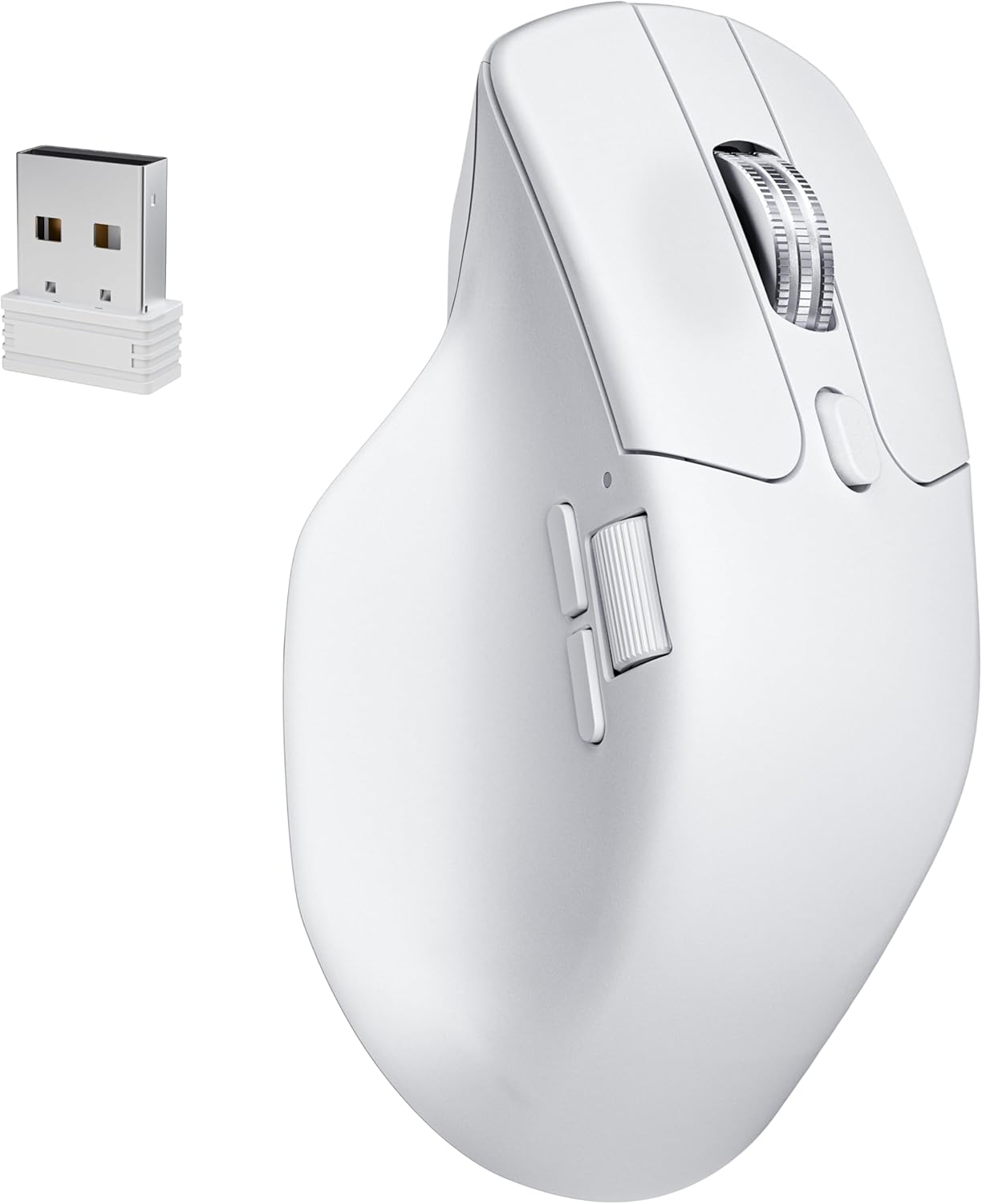
Keychron M6 8000 Hz Wireless Bluetooth 2.4 GHz/Wired Connection Mouse, Lightweight Body Programmable PixArt 3950 Sensor for Windows Mac Linux - White
Want the best price and purchase timing?
Our AI advisor analyzes real-time pricing across all channels to find you the best deal.
AI Verdict
This is an 86g, 30,000 DPI optical mouse with 10+ programmable buttons and multi-mode 2.4 GHz/Bluetooth 5.3/wired connectivity, built for productivity and high-polling rate gaming.
This mouse is a strong contender for specific use cases, offering a high-precision PixArt 3950 sensor and an 8000 Hz polling rate for demanding tasks and gaming. However, its ergonomic shape, while comfortable for many, might not suit all hand sizes, and some build quality concerns exist.
If you prioritize a wider, more robust build and don't need 8000 Hz polling, look for mice with a higher-rated click switch lifespan and a wider ergonomic profile.
Regret Score™
Medium RiskLower is better — measures purchase-regret risk from real buyer complaints, review credibility, and product maturity
Issues discovered after purchase
Critically weak dimension
Amazon rating vs actual quality
Chance this product isn't for you
Pros
- Features a PixArt 3950 sensor capable of 30,000 DPI and 750 IPS tracking, even on glass surfaces 4mm thick.
- Offers multi-mode connectivity with 2.4 GHz (8000 Hz polling), Bluetooth 5.3 (125 Hz polling), and wired USB-C options.
- Includes two scroll wheels, with the main wheel offering both infinite and precision modes, and a side thumb wheel for horizontal scrolling.
- Equipped with silent micro switches for main clicks, rated for 20 million clicks, providing quiet operation.
- Customization is available via the Keychron Launcher web app for button remapping, macros, and DPI adjustments, with settings stored on onboard memory.
- Ergonomic shape with a thumb rest is comfortable for right-handed users during extended sessions.
Cons
- The 11.7-ounce weight listed in product data is incorrect; the actual weight is 86g, which is still heavier than many ultra-light gaming mice.
- The main scroll wheel's click can feel less responsive than other mice, and some users find it loud.
- Battery life is rated for 120 hours, but some users report underwhelming performance or issues holding a charge past 24 hours.
- The Keychron Launcher software does not officially support Linux, though basic mouse functions work.
- Some users with larger hands find the mouse narrower than expected, leading to potential pinky drag or discomfort.
Dimension Scores
The PixArt 3950 sensor offers up to 30,000 DPI, 750 IPS tracking, and can track on glass surfaces 4mm thick, indicating high precision.
The right-handed ergonomic shape with a thumb rest is comfortable for many users, though some with larger hands find it narrow.
It features versatile 2.4 GHz (8000 Hz), Bluetooth 5.3 (125 Hz), and wired USB-C connectivity, with multi-device support.
While some find it sturdy with a metal scroll wheel, others report a 'cheap plastic feel' and flex on the right side.
Best For
- Users needing precise tracking for design or CAD work on various surfaces, including glass.
- Productivity users who frequently navigate long documents or spreadsheets with the infinite scroll wheel and require multiple programmable buttons.
- Gamers who prioritize ultra-low latency with an 8000 Hz polling rate via 2.4 GHz or wired connection.
- Individuals who switch between multiple devices (e.g., laptop, tablet) and benefit from Bluetooth 5.3 multi-device pairing.
Not Recommended For
- Users with very large hands who prefer a wider, fuller grip, as some find its shape too narrow.
- Left-handed users, as its ergonomic design is specifically for right-handed use.
- Those who require seamless 'Smart Scroll Switching' found in some competitor mice, as this mouse uses a physical toggle.
Watch Out For
- The main click switches are rated for 20 million clicks, which is significantly lower than the 80 million click rating of switches in some other gaming mice.
- Some users report the mouse having a 'cheap plastic feel' or noticeable flex on the right side when squeezed.
- The 2.4 GHz USB receiver was previously a large, keyboard-shaped dongle, though the 8K model now uses a standard USB-A dongle.
- On macOS, some users experience scroll lag after short idle periods, requiring a few scrolls to register movement.
- The side scroll wheel's positioning can make it awkward for prolonged use, limiting its utility for some tasks.
Full Specifications
| ASIN | B0FP2FHPWR |
| Brand | Keychron |
| Color | White |
| Language | English |
| Batteries | 1 12V batteries required. (included) |
| Item Weight | 11.7 ounces |
| Manufacturer | Keychron |
| Special Feature | Soundless |
| Package Dimensions | 7.8 x 5.59 x 2.48 inches |
| Connectivity Technology | Bluetooth |
| Movement Detection Technology | Optical |
What Buyers Say
Many users highlight the Keychron M6 8K's dual scroll wheels and high polling rate as key differentiators, especially when compared to more expensive productivity mice. The infinite scroll is a hit for navigating long content, and the silent clicks are appreciated for quiet environments. However, the build quality receives mixed feedback, with some noting a 'cheap plastic feel' despite its feature set. The mouse's shape, while ergonomic for many, can feel too narrow for users with larger hands, leading to discomfort.
“Man, I really wanted to love this thing, but that plastic just feels kinda cheap, and my pinky drags sometimes. The infinite scroll is sweet though, and it's fast as heck for gaming.”
Common Praise
- The infinite scroll wheel makes navigating long documents and web pages effortless.
- The 8000 Hz polling rate provides extremely responsive and smooth cursor movement, especially noticeable on high refresh rate monitors.
- Multi-mode connectivity (2.4 GHz, Bluetooth, wired) allows seamless switching between different devices.
- The Keychron Launcher web app offers extensive customization for buttons and DPI without software installation.
- The silent micro switches for the main clicks contribute to a quieter workspace.
- The ergonomic shape with a thumb rest is comfortable for long work or gaming sessions.
Common Complaints
- The physical toggle for infinite scroll is less convenient than automatic 'Smart Scroll Switching' found in competitor mice.
- Some users report a 'cheap plastic feel' and noticeable flex in the mouse body.
- The mouse's narrow shape can cause discomfort or pinky drag for users with larger hands.
- Battery life can be underwhelming, with some users experiencing rapid drain or issues holding a charge.
- The main scroll wheel's click can be loud and feel less tactile than preferred.
- Lack of official Linux software support limits advanced customization for some users.
Ownership Tips
- The 8000 Hz polling rate is a noticeable upgrade for competitive gaming, but only when using the 2.4 GHz dongle or wired connection.
- The silent clicks are genuinely quiet, making a difference in shared workspaces or late-night use.
- The side scroll wheel, while present, isn't as intuitive or comfortable for prolonged horizontal scrolling as some dedicated designs.
- The Keychron Launcher web app is surprisingly robust for customization, and the onboard memory means settings stick even when switching computers.
- The battery life, while rated high, seems to vary significantly among users; some report needing to charge more frequently than expected.
Frequently Asked Questions
Does the Keychron M6 work with macOS?
Yes, the Keychron M6 is compatible with macOS, offering multi-device Bluetooth 5.3 connectivity and a dedicated web app for customization.
What is the actual weight of the Keychron M6 8K Hz mouse?
Despite some conflicting information, the Keychron M6 8K Hz version weighs 86 grams (2.75 ounces), making it a lightweight option for its feature set.
Can I customize the buttons on the Keychron M6?
Yes, the Keychron M6 has over ten programmable buttons that can be remapped, and macros can be set using the Keychron Launcher web app.
Does the mouse have a silent click feature?
Yes, the Keychron M6 uses silent micro switches for its main clicks, designed to provide quiet operation.
What is the polling rate of the Keychron M6?
The M6 8K Hz model supports an 8000 Hz polling rate via wired and 2.4 GHz connections, and 125 Hz via Bluetooth 5.3.
Buying Guide
When looking at mice like the Keychron M6, you're balancing features for both productivity and gaming. Pay attention to the polling rate, which dictates how often the mouse reports its position to your computer; higher numbers like 8000 Hz mean smoother, more responsive movement, especially on high refresh rate monitors. Also, consider the DPI range for sensitivity, and if you need multi-device connectivity for switching between work and personal setups. Ergonomics are huge, so think about your hand size and grip style.
DPI (Dots Per Inch)
This is how sensitive your mouse is. A higher DPI means the cursor moves further on screen with a smaller physical movement of the mouse. For precise work like graphic design or sniping in games, you might want a high DPI, but for everyday use, you'll likely use a much lower setting.
Polling Rate (Hz)
This is how many times per second your mouse reports its position to your computer. A 1000 Hz mouse reports 1000 times a second, while an 8000 Hz mouse reports 8000 times a second. Higher polling rates reduce input lag and make cursor movement feel smoother, especially on high refresh rate displays, which is critical for competitive gaming.
IPS (Inches Per Second)
This measures the maximum speed at which the mouse can be moved before it stops tracking accurately. A higher IPS means you can flick the mouse very quickly without losing tracking, which is important for fast-paced gaming where rapid movements are common.
Multi-mode Connectivity
This means the mouse can connect in several ways: 2.4 GHz wireless (using a USB dongle for low latency), Bluetooth (for convenience with multiple devices), and wired (for zero latency and charging). It offers flexibility for different setups and needs.
Alternatives
If this mouse doesn't quite fit, look for alternatives with a wider ergonomic shape for larger hands, or models that feature automatic scroll wheel switching for a more seamless productivity experience.
You Might Also Like

Magnetic Charging Mouse Pad 31.5x15.75, 15W Fast Wireless Charging Desk Mat, XXL Desk Pad RGB Gaming Mousepad, Home Office Large Keyboard Pad with Ultra-Smooth Surface, Non-Slip Base
$50-$99This 31.5" x 15.75" RGB desk mat with 15W magnetic phone charging and a Qi headphone charging zone is for users wanting to declutter and illuminate their workstation.

Mouse Pad Desk Mat Full Moon Desk Pad Black Red Large Mouse Pad Gaming Mousepad Extended Laptop Computer Mouse Keyboard Mat-11.8 x 31.5 in
Price range unavailableThis is a 11.8 x 31.5 inch desk mat for users needing a large, undefined surface to cover their desk, but with no available product details or user feedback.

SteelSeries QcK Gaming Mouse Pad - Small Cloth - Optimized For Gaming Sensors
A 250 x 210 x 2mm cloth pad with a non-slip rubber base, ideal for high DPI users or those with limited desk space.

SteelSeries QcK Large Gaming Mousepad — Black — Non-Slip Silicone Rubber Base — Peak Tracking and Stability — Optimized for Gaming Sensors — 490 mm x 420 mm — FPS, MOBAs, RTS, MMO
A 450 mm x 400 mm x 2 mm cloth mousepad designed for precise control in gaming, especially for budget-conscious players.