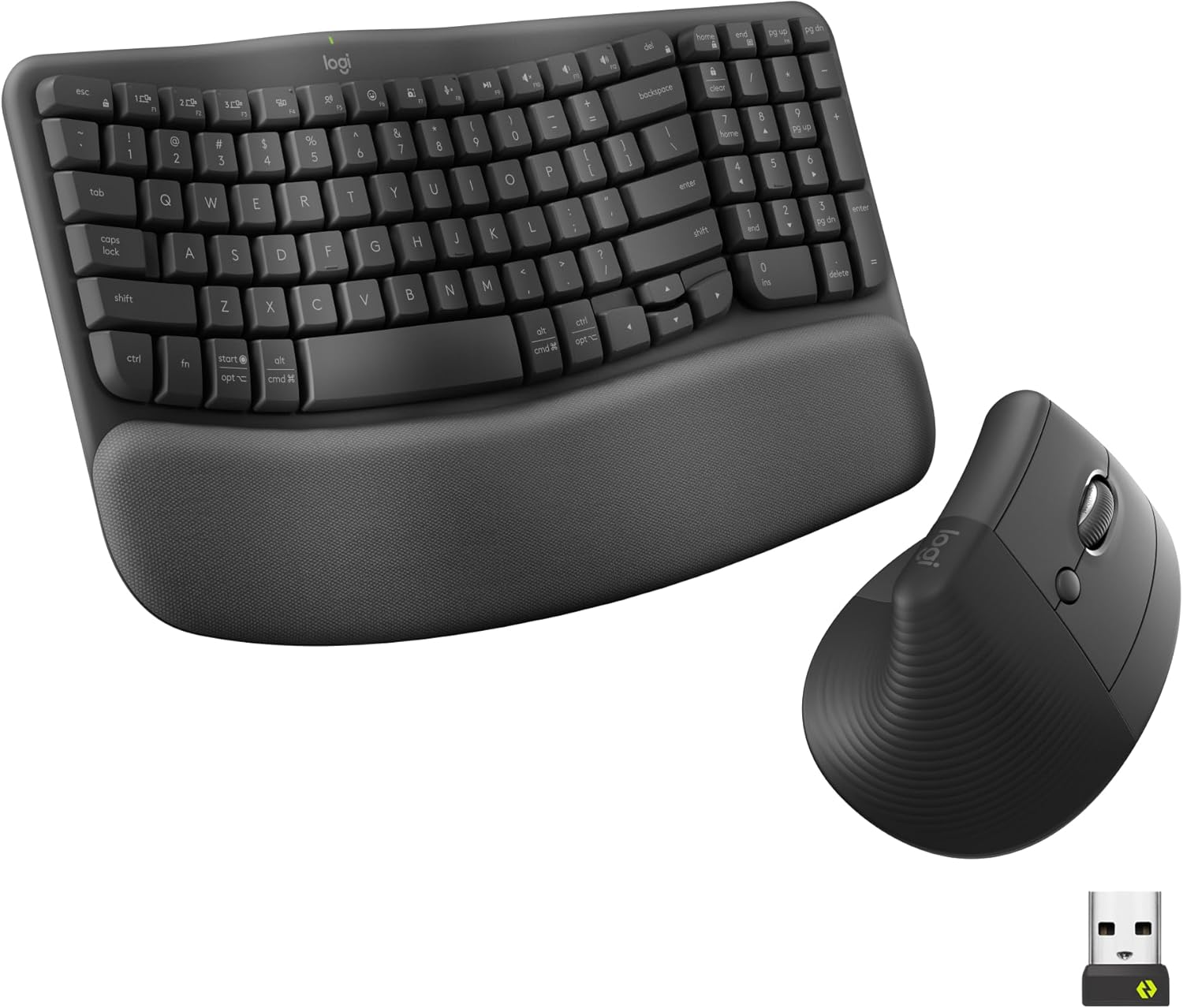
Logitech Wave Keys & Lift Vertical Mouse - Ergonomic Wireless Keyboard and Mouse Combo - with Cushioned Palm Rest, Easy-Switch, Bluetooth, for Multi-OS, Windows/Mac - Graphite
Want the best price and purchase timing?
Our AI advisor analyzes real-time pricing across all channels to find you the best deal.
AI Verdict
This combo offers a wavy membrane keyboard with a memory foam palm rest and a 57° vertical optical mouse for small to medium hands, designed for all-day comfort.
This combo is a strong fit for anyone prioritizing ergonomic comfort in their daily computer use, especially those with small to medium hands. The wavy keyboard and 57° vertical mouse are specifically designed to promote natural posture and reduce strain.
If you need more advanced ergonomic adjustments or a different key feel, look for keyboards with adjustable negative tilt or mechanical switches.
Regret Score™
Very Low RiskLower is better — measures purchase-regret risk from real buyer complaints, review credibility, and product maturity
Issues discovered after purchase
Critically weak dimension
Amazon rating vs actual quality
Chance this product isn't for you
Pros
- Wavy keyboard design supports natural hand, wrist, and forearm alignment for extended typing sessions.
- Cushioned memory foam palm rest on the keyboard provides continuous wrist support.
- Lift mouse's 57° vertical angle promotes a natural forearm posture, reducing wrist pressure.
- Easy-Switch functionality allows connecting and switching between up to three devices via Bluetooth or Logi Bolt receiver.
- Keyboard includes a numpad in a compact layout, useful for data entry without excessive hand movement.
- Mouse features whisper-quiet clicks and a SmartWheel for adaptive scrolling speed.
Cons
- Keyboard only offers one positive tilt adjustment, lacking negative tilt which some users find crucial for ergonomics.
- Keyboard uses plunger (membrane) key switches, which may feel mushy compared to mechanical alternatives.
- Lift mouse is specifically designed for small to medium hands, potentially uncomfortable for users with larger hands.
- Optical sensor in the mouse, while functional, isn't specified for high-precision tasks like graphic design.
Dimension Scores
The mouse uses an optical sensor, which is standard for general use, but lacks specific high-precision features for specialized tasks.
The wavy keyboard design, cushioned memory foam palm rest, and 57° vertical mouse angle are specifically engineered for natural posture and all-day comfort.
Offers flexible connectivity via Bluetooth Low Energy and Logi Bolt USB receiver, with Easy-Switch for up to three devices and multi-OS support.
The keyboard is described as 'fairly sturdy' with 'high-quality plastics,' and both components are made with a significant percentage of recycled plastic.
Best For
- Individuals experiencing wrist or forearm discomfort from traditional keyboard and mouse setups.
- Users needing to switch between multiple operating systems (Windows, Mac, ChromeOS) and devices frequently.
- Office workers or students who type and mouse for 8+ hours daily and prioritize comfort over mechanical key feel.
- Desks with limited space, as the compact keyboard with numpad allows the mouse to be positioned closer.
Not Recommended For
- Users with large hands, as the Lift mouse is optimized for small to medium hand sizes.
- Mechanical keyboard enthusiasts who prefer tactile and auditory feedback from switches.
- Users requiring negative keyboard tilt for their specific ergonomic needs.
Watch Out For
- The keyboard lacks negative tilt, offering only a single positive 4° adjustment, which might not suit all ergonomic preferences.
- Some users report the membrane keys feel 'mushy' compared to mechanical keyboards, impacting typing satisfaction.
- The mouse's vertical design, while ergonomic, might feel less precise for tasks requiring fine motor control like graphic design, as it limits downward force.
Full Specifications
| ASIN | B0FDFZLCMM |
| Brand | Logitech |
| Color | Graphite |
| Series | Wave Keys and Lift Combo |
| Batteries | 2 AAA batteries required. (included) |
| Item Weight | 1.65 pounds |
| Manufacturer | Logitech |
| Power Source | Battery Powered |
| Special Feature | Ergonomic Design, Lightweight, Portable |
| Operating System | ChromeOS™ (4), Linux (4), Windows 10, 11 or later, iPadOS 15 or later (4), macOS 12 or later |
| Item model number | 920-013610 |
| Product Dimensions | 1.2 x 14.8 x 8.62 inches |
| Item Dimensions LxWxH | 1.2 x 14.8 x 8.62 inches |
| Connectivity Technology | Bluetooth Low Energy technology, Logi Bolt USB receiver |
| Movement Detection Technology | Optical |
What Buyers Say
Many users transitioning to ergonomic setups find this combo a comfortable, subtle change from traditional peripherals, especially appreciating the integrated palm rest and the mouse's vertical design. The multi-device switching is a big win for productivity across different computers. However, some mechanical keyboard fans miss the distinct key feel, and the lack of negative keyboard tilt is a recurring point of contention for those with specific ergonomic needs.
“Okay, so my wrists were screaming after 8 hours at the computer, and this combo actually made a difference. The keyboard's squishy wrist rest is a lifesaver, and the mouse feels weird at first but seriously, my forearm feels so much better. I just wish the keyboard could tilt *down* a bit more, that would be perfect.”
Common Praise
- The wrist pad is very comfortable and feels ideal for long typing sessions.
- The keyboard's compact size, even with a numpad, helps keep the mouse closer and reduces hand movement.
- Typing feels smooth, accurate, and quick despite being membrane switches.
- The Easy-Switch feature works seamlessly for hopping between a laptop, tablet, and phone.
- The Lift mouse's vertical angle significantly reduces wrist pain and promotes a more natural forearm position.
- Battery life is long, with users reporting months of use without needing to change batteries.
Common Complaints
- The keyboard lacks negative tilt, which some users consider essential for proper ergonomic positioning.
- Key presses are membrane, leading to a 'mushy' feel that doesn't satisfy mechanical keyboard users.
- The Lift mouse is not suitable for larger hands, limiting its appeal.
- Some users find the wavy keyboard layout takes a bit of getting used to.
Ownership Tips
- The integrated palm rest, while comfortable, can show dirt or wear over time, requiring occasional cleaning.
- Adjusting to the wavy keyframe and vertical mouse takes a few days, but most users adapt quickly and find it more comfortable.
- The Logi Options+ app is genuinely useful for customizing shortcuts and mouse settings, making the workflow smoother.
- The wireless connection, whether Bluetooth or Logi Bolt, is generally stable and reliable, even at a distance of up to 32 feet.
Frequently Asked Questions
What operating systems are compatible with this combo?
The Logitech Wave Keys and Lift Vertical Mouse combo is compatible with multiple operating systems, including Windows, macOS, and ChromeOS.
How does the keyboard connect to devices?
The keyboard connects wirelessly via Bluetooth Low Energy technology or the included Logi Bolt USB receiver. It supports Easy-Switch to quickly move between three paired devices.
Is the mouse suitable for large hands?
No, the Lift Vertical Mouse is specifically designed for small to medium hands to ensure optimal comfort and ergonomic benefit.
Can the keyboard's tilt be adjusted?
The keyboard has one fixed tilt adjustment, providing a 4° difference. It does not offer negative tilt.
What type of key switches does the keyboard use?
The Wave Keys keyboard uses plunger key switches, which are a type of membrane switch designed for a tactile yet discreet typing experience.
How long does the battery last?
Users have reported long battery life, with some not needing to replace the included AAA batteries for several months of daily use.
Buying Guide
When you're looking at an ergonomic keyboard and mouse combo, you're really buying comfort and injury prevention. Don't just focus on looks; think about how your hands and wrists naturally rest. The goal is to keep your body in a neutral, unstrained position, which often means a different shape than what you're used to. This combo aims to achieve that with its specific designs.
Wavy Keyboard Design
This isn't just for aesthetics; the wave shape guides your hands and wrists into a more natural, relaxed position, similar to how your hands would rest if you were shaking someone's hand. This reduces strain over long typing periods.
57° Vertical Mouse Angle
A traditional mouse makes you twist your forearm. A 57° vertical angle, like holding a handshake, keeps your forearm and wrist in a more neutral, less pronated position, taking pressure off the carpal tunnel.
Connectivity (Bluetooth Low Energy, Logi Bolt)
This gives you options. Bluetooth is great for devices without a free USB port or for quick pairing, while the Logi Bolt receiver offers a dedicated, potentially more stable connection, especially in busy wireless environments. Easy-Switch means you can use one set for your work laptop, personal desktop, and even a tablet.
Alternatives
If this combo doesn't fit, consider keyboards with split designs or fully mechanical switches for different tactile feedback, and mice with adjustable angles or larger form factors for bigger hands.
You Might Also Like

Magnetic Charging Mouse Pad 31.5x15.75, 15W Fast Wireless Charging Desk Mat, XXL Desk Pad RGB Gaming Mousepad, Home Office Large Keyboard Pad with Ultra-Smooth Surface, Non-Slip Base
$50-$99This 31.5" x 15.75" RGB desk mat with 15W magnetic phone charging and a Qi headphone charging zone is for users wanting to declutter and illuminate their workstation.

Mouse Pad Desk Mat Full Moon Desk Pad Black Red Large Mouse Pad Gaming Mousepad Extended Laptop Computer Mouse Keyboard Mat-11.8 x 31.5 in
Price range unavailableThis is a 11.8 x 31.5 inch desk mat for users needing a large, undefined surface to cover their desk, but with no available product details or user feedback.

SteelSeries QcK Gaming Mouse Pad - Small Cloth - Optimized For Gaming Sensors
A 250 x 210 x 2mm cloth pad with a non-slip rubber base, ideal for high DPI users or those with limited desk space.

SteelSeries QcK Large Gaming Mousepad — Black — Non-Slip Silicone Rubber Base — Peak Tracking and Stability — Optimized for Gaming Sensors — 490 mm x 420 mm — FPS, MOBAs, RTS, MMO
A 450 mm x 400 mm x 2 mm cloth mousepad designed for precise control in gaming, especially for budget-conscious players.