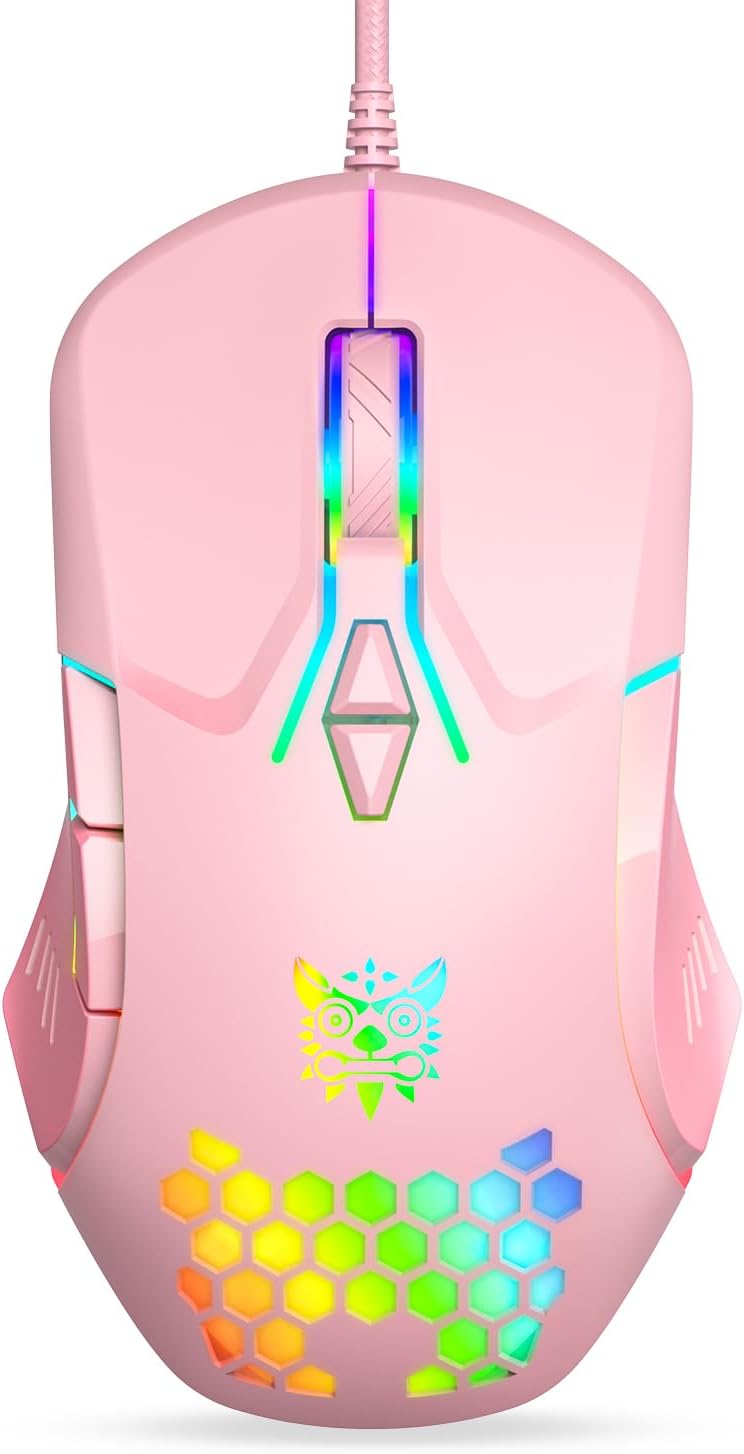
Wired USB Mouse, Computer Mouse with RGB Lighting, 4 Adjustable DPI, Ergonomic Optical Office Mouse, 7 Buttons Corded Mice for Window/PC/Laptop/Desktop/Mac/Chromebook, Pink
Want the best price and purchase timing?
Our AI advisor analyzes real-time pricing across all channels to find you the best deal.
AI Verdict
This is a 5.6-ounce, 7-button wired optical mouse with 4 adjustable DPI levels up to 3600, best for casual users needing a pink, RGB-lit peripheral.
This mouse is a situational fit, offering a specific aesthetic and basic functionality for its budget price. Its 7 buttons and adjustable DPI are adequate for general use, but the 5.6-ounce weight and limited 3600 DPI cap it for more demanding tasks.
If you need more precision or a lighter feel, look for mice with a higher maximum DPI (8000+) and a weight under 90 grams.
Regret Score™
Medium RiskLower is better — measures purchase-regret risk from real buyer complaints, review credibility, and product maturity
Issues discovered after purchase
Critically weak dimension
Amazon rating vs actual quality
Chance this product isn't for you
Pros
- Features 7 programmable buttons including Forward and Back for easy command access.
- Offers 4 adjustable DPI settings (1200-1800-2400-3600) for varied tasks.
- Equipped with dynamic gradient RGB lighting that can be set to a low light mode.
- Designed with a honeycomb shell to reduce heat buildup and provide a breathable grip.
- Boasts broad compatibility, working plug-and-play with Windows, Mac, and Linux devices.
- Built for durability with a 21-million-click lifespan.
Cons
- The 5.6-ounce weight is considerably heavier than many modern mice, especially lightweight gaming models.
- RGB lighting is dynamic gradient only, lacking options for solid color customization.
- Maximum DPI of 3600 is low compared to dedicated gaming mice, limiting precision for high-speed or competitive play.
- As a wired mouse, it lacks the freedom of movement offered by wireless alternatives.
Dimension Scores
The optical sensor offers 4 adjustable DPI levels up to 3600, which is average for general use but below competitive gaming standards.
It claims an 'ergonomic' design with a honeycomb structure for breathability, but the 5.6-ounce weight is heavier than many modern mice, potentially impacting comfort for some users over time.
As a wired USB mouse, it provides reliable plug-and-play connectivity across various operating systems, but lacks the flexibility of wireless options.
The mouse is rated for a 21-million-click lifespan, suggesting reasonable durability, though specific user feedback on component quality like the scroll wheel is limited.
Best For
- Users seeking a budget-friendly, pink aesthetic for their desk setup.
- Everyday office tasks and general web browsing.
- Casual gaming where high DPI and ultra-light weight aren't critical.
- Individuals who prefer a wired connection for consistent performance.
Not Recommended For
- Competitive gamers requiring high DPI sensors and minimal weight.
- Users who need a wireless mouse for clutter-free setups or portability.
- Anyone looking for extensive RGB customization beyond dynamic gradient effects.
Watch Out For
- The RGB lighting is fixed to a gradient dynamic pattern and cannot be set to a single, static color.
- At 5.6 ounces, this mouse is on the heavier side, which might cause fatigue during extended use for some users.
- The scroll wheel on similar budget mice has been noted to feel poorly constructed and prone to issues over time.
Full Specifications
| ASIN | B0DSSZKYVM |
| Brand | ONITOON |
| Color | Pink |
| Item Weight | 5.6 ounces |
| Manufacturer | ONITOON |
| Special Feature | 4 Adjustable DPI Level, 7 Button, Cool RGB Light, Honeycomb, Wide compatibility |
| Item model number | CW902 |
| Package Dimensions | 5.51 x 3.54 x 1.85 inches |
| Connectivity Technology | Wired |
| Movement Detection Technology | Optical |
What Buyers Say
This ONITOON mouse has a high 4.6/5 rating from 237 reviews, indicating general user satisfaction, especially given its budget price point. Many users seem to appreciate its aesthetic and basic functionality for everyday tasks. However, a common sentiment for similar budget mice is a lack of advanced customization, particularly with the RGB lighting, which is often a fixed dynamic gradient rather than user-selectable solid colors.
“I just wanted a cute pink mouse for my laptop, and this one lights up and works, but I wish I could just pick one color for the light instead of it always changing, it's a little distracting sometimes.”
Common Praise
- The pink color and RGB lighting add a fun aesthetic to the setup.
- It's plug-and-play, working immediately without needing software.
- The 7 buttons are useful for navigating and performing various commands.
- The adjustable DPI settings are sufficient for daily computer use.
Common Complaints
- The RGB lighting cannot be set to a static, single color.
- The mouse feels heavier than expected for a modern mouse.
- The scroll wheel sometimes feels less robust or precise than desired.
Ownership Tips
- The honeycomb design, while visually interesting, doesn't significantly impact grip or heat for most users during normal office use.
- The 'low light mode' for RGB is a nice touch for when the dynamic gradient is too much, but it's not a true off switch.
- The cable length is adequate for most desktop setups, but might be restrictive for some larger desk configurations.
- The click feedback on the main buttons is responsive and not overly loud, which is a plus for shared spaces.
Frequently Asked Questions
Can I change the RGB lighting to a single color?
No, the RGB lighting is a gradient dynamic effect. While you can enter a low light mode by pressing the DPI- button for 3 seconds, there are no options for solid color customization.
Is this mouse suitable for gaming?
It's suitable for casual gaming with its 7 buttons and up to 3600 DPI. However, for competitive gaming, its 5.6-ounce weight and lower maximum DPI might not offer the precision and speed needed.
What operating systems is this mouse compatible with?
This mouse offers wide compatibility and is plug-and-play with Windows, Mac, and Linux. It works with PCs, laptops, desktops, Macbooks, and any other USB-enabled device.
How many DPI settings does it have?
It has 4 adjustable DPI levels: 1200, 1800, 2400, and 3600. You can cycle through these settings using the DPI+/- buttons.
Is the mouse comfortable for long use?
The mouse features an ergonomic design with a honeycomb shell intended to reduce heat buildup and provide a comfortable grip. User experience will vary, but the 5.6-ounce weight could be a factor for some during extended sessions.
Buying Guide
When you're looking for a mouse, think about what you'll actually use it for. If you're just clicking around, checking emails, and watching videos, a basic mouse like this one is probably fine. But if you're into gaming or doing precise graphic design, you'll need to pay attention to specific features that make a big difference.
DPI (Dots Per Inch)
This tells you how sensitive the mouse is. Higher DPI means the cursor moves further on screen with less physical mouse movement. Think of it like the sensitivity setting on your phone's touchscreen – a higher number means a lighter touch does more.
Connectivity (Wired vs. Wireless)
Wired mice plug directly into your computer, offering a consistent, lag-free connection and never needing batteries. Wireless mice give you more freedom and a cleaner desk, but you'll need to charge them or replace batteries, and sometimes there's a tiny bit of input lag.
Buttons
Beyond the basic left and right clicks, many mice have extra buttons (like 'Forward' and 'Back' on the side, or DPI adjustment). These can save you time by letting you perform common actions without moving your hand to the keyboard. More buttons mean more shortcuts at your fingertips.
Alternatives
If this mouse doesn't quite fit, look for models with a higher DPI range (e.g., 8000+ DPI) for more precision, or consider a wireless option for greater freedom of movement and a cleaner desk.
You Might Also Like

Magnetic Charging Mouse Pad 31.5x15.75, 15W Fast Wireless Charging Desk Mat, XXL Desk Pad RGB Gaming Mousepad, Home Office Large Keyboard Pad with Ultra-Smooth Surface, Non-Slip Base
$50-$99This 31.5" x 15.75" RGB desk mat with 15W magnetic phone charging and a Qi headphone charging zone is for users wanting to declutter and illuminate their workstation.

Mouse Pad Desk Mat Full Moon Desk Pad Black Red Large Mouse Pad Gaming Mousepad Extended Laptop Computer Mouse Keyboard Mat-11.8 x 31.5 in
Price range unavailableThis is a 11.8 x 31.5 inch desk mat for users needing a large, undefined surface to cover their desk, but with no available product details or user feedback.

SteelSeries QcK Gaming Mouse Pad - Small Cloth - Optimized For Gaming Sensors
A 250 x 210 x 2mm cloth pad with a non-slip rubber base, ideal for high DPI users or those with limited desk space.

SteelSeries QcK Large Gaming Mousepad — Black — Non-Slip Silicone Rubber Base — Peak Tracking and Stability — Optimized for Gaming Sensors — 490 mm x 420 mm — FPS, MOBAs, RTS, MMO
A 450 mm x 400 mm x 2 mm cloth mousepad designed for precise control in gaming, especially for budget-conscious players.