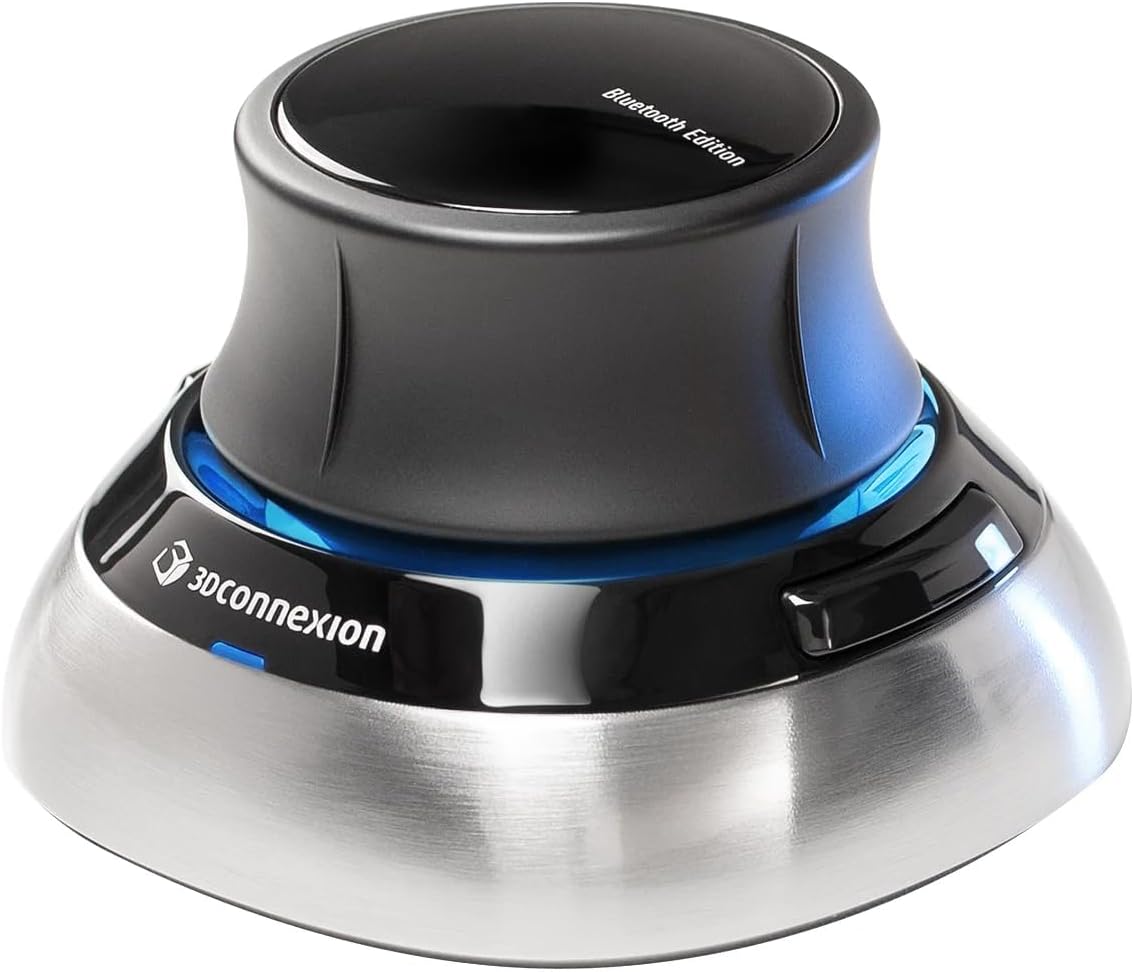
3Dconnexion SpaceMouse Wireless Bluetooth Edition
Want the best price and purchase timing?
Our AI advisor analyzes real-time pricing across all channels to find you the best deal.
AI Verdict
This 1.57-pound 3D navigation tool with laser sensor and 1-month battery is for CAD professionals needing precise 6DoF control and multi-connectivity.
This SpaceMouse is a strong fit for anyone deep into 3D design because its 6DoF laser sensor and dedicated navigation cap make manipulating complex models much more intuitive than a standard mouse. The multiple connectivity options, including Bluetooth and USB-C, plus the included carry case, mean it's ready for both desk work and travel. It's built specifically for the demands of professional 3D applications.
If you need more dedicated macro buttons or a larger form factor for extended use, look for models with additional programmable buttons or a 'Pro' designation.
Regret Score™
Medium RiskLower is better — measures purchase-regret risk from real buyer complaints, review credibility, and product maturity
Issues discovered after purchase
Critically weak dimension
Amazon rating vs actual quality
Chance this product isn't for you
Pros
- Offers three connection options: Bluetooth, USB-C, and a Universal Receiver dongle for flexibility.
- Rechargeable battery provides up to 1 month of use, with some users reporting 6-8 weeks between charges.
- Includes a lightweight and durable carry case for protection during transport.
- Features a patented 6-Degrees-of-Freedom (6DoF) sensor for precise manipulation in 3D applications.
- Comes with 2 programmable side buttons for custom shortcuts.
- Its symmetrical design allows comfortable use for both left and right-handed users.
Cons
- Occasional lag reported when using Bluetooth or switching between devices.
- The joystick's sensitivity can make it difficult to differentiate between push and tilt inputs, leading to unintended rotations.
- Battery status display can be inaccurate, sometimes showing below 5% even after charging.
- The 1.57-pound weight, while providing stability, might not fully prevent sliding on a desk due to the internal spring's tightness.
- 3D functionality does not transmit over remote desktop without specific USB passthrough setup.
Dimension Scores
The patented 6-Degrees-of-Freedom (6DoF) laser sensor provides highly precise and smooth manipulation of 3D models, crucial for professional design work.
Its symmetrical design and comfortable form factor are widely praised, allowing for extended use without strain, though some with larger hands find it a bit small.
Offering Bluetooth, USB-C, and a Universal Receiver dongle provides excellent flexibility, but occasional Bluetooth lag and remote desktop limitations prevent a higher score.
The device features a polished aluminum housing and a 'lovely weight' that contributes to stability, though the plastic joystick feels less premium to some.
Best For
- Engineers and architects refining intricate models in CAD software.
- 3D creators and animators exploring creative solutions and crafting immersive presentations.
- Professionals who frequently work in different locations, requiring portable and reliable 3D navigation.
- Users seeking to offload 3D model manipulation from their primary mouse and keyboard.
Not Recommended For
- Casual users or those expecting a basic mouse replacement for general computing tasks.
- Individuals with small hands who might find the device's size less ideal.
- Users primarily working via remote desktop without advanced USB passthrough capabilities.
Watch Out For
- Bluetooth connectivity can be finicky; some users experience lag or find it unreliable, often resorting to the dongle or wired connection.
- The joystick's sensitivity can be a pain, making it hard to get precise movements without accidentally rotating or tilting when you just want to push.
- If you're using this for remote work, be warned: the 3D navigation features won't work over remote desktop unless you set up full USB passthrough, otherwise it acts like a basic mouse.
- The battery indicator can be misleading, showing a low charge even when the device is fully functional for weeks.
- Despite its 1.57-pound heft, the device might still slide on your desk if the internal spring tension is too high for your grip style.
Full Specifications
| ASIN | B0D64M2YVH |
| Brand | 3Dconnexion |
| Color | Black |
| Item Weight | 1.57 pounds |
| Manufacturer | 3Dconnexion |
| Special Feature | Wireless |
| Item model number | 3DX-700115 |
| Product Dimensions | 78 x 78 x 0.04 inches |
| Connectivity Technology | USB |
| Movement Detection Technology | Laser |
| Is Discontinued By Manufacturer | No |
What Buyers Say
What really stands out is how many users say this thing becomes an indispensable part of their workflow, making 3D navigation feel like second nature after a short learning period. The freedom of wireless connectivity, especially with the Bluetooth option, is a huge plus for keeping desks tidy and working on the go. However, a few folks have hit snags with inconsistent Bluetooth performance and a joystick that's a little too sensitive, sometimes making precise movements a bit of a wrestling match. The battery life is consistently lauded, often exceeding the advertised month, which is a pleasant surprise for daily users.
“Dude, this thing is a game-changer for Fusion 360, but seriously, the Bluetooth drops sometimes and that joystick is so touchy, I'm constantly spinning my model when I just wanna pan. Still, can't live without it now.”
Common Praise
- Navigation is incredibly smooth and precise in CAD and 3D modeling software.
- The rechargeable battery often lasts 6-8 weeks, exceeding the advertised one-month duration.
- Comfortable design allows for long hours of use without hand strain.
- The included carry case is compact, lightweight, and durable, protecting the device during transport.
- Multiple connectivity options (Bluetooth, USB-C, dongle) offer great flexibility.
- The device's weight provides stability on the desk during use.
Common Complaints
- Occasional lag or connectivity issues when using Bluetooth, sometimes requiring the dongle or wired mode.
- The joystick's sensitivity can make it hard to distinguish between a push and a tilt, leading to accidental rotations.
- Battery status indicator can be inaccurate, showing low charge even when fully functional.
- The plastic joystick feels cheap compared to the polished aluminum base.
- 3D functionality does not work over remote desktop without specific USB passthrough setup.
Ownership Tips
- You'll probably find yourself reaching for the USB-C cable or dongle more often than pure Bluetooth if you experience any lag or drops.
- The learning curve is real, but once you get the muscle memory down, it feels like an extension of your hand for 3D navigation.
- Even with its weight, some users report it can still slide a bit on certain desk surfaces, especially with aggressive movements.
- The battery life is genuinely long, so don't freak out if the indicator seems stuck at a low percentage; it'll probably keep going for weeks.
- Customizing the two side buttons is essential; don't skip that step to truly streamline your workflow.
Frequently Asked Questions
Does this SpaceMouse connect via Bluetooth, or do I need a dongle?
It connects via Bluetooth, but it also comes with a Universal Receiver dongle and can connect directly via USB-C, giving you three ways to hook it up.
How long does the battery last on a single charge?
The rechargeable battery is rated to last up to one month, with some users reporting even longer durations, like 6-8 weeks, between charges.
Can I use this with any 3D software?
It's designed for advanced 3D navigation in CAD software and 3D modeling applications, working seamlessly with programs like Autodesk software.
Is it comfortable for long work sessions?
Many users find its ergonomic design exceptionally comfortable, allowing for long hours of use without strain.
Are the buttons customizable?
Yes, it features 2 programmable side buttons that you can customize to assign shortcuts for specific tasks in your workflow.
Will this replace my regular mouse?
No, it's an additional tool for 3D navigation, meant to be used alongside your traditional mouse and keyboard, not as a replacement.
Buying Guide
When you're looking at a 3D navigation device like this, you're not buying a regular mouse. This is a specialized tool designed to let you manipulate 3D objects in space with your non-dominant hand, freeing up your main mouse for selections and clicks. The key is the '6-Degrees-of-Freedom' sensor, which means you can pan, zoom, and rotate simultaneously, making complex model interaction much more fluid. Think of it as having a physical handle on your digital object.
6-Degrees-of-Freedom (6DoF) sensor
This is the core of a 3D mouse. It means the device can detect movement along all three axes (up/down, left/right, forward/backward) and rotation around all three axes (pitch, yaw, roll) simultaneously. It's like having six separate controls all integrated into one intuitive motion, letting you 'hold' and 'move' your 3D model naturally.
Wireless and USB-C connectivity
Wireless connectivity means less desk clutter and more freedom of movement, which is great for presentations or hot-desking. USB-C is the modern standard for charging and wired connection, ensuring compatibility with newer laptops and faster data transfer if you prefer a wired link or need to charge.
Rechargeable battery lasting up to 1 month
A long battery life is crucial for uninterrupted workflow. You don't want your navigation tool dying in the middle of a critical design session. A month of use means you'll only need to charge it about once a month, making it very convenient for daily professional use.
Alternatives
If this model doesn't quite fit, look for devices with more programmable buttons for extensive macro use, or a larger, heavier base if desk stability is a primary concern.
You Might Also Like

Magnetic Charging Mouse Pad 31.5x15.75, 15W Fast Wireless Charging Desk Mat, XXL Desk Pad RGB Gaming Mousepad, Home Office Large Keyboard Pad with Ultra-Smooth Surface, Non-Slip Base
$50-$99This 31.5" x 15.75" RGB desk mat with 15W magnetic phone charging and a Qi headphone charging zone is for users wanting to declutter and illuminate their workstation.

Mouse Pad Desk Mat Full Moon Desk Pad Black Red Large Mouse Pad Gaming Mousepad Extended Laptop Computer Mouse Keyboard Mat-11.8 x 31.5 in
Price range unavailableThis is a 11.8 x 31.5 inch desk mat for users needing a large, undefined surface to cover their desk, but with no available product details or user feedback.

SteelSeries QcK Gaming Mouse Pad - Small Cloth - Optimized For Gaming Sensors
A 250 x 210 x 2mm cloth pad with a non-slip rubber base, ideal for high DPI users or those with limited desk space.

SteelSeries QcK Large Gaming Mousepad — Black — Non-Slip Silicone Rubber Base — Peak Tracking and Stability — Optimized for Gaming Sensors — 490 mm x 420 mm — FPS, MOBAs, RTS, MMO
A 450 mm x 400 mm x 2 mm cloth mousepad designed for precise control in gaming, especially for budget-conscious players.