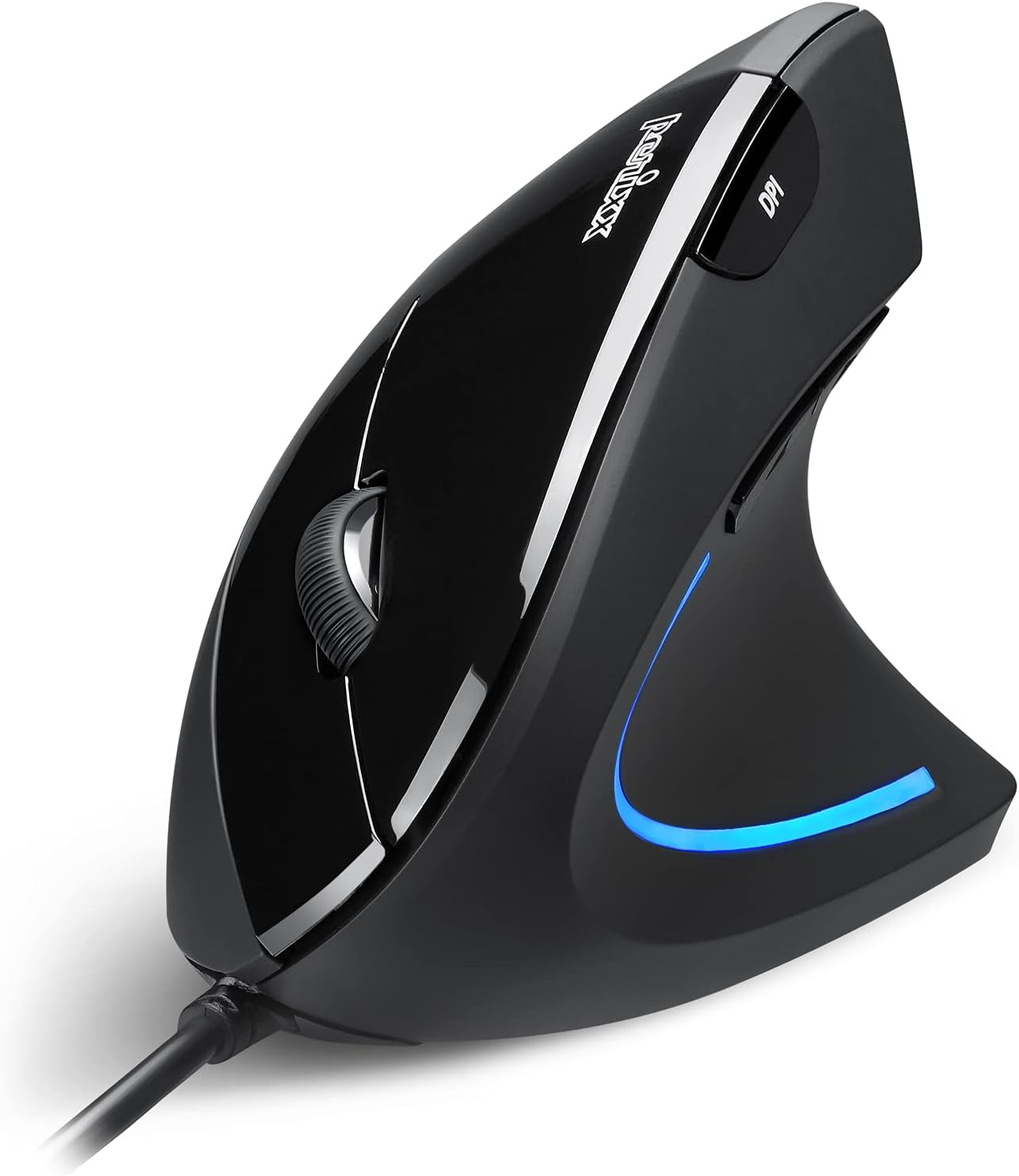
Perixx PERIMICE-513 Wired Ergonomic Vertical Mouse - 6 Buttons with 1000/1600/3200/6400 DPI - Right-Handed Design - Wired USB 5.9ft Cable - Black
Want the best price and purchase timing?
Our AI advisor analyzes real-time pricing across all channels to find you the best deal.
AI Verdict
This is a 6-button, 6400 DPI optical vertical mouse with a 5.9ft wired USB connection, designed for right-handed users seeking wrist comfort.
This mouse is a strong contender for right-handed Windows users prioritizing wrist ergonomics and quiet primary clicks, especially given its 4.5/5 rating. However, the lack of programmable buttons and macOS compatibility for side buttons means it won't fit everyone's workflow.
If you need programmable buttons or full macOS compatibility, look for mice explicitly stating software customization and cross-platform support.
Regret Score™
Medium RiskLower is better — measures purchase-regret risk from real buyer complaints, review credibility, and product maturity
Issues discovered after purchase
Critically weak dimension
Amazon rating vs actual quality
Chance this product isn't for you
Pros
- Vertical design promotes a neutral wrist position, reducing strain during prolonged use.
- Left and right mouse buttons feature quiet click mechanisms, minimizing noise.
- Adjustable DPI settings (1000/1600/3200/6400) allow for precise cursor control.
- Soft rubber-coated surface provides a secure and comfortable grip.
- Extra-long 5.9-ft wired USB-A cable offers flexible placement and plug-and-play functionality.
- Weighs 0.35 lb, making it relatively light for its size.
Cons
- Scroll wheel and back/forward buttons do not have quiet click mechanisms.
- Back and forward buttons are not supported on macOS.
- Buttons are not programmable, limiting customization.
- Smooth-scroll wheel lacks tactile steps or adjustable resistance, which some users prefer.
- Right-handed design makes it unsuitable for left-handed individuals.
Dimension Scores
The optical sensor offers adjustable DPI settings up to 6400, providing precise tracking for various tasks.
Its vertical design promotes a natural handshake posture, reducing wrist and forearm strain, complemented by a soft rubber coating for grip.
The 5.9-ft wired USB-A connection is stable and plug-and-play, but being wired limits mobility compared to wireless options.
Features a soft rubber-coated surface for durability and comfort, though specific material grades aren't detailed.
Best For
- Individuals experiencing wrist discomfort with traditional mice.
- Office environments where quiet operation is valued for primary clicks.
- Windows users needing adjustable sensitivity for varied tasks.
- Workspaces requiring a long, stable wired connection.
Not Recommended For
- Left-handed users.
- Users who require programmable mouse buttons.
- macOS users who rely on back/forward mouse buttons.
- Gamers or designers who prefer a scroll wheel with tactile feedback.
Watch Out For
- The scroll wheel and side buttons are not silent, only the main left and right clicks are quiet.
- Back/forward buttons won't work if you're on a Mac, which can be a workflow disruption.
- You can't remap any of the 6 buttons; they're fixed in their functions.
- The scroll wheel is completely smooth, so if you like a 'clicky' scroll for precision, this isn't it.
Full Specifications
| ASIN | B0D14D4P98 |
| Brand | Perixx |
| Color | black |
| Item Weight | 5.6 ounces |
| Manufacturer | Perixx |
| Special Feature | Ergonomic Design |
| Item model number | 12364 |
| Product Dimensions | 4.92 x 2.44 x 0.1 inches |
| Connectivity Technology | USB |
| Movement Detection Technology | Optical |
What Buyers Say
This vertical mouse seems to hit the mark for many looking to alleviate wrist discomfort, with its ergonomic design being a consistent highlight. The quiet left and right clicks are a definite plus for focused work environments. However, the non-programmable buttons and the smooth scroll wheel without tactile steps are recurring points where users might find it falls short of expectations. macOS users also need to be aware that the side buttons won't function for navigation.
“Okay, so my wrist was killing me with my old mouse, and this vertical thing actually helps a ton, but seriously, why aren't all the buttons quiet? And the scroll wheel feels weird without the clicks.”
Common Praise
- Vertical shape feels natural and reduces wrist pain.
- Left and right clicks are genuinely quiet, making for a less distracting workspace.
- Adjustable DPI settings allow for quick sensitivity changes.
- The rubberized coating provides a comfortable and secure grip.
- Plug-and-play setup means no drivers or software are needed.
Common Complaints
- Side buttons and scroll wheel are not silent, which can be jarring after quiet main clicks.
- Back/forward buttons don't work on macOS, limiting functionality for Apple users.
- Lack of programmable buttons restricts customization for specific tasks.
- The scroll wheel is smooth and lacks tactile feedback, which some find less precise.
Ownership Tips
- The adjustment period for the vertical design can take a week or two, but many find it worth it for reduced wrist pressure.
- The 5.9-ft cable is long enough for most desk setups, even if your PC is under the desk.
- The rubber coating holds up well to daily use, maintaining its grip.
- The DPI button is easy to reach for on-the-fly sensitivity changes.
Frequently Asked Questions
Is this mouse suitable for left-handed users?
No, the Perixx PERIMICE-513 features a right-handed ergonomic design, making it uncomfortable and awkward for left-handed individuals.
Are all the buttons silent?
Only the left and right mouse buttons are designed for quiet clicks. The scroll wheel and the back/forward buttons do not have silent operation.
Can I customize the buttons on this mouse?
No, the buttons on the Perixx PERIMICE-513 are not programmable, meaning their functions cannot be changed.
Does the back/forward button work on macOS?
The back and forward buttons are not supported on macOS, so they will not function on Apple computers.
What is the cable length?
The mouse comes with an extra-long 5.9-ft (1.8-meter) wired USB-A cable, providing ample length for flexible desk setups.
Buying Guide
When you're looking at a vertical mouse like this, you're primarily buying it for your wrist health. It's about changing your hand's posture to a more natural 'handshake' position to avoid strain. Don't expect a gaming mouse with tons of customizable features; focus on comfort and basic functionality. The wired connection means no battery worries, but also less freedom of movement.
Ergonomic Vertical Design
DPI (Dots Per Inch)
Quiet Click Buttons
Alternatives
If this mouse doesn't quite fit, look for wireless vertical mice for more freedom, or models with programmable buttons and dedicated software for advanced customization, especially if you're on macOS.
You Might Also Like

Magnetic Charging Mouse Pad 31.5x15.75, 15W Fast Wireless Charging Desk Mat, XXL Desk Pad RGB Gaming Mousepad, Home Office Large Keyboard Pad with Ultra-Smooth Surface, Non-Slip Base
$50-$99This 31.5" x 15.75" RGB desk mat with 15W magnetic phone charging and a Qi headphone charging zone is for users wanting to declutter and illuminate their workstation.

Mouse Pad Desk Mat Full Moon Desk Pad Black Red Large Mouse Pad Gaming Mousepad Extended Laptop Computer Mouse Keyboard Mat-11.8 x 31.5 in
Price range unavailableThis is a 11.8 x 31.5 inch desk mat for users needing a large, undefined surface to cover their desk, but with no available product details or user feedback.

SteelSeries QcK Gaming Mouse Pad - Small Cloth - Optimized For Gaming Sensors
A 250 x 210 x 2mm cloth pad with a non-slip rubber base, ideal for high DPI users or those with limited desk space.

SteelSeries QcK Large Gaming Mousepad — Black — Non-Slip Silicone Rubber Base — Peak Tracking and Stability — Optimized for Gaming Sensors — 490 mm x 420 mm — FPS, MOBAs, RTS, MMO
A 450 mm x 400 mm x 2 mm cloth mousepad designed for precise control in gaming, especially for budget-conscious players.