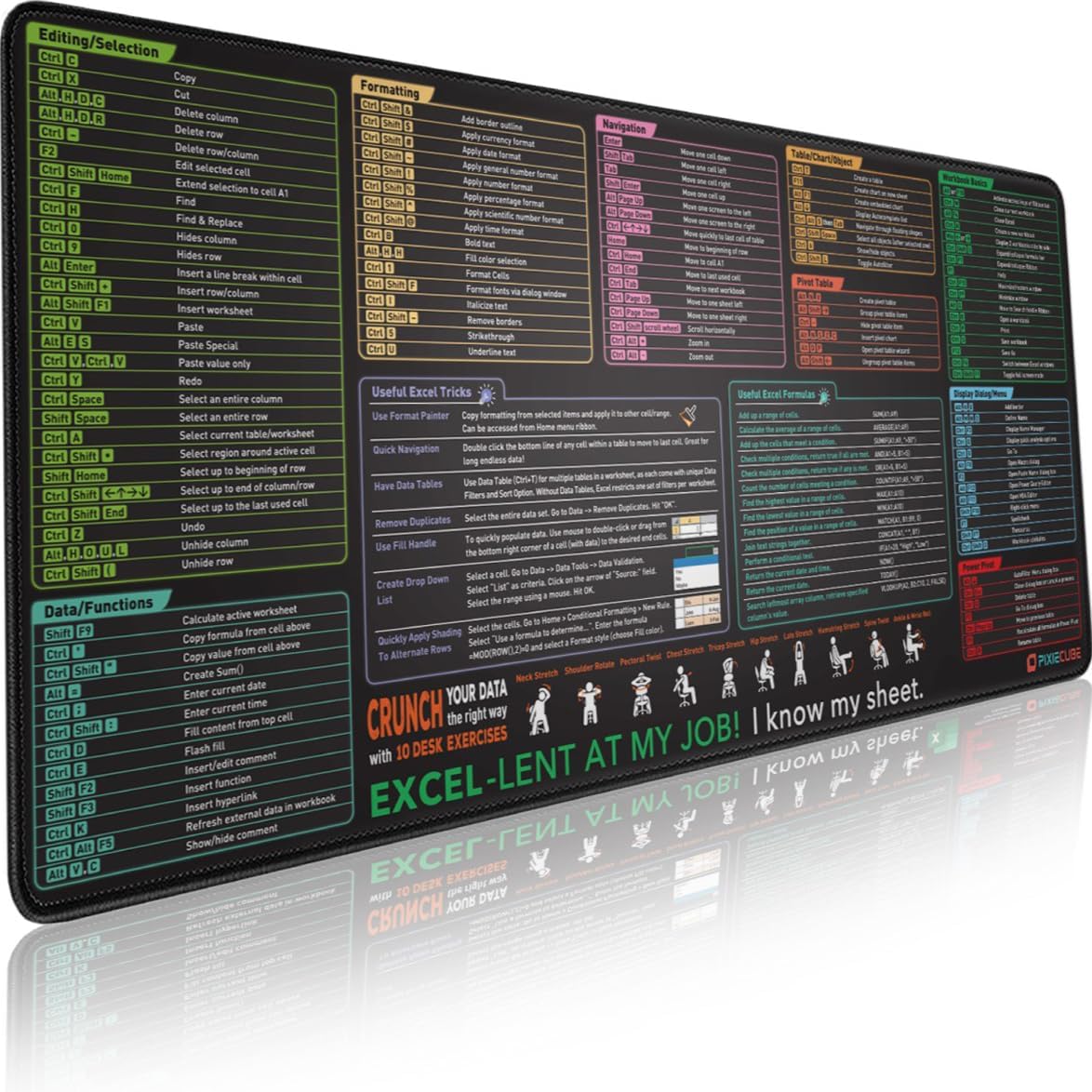
Excel Shortcut Keys Mouse Pad - Extended Large XXL Cheat Sheet Gaming Mousepad | PC Office Spreadsheet Keyboard Mat | Non-Slip Stitched Edge
Want the best price and purchase timing?
Our AI advisor analyzes real-time pricing across all channels to find you the best deal.
AI Verdict
This 900x400x3mm mat is for Excel users who want a large, non-slip surface with categorized shortcuts and desk exercises right on their desk.
This mat is a strong fit for its intended purpose: providing Excel shortcuts and a large workspace. Its 900x400x3mm size and extensive, categorized shortcut compilation directly address the needs of Excel users, from beginners to experienced professionals. The non-slip base and stitched edges ensure it stays put and holds up to daily use.
If you need more cushioning or a different surface texture for specific mouse control, look for mats with a thickness of 4mm or more and specialized fabric weaves.
Regret Score™
Medium RiskLower is better — measures purchase-regret risk from real buyer complaints, review credibility, and product maturity
Issues discovered after purchase
Critically weak dimension
Amazon rating vs actual quality
Chance this product isn't for you
Pros
- The 900x400x3mm size provides ample space for a laptop, keyboard, and mouse, preventing clutter.
- Features an extensive and well-categorized compilation of commonly used Excel shortcut keys, formulas, and tricks, making them easy to find.
- Includes 10 desk exercise diagrams, offering a quick break during long work sessions.
- The heavy-duty, non-slip natural rubber base offers a strong grip, preventing the mat from sliding around on most surfaces.
- Anti-fray stitched edges are densely bonded, contributing to durability and a seamless feel.
- The mat is washable, allowing for easy cleaning with a damp cloth and mild soap, or by soaking in warm water and soap.
Cons
- Some users have reported an initial 'eye-watering chemical stink' upon unboxing, which typically dissipates after gentle washes.
- The printed shortcuts might become outdated as Microsoft Excel updates, potentially rendering some information less relevant over time.
- The specific design with desk exercises might not appeal to every user's aesthetic preferences.
- At 3mm thick, the mat offers average cushioning; some users might prefer a thicker surface for enhanced wrist comfort.
- The large 900x400mm footprint might not fit smaller desk setups, requiring significant desk space.
Dimension Scores
The densely bonded soft fabric surface is designed for 'accurate and faster mouse movement,' contributing to a seamless experience.
The 3mm thickness and soft fabric provide a comfortable surface, and the inclusion of 10 desk exercise diagrams promotes wellness during long sessions.
As a passive mouse pad, it has no electronic connectivity features.
Features like 'densely bonded soft fabric,' 'anti-fray stitched edges,' 'heavy duty & non-slip natural rubber base,' and 'highly durable inks' indicate a robust construction designed for longevity.
Best For
- Beginners learning Microsoft Excel who need constant visual reference for shortcuts and formulas.
- Experienced Excel users aiming to boost productivity by having quick access to advanced commands.
- Office workers or students who spend long hours at a desk and benefit from integrated desk exercises.
- Anyone needing a large, stable desk mat that also protects their desktop from scratches and spills.
Not Recommended For
- Individuals who rarely use Microsoft Excel or prefer a minimalist, plain desk surface.
- Users with limited desk space, as the 900x400mm dimensions require a substantial area.
- Those who require a mouse pad with advanced gaming-specific features beyond a smooth surface.
Watch Out For
- An initial 'eye-watering chemical stink' has been reported by some users, which usually requires washing to resolve.
- While the print uses 'highly durable inks,' prolonged heavy use and frequent washing could theoretically lead to some fading over several years.
- The mat's large size (1.41 pounds, 900x400x3mm) means it won't lay perfectly flat immediately out of the box and might need time to flatten completely.
Full Specifications
| ASIN | B0CNCTXVQ7 |
| Size | 35.4L x 15.7W inches |
| Brand | Pixiecube |
| Color | Excel Shortcuts |
| Shape | Rectangular |
| Material | Polyester, Rubber |
| Item Weight | 1.41 pounds |
| Manufacturer | Glittery Garden |
| Material Type | Polyester, Rubber |
| Number of Items | 1 |
| Special Feature | Non-slip, Washable |
| Item model number | GG-2335 |
| Product Dimensions | 35.43 x 15.75 x 0.04 inches |
| Manufacturer Part Number | GG-2335 |
| Recommended Uses For Product | Gaming, Office |
What Buyers Say
Users are primarily drawn to this mat for its comprehensive Excel shortcut compilation, which many find genuinely helps them learn and work faster. The large size is consistently appreciated for providing ample workspace, and the non-slip base keeps it firmly in place, even during active use. The inclusion of desk exercises is a unique touch that some find surprisingly useful for quick breaks.
“OMG, this mat is a lifesaver! I used to waste so much time looking up Excel stuff, but now it's all right here. My boss thinks I'm a genius, and I even do those little stretches sometimes. Totally worth it!”
Common Praise
- The extensive and well-categorized Excel shortcuts are genuinely helpful for learning and quick reference.
- The 900x400x3mm size provides plenty of room for a keyboard, mouse, and other desk items.
- The non-slip natural rubber base prevents the mat from shifting during use.
- The stitched edges prevent fraying, making the mat feel more durable.
- The washable material makes cleaning spills and dirt straightforward.
- The printed shortcuts are sharp and distinct, remaining unfaded even after cleaning.
Common Complaints
- Some users experienced an initial 'eye-watering chemical stink' when first unboxing the mat.
- The specific design with desk exercises might not appeal to everyone's personal taste.
- A few users might find the 3mm thickness less plush than desired for extended wrist support.
- The shortcuts, while extensive, could potentially become outdated with future Excel software updates.
Ownership Tips
- After a few days, any initial chemical smell typically disappears, especially if aired out or gently washed.
- The mat maintains its non-slip grip and flat profile even after weeks of daily use, without curling at the edges.
- The printed shortcuts remain clear and legible, showing no signs of smudging or fading with regular mouse movement.
- The large surface area truly helps keep the desk organized, providing a consistent space for all peripherals.
- The washable feature proves genuinely useful for maintaining cleanliness, especially with coffee spills or crumbs.
Frequently Asked Questions
How do I clean this Excel shortcut mouse pad?
You can clean it with a damp cloth and mild soap to wipe away dirt or stains. Alternatively, you can wash it by soaking it in warm water and soap.
Is the print on the mat durable and will it fade?
The mat features 'premium quality print with highly durable inks' designed to display sharp details and remain unfaded even after numerous cleanings.
Will this mouse pad slide around on my desk?
No, it has a 'heavy duty & non-slip natural rubber base' that offers a strong grip to prevent sliding and movement on most surfaces.
Is this mat suitable for both gaming and office work?
Yes, its 'densely bonded soft fabric' allows for accurate and faster mouse movement, providing a seamless experience for both gaming and office tasks.
What are the exact dimensions of this mouse pad?
This Pixiecube desk pad measures 900x400x3mm (35.43x15.75x0.12 inches), providing a large surface area.
Buying Guide
When you're looking at a desk mat like this, you're buying more than just a surface for your mouse. You're getting a tool that can genuinely make your daily computer work faster, especially if you spend a lot of time in spreadsheets. Think about how often you Google an Excel shortcut; this puts that info right under your nose. It also protects your desk and can make your workspace feel more cohesive.
Size (900x400x3mm)
This isn't just a mouse pad; it's a desk mat. The 900x400mm dimensions mean it's big enough to fit your keyboard, mouse, and often a laptop, creating a unified, protected surface. The 3mm thickness provides a comfortable, slightly cushioned feel without being too bulky.
Shortcut Compilation
The core value here is the printed Excel shortcuts and formulas. Look for mats that categorize these shortcuts logically (like navigation, formatting, data functions) so you can find what you need quickly, rather than just a jumbled list.
Non-Slip Stitched Edge
A non-slip rubber base is crucial so your mat doesn't move around while you're working or gaming. Stitched edges prevent the fabric surface from fraying and peeling away from the rubber base over time, which is a common failure point for cheaper mats.
Alternatives
If this mat doesn't fit, look for desk mats with different shortcut compilations (e.g., Windows, Photoshop, coding), varying sizes for smaller desks, or thicker materials for more wrist cushioning.
You Might Also Like

Magnetic Charging Mouse Pad 31.5x15.75, 15W Fast Wireless Charging Desk Mat, XXL Desk Pad RGB Gaming Mousepad, Home Office Large Keyboard Pad with Ultra-Smooth Surface, Non-Slip Base
$50-$99This 31.5" x 15.75" RGB desk mat with 15W magnetic phone charging and a Qi headphone charging zone is for users wanting to declutter and illuminate their workstation.

Mouse Pad Desk Mat Full Moon Desk Pad Black Red Large Mouse Pad Gaming Mousepad Extended Laptop Computer Mouse Keyboard Mat-11.8 x 31.5 in
Price range unavailableThis is a 11.8 x 31.5 inch desk mat for users needing a large, undefined surface to cover their desk, but with no available product details or user feedback.

SteelSeries QcK Gaming Mouse Pad - Small Cloth - Optimized For Gaming Sensors
A 250 x 210 x 2mm cloth pad with a non-slip rubber base, ideal for high DPI users or those with limited desk space.

SteelSeries QcK Large Gaming Mousepad — Black — Non-Slip Silicone Rubber Base — Peak Tracking and Stability — Optimized for Gaming Sensors — 490 mm x 420 mm — FPS, MOBAs, RTS, MMO
A 450 mm x 400 mm x 2 mm cloth mousepad designed for precise control in gaming, especially for budget-conscious players.