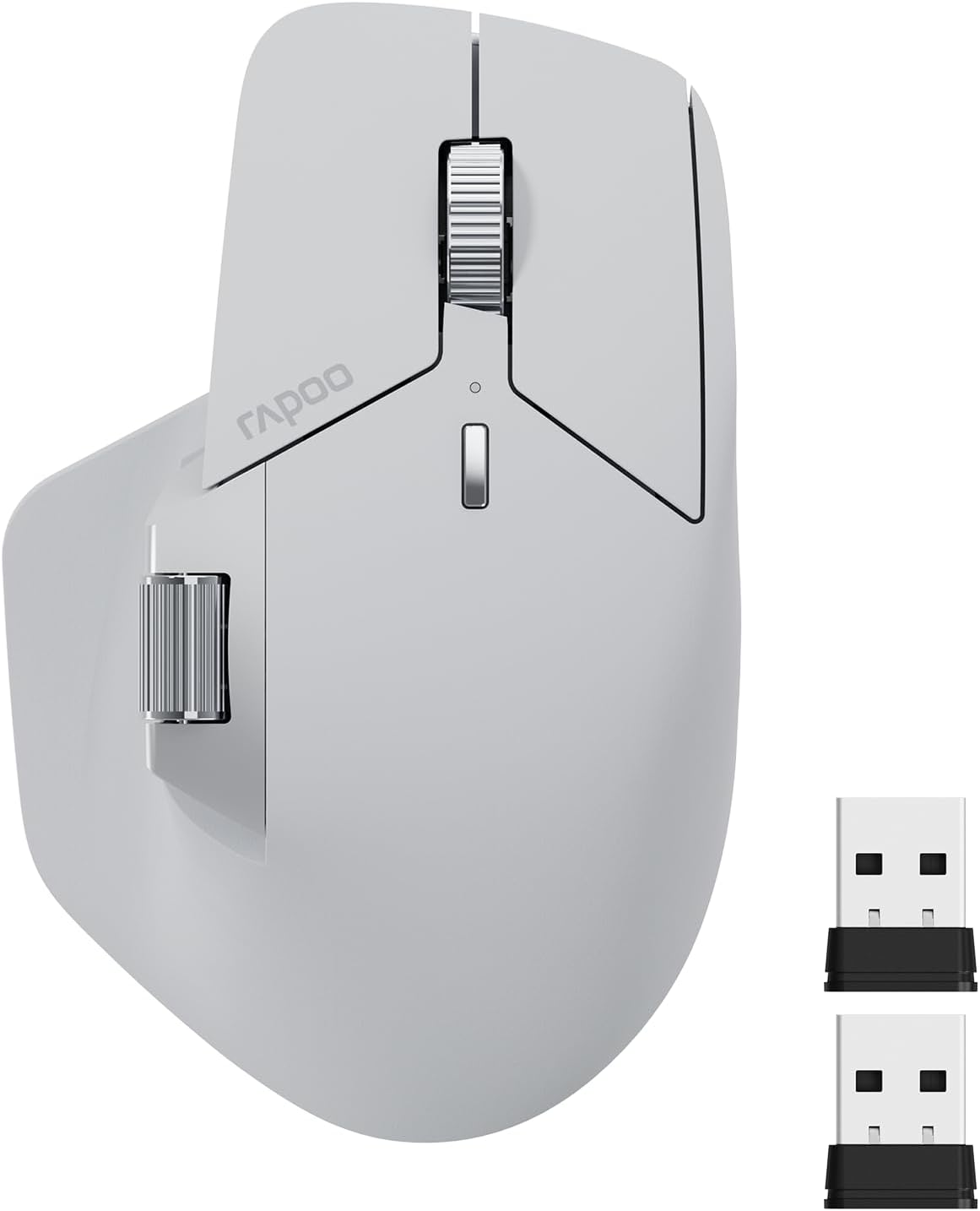
Rapoo MT760 Multi-Device Wireless Mouse, Bluetooth 5.0 and 2.4G Multi-Mode Connection, Up to 4 Devices, 11 Programmable Buttons, 4K DPI, 90 Days Battery Life, PC, Light Grey
Want the best price and purchase timing?
Our AI advisor analyzes real-time pricing across all channels to find you the best deal.
AI Verdict
This is a 4000 DPI optical mouse with 11 programmable buttons and multi-device Bluetooth 5.0/2.4GHz connectivity for up to four devices, aimed at budget-conscious multitaskers.
This mouse is a strong fit for multitaskers who juggle up to four devices and need extensive button customization. Its multi-mode connectivity (Bluetooth 5.0 and 2.4GHz) and 11 programmable buttons directly address complex workflows, especially given its budget price point. The ergonomic design also caters to users with larger hands, promoting comfort during long sessions.
If you need higher precision for gaming or more advanced cross-device features, look for mice with a higher polling rate (2000Hz or more) and a more advanced sensor like the PixArt PAW3311 or Darkfield, which are often found in higher-end models like the MT760 Pro.
Regret Score™
Low RiskLower is better — measures purchase-regret risk from real buyer complaints, review credibility, and product maturity
Issues discovered after purchase
Critically weak dimension
Amazon rating vs actual quality
Chance this product isn't for you
Pros
- Connects to up to four devices (three Bluetooth, one 2.4GHz USB dongle) for quick switching.
- Features 11 programmable buttons for custom shortcuts and macros.
- Offers 800-4000 DPI adjustable sensitivity with seven preset values.
- Includes M+ Cross-Computer Technology for seamless cursor and file transfer across multiple screens.
- Provides up to 90 days of use on its 800mAh li-po battery with USB-C charging.
- Ergonomic bow-back design with thumb support is shaped for larger hands and extended use.
Cons
- The side scroll wheel is often reported as too easy to rotate, causing accidental input.
- The side scroll wheel can feel 'unpleasant and scratchy' during use.
- Left and right click buttons tend to flex significantly when pressed.
- M+ Cross-Computer Technology requires driver installation and all connected computers to be on the same Wi-Fi or Ethernet network.
- Wireless charging capability requires a separately purchased P3 Wireless Charging Module.
Dimension Scores
The optical sensor offers 4000 DPI with seven adjustable levels, which is sufficient for productivity but not top-tier for precision tasks or competitive gaming.
Its ergonomic bow-back design with thumb support is specifically noted to fit larger hands and provide comfort during extended use.
The mouse supports Bluetooth 5.0/3.0 and 2.4GHz multi-mode, connecting up to four devices with quick switching, and includes two USB dongles.
While materials feel more premium than expected for the price, the side scroll wheel can feel scratchy, and the main click buttons tend to flex.
Best For
- Users managing multiple computers, laptops, or tablets who need quick switching between devices.
- Individuals requiring extensive button customization for productivity tasks.
- Those with larger hands seeking an ergonomic mouse for prolonged use.
- Budget-focused users who need a feature-rich mouse without a premium price tag.
Not Recommended For
- Competitive gamers due to the 125Hz Bluetooth polling rate and optical sensor limitations.
- Users who prioritize a premium, tactile side scroll wheel experience.
- Anyone needing an infinite scroll wheel feature.
Watch Out For
- The side scroll wheel's low resistance means you might accidentally scroll horizontally when you don't mean to.
- The M+ Cross-Computer Technology needs a specific driver installed and all devices on the same network, which isn't always convenient.
- If you want wireless charging, you'll need to buy the P3 Wireless Charging Module separately, adding to the cost.
- The main scroll wheel's click sometimes doesn't register, which can be frustrating.
- The polling rate button on the bottom of the mouse doesn't give any visual feedback on the current setting, leaving you guessing.
Full Specifications
| ASIN | B0CMZ1PQV6 |
| Brand | Rapoo |
| Color | Light Grey |
| Batteries | 1 D batteries required. (included) |
| Item Weight | 3.88 ounces |
| Manufacturer | Shenzhen Rapoo Technology Co., Ltd. |
| Item model number | MT760 |
| Product Dimensions | 4.85 x 2.13 x 0.1 inches |
| Connectivity Technology | Bluetooth, Radio Frequency |
| Movement Detection Technology | Optical |
What Buyers Say
Users frequently highlight the convenience of switching between multiple devices, calling it a game-changer for productivity across different systems. However, the side scroll wheel is a recurring point of frustration, with many finding it too loose and prone to accidental activation. The ergonomic shape receives consistent praise for comfort, especially for those with larger hands. The 90-day battery life and USB-C charging are also well-received features.
“Dude, this mouse is actually pretty sweet for the price, but seriously, that side scroll wheel is gonna drive me nuts sometimes, it just moves if you breathe on it wrong. But hey, 90 days battery life and I can use it on my work laptop AND my iPad? Worth it.”
Common Praise
- Seamless switching between up to four devices (PC, laptop, phone, tablet).
- Comfortable ergonomic design with thumb rest, especially for larger hands.
- Long battery life of up to 90 days on a single charge.
- USB-C charging port is a convenient modern feature.
- 11 programmable buttons offer extensive customization for workflows.
- M+ Cross-Computer Technology allows cursor and file transfer between screens.
Common Complaints
- Side scroll wheel is too sensitive and easily activated by accident.
- The side scroll wheel can feel 'scratchy' and lacks a smooth feel.
- Left and right click buttons exhibit noticeable flex.
- The main scroll wheel's click sometimes fails to register.
- No visual indicator for the current polling rate setting when adjusted.
- M+ Cross-Computer Technology requires specific software and network setup.
Ownership Tips
- The rubberized texture on the shell seems to resist dirt and degradation better than some other mice with similar coatings.
- The quiet clicks are a plus in shared office environments, but they still have a tactile feel.
- You'll probably find yourself adjusting the side scroll wheel sensitivity in software if it's an option, or just getting used to its looseness.
- The onboard memory for button assignments is a lifesaver when switching between computers without reinstalling software.
- The included two USB dongles are handy if you lose one or want to keep one plugged into a second 2.4GHz device.
Frequently Asked Questions
How many devices can this mouse connect to simultaneously?
The Rapoo MT760 can connect to up to four devices: one via the 2.4GHz USB dongle and three via Bluetooth 5.0/3.0.
Does it have an infinite scroll wheel like some other productivity mice?
No, the Rapoo MT760 does not feature an infinite scroll wheel.
Is wireless charging included?
The mouse is wireless charging enabled, but you need to purchase the P3 Wireless Charging Module separately to use this feature.
Can I use this mouse for gaming?
It's adequate for casual gaming and can handle fast movements, but its 125Hz Bluetooth polling rate and optical sensor make it less suitable for competitive gaming.
How long does the battery last?
The 800mAh li-po battery provides up to 90 days of use on a single charge, and it recharges via USB-C.
Buying Guide
When you're looking at a multi-device mouse like this, think about how many gadgets you actually switch between daily. The Rapoo MT760 handles up to four, which is plenty for most people. Also, consider if you need a lot of custom buttons; 11 is a lot, so make sure you'll actually use them to streamline your work. Don't forget about the ergonomics – a comfortable mouse prevents hand strain over hours of use, and this one is designed to fit larger hands well.
Multi-Mode Connectivity (Bluetooth 5.0 and 2.4GHz)
This means you can connect wirelessly in two ways: Bluetooth for devices like tablets or laptops without a free USB port, and 2.4GHz (with a USB dongle) for a more stable, lower-latency connection on desktops. It's like having two different wireless highways for your mouse.
4K DPI (Dots Per Inch)
DPI measures how sensitive your mouse is. A 4K DPI means the cursor moves 4,000 pixels for every inch you move the mouse. Higher DPI is useful for large, high-resolution monitors where you want the cursor to travel across the screen quickly with minimal physical movement. Seven adjustable levels let you fine-tune this.
11 Programmable Buttons
These are extra buttons you can customize to do almost anything – launch applications, copy/paste, control media, or even execute complex macros. It's like having a mini keyboard built into your mouse, saving you clicks and keystrokes throughout your day.
Alternatives
If this mouse doesn't quite fit, look for models with a higher polling rate for smoother cursor movement, especially if you game, or those with a magnetic or 'infinite' scroll wheel if you frequently scroll through long documents.
You Might Also Like

Magnetic Charging Mouse Pad 31.5x15.75, 15W Fast Wireless Charging Desk Mat, XXL Desk Pad RGB Gaming Mousepad, Home Office Large Keyboard Pad with Ultra-Smooth Surface, Non-Slip Base
$50-$99This 31.5" x 15.75" RGB desk mat with 15W magnetic phone charging and a Qi headphone charging zone is for users wanting to declutter and illuminate their workstation.

Mouse Pad Desk Mat Full Moon Desk Pad Black Red Large Mouse Pad Gaming Mousepad Extended Laptop Computer Mouse Keyboard Mat-11.8 x 31.5 in
Price range unavailableThis is a 11.8 x 31.5 inch desk mat for users needing a large, undefined surface to cover their desk, but with no available product details or user feedback.

SteelSeries QcK Gaming Mouse Pad - Small Cloth - Optimized For Gaming Sensors
A 250 x 210 x 2mm cloth pad with a non-slip rubber base, ideal for high DPI users or those with limited desk space.

SteelSeries QcK Large Gaming Mousepad — Black — Non-Slip Silicone Rubber Base — Peak Tracking and Stability — Optimized for Gaming Sensors — 490 mm x 420 mm — FPS, MOBAs, RTS, MMO
A 450 mm x 400 mm x 2 mm cloth mousepad designed for precise control in gaming, especially for budget-conscious players.