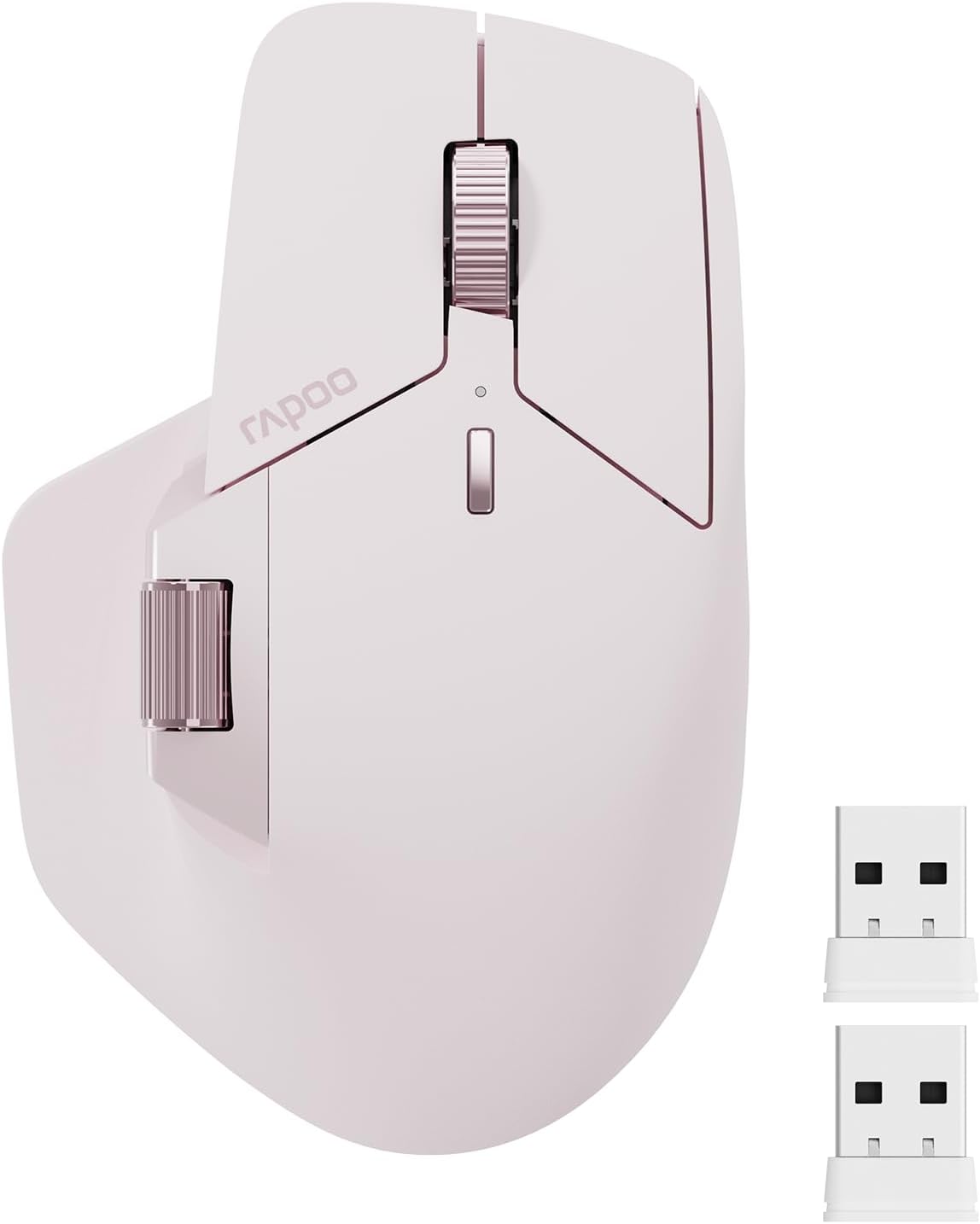
Rapoo MT760 Multi-Device Wireless Mouse, Bluetooth 5.0 and 2.4GHz Multi-Mode Connection, Up to 4 Devices, 11 Programmable Buttons, 4K DPI, Ergonomic Design, 90 Days Battery Life, PC, Pink
Want the best price and purchase timing?
Our AI advisor analyzes real-time pricing across all channels to find you the best deal.
AI Verdict
This 3.88-ounce multi-device wireless mouse offers 11 programmable buttons and 4000 DPI, suitable for productivity users seeking a budget-friendly MX Master alternative.
This mouse is a situational fit for users prioritizing multi-device connectivity and programmable buttons on a budget. Its 4000 DPI optical sensor and 90-day battery life are solid for office work, but the scroll wheel mechanics and software limitations for Mac users are compromises.
If you need a more refined scrolling experience or dedicated Mac software, look for mice with a free-spinning scroll wheel and native macOS driver support.
Regret Score™
Medium RiskLower is better — measures purchase-regret risk from real buyer complaints, review credibility, and product maturity
Issues discovered after purchase
Critically weak dimension
Amazon rating vs actual quality
Chance this product isn't for you
Pros
- Connects to up to four devices via Bluetooth 5.0/3.0 and 2.4GHz, allowing seamless switching.
- Features 11 programmable buttons for custom shortcuts and macros.
- Offers 7 adjustable DPI settings from 800 to 4000 for varied sensitivity needs.
- Includes M+ Cross-Computer Technology for moving cursor and transferring files between multiple computers (requires driver and shared network).
- Provides up to 90 days of battery life from an 800mAh li-po battery with USB-C quick charge.
- Supports Qi wireless charging with a separately purchased P3 Wireless Charging Module.
Cons
- The side scroll wheel is very light and can be accidentally rotated by the thumb.
- The main scroll wheel lacks a free-scrolling mode, offering only tactile, line-by-line scrolling.
- The middle button/scroll wheel click can be stiff and inconsistent, sometimes not registering presses.
- Software support for Mac is limited, requiring Windows for full driver functionality and settings.
- Build quality, particularly the scroll wheel, is reported to feel less premium than higher-priced alternatives.
Dimension Scores
The optical sensor offers 7 adjustable DPI settings up to 4000 DPI, which is adequate for office tasks but not competitive gaming.
It features an ergonomic bow-back design with thumb support, fitting medium to large hands for extended use.
Supports Bluetooth 5.0/3.0 and 2.4GHz multi-mode connection for up to four devices, with M+ Cross-Computer Technology for file transfer.
While feeling sturdy for its price, user reviews indicate the scroll wheels and button flex are not as refined as higher-end alternatives.
Best For
- Users who frequently switch between up to four different computers or mobile devices.
- Productivity tasks requiring customizable buttons and adjustable DPI settings.
- Individuals with medium to large hands seeking an ergonomic shape with thumb support.
- Budget-conscious users looking for multi-device functionality and ergonomic features.
Not Recommended For
- Competitive gamers due to the optical sensor and potential for stuttering with fast movements.
- Users who require a free-spinning or 'hyperscroll' main scroll wheel.
- Mac users who need full software customization and driver support directly on macOS.
Watch Out For
- The side scroll wheel is described as 'extremely easy to rotate,' leading to accidental inputs.
- The middle button click on the main scroll wheel can be 'super hard to press' and 'does not work consistently.'
- M+ Cross-Computer Technology requires driver installation and computers to be on the same Wi-Fi or Ethernet network.
- Wireless charging requires a separate purchase of the P3 Wireless Charging Module.
- Bluetooth connectivity on Mac systems may cap polling rates at 95Hz, even if set higher in drivers.
Full Specifications
| ASIN | B0CM5T8GX7 |
| Brand | Rapoo |
| Color | Pink |
| Batteries | 1 Lithium Polymer batteries required. (included) |
| Item Weight | 3.88 ounces |
| Manufacturer | Shenzhen Rapoo Technology Co., Ltd. |
| Item model number | MT760 |
| Product Dimensions | 4.92 x 3.12 x 0.1 inches |
| Connectivity Technology | Bluetooth, Radio Frequency |
| Movement Detection Technology | Optical |
What Buyers Say
Users frequently compare the Rapoo MT760 to the Logitech MX Master series, often praising its similar ergonomic shape and multi-device capabilities at a significantly lower price point. Many appreciate the silent clicks and the inclusion of a side scroll wheel, even if its tension is too loose. However, recurring complaints highlight the lack of a free-spinning scroll wheel and the stiffness or inconsistency of the middle click. Mac users also report frustration with limited software support and capped Bluetooth polling rates.
“Okay, so it's not a Logitech, but for like half the price, it does most of the same stuff, just wish that side scroll wasn't so twitchy and the middle click actually worked every time.”
Common Praise
- Comfortable ergonomic shape, similar to the MX Master, fitting well for medium to large hands.
- Multi-device connectivity (up to 4 devices) with easy switching between Bluetooth and 2.4GHz.
- Silent left and right clicks with tactile feedback.
- Long battery life, with users reporting weeks of use without needing a charge.
- M+ Cross-Computer Technology for seamless cursor movement and file transfer between networked PCs.
Common Complaints
- The side scroll wheel is too loose, leading to accidental scrolling.
- The main scroll wheel lacks a free-spinning or 'hyperscroll' mode.
- Middle click on the main scroll wheel is stiff, inconsistent, or difficult to press straight down.
- Limited or non-existent software support for Mac, requiring Windows for full customization.
- Build quality, particularly the scroll wheel, feels less premium and potentially less durable than expected.
Ownership Tips
- The soft-touch material on the mouse feels less grippy than some premium alternatives, but also seems less prone to discoloration.
- The mouse can be used in wired mode while charging, which is a convenient feature not always found on similar wireless mice.
- The included USB dongles (sometimes two) are handy, and there's storage for one on the mouse itself.
- The DPI button's color-coded levels help identify sensitivity, but the specific levels change based on connection type.
- Initial driver issues have largely been resolved, with correct drivers now available online.
Frequently Asked Questions
How many devices can the Rapoo MT760 connect to?
The Rapoo MT760 can connect to up to four devices using a combination of Bluetooth 5.0/3.0 and 2.4GHz wireless modes.
Does the Rapoo MT760 have a free-scrolling wheel?
No, the Rapoo MT760's main scroll wheel has tactile bumps and scrolls line by line; it does not feature a free-spinning or 'hyperscroll' mode.
Is the Rapoo MT760 compatible with Mac?
Yes, it's compatible with Mac OS 10.15 or later via Bluetooth or the USB dongle. However, full software customization and driver functionality are primarily for Windows, and Bluetooth polling rates may be capped on Mac.
How long does the battery last on a single charge?
The 800mAh li-po battery can last up to 90 days on a single USB-C quick charge, though actual battery life varies with usage.
Can I use the Rapoo MT760 while it's charging?
Yes, the mouse can be used in wired mode by plugging in the USB-C charging cable, allowing you to continue working while it charges.
Buying Guide
When picking a multi-device mouse like this, you're balancing convenience with performance. You need to think about how many computers you actually use and if you need to jump between them quickly. Also, consider your hand size and how much you rely on advanced features like a super-fast scroll wheel or custom macros. A mouse like this can save you money, but sometimes you trade off a bit of polish in the process.
Multi-Mode Connection (Bluetooth 5.0 & 2.4GHz)
This means you can connect to devices that have Bluetooth (like laptops, tablets, phones) or older PCs using the included USB dongle. Being able to switch between up to four devices means you only need one mouse for your work setup, home PC, and even a tablet, without constantly re-pairing.
DPI (Dots Per Inch)
DPI is how sensitive your mouse is. A higher DPI (like 4000 on this mouse) means the cursor moves further with less physical mouse movement. This is useful for large monitors or precise work, while lower DPI is better for tasks needing more control. Adjustable DPI lets you tailor it to different tasks or screen sizes.
Programmable Buttons
Think of these as extra shortcut keys on your mouse. Instead of reaching for the keyboard, you can assign common actions (like copy, paste, open an app, or even complex macros) to these buttons. This can speed up your workflow significantly, especially in repetitive tasks.
Alternatives
If this mouse doesn't quite fit, look for models with a free-spinning scroll wheel for faster document navigation, or those with robust native software support for your specific operating system if customization is a top priority.
You Might Also Like

Magnetic Charging Mouse Pad 31.5x15.75, 15W Fast Wireless Charging Desk Mat, XXL Desk Pad RGB Gaming Mousepad, Home Office Large Keyboard Pad with Ultra-Smooth Surface, Non-Slip Base
$50-$99This 31.5" x 15.75" RGB desk mat with 15W magnetic phone charging and a Qi headphone charging zone is for users wanting to declutter and illuminate their workstation.

Mouse Pad Desk Mat Full Moon Desk Pad Black Red Large Mouse Pad Gaming Mousepad Extended Laptop Computer Mouse Keyboard Mat-11.8 x 31.5 in
Price range unavailableThis is a 11.8 x 31.5 inch desk mat for users needing a large, undefined surface to cover their desk, but with no available product details or user feedback.

SteelSeries QcK Gaming Mouse Pad - Small Cloth - Optimized For Gaming Sensors
A 250 x 210 x 2mm cloth pad with a non-slip rubber base, ideal for high DPI users or those with limited desk space.

SteelSeries QcK Large Gaming Mousepad — Black — Non-Slip Silicone Rubber Base — Peak Tracking and Stability — Optimized for Gaming Sensors — 490 mm x 420 mm — FPS, MOBAs, RTS, MMO
A 450 mm x 400 mm x 2 mm cloth mousepad designed for precise control in gaming, especially for budget-conscious players.