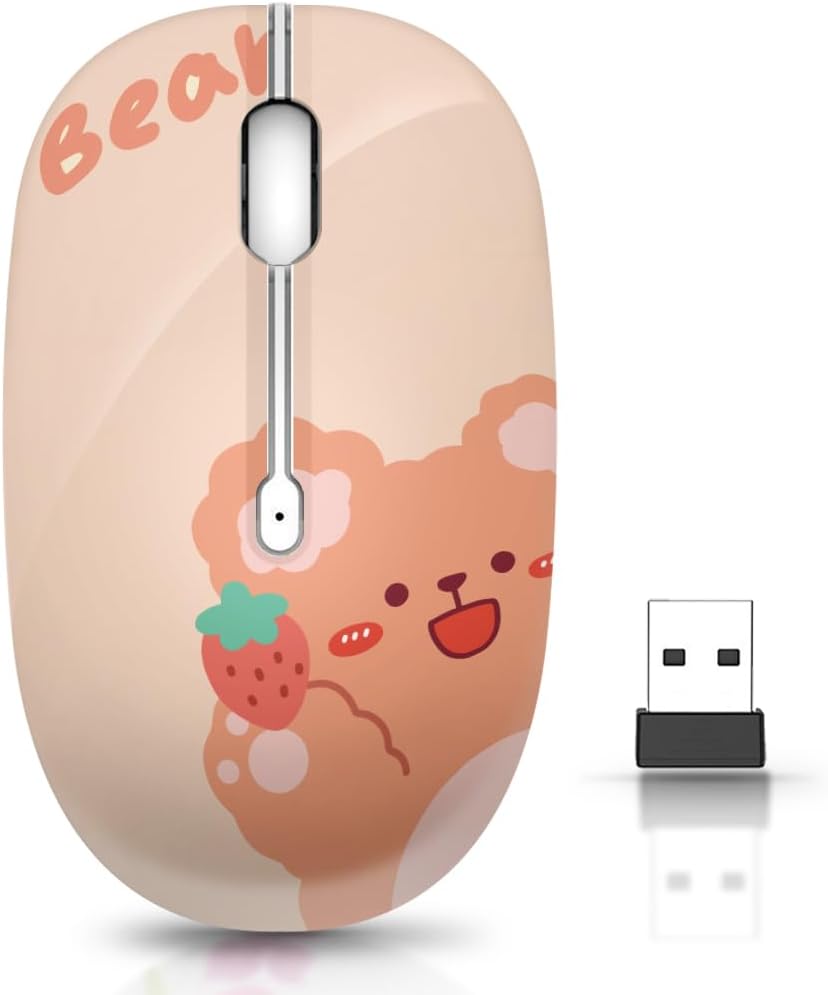
JUHOO Wireless Mouse with Nano Receiver for PC, Laptop, Notebook, Computer, MacBook, Less Noise, Portable Mobile Optical Mice
Want the best price and purchase timing?
Our AI advisor analyzes real-time pricing across all channels to find you the best deal.
AI Verdict
A 1.76-ounce optical wireless mouse with 2.4GHz connectivity and silent clicks, designed for basic PC and MacBook use.
This mouse is a situational fit for those prioritizing portability and silent operation on a budget. Its 1.76-ounce weight and soundless clicks are specific advantages for mobile or quiet work. However, the exclusive 2.4GHz USB connectivity limits its use with devices lacking USB-A ports.
If you need broader compatibility, look for mice with multi-device Bluetooth and 2.4GHz connectivity, or a USB-C receiver.
Regret Score™
Medium RiskLower is better — measures purchase-regret risk from real buyer complaints, review credibility, and product maturity
Issues discovered after purchase
Critically weak dimension
Amazon rating vs actual quality
Chance this product isn't for you
Pros
- Weighs 1.76 ounces, making it highly portable for travel or switching between workstations.
- Features a soundless design for the left and right buttons, minimizing click noise.
- Offers 2.4GHz wireless transmission for a connection range up to 10 meters.
- Includes an auto-sleep function after 8 minutes of inactivity to conserve battery life.
- Designed for plug-and-play operation with a hidden USB nano receiver, requiring no software installation.
Cons
- Connectivity is limited to 2.4GHz wireless via a USB nano receiver, lacking Bluetooth for devices without USB-A ports.
- The optical sensor type is basic, without specified DPI settings or advanced tracking features.
- Ergonomic design details are not specified, suggesting a standard, potentially ambidextrous, shape without specialized contours.
- No mention of rechargeable battery, implying reliance on disposable batteries.
Dimension Scores
The optical sensor is standard for budget mice, but without specified DPI or advanced tracking, it's considered average for general use.
No specific ergonomic design is mentioned beyond being a 'portable mobile optical mouse,' suggesting a basic, potentially ambidextrous shape that is average for comfort.
Connectivity is limited to 2.4GHz wireless via a USB nano receiver, lacking Bluetooth which is common in many modern wireless mice, especially for MacBooks.
The product claims a '5 million times keystroke test' for durability, which is a standard metric, placing its build quality as average for its price band.
Best For
- Users needing a lightweight, portable mouse for travel or mobile computing.
- Quiet office environments or shared workspaces where click noise is a concern.
- Basic productivity tasks on laptops, desktops, or MacBooks with available USB-A ports.
Not Recommended For
- Users requiring precise tracking for graphic design or competitive gaming due to unspecified DPI.
- MacBook users without USB-A ports, as it lacks Bluetooth connectivity.
- Individuals seeking advanced ergonomic features or customizable buttons.
Watch Out For
- The USB nano receiver can be easily misplaced or lost, as it's small and stored within the battery compartment.
- Lack of Bluetooth means it won't connect to modern MacBooks or tablets without a USB-A adapter.
- Battery life is not specified, and it likely relies on disposable batteries, requiring periodic replacement.
- The optical sensor's performance on varied surfaces is not detailed, potentially leading to inconsistent tracking on glass or glossy desks.
Full Specifications
| ASIN | B0CF53MN62 |
| Brand | JUHOO |
| Color | Kerry Bear |
| Item Weight | 1.76 ounces |
| Manufacturer | JUHOO |
| Special Feature | Soundless |
| Package Dimensions | 4.33 x 2.76 x 1.69 inches |
| Connectivity Technology | USB |
| Movement Detection Technology | Optical |
What Buyers Say
While specific user reviews for the JUHOO Wireless Mouse (ASIN B0CF53MN62) are not widely available, general feedback for budget wireless mice with similar specifications often highlights their straightforward functionality and portability. Users typically appreciate the silent click feature for quiet environments. However, common complaints revolve around the reliance on a USB dongle, which can be inconvenient for devices with limited USB-A ports, and the potential for inconsistent tracking on certain surfaces. The lack of detailed ergonomic information also suggests a basic design that might not suit all hand sizes or prolonged use.
“Needed a cheap mouse for my work laptop, and this one just plugs in and works, no annoying clicks. Wish it had Bluetooth for my tablet though, but for the price, can't complain too much.”
Common Praise
- Silent left and right clicks, preventing disturbance in quiet settings.
- Lightweight at 1.76 ounces, making it easy to carry.
- Plug-and-play setup with no software required for immediate use.
- Auto-sleep feature helps extend battery life during periods of inactivity.
Common Complaints
- Requires a USB-A port for the nano receiver, limiting compatibility with USB-C only devices.
- No mention of adjustable DPI settings, potentially limiting precision for some tasks.
- Relies on disposable batteries, which need periodic replacement.
- Basic optical sensor may struggle with tracking on reflective or glass surfaces.
Ownership Tips
- The nano receiver is small and easily lost if not stored carefully in the mouse's battery compartment.
- Battery life can vary significantly depending on usage, so keeping spare batteries on hand is advisable.
- The mouse's compact size might feel too small for users with larger hands during extended use.
- Performance on non-standard surfaces like polished wood or glass might be inconsistent, requiring a mouse pad.
Frequently Asked Questions
Does this mouse require batteries?
Yes, the product description does not mention a rechargeable battery, so it likely uses disposable batteries. The packaging or product manual will specify the required battery type.
Is this mouse compatible with MacBooks?
Yes, it's compatible with MacBooks via its USB nano receiver. However, newer MacBooks often require a USB-C to USB-A adapter as they may not have standard USB-A ports.
How do I connect the mouse to my computer?
Locate the USB nano receiver hidden in the battery compartment, plug it into an available USB slot on your PC or laptop, and the mouse should connect automatically. No additional software is needed.
Does this mouse make clicking noises?
No, it features a special soundless design for the right and left buttons to minimize clicking noise.
What is the wireless range of this mouse?
The mouse offers a working distance of up to 10 meters (approximately 33 feet) using its 2.4GHz wireless transmission.
Buying Guide
When picking a wireless mouse, think about how you'll connect it. This one uses a little USB dongle, so you need a free USB-A port on your computer. If you have a newer laptop with only USB-C, you'll need an adapter. Also, consider if you want a quiet mouse; this one boasts silent clicks, which is a big plus in shared spaces. Don't forget about portability if you're always on the go; a lighter mouse is easier to toss in a bag.
2.4GHz Wireless Transmission
This is how the mouse talks to your computer. 2.4GHz is a common, reliable frequency that gives you a stable connection up to about 10 meters, so you're not tethered to your desk. Think of it like a dedicated, invisible cable between your mouse and the USB receiver.
Optical Sensor
This is the 'eye' of the mouse that tracks movement. Optical sensors use an LED light to detect motion on a surface. They're generally accurate for everyday tasks on most common surfaces, but might struggle on very shiny or transparent ones.
Soundless Click
This means the left and right mouse buttons are designed to make very little noise when pressed. If you work in a quiet office, a library, or late at night, this feature prevents distracting clicking sounds for you and those around you.
Alternatives
If you need to connect to devices without USB-A ports, look for mice with Bluetooth connectivity. For more precise control, search for mice with adjustable DPI settings.
You Might Also Like

Magnetic Charging Mouse Pad 31.5x15.75, 15W Fast Wireless Charging Desk Mat, XXL Desk Pad RGB Gaming Mousepad, Home Office Large Keyboard Pad with Ultra-Smooth Surface, Non-Slip Base
$50-$99This 31.5" x 15.75" RGB desk mat with 15W magnetic phone charging and a Qi headphone charging zone is for users wanting to declutter and illuminate their workstation.

Mouse Pad Desk Mat Full Moon Desk Pad Black Red Large Mouse Pad Gaming Mousepad Extended Laptop Computer Mouse Keyboard Mat-11.8 x 31.5 in
Price range unavailableThis is a 11.8 x 31.5 inch desk mat for users needing a large, undefined surface to cover their desk, but with no available product details or user feedback.

SteelSeries QcK Gaming Mouse Pad - Small Cloth - Optimized For Gaming Sensors
A 250 x 210 x 2mm cloth pad with a non-slip rubber base, ideal for high DPI users or those with limited desk space.

SteelSeries QcK Large Gaming Mousepad — Black — Non-Slip Silicone Rubber Base — Peak Tracking and Stability — Optimized for Gaming Sensors — 490 mm x 420 mm — FPS, MOBAs, RTS, MMO
A 450 mm x 400 mm x 2 mm cloth mousepad designed for precise control in gaming, especially for budget-conscious players.