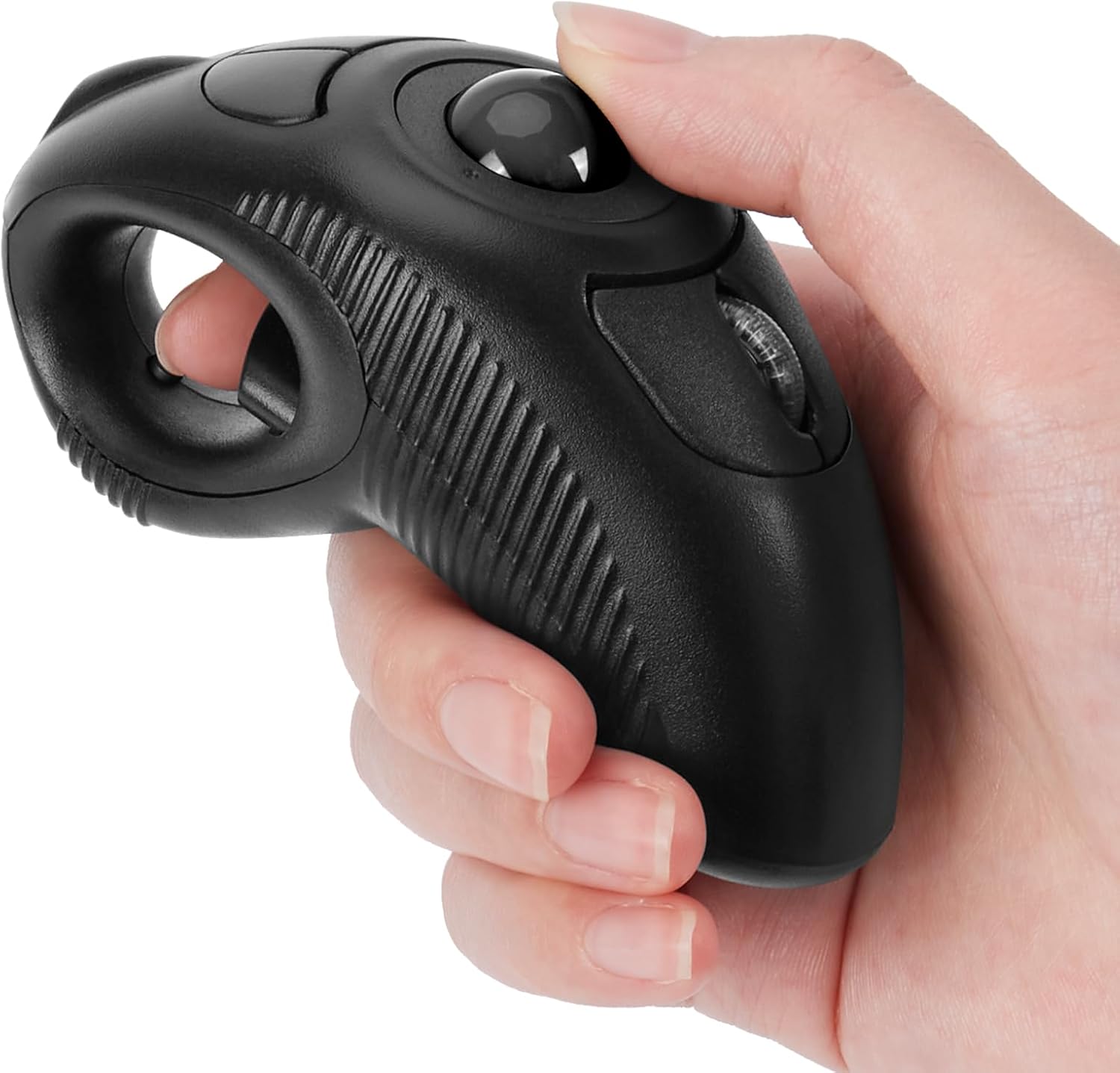
welspo Wireless USB Handheld Finger Trackball(Black) Mouse with Laser Pointer
Want the best price and purchase timing?
Our AI advisor analyzes real-time pricing across all channels to find you the best deal.
AI Verdict
This 5.5-ounce wireless handheld trackball mouse with a laser pointer is for users needing off-table control and wrist strain relief.
This trackball mouse is a situational fit, primarily for users prioritizing wrist comfort and off-table use over traditional mouse precision. Its ergonomic, handheld design and laser pointer are specific advantages for presentations or users with wrist strain, but the trackball sensor and AAA battery power limit its appeal for general daily use.
If you need more consistent precision or a rechargeable option, look for trackballs with higher DPI settings and integrated rechargeable batteries.
Regret Score™
Medium RiskLower is better — measures purchase-regret risk from real buyer complaints, review credibility, and product maturity
Issues discovered after purchase
Critically weak dimension
Amazon rating vs actual quality
Chance this product isn't for you
Pros
- Ergonomic design specifically aims to reduce wrist and muscle strain, potentially preventing Arthritis and CTS.
- Allows off-table operation, freeing you from needing a flat surface for mouse movement.
- Includes a laser pointer, making it suitable for presentations.
- Plug-and-play USB 2.0 connectivity means no software installation is required.
- Its 5.5-ounce weight and handheld design make it highly portable for travel or different workspaces.
- Designed for use with either the left or right hand.
Cons
- Users report a learning curve to adapt to trackball control, especially coming from traditional mice.
- Some users experience occasional connectivity issues with the wireless USB receiver.
- The trackball's sensitivity can be inconsistent, leading to less precise control for some tasks.
- Powered by AAA batteries, requiring replacements rather than offering a rechargeable option.
- The trackball mechanism may require periodic cleaning to maintain smooth operation.
Dimension Scores
The trackball sensor can be precise, but user reports of sensitivity issues and a learning curve place it below average for consistent accuracy.
Its handheld, ergonomic design is a primary selling point, specifically engineered to reduce wrist and muscle strain, making it highly comfortable for its target users.
It uses a standard USB receiver for wireless plug-and-play connectivity, which is convenient, but some users report occasional connection issues.
As a budget-priced, unbranded device (similar products are described as 'knockoff thing from China'), there are no indicators of premium materials or construction, and the trackball may require regular cleaning.
Best For
- Presentations where a laser pointer and remote control are beneficial.
- Users experiencing wrist pain or seeking to prevent conditions like Carpal Tunnel Syndrome.
- Environments where a desk or flat surface for a traditional mouse is unavailable or inconvenient.
- Laptop users needing a portable, off-table input device.
Not Recommended For
- Precision-intensive tasks like graphic design or gaming, due to reported sensitivity issues and learning curve.
- Users who prefer the immediate responsiveness and familiarity of a traditional optical mouse.
- Anyone who dislikes regularly replacing AAA batteries.
Watch Out For
- Expect a significant learning curve; some users find the trackball's sensitivity challenging to master for accurate cursor control.
- Occasional wireless connectivity drops can interrupt workflow, as reported by some users.
- The trackball will need cleaning periodically, as lint and dirt can affect its smooth movement.
- Battery life can be a concern; one user noted a similar device would drain batteries in a couple of hours if left on.
Full Specifications
| ASIN | B0BJZQX6CM |
| Brand | welspo |
| Color | black ball |
| Batteries | 1 AAA batteries required. |
| Item Weight | 5.5 ounces |
| Manufacturer | BrainyTrade |
| Special Feature | Ergonomic Design, Handheld, Wireless |
| Item model number | iF6B |
| Product Dimensions | 4.3 x 1.9 x 0.04 inches |
| Connectivity Technology | USB |
| Movement Detection Technology | Trackball |
What Buyers Say
The biggest takeaway is that this trackball mouse is a polarizing device; people either love it for its specific use cases or struggle with its unconventional control. Many users specifically sought it out to alleviate wrist pain, and for them, the ergonomic, handheld design is a game-changer. However, getting used to controlling the cursor with your thumb on a trackball takes time, and some find the sensitivity inconsistent. The laser pointer is a definite plus for presentations, but be ready to swap out AAA batteries frequently.
“Honestly, this thing felt weird at first, like trying to write with my off-hand, but my wrist feels so much better after a week of using it for work presentations, so I guess I'm keeping it.”
Common Praise
- Alleviates wrist strain and discomfort, making long computer sessions bearable.
- Portable and easy to carry, fitting well into a bag for on-the-go use.
- The integrated laser pointer is super handy for giving presentations.
- Works without needing a flat surface, offering freedom of movement.
- Simple plug-and-play setup with no software required.
- Can be used comfortably by both left and right-handed individuals.
Common Complaints
- Requires a significant adjustment period to get used to the trackball movement.
- The trackball's sensitivity can be tricky, leading to imprecise cursor control.
- Occasional drops in wireless connectivity can be frustrating during use.
- Relies on AAA batteries, which need frequent replacement and aren't ideal for everyone.
- The trackball itself can get dirty and require regular cleaning to maintain smooth operation.
Ownership Tips
- You'll quickly learn that the trackball needs a wipe down every now and then to keep it from feeling sticky.
- Keep spare AAA batteries on hand, because it will die on you at the most inconvenient times.
- The thumb control becomes second nature after a few days, but don't expect to be a pro immediately.
- It's surprisingly useful for controlling media from the couch, way better than a regular mouse for that.
- The laser pointer is brighter than you'd expect for a mouse, actually useful in a bright room.
Frequently Asked Questions
Is this trackball mouse rechargeable?
No, this device is powered by AAA batteries, which you will need to replace when they run out.
Does it require any special software or drivers?
No, it features a plug-and-play USB 2.0 interface and requires no software installation.
Can I use this with a Mac or Linux computer?
Yes, it is compatible with various platforms including Windows, Linux, and Mac OS.
How do I scroll with this mouse?
The scrolling function is controlled simply by your thumb on the roller ball.
Is it comfortable for long periods of use?
Many users find its ergonomic, handheld design comfortable and beneficial for reducing wrist strain during extended use.
Buying Guide
When looking at a trackball mouse like this, you're trading traditional mouse movement for a stationary control method. This means you move a ball with your thumb or fingers instead of sliding the entire device around. This is a game-changer if you have limited desk space or wrist issues, as it keeps your hand and arm still. The laser pointer is a bonus if you're presenting, but the core experience is about that trackball.
Sensor: Trackball
Unlike a traditional optical sensor that tracks movement across a surface, a trackball sensor tracks the rotation of a ball. This means you don't need to move the mouse itself, only the ball, which can reduce arm and wrist strain.
Connectivity: USB
This means it connects wirelessly via a small USB dongle that plugs into your computer. It's 'plug and play,' so your computer should recognize it instantly without needing to install anything.
Ergonomic Design
This isn't just a marketing buzzword here; it means the shape and layout are specifically designed to fit your hand naturally and minimize stress on your joints and muscles, especially your wrist, which can help prevent discomfort over long periods.
Wireless
No cables mean more freedom of movement and a tidier workspace. You can use it from a distance, like controlling a presentation from across a room, without being tethered to your computer.
Alternatives
If this trackball doesn't quite fit, look for alternatives with Bluetooth connectivity for dongle-free use, rechargeable batteries to avoid constant replacements, or models with adjustable DPI settings for more precise control.
You Might Also Like

Magnetic Charging Mouse Pad 31.5x15.75, 15W Fast Wireless Charging Desk Mat, XXL Desk Pad RGB Gaming Mousepad, Home Office Large Keyboard Pad with Ultra-Smooth Surface, Non-Slip Base
$50-$99This 31.5" x 15.75" RGB desk mat with 15W magnetic phone charging and a Qi headphone charging zone is for users wanting to declutter and illuminate their workstation.

Mouse Pad Desk Mat Full Moon Desk Pad Black Red Large Mouse Pad Gaming Mousepad Extended Laptop Computer Mouse Keyboard Mat-11.8 x 31.5 in
Price range unavailableThis is a 11.8 x 31.5 inch desk mat for users needing a large, undefined surface to cover their desk, but with no available product details or user feedback.

SteelSeries QcK Gaming Mouse Pad - Small Cloth - Optimized For Gaming Sensors
A 250 x 210 x 2mm cloth pad with a non-slip rubber base, ideal for high DPI users or those with limited desk space.

SteelSeries QcK Large Gaming Mousepad — Black — Non-Slip Silicone Rubber Base — Peak Tracking and Stability — Optimized for Gaming Sensors — 490 mm x 420 mm — FPS, MOBAs, RTS, MMO
A 450 mm x 400 mm x 2 mm cloth mousepad designed for precise control in gaming, especially for budget-conscious players.