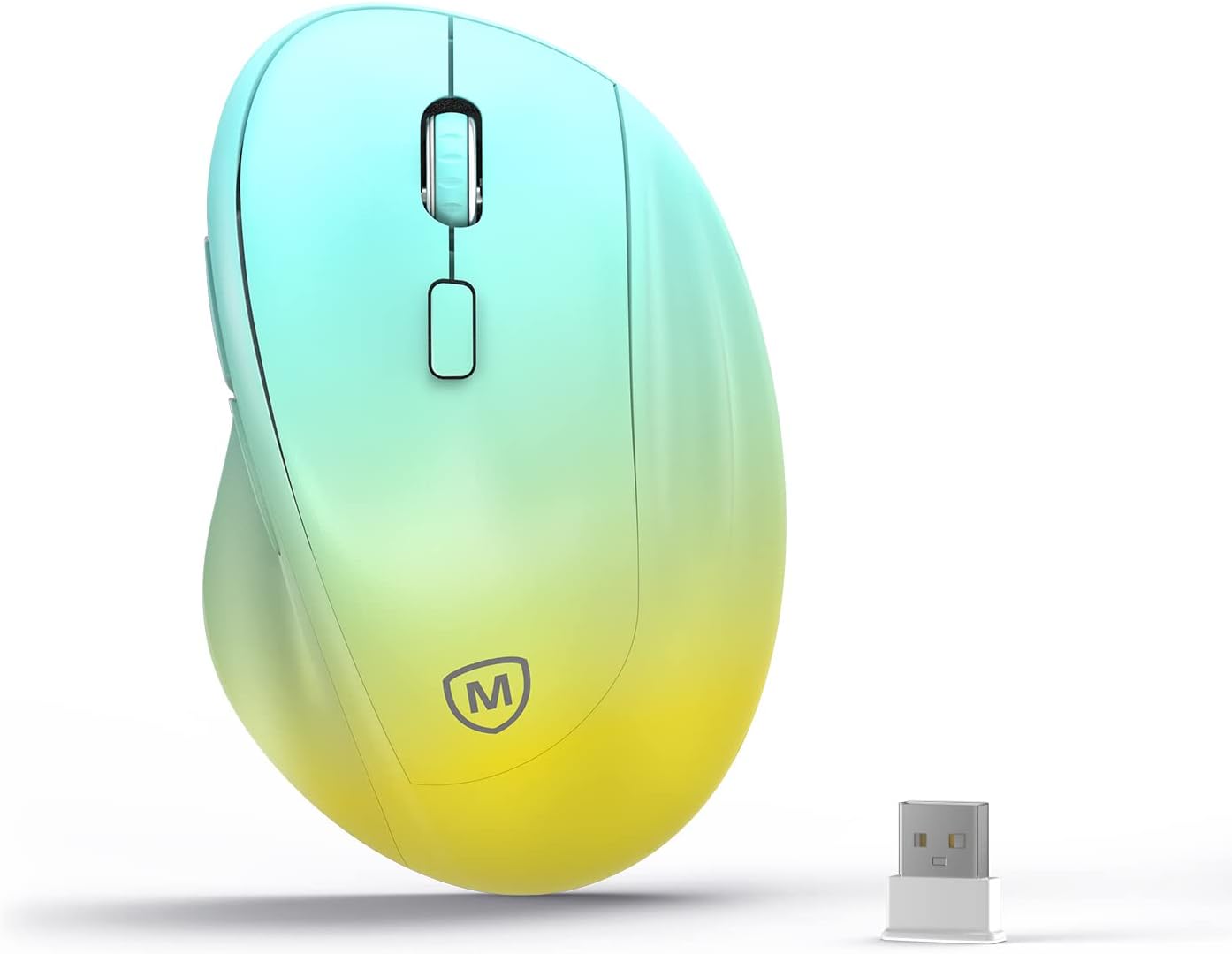
Ergonomic Wireless Mouse with USB Receiver for PC Computer, Laptop and Desktop, Ergo Mouse Vertical with Silent Clicks Long Battery Life, Up to 1600 DPI & 1 AA Battery Powered, YellowBlue
Want the best price and purchase timing?
Our AI advisor analyzes real-time pricing across all channels to find you the best deal.
AI Verdict
This 1600 DPI optical wireless mouse with silent clicks and 16-month AA battery life is for users needing basic ergonomic comfort for medium to large hands.
This mouse is a situational fit because its ergonomic design and silent clicks address specific user needs like wrist strain and quiet environments. However, its basic 1600 DPI optical sensor and USB dongle connectivity limit its appeal for users requiring more advanced features or wider compatibility.
If this mouse isn't enough, look for models with adjustable DPI settings (e.g., 800-4000 DPI) and multi-device Bluetooth connectivity.
Regret Score™
Medium RiskLower is better — measures purchase-regret risk from real buyer complaints, review credibility, and product maturity
Issues discovered after purchase
Critically weak dimension
Amazon rating vs actual quality
Chance this product isn't for you
Pros
- The vertical design aims to position your hand in a natural handshake grip, which can reduce wrist strain.
- Features silent clicks, creating a quieter work environment.
- Offers a long battery life of up to 16 months on a single AA battery, aided by an auto-sleep mode and on/off switch.
- Includes well-placed front and back thumb buttons for intuitive navigation.
- Plug-and-play USB dongle provides a wireless connection with a working range of up to 32 feet, requiring no additional drivers.
Cons
- The 1600 DPI optical sensor is fixed, lacking adjustable DPI settings common in other mice.
- Connectivity is limited to a USB receiver, without Bluetooth options found in some ergonomic mice.
- The ergonomic shape, while beneficial, requires an adjustment period for users accustomed to traditional mice.
- Some generic vertical mice in this price range have reported issues with stiff switches or loose dongles.
- The product's stated dimensions (11.8cm*7.5cm*5.8cm) are specifically for medium or large hands, potentially excluding users with smaller hands.
Dimension Scores
The optical sensor with a fixed 1600 DPI is standard for basic tasks but lacks the precision and adjustability of higher-end mice.
The vertical design aims to place the hand in a natural handshake position, which many users find reduces wrist strain for medium to large hands.
Connectivity is limited to a single USB receiver, lacking the versatility of Bluetooth or multi-device pairing found in many modern wireless mice.
As a budget-priced mouse, the build quality is likely average, with some generic vertical mice experiencing issues like stiff switches or loose dongles.
Best For
- Individuals experiencing wrist discomfort from prolonged traditional mouse use.
- Office environments where silent clicks are preferred to minimize noise.
- Users with medium to large hands seeking a basic, budget-friendly ergonomic mouse.
- Desktops or laptops where a dedicated USB port for the receiver is readily available.
Not Recommended For
- Gamers who require higher DPI, faster response times, or more customizable buttons.
- Users with small hands, as the comfort shape is designed for medium or large grips.
- Individuals needing multi-device connectivity via Bluetooth or multiple dongles.
- Mac users who might encounter compatibility issues with thumb buttons or require a USB-A adapter.
Watch Out For
- The ergonomic shape takes getting used to; some users find it initially awkward for daily use.
- Thumb buttons on similar generic vertical mice may not function on macOS without third-party software.
- The USB dongle, in some generic vertical mice, has been reported to feel loose in its storage slot.
- Some budget vertical mice have been criticized for stiff button switches, which can impact comfort during extended use.
- The 1600 DPI is fixed, meaning you can't adjust sensitivity on the fly if your workflow requires different speeds.
Full Specifications
| ASIN | B0BCW3KLZF |
| Brand | MICROPACK Digitally Yours |
| Color | Yellow-Blue |
| Item Weight | 4.2 ounces |
| Manufacturer | MICROPACK Digitally Yours |
| Special Feature | Wireless |
| Item model number | MP-V01W |
| Product Dimensions | 4.6 x 3 x 0.04 inches |
| Connectivity Technology | USB |
| Movement Detection Technology | Optical |
What Buyers Say
Many users report that the vertical design genuinely helps alleviate wrist pain and discomfort from traditional mouse use, though there's a definite adjustment period to the new hand position. The silent clicks are a frequently praised feature, contributing to a less distracting workspace. However, some generic vertical mice in this category have faced criticism for stiff buttons or the dongle feeling a bit loose. The fixed 1600 DPI is adequate for everyday tasks but won't satisfy those needing more precise control or on-the-fly sensitivity changes.
“Okay, so my wrist was killing me from my old mouse, and this thing actually helps! It felt weird for like two days, but now my hand just chills. The clicks are super quiet, which is awesome, but I wish I could change the speed a bit more. For the price, though, my wrist is way happier.”
Common Praise
- The vertical orientation significantly reduces wrist strain and discomfort during long work sessions.
- Silent clicks are a welcome feature, making for a quieter user experience.
- The mouse feels comfortable for users with medium to large hands once accustomed to the shape.
- The 16-month battery life from a single AA battery is very convenient.
- The plug-and-play USB receiver makes setup quick and easy.
Common Complaints
- Requires an adjustment period to get used to the vertical grip, which can feel awkward initially.
- The fixed 1600 DPI is not adjustable, limiting precision for certain tasks.
- Some users find the button switches on similar budget vertical mice to be stiff.
- The USB dongle can sometimes be loose in its storage slot or connection.
- Lack of Bluetooth connectivity means it occupies a USB port and isn't as versatile for multi-device setups.
Ownership Tips
- The 'silent clicks' hold up over weeks of use, maintaining their quiet operation.
- The battery life is genuinely long; you'll forget when you last changed the AA battery.
- The plastic material, while not premium, feels durable enough for daily office use.
- The thumb buttons are positioned well and become second nature after a week or so.
- The USB receiver is small enough to leave in a laptop port without much protrusion.
Frequently Asked Questions
Does this mouse require special drivers?
No, it's designed for plug-and-play functionality with its USB dongle, so no additional drivers are needed for basic operation.
What kind of battery does it use and how long does it last?
It uses one AA battery and can last up to 16 months, thanks to its auto-sleep power-saving mode and on/off switch.
Is this mouse suitable for small hands?
The comfort shape is specifically designed for medium or large grips (Dimensions: 11.8cm*7.5cm*5.8cm), so it might feel too large for users with smaller hands.
Can I use this mouse with a Mac?
While it's generally compatible with PC, Laptop, and Desktop systems, some generic vertical mice may have limited functionality for thumb buttons on macOS without additional software or require a USB-A adapter.
Does it have Bluetooth connectivity?
No, this mouse connects wirelessly using a dedicated USB receiver (dongle), not Bluetooth.
Buying Guide
When you're looking at a vertical ergonomic mouse, you're primarily trying to solve wrist or forearm discomfort. The 'vertical' part means your hand rests in a more natural handshake position, which can reduce strain compared to a flat mouse. Don't expect gaming-level precision or a ton of fancy features at this price point; it's about comfort for everyday tasks. You'll need to be patient, as it takes a few days to a week to truly get used to the new grip.
Ergonomic Design
This isn't just a buzzword; it refers to the mouse's shape that positions your hand and wrist in a more neutral, less twisted posture, similar to a handshake. This can significantly reduce the stress on your carpal tunnel and forearm muscles over long periods.
1600 DPI
DPI (dots per inch) tells you how sensitive the mouse sensor is. 1600 DPI means the cursor moves 1600 pixels for every inch you move the mouse. For basic office work and browsing, 1600 DPI is perfectly fine, but if you do detailed graphic design or gaming, you might want a mouse with adjustable or higher DPI for more precise control.
USB Receiver
This is how the mouse connects wirelessly to your computer. You plug a small 'dongle' into a USB port, and the mouse communicates with it. It's reliable and easy to set up ('plug and play'), but it does use up one of your USB ports and doesn't offer the multi-device switching capabilities of Bluetooth.
Alternatives
If this mouse doesn't fit, look for models with adjustable DPI settings (e.g., 800-4000 DPI), Bluetooth connectivity for multi-device use, or a more compact size if you have smaller hands.
You Might Also Like

Magnetic Charging Mouse Pad 31.5x15.75, 15W Fast Wireless Charging Desk Mat, XXL Desk Pad RGB Gaming Mousepad, Home Office Large Keyboard Pad with Ultra-Smooth Surface, Non-Slip Base
$50-$99This 31.5" x 15.75" RGB desk mat with 15W magnetic phone charging and a Qi headphone charging zone is for users wanting to declutter and illuminate their workstation.

Mouse Pad Desk Mat Full Moon Desk Pad Black Red Large Mouse Pad Gaming Mousepad Extended Laptop Computer Mouse Keyboard Mat-11.8 x 31.5 in
Price range unavailableThis is a 11.8 x 31.5 inch desk mat for users needing a large, undefined surface to cover their desk, but with no available product details or user feedback.

SteelSeries QcK Gaming Mouse Pad - Small Cloth - Optimized For Gaming Sensors
A 250 x 210 x 2mm cloth pad with a non-slip rubber base, ideal for high DPI users or those with limited desk space.

SteelSeries QcK Large Gaming Mousepad — Black — Non-Slip Silicone Rubber Base — Peak Tracking and Stability — Optimized for Gaming Sensors — 490 mm x 420 mm — FPS, MOBAs, RTS, MMO
A 450 mm x 400 mm x 2 mm cloth mousepad designed for precise control in gaming, especially for budget-conscious players.