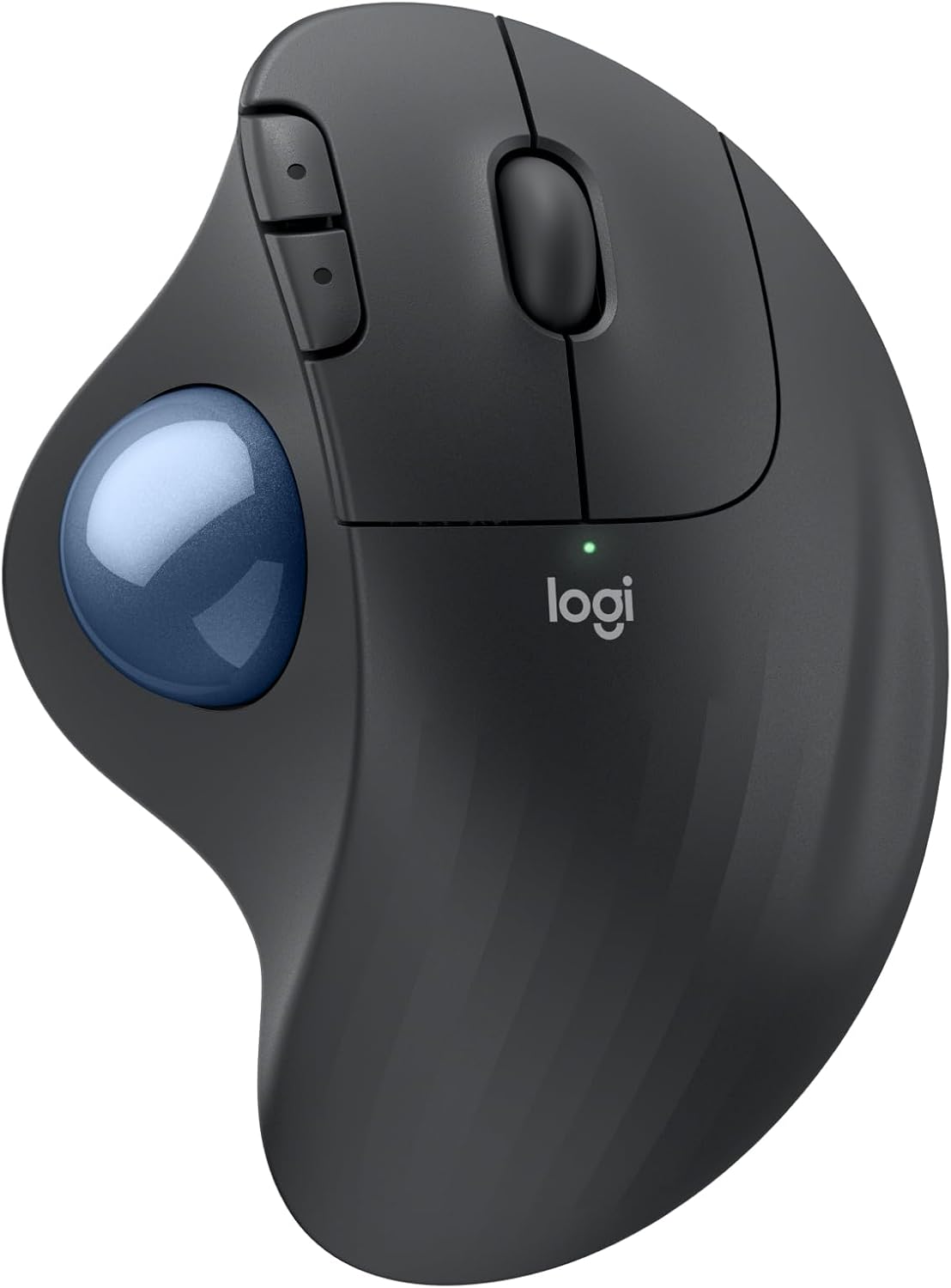
Logitech Ergo M575S Wireless Trackball Mouse, Wireless Ergonomic Mouse with Bluetooth and Encrypted Dongle, Comfortable Thumb Control, Precise and Smooth Tracking, for PC/Mac - Graphite Blue Ball
Want the best price and purchase timing?
Our AI advisor analyzes real-time pricing across all channels to find you the best deal.
AI Verdict
This is a budget ergonomic trackball mouse with thumb control and dual wireless connectivity, designed for users seeking to reduce forearm strain.
This trackball mouse is a strong fit for those prioritizing ergonomic comfort and reduced arm movement, especially in space-constrained environments. However, its thumb-controlled trackball design and lack of horizontal scrolling mean it won't suit every workflow or user preference, requiring a commitment to adapt.
If thumb control isn't working out, look for a finger-controlled trackball or a vertical mouse for alternative ergonomic benefits.
Regret Score™
Medium RiskLower is better — measures purchase-regret risk from real buyer complaints, review credibility, and product maturity
Issues discovered after purchase
Critically weak dimension
Amazon rating vs actual quality
Chance this product isn't for you
Pros
- Ergonomic design reduces forearm muscle strain by 25% and promotes a more natural forearm posture.
- Offers dual connectivity via Bluetooth or the included Logi Bolt USB receiver.
- Features quiet clicks for both left and right mouse buttons.
- Provides up to 18 months of battery life with a single AA battery.
- Three customizable buttons and adjustable cursor speed are available through the Logi Options+ App.
- Thumb control allows cursor movement without hand movement, saving desk space.
Cons
- Requires a learning curve to adapt to thumb-controlled trackball navigation.
- Lacks horizontal scrolling functionality.
- Some users report difficulty with fine cursor movements, especially in tasks like photo editing or gaming.
- Durability concerns exist regarding the mouse switches, with some users reporting failure within 10 months.
- The design is primarily for right-handed users, limiting options for left-handed individuals.
Dimension Scores
The optical sensor provides precise tracking for general use, but some users report challenges with very fine movements required for tasks like video editing.
The sculpted shape and thumb control are certified by ergonomists to reduce forearm muscle strain by 25% and promote a natural hand posture.
It offers flexible dual connectivity options with both Bluetooth and the Logi Bolt USB receiver.
While generally considered functional, some users describe the build as 'nothing special' and there are reports of mouse switch durability issues within a year.
Best For
- Individuals experiencing wrist or forearm pain from traditional mouse use.
- Workspaces with limited desk space where arm movement is restricted.
- Users who prefer a relaxed hand and forearm posture for extended computer sessions.
Not Recommended For
- Gamers requiring rapid, pixel-precise cursor movements in competitive titles.
- Users who frequently need horizontal scrolling for spreadsheets or large documents.
- Individuals with very large hands, as some find the M575S less comfortable than larger trackball models.
Watch Out For
- The trackball requires an adjustment period; some users report it takes days to weeks to feel natural.
- Fine motor control for tasks like video editing or precise graphic design can be challenging, leading to frustration.
- Mouse button switches have been reported to fail, with one user experiencing left-click issues after 10 months of use.
- The scroll wheel lacks side-to-side tilt for horizontal scrolling, which can be a workflow hindrance.
- The overall build quality is described as 'nothing special' by some, despite its functional design.
Full Specifications
| ASIN | B0BBQ3ZYNY |
| Brand | Logitech |
| Color | Graphite Blue Ball |
| Series | ERGO M575s |
| Item Weight | 8.1 ounces |
| Manufacturer | Logitech |
| Power Source | Battery Powered |
| Special Feature | Lightweight, Portable, Wireless |
| Operating System | Windows, macOS |
| Hardware Platform | PC |
| Item model number | 910-007027 |
| Product Dimensions | 4.13 x 3.94 x 5.28 inches |
| Item Dimensions LxWxH | 4.13 x 3.94 x 5.28 inches |
| Connectivity Technology | Bluetooth, USB |
| Movement Detection Technology | Optical |
| Average Battery Life (in hours) | 18 months |
What Buyers Say
The most surprising thing about this trackball is how many users report a significant learning curve, but once past that, they often find it a game-changer for wrist comfort. Many praise the quiet clicks and the flexibility of dual Bluetooth and USB receiver connectivity. However, the absence of horizontal scrolling is a recurring complaint, and some users struggle with the precision needed for detailed work like photo editing.
“Okay, so it took me like a week to stop feeling like a total noob, but seriously, my wrist doesn't ache anymore after 8 hours of spreadsheets, so I guess it's worth the weird thumb gymnastics.”
Common Praise
- Significantly reduces wrist and forearm pain after switching from a traditional mouse.
- The quiet clicks are appreciated for not disturbing others in shared spaces.
- Dual connectivity options (Bluetooth and Logi Bolt) offer flexibility for different devices.
- Customizable buttons through the Logi Options+ app enhance workflow efficiency.
- Thumb control eliminates the need to move the entire hand, saving desk space.
Common Complaints
- Takes a considerable amount of time to get accustomed to the thumb-controlled trackball.
- Lack of horizontal scrolling is a noticeable omission for some users.
- Precision for fine movements, such as in graphic design or certain games, can be frustrating.
- Concerns about the longevity of the mouse switches, with some reporting early failure.
- Not suitable for all hand sizes, with some finding it too small or less ergonomic than other models.
Ownership Tips
- The trackball itself occasionally needs cleaning to maintain smooth tracking.
- The Logi Options+ app is essential for customizing buttons and adjusting sensitivity, and it generally works without major glitches.
- Switching between Bluetooth and the USB receiver is seamless and quick.
- The mouse stays firmly in place on the desk due to its rubber feet, as only the trackball moves.
- The single AA battery lasts for months, making battery changes infrequent.
Frequently Asked Questions
Does the Logitech Ergo M575S have quiet clicks?
Yes, the ERGO M575S features quiet clicks for the left and right mouse buttons, which is an upgrade from previous models.
How do I connect the M575S to my computer?
You can connect the mouse using either Bluetooth or the included Logi Bolt USB receiver. There's a switch on the bottom to toggle between connection modes.
What is the battery life of the Logitech Ergo M575S?
The mouse can last up to 18 months on a single AA battery, which is included.
Can I customize the buttons on the M575S?
Yes, the three buttons can be customized using the Logi Options+ App, allowing for time-saving shortcuts and cursor speed adjustments.
Is this trackball mouse suitable for left-handed users?
No, the Logitech Ergo M575S has a sculpted design specifically for right-handed use.
Buying Guide
When looking at a trackball mouse like this, you're essentially trading traditional mouse movement for thumb control. This means your hand stays stationary, which can be a huge relief for wrist and arm pain. Be prepared for an adjustment period; it won't feel natural right away, but many find the ergonomic benefits worth the effort. Consider your daily tasks – if you do a lot of precise, fine-motor work, test it out first.
Sensor (Optical)
This determines how accurately the trackball translates your thumb's movement into cursor movement on screen. An optical sensor provides consistent and smooth tracking, which is crucial for precision without physical mouse movement.
Connectivity (Bluetooth, USB)
This tells you how the mouse talks to your computer. Bluetooth is great for wireless convenience and connecting to multiple devices without a dongle, while a USB receiver (Logi Bolt here) often offers a more stable, dedicated connection and can be better for devices without Bluetooth.
Ergonomic Design
This isn't just marketing fluff; it means the mouse is shaped to support your hand and wrist in a more natural position, aiming to reduce strain and discomfort over long periods. For this mouse, it specifically targets forearm muscle strain.
Battery Life (18 months)
This indicates how often you'll need to replace the battery. A long battery life means less interruption and fewer disposable batteries, which is a practical consideration for daily use.
Alternatives
If thumb control isn't your thing, look for trackballs with finger control for different muscle engagement, or consider vertical ergonomic mice that keep your hand in a handshake position.
You Might Also Like

Magnetic Charging Mouse Pad 31.5x15.75, 15W Fast Wireless Charging Desk Mat, XXL Desk Pad RGB Gaming Mousepad, Home Office Large Keyboard Pad with Ultra-Smooth Surface, Non-Slip Base
$50-$99This 31.5" x 15.75" RGB desk mat with 15W magnetic phone charging and a Qi headphone charging zone is for users wanting to declutter and illuminate their workstation.

Mouse Pad Desk Mat Full Moon Desk Pad Black Red Large Mouse Pad Gaming Mousepad Extended Laptop Computer Mouse Keyboard Mat-11.8 x 31.5 in
Price range unavailableThis is a 11.8 x 31.5 inch desk mat for users needing a large, undefined surface to cover their desk, but with no available product details or user feedback.

SteelSeries QcK Gaming Mouse Pad - Small Cloth - Optimized For Gaming Sensors
A 250 x 210 x 2mm cloth pad with a non-slip rubber base, ideal for high DPI users or those with limited desk space.

SteelSeries QcK Large Gaming Mousepad — Black — Non-Slip Silicone Rubber Base — Peak Tracking and Stability — Optimized for Gaming Sensors — 490 mm x 420 mm — FPS, MOBAs, RTS, MMO
A 450 mm x 400 mm x 2 mm cloth mousepad designed for precise control in gaming, especially for budget-conscious players.