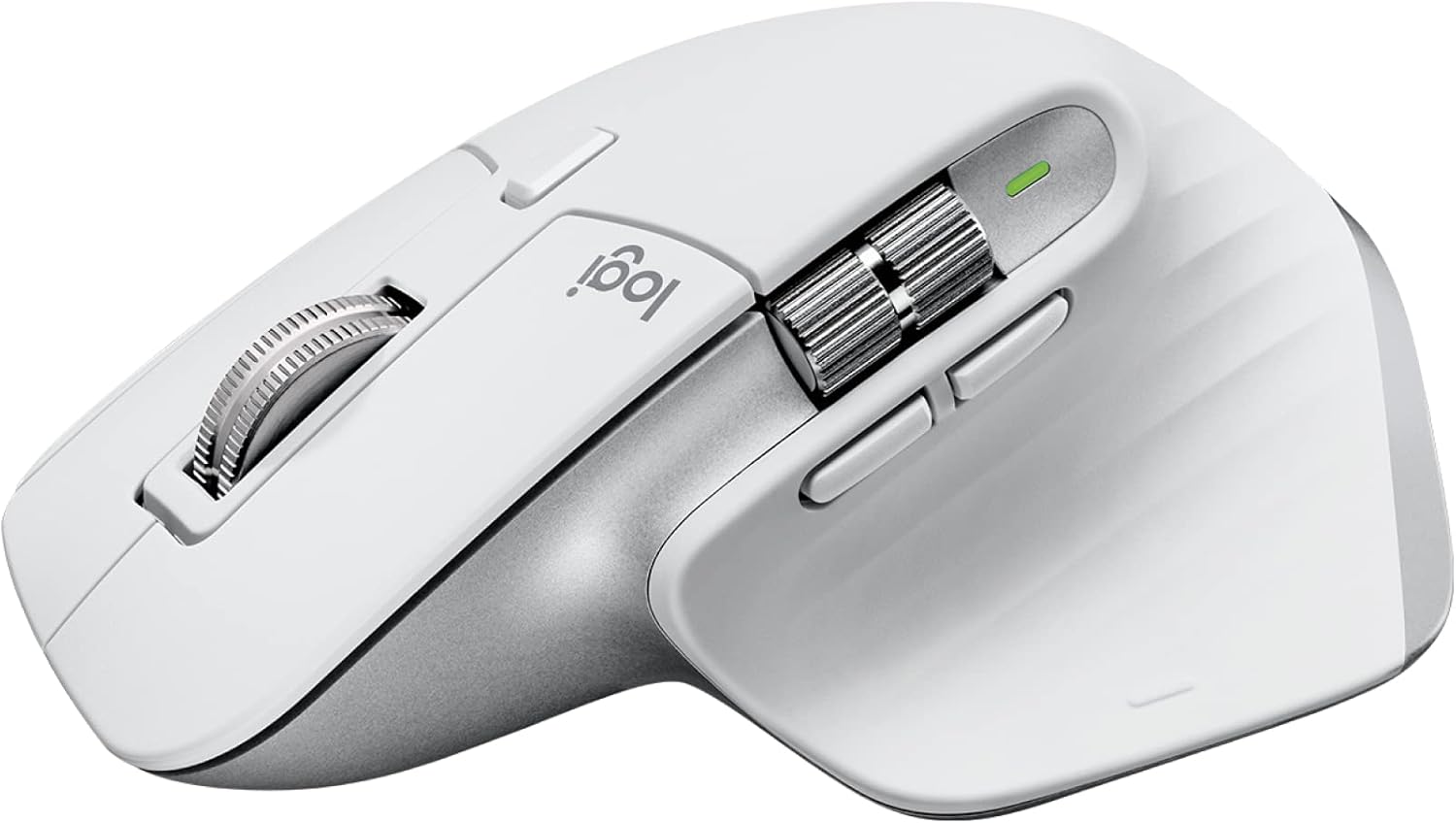
Logitech MX Master 3S Wireless Mouse Standard Edition with Logi Bolt USB Receiver, Ultra-Fast Scrolling, Ergo, 8K DPI, Track on Glass, Quiet Clicks, USB-C, Bluetooth, Windows, Linux, Chrome- Pale Grey
Want the best price and purchase timing?
Our AI advisor analyzes real-time pricing across all channels to find you the best deal.
AI Verdict
This 8K DPI optical mouse with quiet clicks and MagSpeed scrolling is for productivity users who need multi-device connectivity and an ergonomic shape.
This mouse is a strong fit for its intended audience: productivity users. Its MagSpeed scrolling, quiet clicks, multi-device connectivity, and ergonomic design are tailored for efficient, comfortable work across various tasks and setups. The 8K DPI sensor tracking on glass further enhances its utility for diverse workspaces.
If you need a mouse for gaming or tasks requiring extremely precise, lag-free cursor movement, look for models with a polling rate of 500Hz or 1000Hz and a lighter weight.
Regret Score™
Low RiskLower is better — measures purchase-regret risk from real buyer complaints, review credibility, and product maturity
Issues discovered after purchase
Critically weak dimension
Amazon rating vs actual quality
Chance this product isn't for you
Pros
- MagSpeed scroll wheel offers 90% faster and 87% more precise scrolling, switching between smooth and ratcheted motion.
- Quiet Clicks reduce click noise by 90% while retaining tactile feedback.
- 8000 DPI optical sensor tracks on virtually any surface, including glass.
- Connects to up to three devices via Logi Bolt or Bluetooth, with quick switching.
- Ergonomic design with a sculpted shape and thumb rest promotes a natural wrist posture.
- Rechargeable battery provides up to 70 days of use, with 3 hours of power from a 1-minute charge via USB-C.
Cons
- Low polling rate, reported as sub-100Hz or 125Hz, causes visibly choppy cursor motion and lag for some users.
- Large size and specific ergonomic shape may not fit users with small hands, making buttons difficult to reach.
- Soft-touch coating can degrade, get dirty, or become grimy over time, especially in lighter colors.
- No internal storage for the Logi Bolt USB receiver.
- Lacks a wired connection mode, operating only wirelessly.
Dimension Scores
The 8000 DPI optical sensor tracks on any surface, including glass, but the low polling rate (sub-100Hz) can cause choppy cursor movement for some users.
The sculpted, ergonomic shape with a thumb rest is designed for natural wrist posture, though its large size (141g, 124.9mm length) may not suit all hand sizes.
Offers flexible connectivity via Logi Bolt USB receiver and Bluetooth, supporting up to three devices with easy switching, but lacks a wired mode.
The mouse feels premium and sturdy, but the soft-touch coating is prone to degrading, getting dirty, or becoming grimy over time.
Best For
- Productivity-focused professionals like coders, designers, and video editors.
- Users needing to switch between multiple computers or operating systems frequently.
- Office environments or late-night work where quiet operation is essential.
- Individuals who work on diverse surfaces, including glass desks.
Not Recommended For
- Competitive or fast-paced gamers due to the low polling rate and heavier weight (141g).
- Users with small hands who may find the mouse too large or uncomfortable.
- Individuals who prefer or require a wired mouse connection.
Watch Out For
- The polling rate is a major drawback, often reported as sub-100Hz or 125Hz, which can lead to a visibly choppy cursor and a feeling of lag, especially when dragging items or for precise movements.
- The soft-touch rubberized coating, while initially comfortable, can degrade, show hand marks, or become dirty and grimy over time, particularly on lighter color variants.
- Its large, sculpted ergonomic shape means it might not fit smaller hands comfortably, with some users reporting difficulty reaching the thumb gesture button or back buttons.
- There is no dedicated compartment within the mouse to store the Logi Bolt USB receiver, increasing the risk of losing it during transport.
- The 8K DPI mode can be software-dependent, sometimes resetting or not working correctly if the Logi Options+ software isn't running or after the mouse wakes up, causing temporary sensitivity issues.
Full Specifications
| ASIN | B09HMKFDXC |
| Brand | Logitech |
| Color | Pale Grey |
| Series | MX Master 3S |
| Batteries | 1 Lithium Polymer batteries required. (included) |
| Item Weight | 0.7 ounces |
| Manufacturer | Logitech |
| Power Source | Battery Powered |
| Special Feature | Lightweight, Portable, Rechargeable, Wireless |
| Operating System | Chrome OS, Linux |
| Hardware Platform | Mac, PC |
| Item model number | 910-006558 |
| Product Dimensions | 2 x 3.31 x 4.91 inches |
| Item Dimensions LxWxH | 2 x 3.31 x 4.91 inches |
| Connectivity Technology | HDMI, Radio Frequency, USB |
| Movement Detection Technology | Optical |
| Average Battery Life (in hours) | 1680 Hours |
What Buyers Say
The MX Master 3S is a polarizing mouse; while many hail it as a productivity king for its advanced features, a significant number of users report frustration with its low polling rate, which can make the cursor feel choppy or laggy, even for non-gaming tasks. The MagSpeed scroll wheel and quiet clicks are consistently praised as standout features, enhancing workflow efficiency. However, the large ergonomic design, while comfortable for some, is a deal-breaker for those with smaller hands, and the soft-touch coating's long-term durability is a recurring concern.
“Man, I wanted to love this mouse for my coding, but that low polling rate makes the cursor feel like it's dragging through mud sometimes, even with 8K DPI. My old gaming mouse felt smoother, which is wild for a 'productivity' king.”
Common Praise
- The MagSpeed electromagnetic scroll wheel is exceptionally smooth, fast, and precise, often described as the best scroll wheel on any mouse.
- Quiet Clicks significantly reduce noise, making it ideal for shared workspaces or late-night use without sacrificing tactile feel.
- The ability to connect and switch between up to three devices seamlessly via Logi Bolt or Bluetooth is highly valued for multi-system setups.
- The 8000 DPI sensor's ability to track accurately on virtually any surface, including glass, is a practical advantage for diverse work environments.
- Exceptional battery life of up to 70 days and fast USB-C charging (3 hours from 1 minute) minimizes downtime.
Common Complaints
- The low polling rate (often sub-100Hz or 125Hz) causes noticeable cursor choppiness and lag, making precise movements frustrating for some users.
- The mouse's large size and specific ergonomic contour are not universally comfortable and can lead to discomfort or difficulty reaching buttons for users with smaller hands.
- The soft-touch rubberized coating tends to show wear, get dirty, or become grimy over time, especially on lighter color variants, impacting its aesthetic and feel.
- Lack of a storage compartment for the Logi Bolt USB receiver is an inconvenience, increasing the risk of misplacing the dongle.
- The absence of a wired connection option means it relies solely on wireless connectivity, which can be a limitation for some users.
Ownership Tips
- The soft-touch coating on the mouse can start to degrade or get sticky after prolonged use, especially in areas of frequent contact.
- Despite the high DPI, the low polling rate can make the cursor feel less responsive than expected, even for non-gaming tasks like graphic design or video editing.
- The 8K DPI setting might occasionally reset or not activate properly if the Logi Options+ software isn't consistently running in the background.
- While you can use it while charging via USB-C, the cable placement on the front can be awkward for continuous use.
- The multi-device switching buttons on the bottom of the mouse require flipping it over, which can interrupt workflow slightly.
Frequently Asked Questions
Is the Logitech MX Master 3S suitable for gaming?
No, it's not designed for gaming. While it can handle casual games, its low polling rate (often below 100Hz) and heavier weight make it unsuitable for fast-paced or competitive gaming.
How long does the battery last and how is it charged?
The battery lasts up to 70 days on a full charge. It charges via a USB-C port, and a quick 1-minute charge provides about 3 hours of use. You can continue using the mouse while it's charging.
Can I use this mouse with multiple devices?
Yes, the MX Master 3S can connect to up to three different devices using either the included Logi Bolt USB receiver or Bluetooth, allowing for quick switching between them.
Does the mouse work on all surfaces, including glass?
Yes, its 8000 DPI optical sensor is designed to track accurately on virtually any surface, including glass, without needing a mouse pad. [cite: Product Data, 4, 6]
Are the clicks truly quiet?
Yes, Logitech states the Quiet Clicks are 90% less noisy than the previous model, providing a satisfying feel with significantly reduced sound. Users confirm they are 'insanely quiet'. [cite: Product Data, 3, 9]
Buying Guide
When looking at a mouse like this, you need to decide if your priority is pure productivity or if you need it for gaming too. For productivity, features like the MagSpeed scroll wheel and multi-device switching are game-changers for navigating documents and managing multiple computers. Ergonomics are also key, so consider if the mouse's size and shape will fit your hand comfortably for hours of use. Don't get too hung up on just DPI; for productivity, a smooth sensor and useful scroll wheels matter more than raw speed.
DPI (Dots Per Inch)
This measures how sensitive the mouse is. A higher DPI (like 8000 here) means the cursor moves further on screen with less physical mouse movement. It's like having a very sensitive gas pedal in a car – a light touch gets you moving fast. For productivity, it allows precise control on high-resolution monitors. [cite: Product Data, 5]
MagSpeed Scrolling
This isn't just a regular scroll wheel; it's a magnetic one that can switch between super-fast, smooth scrolling (like a flywheel) and precise, click-by-click scrolling. Imagine reading a long document: you can zip through hundreds of lines in seconds, then switch to precise mode for line-by-line editing. [cite: Product Data, 1, 3, 9]
Logi Bolt / Bluetooth Connectivity
This mouse offers two ways to connect wirelessly. Logi Bolt uses a dedicated USB receiver for a stable, low-latency connection, similar to a private highway for your mouse. Bluetooth is more universal, letting you connect directly to devices without a dongle, like taking a public bus. Both allow you to switch between up to three devices. [cite: Product Data, 4]
Alternatives
If this mouse doesn't fit, consider models with a higher polling rate (500Hz or 1000Hz) for smoother cursor movement, or a smaller, ambidextrous form factor if you have smaller hands or prefer a different grip style.
You Might Also Like

Magnetic Charging Mouse Pad 31.5x15.75, 15W Fast Wireless Charging Desk Mat, XXL Desk Pad RGB Gaming Mousepad, Home Office Large Keyboard Pad with Ultra-Smooth Surface, Non-Slip Base
$50-$99This 31.5" x 15.75" RGB desk mat with 15W magnetic phone charging and a Qi headphone charging zone is for users wanting to declutter and illuminate their workstation.

Mouse Pad Desk Mat Full Moon Desk Pad Black Red Large Mouse Pad Gaming Mousepad Extended Laptop Computer Mouse Keyboard Mat-11.8 x 31.5 in
Price range unavailableThis is a 11.8 x 31.5 inch desk mat for users needing a large, undefined surface to cover their desk, but with no available product details or user feedback.

SteelSeries QcK Gaming Mouse Pad - Small Cloth - Optimized For Gaming Sensors
A 250 x 210 x 2mm cloth pad with a non-slip rubber base, ideal for high DPI users or those with limited desk space.

SteelSeries QcK Large Gaming Mousepad — Black — Non-Slip Silicone Rubber Base — Peak Tracking and Stability — Optimized for Gaming Sensors — 490 mm x 420 mm — FPS, MOBAs, RTS, MMO
A 450 mm x 400 mm x 2 mm cloth mousepad designed for precise control in gaming, especially for budget-conscious players.