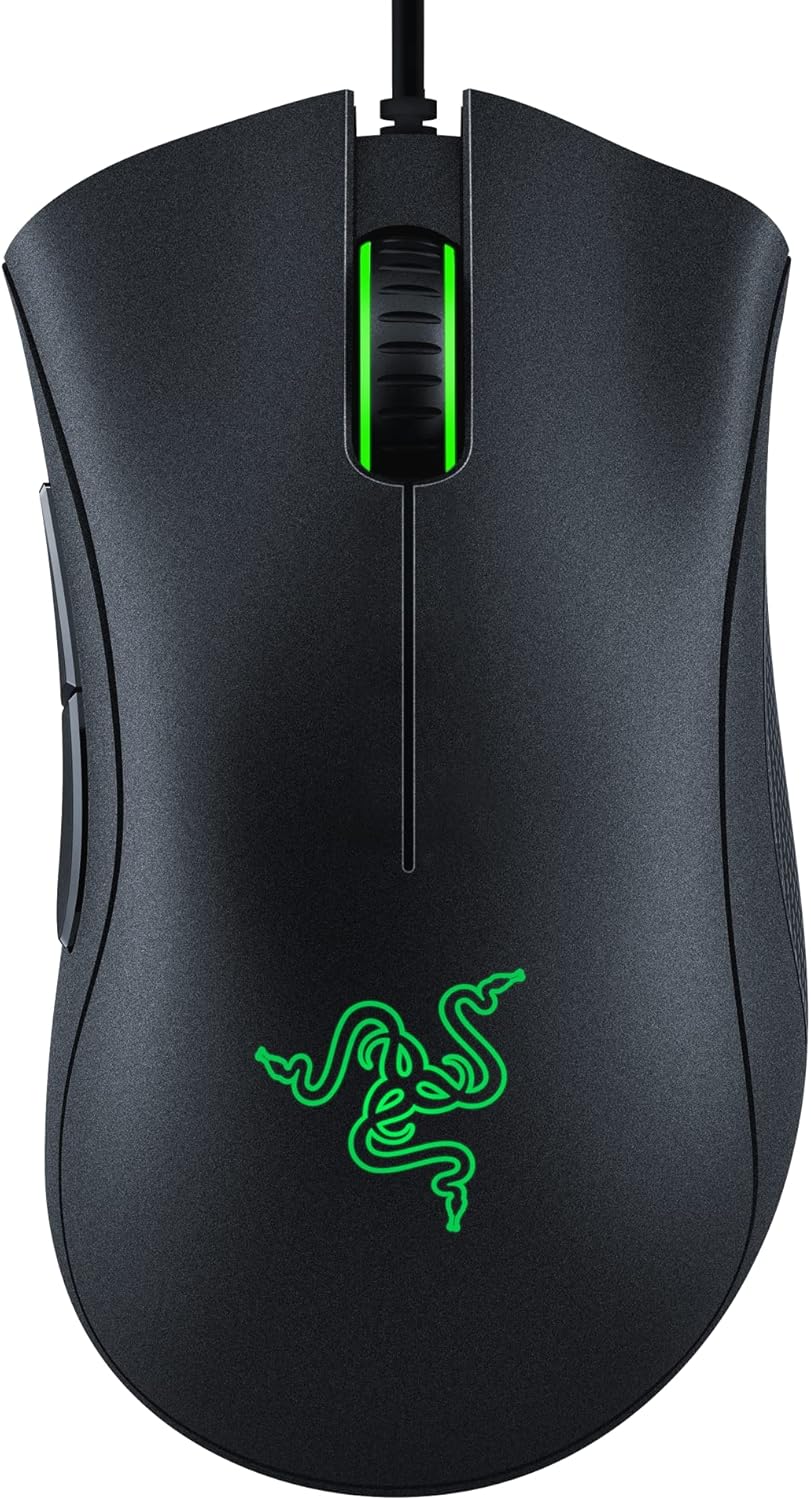
Razer DeathAdder Essential Gaming Mouse: 6400 DPI Optical Sensor - 5 Programmable Buttons - Mechanical Switches - Rubber Side Grips - Classic Black
Want the best price and purchase timing?
Our AI advisor analyzes real-time pricing across all channels to find you the best deal.
AI Verdict
This is a 4.6-ounce wired optical mouse with a 6400 DPI sensor and 5 programmable buttons, designed for budget-conscious gamers with larger hands who prioritize ergonomic comfort over advanced feature
This mouse is a situational fit because its strong ergonomic design and programmable buttons are appealing for budget-conscious users, but its stiff cable and heavier weight limit its appeal for competitive gaming. The mid-level optical sensor is adequate for most, but not for those seeking top-tier performance.
If you need a lighter mouse with a more flexible cable and a higher-end sensor, look for models under 80 grams with paracord-like cables and a PixArt 3360 or newer sensor.
Regret Score™
Medium RiskLower is better — measures purchase-regret risk from real buyer complaints, review credibility, and product maturity
Issues discovered after purchase
Critically weak dimension
Amazon rating vs actual quality
Chance this product isn't for you
Pros
- The classic DeathAdder ergonomic shape is comfortable for users with larger hands, especially for palm grip.
- The 6400 DPI optical sensor provides accurate tracking for casual gaming and general use.
- It features 5 programmable buttons, allowing for custom keybinds and macros through Razer Synapse.
- Mechanical switches are rated for 10 million clicks, offering a responsive feel.
- The ridged, rubberized scroll wheel provides tactile feedback for controlled scrolling.
Cons
- The wired cable is stiff and can cause drag or coil, hindering fluid mouse movement.
- At 4.6 ounces (94-96g), it's considered heavy by some users, not ideal for fast-paced competitive gaming.
- The scroll wheel has been reported by users to develop issues like rattling or breaking over time.
- It lacks a dedicated DPI button, requiring software (Razer Synapse) for sensitivity adjustments.
- The side grips are made of plastic, not rubber, which some users find makes it feel less premium than other DeathAdder models.
Dimension Scores
The 6400 DPI optical sensor (PixArt PAW3328) offers decent performance and low lift-off distance for casual gaming, but isn't a high-end sensor compared to category leaders.
The classic DeathAdder shape is widely praised for its comfort, especially for palm grip users with larger hands, allowing for extended use without fatigue.
It's a wired-only mouse, and its braided cable is frequently criticized by users for being stiff and creating drag, which is a significant drawback for gaming.
While generally feeling well-built, some users report issues with the scroll wheel and the plastic side grips, and overall durability concerns suggest a lifespan of 3-4 years.
Best For
- Casual PC gaming where precise, high-speed movements aren't critical.
- Users with larger hands who prefer a palm grip and prioritize ergonomic comfort.
- Budget-focused setups where a reliable, basic gaming mouse is needed.
- Everyday productivity and office tasks requiring a comfortable, full-sized mouse.
Not Recommended For
- Competitive esports players needing a lightweight mouse with a flexible cable and advanced sensor.
- Users with small hands, as the large ergonomic shape might be unwieldy.
- Anyone requiring extensive RGB customization, as it only has green LED lighting.
Watch Out For
- The braided cable is stiff and can create drag on your mousepad, potentially requiring a mouse bungee to manage.
- Some users report the scroll wheel developing a rattle or failing after several months of use.
- The sensor, while accurate for its class, is a mid-level PixArt PAW3328 and may not satisfy users accustomed to high-end sensors with lower lift-off distances or wider CPI ranges.
- The mouse weighs 94-96 grams, which is heavier than many modern gaming mice, making quick flicks more strenuous.
- The side grips are textured plastic, not rubber, which some users feel compromises the grip and overall build quality compared to other DeathAdder versions.
Full Specifications
| ASIN | B094PS5RZQ |
| Brand | Razer |
| Color | Classic Black |
| Series | Deathadder Essential |
| Batteries | 1 AA batteries required. |
| Item Weight | 4.6 ounces |
| Manufacturer | Razer |
| Power Source | Corded Electric |
| Special Feature | Durable, Ergonomic Design, Lightweight, Optical Sensor, Programmable Buttons |
| Operating System | Windows, macOS, Linux |
| Hardware Platform | PC |
| Item model number | RZ01-03850100-R3U1 |
| Product Dimensions | 5.01 x 2.86 x 1.69 inches |
| Item Dimensions LxWxH | 5.01 x 2.86 x 1.69 inches |
| Connectivity Technology | Wired |
| Movement Detection Technology | Optical |
What Buyers Say
Many users are surprised by the comfort of the DeathAdder Essential's shape, often comparing it favorably to more expensive mice, especially for those with larger hands. However, the stiff cable is a recurring complaint, causing drag and limiting fluid movement. The scroll wheel also appears to be a point of failure for a noticeable number of owners, developing rattles or outright breaking. Despite these issues, its performance for the price point is frequently highlighted as a major selling point.
“Dude, for like twenty bucks on sale, this thing feels amazing in my hand, but that damn cable is so stiff it feels like I'm dragging a brick, and my scroll wheel started acting up after six months, seriously annoying.”
Common Praise
- The ergonomic design feels incredibly comfortable, especially for palm grip users.
- The 6400 DPI sensor provides accurate and consistent tracking for everyday use and casual gaming.
- The mechanical buttons offer a satisfying and responsive click.
- It's a budget-friendly option that often goes on sale, offering good value for its features.
- The 5 programmable buttons are useful for remapping and macros.
Common Complaints
- The braided cable is stiff and creates noticeable drag, feeling less premium than modern flexible cables.
- The scroll wheel can develop a rattle or become faulty after several months of use.
- The mouse is heavier than many current gaming mice, making it less ideal for competitive play.
- The side grips are plastic, not rubber, which some users find reduces grip and feels cheaper.
- Lack of a dedicated DPI button means sensitivity adjustments require opening software.
Ownership Tips
- The green LED lighting is fixed and cannot be changed to other colors or complex RGB patterns.
- The mouse's weight, while listed as 4.6 ounces, feels more substantial during long gaming sessions than lighter alternatives.
- Razer Synapse software is required for button remapping and DPI adjustments, and it needs a Razer account to function.
- The textured plastic side grips, while easy to clean, don't offer the same tactile feel or grip as rubberized surfaces.
- The sensor's lift-off distance is low enough for most, but some users might find it slightly too high without software adjustment options.
Frequently Asked Questions
Does this mouse have RGB lighting?
No, the Razer DeathAdder Essential only features single-color green LED lighting on the Razer logo and scroll wheel.
Is the cable braided?
Yes, it comes with a braided cable, but users often describe it as stiff and prone to coiling or drag.
Can I change the DPI on the fly?
There is no dedicated DPI button on the mouse itself. You need to use the Razer Synapse software to adjust the 6400 DPI optical sensor's sensitivity.
Is this mouse suitable for small hands?
The DeathAdder Essential has a large ergonomic shape that is generally more comfortable for users with average to larger hands; people with small hands might find it unwieldy or struggle with certain grip types.
What kind of switches does it use?
It uses durable mechanical switches that are rated for up to 10 million clicks.
Does it have rubber side grips?
Despite the product description, user reviews indicate the side grips are textured plastic, not rubber, which can make it feel less premium.
Buying Guide
When you're looking at a gaming mouse, you need to think about how it fits your hand and how you play. This DeathAdder Essential is a classic shape, meaning it's big and comfy for a palm grip, but if you've got small hands or prefer a claw grip, it might feel awkward. The sensor's DPI number tells you how sensitive it is, but what really matters is how consistently it tracks your movements without skipping or jittering. Don't get hung up on super high DPI numbers if you're not a pro gamer.
6400 DPI Optical Sensor
DPI (dots per inch) dictates how far your cursor moves on screen for every inch you move the mouse. A 6400 DPI sensor means it's pretty sensitive, letting you move the cursor across your screen with minimal physical movement. Optical sensors use light to track movement, offering reliable and accurate tracking on most surfaces.
5 Programmable Buttons
Beyond the standard left, right, and scroll click, these extra buttons (usually on the side) can be customized. This is huge for gaming, letting you bind complex actions or spells to a single click, or for productivity, assigning shortcuts like copy/paste, saving you time and effort.
Mechanical Switches
These are the physical mechanisms under your mouse buttons that register clicks. Mechanical switches are known for their durability and a distinct, tactile 'clicky' feel. They're built to last for millions of clicks, ensuring your mouse buttons remain responsive and consistent over time, which is crucial for gaming.
Wired Connectivity
A wired mouse connects directly to your computer via a USB cable. This means you get a consistent, lag-free connection, which is important for gaming where every millisecond counts. You also never have to worry about batteries dying in the middle of a game.
Alternatives
If this mouse doesn't quite fit, look for models with a lower weight (under 80g), a more flexible paracord-style cable, and a newer generation optical sensor for improved tracking and responsiveness.
You Might Also Like

Magnetic Charging Mouse Pad 31.5x15.75, 15W Fast Wireless Charging Desk Mat, XXL Desk Pad RGB Gaming Mousepad, Home Office Large Keyboard Pad with Ultra-Smooth Surface, Non-Slip Base
$50-$99This 31.5" x 15.75" RGB desk mat with 15W magnetic phone charging and a Qi headphone charging zone is for users wanting to declutter and illuminate their workstation.

Mouse Pad Desk Mat Full Moon Desk Pad Black Red Large Mouse Pad Gaming Mousepad Extended Laptop Computer Mouse Keyboard Mat-11.8 x 31.5 in
Price range unavailableThis is a 11.8 x 31.5 inch desk mat for users needing a large, undefined surface to cover their desk, but with no available product details or user feedback.

SteelSeries QcK Gaming Mouse Pad - Small Cloth - Optimized For Gaming Sensors
A 250 x 210 x 2mm cloth pad with a non-slip rubber base, ideal for high DPI users or those with limited desk space.

SteelSeries QcK Large Gaming Mousepad — Black — Non-Slip Silicone Rubber Base — Peak Tracking and Stability — Optimized for Gaming Sensors — 490 mm x 420 mm — FPS, MOBAs, RTS, MMO
A 450 mm x 400 mm x 2 mm cloth mousepad designed for precise control in gaming, especially for budget-conscious players.