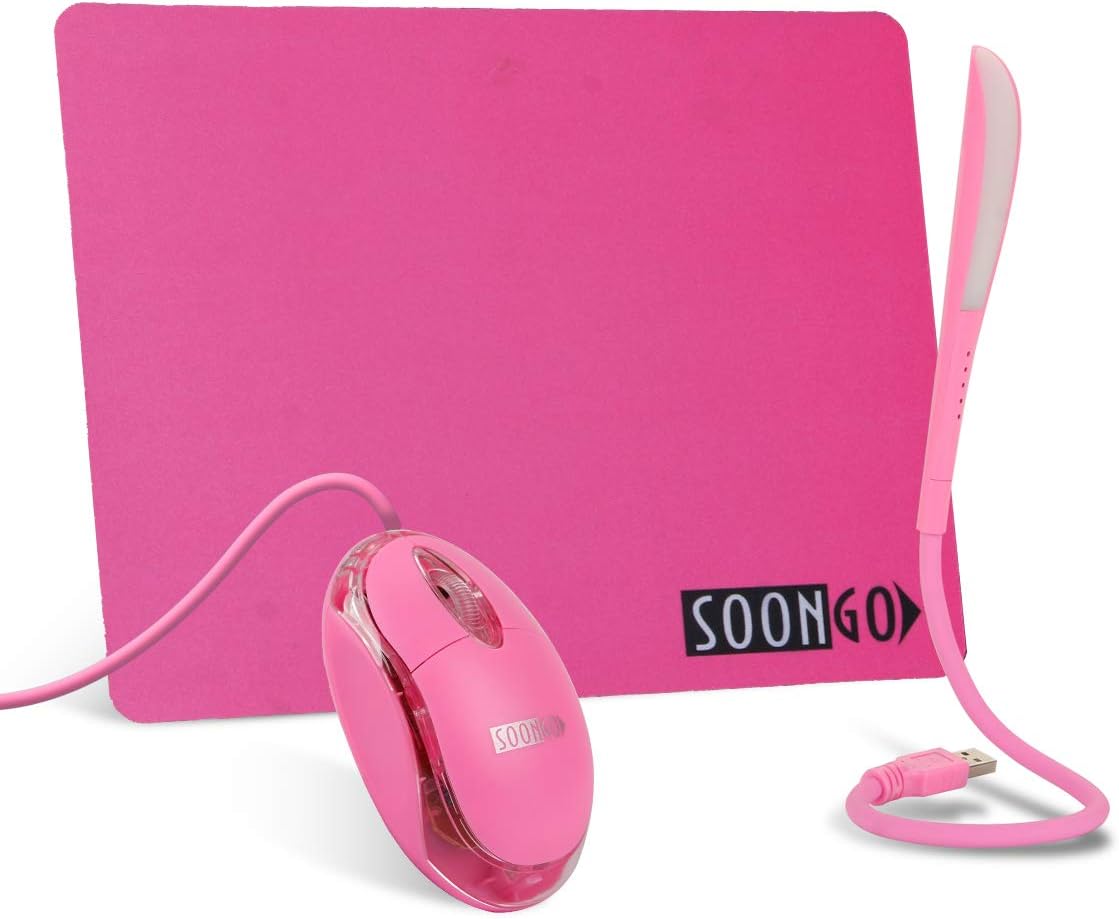
Pink Mouse and Pad USB LED Light 3 in 1 Gift Comb Kids Mouse for Laptop Home Office Travel by SOONGO
Want the best price and purchase timing?
Our AI advisor analyzes real-time pricing across all channels to find you the best deal.
AI Verdict
This 7.4-ounce wired optical mouse with a 9x7.75-inch pad and a 3-level USB light is for kids or casual users needing a basic, colorful setup.
This 3-in-1 combo is a strong fit for its intended audience: kids and casual users. The mouse's small 3.54in x 1.96in x 1.18in size, plug-and-play USB connectivity, and included mouse pad and LED light make it a complete, easy-to-use package for basic computing tasks and travel.
If you need more precision or freedom of movement, look for a mouse with adjustable DPI settings and wireless connectivity.
Regret Score™
Medium RiskLower is better — measures purchase-regret risk from real buyer complaints, review credibility, and product maturity
Issues discovered after purchase
Critically weak dimension
Amazon rating vs actual quality
Chance this product isn't for you
Pros
- Plug-and-play USB connectivity means no drivers are needed for Windows, Linux, or Mac OS X.
- The mouse's 3.54in x 1.96in x 1.18in dimensions are suitable for smaller hands, making it ideal for children.
- The included 9x7.75-inch mouse pad has a smooth, tightly woven nylon surface and a non-slip rubber base with stitched edges.
- The 3-level adjustable brightness USB light features 14 LEDs with a lifespan exceeding 10,000 hours.
- The mouse features internal LED lighting, enhancing its visual appeal.
- The entire combo is lightweight and portable, suitable for travel or home office use.
Cons
- The mouse is wired, limiting movement range to its 5-foot cable length.
- The optical sensor lacks specified DPI settings, suggesting it's not designed for precision tasks.
- The USB light reverts to an off state when unplugged, requiring manual re-activation and brightness adjustment.
- The mouse's weight of 7.4 ounces is on the heavier side for a compact wired mouse, potentially causing fatigue for some users.
- The mouse lacks additional buttons or programmability, offering only basic left-click, right-click, and scroll wheel functionality.
Dimension Scores
The mouse uses an optical sensor, but no DPI or tracking speed specifications are provided, indicating basic accuracy suitable for general use, not precision tasks.
The mouse is described as ergonomic and its 3.54in x 1.96in x 1.18in size is specifically noted as comfortable for smaller hands, but it lacks advanced ergonomic features or customization.
It offers simple plug-and-play USB wired connectivity with a 5-foot cable, which is standard but lacks the flexibility of wireless options.
The mouse pad has stitched edges and a rubber sole to prevent damage and slipping, suggesting attention to durability for the pad, but specific mouse build materials are not detailed.
Best For
- Children learning to use a computer mouse.
- Casual home office or school work requiring basic mouse functionality.
- Users who prioritize a visually appealing, colorful setup with LED accents.
- Travelers needing a compact, plug-and-play mouse and light combo.
Not Recommended For
- Professional gamers or users requiring high DPI and precision tracking.
- Users needing a wireless mouse for clutter-free setups or extended range.
- Individuals with large hands who may find the 3.54in x 1.96in x 1.18in mouse too small.
- Users who require programmable buttons or advanced mouse features.
Watch Out For
- The mouse is wired, which can be restrictive compared to wireless options, especially for dynamic use cases.
- The USB light does not retain its last brightness setting after being unplugged, requiring three taps to reach full brightness each time.
- At 7.4 ounces, the mouse is heavier than many compact wired mice, which might feel cumbersome for prolonged use despite its small size.
- The optical sensor's performance metrics like DPI are not specified, meaning users cannot adjust sensitivity for different tasks.
Full Specifications
| ASIN | B0899X66WV |
| Brand | SOON GO |
| Color | Pinkset |
| Item Weight | 7.4 ounces |
| Manufacturer | SOON GO |
| Special Feature | Wired |
| Item model number | Wired mouse |
| Product Dimensions | 9 x 3.2 x 0.1 inches |
| Connectivity Technology | USB |
| Movement Detection Technology | Optical |
What Buyers Say
Users are really digging this 3-in-1 combo, especially for kids, because it's super easy to set up and the mouse lights up, which is a big hit. The mouse itself is small enough for little hands, and people say it tracks smoothly. The whole package, including the mouse pad and USB light, feels like a good deal for the price.
“OMG my daughter LOVES this pink mouse! It lights up and the pad is so cute. She uses it for her school laptop and it just works, no fuss. The little light is handy too for when she's doing homework in bed. Totally worth it for a kid.”
Common Praise
- The compact size of the mouse is perfect for small hands, especially for children.
- The light-up feature of the mouse is a fun and captivating element for kids.
- Setup is straightforward plug-and-play, requiring no complicated driver installation.
- The mouse operates smoothly and responsively for general tasks.
- The included mouse pad offers a smooth surface and a non-slip rubber bottom with stitched edges.
- The USB LED light provides adjustable brightness and is very portable.
Common Complaints
- The wired connection can be restrictive, limiting desk placement and movement.
- The USB light doesn't save its brightness setting and defaults to off when unplugged.
- The mouse's 7.4-ounce weight is heavier than expected for its size, potentially impacting long-term comfort.
- Lack of advanced features like adjustable DPI or programmable buttons for more demanding users.
Ownership Tips
- The mouse's internal LED lights are always on when plugged in, adding a constant visual element.
- The 5-foot USB cable, while providing ample reach for most desktop setups, can tangle if not managed.
- The mouse pad's smooth surface holds up well to daily use and is easy to wipe clean.
- The USB light's flexible neck allows for precise positioning, but its small size means it's best for focused illumination rather than room lighting.
Frequently Asked Questions
Is the USB light bright enough for reading in a dark room?
Yes, the USB light is bright enough for reading in a dark room. It also offers three dimmable steps (low, medium, high) to adjust the brightness to your preference.
Will the USB light work with a car USB adapter?
Yes, the USB light is designed to fit into any standard USB port, including car USB adapters.
Does the USB light remember its last setting when unplugged?
No, the USB light reverts to the OFF position when unplugged and requires you to tap the back side of the housing to turn it back on and adjust brightness.
How much power does the USB light consume from a laptop battery?
The LED light consumes a minimal amount of power, so it will hardly affect your laptop's battery life.
What is the mouse pad made of?
The mouse pad features a smooth, tough, tightly woven nylon surface for optimal mouse movement, with a rubber material on the back to prevent slipping.
Is the mouse suitable for a 7-year-old's hand?
Yes, with dimensions of 3.54in x 1.96in x 1.18in, the mouse is considered suitable for a 7-year-old's hand.
Buying Guide
When you're looking at a mouse, especially one like this that comes with a pad and light, you need to think about who's using it and for what. For kids or basic tasks, simple plug-and-play wired connectivity is fine, but for anything more serious, you'll want to check for things like DPI and wireless options. The size of the mouse matters a lot for comfort, especially for smaller hands. Don't forget the extras; a good mouse pad can make a big difference in how the mouse feels.
Sensor (Optical)
This is how the mouse 'sees' your desk. An optical sensor is standard and works well on most surfaces. For basic use, it's perfectly fine, but for gaming or graphic design, you'd want a more advanced sensor with higher DPI (dots per inch) for more precise control.
Connectivity (USB, Wired)
This tells you how the mouse connects to your computer. Wired means it plugs in directly with a cable, so no batteries needed and no signal drops. The downside is the cable can limit your movement and clutter your desk. Wireless gives you freedom but needs batteries or charging.
Ergonomic Design
This refers to how comfortable the mouse is to hold for long periods. An ergonomic design aims to fit the natural shape of your hand to prevent strain. For a kid, a smaller, contoured mouse is usually better, but for adults, 'ergonomic' can mean many different shapes and sizes.
Alternatives
If this combo doesn't quite fit, look for a wireless mouse to reduce cable clutter, or a mouse with adjustable DPI settings for more control over cursor speed and precision.
You Might Also Like

Magnetic Charging Mouse Pad 31.5x15.75, 15W Fast Wireless Charging Desk Mat, XXL Desk Pad RGB Gaming Mousepad, Home Office Large Keyboard Pad with Ultra-Smooth Surface, Non-Slip Base
$50-$99This 31.5" x 15.75" RGB desk mat with 15W magnetic phone charging and a Qi headphone charging zone is for users wanting to declutter and illuminate their workstation.

Mouse Pad Desk Mat Full Moon Desk Pad Black Red Large Mouse Pad Gaming Mousepad Extended Laptop Computer Mouse Keyboard Mat-11.8 x 31.5 in
Price range unavailableThis is a 11.8 x 31.5 inch desk mat for users needing a large, undefined surface to cover their desk, but with no available product details or user feedback.

SteelSeries QcK Gaming Mouse Pad - Small Cloth - Optimized For Gaming Sensors
A 250 x 210 x 2mm cloth pad with a non-slip rubber base, ideal for high DPI users or those with limited desk space.

SteelSeries QcK Large Gaming Mousepad — Black — Non-Slip Silicone Rubber Base — Peak Tracking and Stability — Optimized for Gaming Sensors — 490 mm x 420 mm — FPS, MOBAs, RTS, MMO
A 450 mm x 400 mm x 2 mm cloth mousepad designed for precise control in gaming, especially for budget-conscious players.