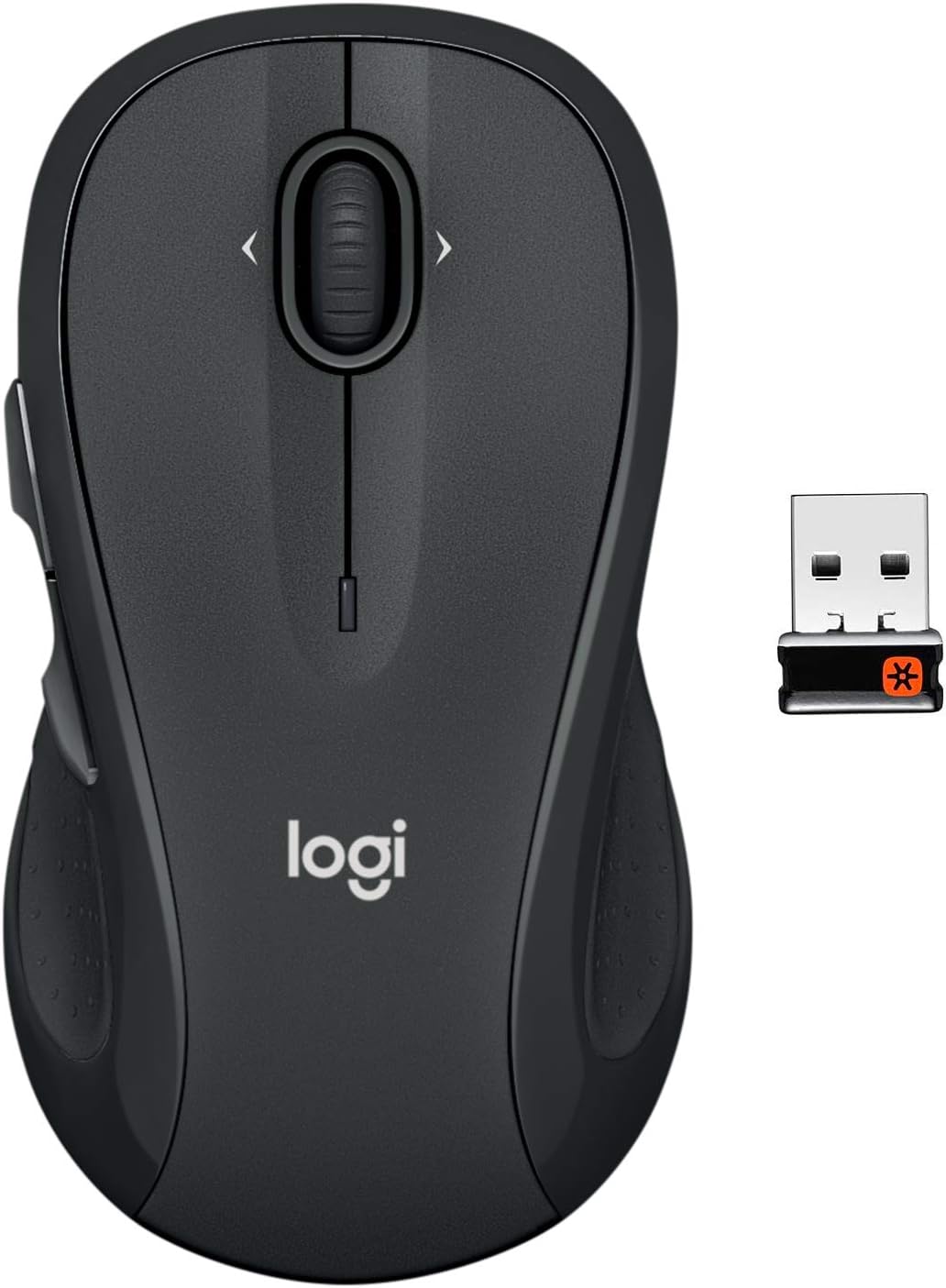
Logitech M510 Wireless Mouse, Mouse for Laptop and PC with USB Unifying Receiver, Programmable Buttons - Graphite
Want the best price and purchase timing?
Our AI advisor analyzes real-time pricing across all channels to find you the best deal.
AI Verdict
A full-size optical wireless mouse with 2-year battery life and programmable buttons, built for comfortable Windows, Chrome, or Linux use.
This mouse is a strong contender for basic productivity and general use due to its ergonomic design and 2-year battery life. However, its optical sensor with a 1000 CPI limit and lack of Bluetooth connectivity make it unsuitable for tasks requiring high precision or modern, dongle-free setups.
If you need higher precision or Bluetooth, look for mice with a laser sensor (like Logitech's Darkfield) and multi-device Bluetooth support.
Regret Score™
Medium RiskLower is better — measures purchase-regret risk from real buyer complaints, review credibility, and product maturity
Issues discovered after purchase
Critically weak dimension
Amazon rating vs actual quality
Chance this product isn't for you
Pros
- Offers a 2-year battery life, practically eliminating the need for frequent battery replacements, aided by an on/off switch and smart sleep mode.
- The tiny USB Unifying receiver allows connecting up to six compatible Logitech devices to a single USB port, reducing clutter.
- Ergonomic design features a contoured shape, soft rubber grips, and a broad palm area for comfort during extended use.
- Includes programmable Back/Forward buttons and side-to-side scrolling, customizable via Logitech Options software for enhanced productivity.
- A battery indicator light on the top provides a visual warning before power runs out.
- Works reliably on various surfaces like carpet, wood, and clothes, though not on glass.
Cons
- The optical sensor, with a maximum CPI of 1000, is not suitable for high-sensitivity tasks, precision work, or gaming.
- Connectivity is limited to the USB Unifying receiver; it does not offer Bluetooth for broader compatibility.
- The placement of side buttons on the left limits its ergonomic comfort and usability primarily to right-handed users.
- Buttons produce an audible click sound, making it less ideal for quiet environments.
- The scroll wheel can feel loose or lack sufficient friction for some users, and may develop issues over time.
Dimension Scores
The optical sensor with a maximum 1000 CPI is adequate for basic tasks but lacks the precision and sensitivity of higher-end mice for gaming or detailed work.
Its contoured shape, soft rubber grips, and broad palm area provide comfort for right-handed users during long sessions.
Uses a reliable USB Unifying receiver, which is convenient for multiple Logitech devices, but lacks Bluetooth for broader compatibility.
Users report it feels durable and lasts for years, though some mention a 'cheap plastic feeling' and potential scroll wheel issues over time.
Best For
- Users needing a comfortable, full-size mouse for extended productivity on Windows, Chrome, or Linux systems.
- Individuals with multiple Logitech Unifying devices looking to consolidate USB ports with a single receiver.
- General web browsing and office work where high precision and rapid movements are not critical.
- Those prioritizing long battery life and convenience over frequent charging or battery changes.
Not Recommended For
- Competitive gamers or users requiring high-sensitivity tracking, low latency, or adjustable DPI.
- Left-handed individuals, as the side buttons are positioned for right-hand thumb access.
- Users who require Bluetooth connectivity for devices without available USB-A ports, such as some modern laptops or tablets.
Watch Out For
- The optical sensor's maximum 1000 CPI can feel sluggish for high-resolution displays or tasks requiring quick, precise cursor movements.
- It struggles to track on glass or mirrored surfaces, often requiring a mouse pad or an opaque surface for proper function.
- Some users report the scroll wheel can become 'mushy' or lose its tactile click and functionality after prolonged use.
- At 4.5 ounces, the mouse is relatively heavy, which might be a drawback for users who prefer lighter peripherals or frequent travel.
- The side buttons are exclusively on the left, making the mouse uncomfortable or unusable for left-handed individuals.
Full Specifications
| ASIN | B087Z5WDJ2 |
| Brand | Logitech |
| Color | Graphite |
| Series | M510 Comfort Plus |
| Batteries | 2 AA batteries required. (included) |
| Item Weight | 4.5 ounces |
| Manufacturer | Logitech |
| Power Source | Battery Powered |
| Special Feature | Ergonomic Design, Wireless |
| Operating System | Windows 10, 11 or later, Linux, Chrome OS |
| Hardware Platform | Linux, Mac, PC |
| Item model number | 910-006030 |
| Product Dimensions | 2.83 x 1.81 x 5.16 inches |
| Item Dimensions LxWxH | 2.83 x 1.81 x 5.16 inches |
| Connectivity Technology | USB |
| Movement Detection Technology | Optical |
| Average Battery Life (in hours) | 2 years |
What Buyers Say
Many users praise the M510 for its long battery life, often reporting months or even years of use without changing batteries, even with daily use. The ergonomic shape and soft rubber grips are frequently highlighted for providing comfort during extended work sessions. However, some users note the audible click sound and a scroll wheel that can feel loose or develop issues over time. The mouse's optical sensor, with a 1000 CPI limit, is generally considered adequate for office tasks but not for high-sensitivity applications.
“Dude, this M510 just works, and I swear I haven't changed the batteries in like a year. It's comfy for my big hands, but yeah, the clicks are kinda loud and it's not for gaming, just get it for work.”
Common Praise
- Batteries last for months or years, with some users reporting not having to change them at all.
- Contoured shape and soft rubber grips fit the hand comfortably, reducing strain during long work sessions.
- The Unifying receiver is genuinely convenient if you have other compatible Logitech peripherals, freeing up USB ports.
- Programmable side buttons are useful for productivity, like back/forward in browsers or custom shortcuts.
- Works reliably on various surfaces, including wood, carpet, and clothes.
Common Complaints
- Click sound is noticeable and not quiet, which can be an issue in silent environments.
- The scroll wheel can feel loose, lack friction, or develop a 'mushy' feel over time.
- Not suitable for left-handed users due to the placement of the side buttons.
- The optical sensor is not precise enough for gaming or high-sensitivity work, with a maximum 1000 CPI.
- Can be too large for users with smaller hands, making it less comfortable.
Ownership Tips
- The 2-year battery life claim holds up for many users, often exceeding expectations, even with daily use.
- The Unifying receiver is genuinely convenient if you have other compatible Logitech peripherals, freeing up USB ports.
- The side buttons, once programmed, become indispensable for quick navigation and shortcuts, significantly speeding up workflow.
- The mouse's weight (4.5 ounces) and full-size design might be a factor for portability or for users with smaller hands.
- The optical sensor struggles on reflective surfaces like glass, requiring a mouse pad or alternative surface.
Frequently Asked Questions
Does the Logitech M510 work on Mac?
Yes, the Logitech M510 is compatible with macOS. You can also customize its buttons using Logitech Options software on Mac.
Can I use the M510 with multiple computers?
Yes, you can move the USB Unifying receiver between computers. The Unifying software allows you to pair the mouse with different receivers, or pair multiple Logitech devices to a single receiver.
Is the M510 a silent mouse?
No, the M510 has audible clicks for its buttons and scroll wheel. It is not designed as a silent mouse.
What kind of batteries does the M510 use?
The M510 uses two AA batteries, which are included. You can technically use just one AA battery for about 12 months of life instead of 24 months.
Can I customize the side buttons?
Yes, the Back/Forward buttons and side-to-side scrolling can be customized using Logitech Options software.
Buying Guide
When picking a mouse, you're balancing comfort, connectivity, and how precise you need it to be. For everyday tasks, a comfortable shape is key to avoid hand strain. Wireless connectivity means no cable clutter, but you need to decide between a USB dongle or Bluetooth, which affects device compatibility. Sensor type and CPI (counts per inch) tell you how sensitive and accurate the mouse will be; higher CPI means less physical movement for the same cursor travel.
sensor
This is like the mouse's eye. An 'Optical' sensor, like in the M510, is good for most surfaces and general use, but might not be as precise as a 'Laser' sensor on tricky surfaces or for very fine movements.
connectivity
'USB Unifying Receiver' means it uses a small USB dongle that plugs into your computer. This dongle can connect to multiple compatible Logitech devices, saving USB ports, but it's not Bluetooth, so it won't work with devices that only have Bluetooth.
battery_life
This tells you how long the mouse will run before you need to change or recharge batteries. A '2-year' battery life means you'll rarely think about power, which is a huge convenience compared to mice you charge weekly.
Alternatives
If you need higher precision for detailed work or gaming, look for mice with a laser sensor and adjustable DPI settings. If you need to connect to tablets or laptops without available USB-A ports, search for mice with Bluetooth connectivity.
You Might Also Like

Magnetic Charging Mouse Pad 31.5x15.75, 15W Fast Wireless Charging Desk Mat, XXL Desk Pad RGB Gaming Mousepad, Home Office Large Keyboard Pad with Ultra-Smooth Surface, Non-Slip Base
$50-$99This 31.5" x 15.75" RGB desk mat with 15W magnetic phone charging and a Qi headphone charging zone is for users wanting to declutter and illuminate their workstation.

Mouse Pad Desk Mat Full Moon Desk Pad Black Red Large Mouse Pad Gaming Mousepad Extended Laptop Computer Mouse Keyboard Mat-11.8 x 31.5 in
Price range unavailableThis is a 11.8 x 31.5 inch desk mat for users needing a large, undefined surface to cover their desk, but with no available product details or user feedback.

SteelSeries QcK Gaming Mouse Pad - Small Cloth - Optimized For Gaming Sensors
A 250 x 210 x 2mm cloth pad with a non-slip rubber base, ideal for high DPI users or those with limited desk space.

SteelSeries QcK Large Gaming Mousepad — Black — Non-Slip Silicone Rubber Base — Peak Tracking and Stability — Optimized for Gaming Sensors — 490 mm x 420 mm — FPS, MOBAs, RTS, MMO
A 450 mm x 400 mm x 2 mm cloth mousepad designed for precise control in gaming, especially for budget-conscious players.