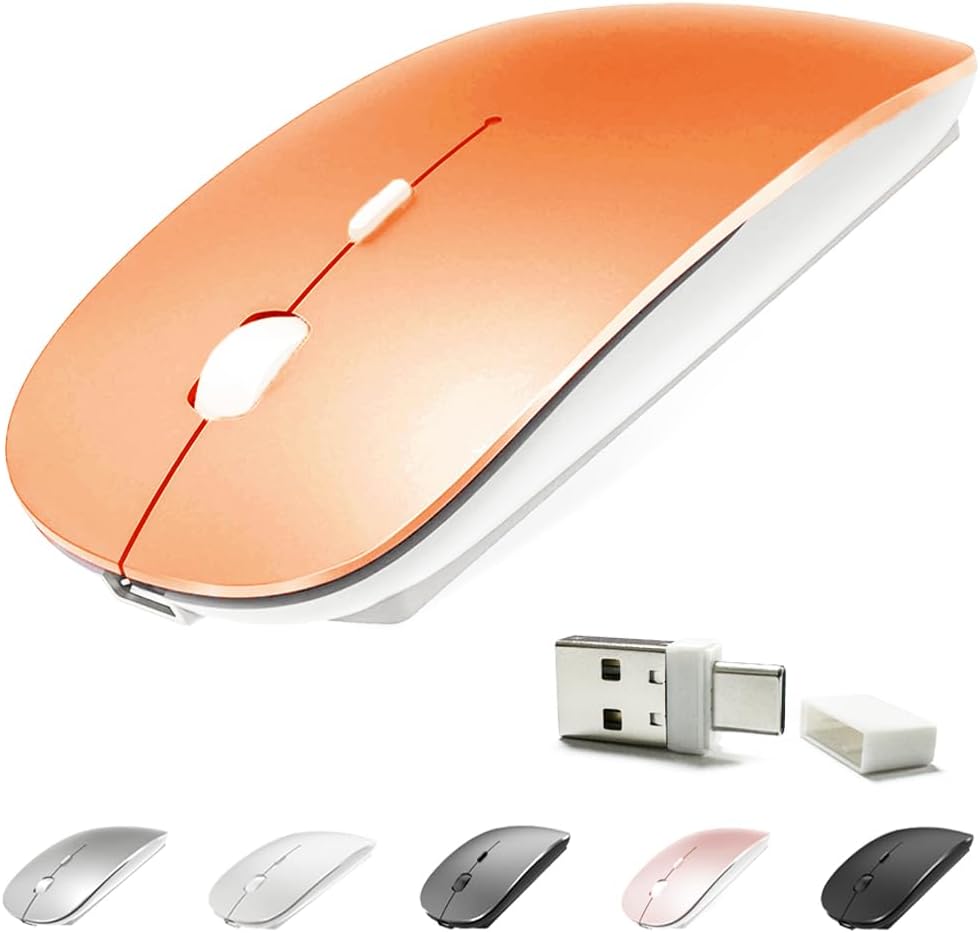
4 Modes Rechargeable Bluetooth Mouse BT3.0/5.2+USB-2.4G/Type-C,Wireless Mouse for MacBook pro/MacBook air/Laptop/iMac/ipad/Notebook/pc (BT/USB-C Orange)
Want the best price and purchase timing?
Our AI advisor analyzes real-time pricing across all channels to find you the best deal.
AI Verdict
This KLO mouse offers 4-mode connectivity (BT 3.0/5.2, USB 2.4G, Type-C) and 3 DPI settings (1000, 1200, 1600) for budget-conscious users needing multi-device support.
This mouse is a situational fit because its extensive 4-mode connectivity and silent operation are genuinely useful for multi-device setups and quiet environments. However, its reported build quality issues, inconsistent connectivity, and small size for some users mean it won't be a universal solution.
If this mouse isn't enough, look for models with a higher weight (e.g., 4+ ounces) and a more robust, full-sized ergonomic design for better comfort and durability.
Regret Score™
High RiskLower is better — measures purchase-regret risk from real buyer complaints, review credibility, and product maturity
Issues discovered after purchase
Critically weak dimension
Amazon rating vs actual quality
Chance this product isn't for you
Pros
- Features four distinct connection modes (Bluetooth 3.0, Bluetooth 5.2, USB 2.4G, and Type-C) allowing connection to a wide range of devices including Mac OS and Windows systems.
- Equipped with a built-in 500mAh Lithium polymer rechargeable battery, providing 7-30 days of use on a 2-3 hour charge, and can be used while charging.
- Designed for ultra-silent operation, reducing click noise by up to 96% compared to other mice.
- Offers three adjustable DPI settings (1000, 1200, 1600) for varied cursor sensitivity.
- Its contoured shape and lightweight 3.2-ounce design aim for comfortable use during extended periods.
Cons
- Some users report the mouse feeling cheap and prone to breakage, with one user stating the left click button failed after a single drop.
- Connectivity can be inconsistent, with users experiencing frequent disconnections and needing to repeatedly reconnect the mouse.
- The scrolling mechanism has been described as erratic and not smooth, hindering precise navigation.
- For users with larger hands, the mouse's size may be too small, leading to discomfort and hand cramps during prolonged use.
- The advertised battery life may degrade significantly after a few months of use, becoming shorter than initially stated.
Dimension Scores
The mouse features a Laser sensor with 3 DPI settings (1000, 1200, 1600), which is average for basic office tasks, but some users report erratic scrolling.
It has a contoured shape and is lightweight at 3.2 ounces, but some users with larger hands experience discomfort and cramps.
Offering four modes (BT 3.0/5.2, USB 2.4G, Type-C) with a dual-port receiver provides broad compatibility, though some users report connectivity issues.
User feedback indicates the mouse feels cheap and is prone to breaking, with reports of buttons failing after minor drops.
Best For
- Users who need to switch between multiple devices (e.g., laptop, tablet, desktop) with different port types (USB-A, USB-C) and Bluetooth capabilities.
- Environments where quiet operation is essential, such as libraries or shared office spaces, due to its soundless clicks.
- Budget-conscious individuals looking for a rechargeable wireless mouse with adjustable DPI settings.
Not Recommended For
- Users with larger hands who require a full-sized, ergonomic mouse for comfort during long work sessions.
- Anyone needing highly precise and consistent tracking or scrolling for tasks like graphic design or gaming.
- Users prioritizing robust build quality and long-term durability over multi-connectivity features.
Watch Out For
- The mouse's build quality is a concern, with reports of it feeling flimsy and breaking easily, like a left click button failing after one drop.
- Connectivity can be unstable, with users frequently needing to reconnect the mouse, making it unreliable for continuous work.
- The scrolling experience is often erratic, which can be frustrating for tasks requiring precise movement.
- Battery life has been reported to diminish significantly after a few months, falling short of the initial 7-30 day claim.
- The mouse's small size can cause hand cramps for users with larger hands during extended use.
Full Specifications
| ASIN | B082Y8CVRP |
| Brand | KLO |
| Color | BT/USB-C orange |
| Batteries | 1 Lithium Ion batteries required. (included) |
| Item Weight | 3.2 ounces |
| Manufacturer | KLO GD |
| Special Feature | Rechargeable Ergonomic Design Soundless |
| Product Dimensions | 4.5 x 2.2 x 1 inches |
| Connectivity Technology | Bluetooth Wireless USB |
| Movement Detection Technology | Laser |
What Buyers Say
The most surprising finding is how many users complain about the build quality and connectivity, despite the high overall rating. Many report the mouse feels flimsy and breaks easily, with the left click button failing after a single drop. Connectivity issues are also common, requiring frequent reconnections. The scrolling can be erratic, making precise work frustrating. While the multi-mode connectivity is a strong selling point, these consistent durability and performance issues are significant drawbacks.
“Dude, this mouse is cheap for a reason. It connects to everything, which is cool, but it feels like it's gonna fall apart any second and the scroll wheel is driving me nuts, keeps jumping around. My hand hurts after an hour. Don't bother unless you literally just need something to click.”
Common Praise
- The mouse connects easily to multiple devices using its 4 modes (Bluetooth 3.0/5.2, USB 2.4G, Type-C).
- Clicks are genuinely quiet, reducing noise by up to 96%.
- The rechargeable battery is convenient, eliminating the need for disposable batteries.
- It's lightweight and portable, making it easy to carry around.
- The adjustable DPI settings (1000, 1200, 1600) allow for sensitivity customization.
Common Complaints
- The mouse feels cheaply made and is not durable, with some parts breaking after minimal use or drops.
- Frequent disconnections and difficulty reconnecting are common, especially with Bluetooth.
- The scrolling wheel is often reported as erratic and imprecise.
- The size is too small for many, causing hand cramps and discomfort during extended use.
- Battery life degrades noticeably after a few months of ownership.
Ownership Tips
- After a few months, the battery life significantly shortens, requiring more frequent charging than initially.
- The plastic construction feels flimsy and can show signs of wear quickly, such as scuffs or loose buttons.
- The scroll wheel's erratic behavior often becomes more pronounced over time, making it frustrating for daily tasks.
- Maintaining a stable Bluetooth connection can be a persistent issue, requiring regular re-pairing.
- The small form factor, while portable, consistently leads to hand fatigue for users with average to large hands after prolonged use.
Frequently Asked Questions
What devices is this mouse compatible with?
It's compatible with Mac OS, Windows XP, Vista, 7, 8, 10, and can connect to desktops, notebooks, PCs, MacBooks (Pro/Air), iPads, and iMacs.
How do I charge the mouse and how long does the battery last?
You charge it via a USB cable, and it takes 2-3 hours for a full charge, which should last about 7-30 days. It also has an automatic sleep mode to save power.
Can I use the mouse while it's charging?
Yes, you can use the mouse while it's connected for charging.
Does this mouse make a lot of noise when clicking?
No, it's designed to be ultra-silent, reducing click noise by up to 96%.
How do I change the mouse's speed or sensitivity?
The mouse has a DPI switch that allows you to cycle through three sensitivity settings: 1000, 1200, and 1600 DPI.
Buying Guide
When you're looking for a mouse, don't just focus on the number of features. Think about how you'll actually use it. If you're going to be clicking all day, comfort and consistent tracking are way more important than having five different ways to connect. Also, a 'rechargeable' battery sounds great, but if it dies quickly after a few months, you're just trading one hassle for another.
DPI (Dots Per Inch)
This measures how sensitive your mouse is. Higher DPI means the cursor moves further with less physical mouse movement. For precise work like photo editing, you might want lower DPI, while for general browsing, a higher DPI can feel faster. Think of it like a car's steering sensitivity – some prefer a light touch, others a firmer feel.
Connectivity Modes (Bluetooth, 2.4G Wireless, Type-C)
This tells you how the mouse talks to your computer. Bluetooth is great for devices without USB ports (like some tablets) or if you want to save a USB port. 2.4G wireless uses a small USB dongle and is often more stable and responsive. Type-C connectivity means it can plug directly into modern USB-C ports. More options mean more flexibility across different devices.
Ergonomic Design
This refers to how comfortably the mouse fits your hand. A well-designed ergonomic mouse reduces strain and prevents discomfort, especially during long hours of use. It's like wearing shoes – a good fit makes a huge difference in how your feet feel after a long walk.
Alternatives
If this mouse doesn't fit, look for models with a higher weight for better build quality, a larger form factor for improved ergonomics, and user reviews specifically praising consistent tracking and stable wireless connections.
You Might Also Like

Magnetic Charging Mouse Pad 31.5x15.75, 15W Fast Wireless Charging Desk Mat, XXL Desk Pad RGB Gaming Mousepad, Home Office Large Keyboard Pad with Ultra-Smooth Surface, Non-Slip Base
$50-$99This 31.5" x 15.75" RGB desk mat with 15W magnetic phone charging and a Qi headphone charging zone is for users wanting to declutter and illuminate their workstation.

Mouse Pad Desk Mat Full Moon Desk Pad Black Red Large Mouse Pad Gaming Mousepad Extended Laptop Computer Mouse Keyboard Mat-11.8 x 31.5 in
Price range unavailableThis is a 11.8 x 31.5 inch desk mat for users needing a large, undefined surface to cover their desk, but with no available product details or user feedback.

SteelSeries QcK Gaming Mouse Pad - Small Cloth - Optimized For Gaming Sensors
A 250 x 210 x 2mm cloth pad with a non-slip rubber base, ideal for high DPI users or those with limited desk space.

SteelSeries QcK Large Gaming Mousepad — Black — Non-Slip Silicone Rubber Base — Peak Tracking and Stability — Optimized for Gaming Sensors — 490 mm x 420 mm — FPS, MOBAs, RTS, MMO
A 450 mm x 400 mm x 2 mm cloth mousepad designed for precise control in gaming, especially for budget-conscious players.