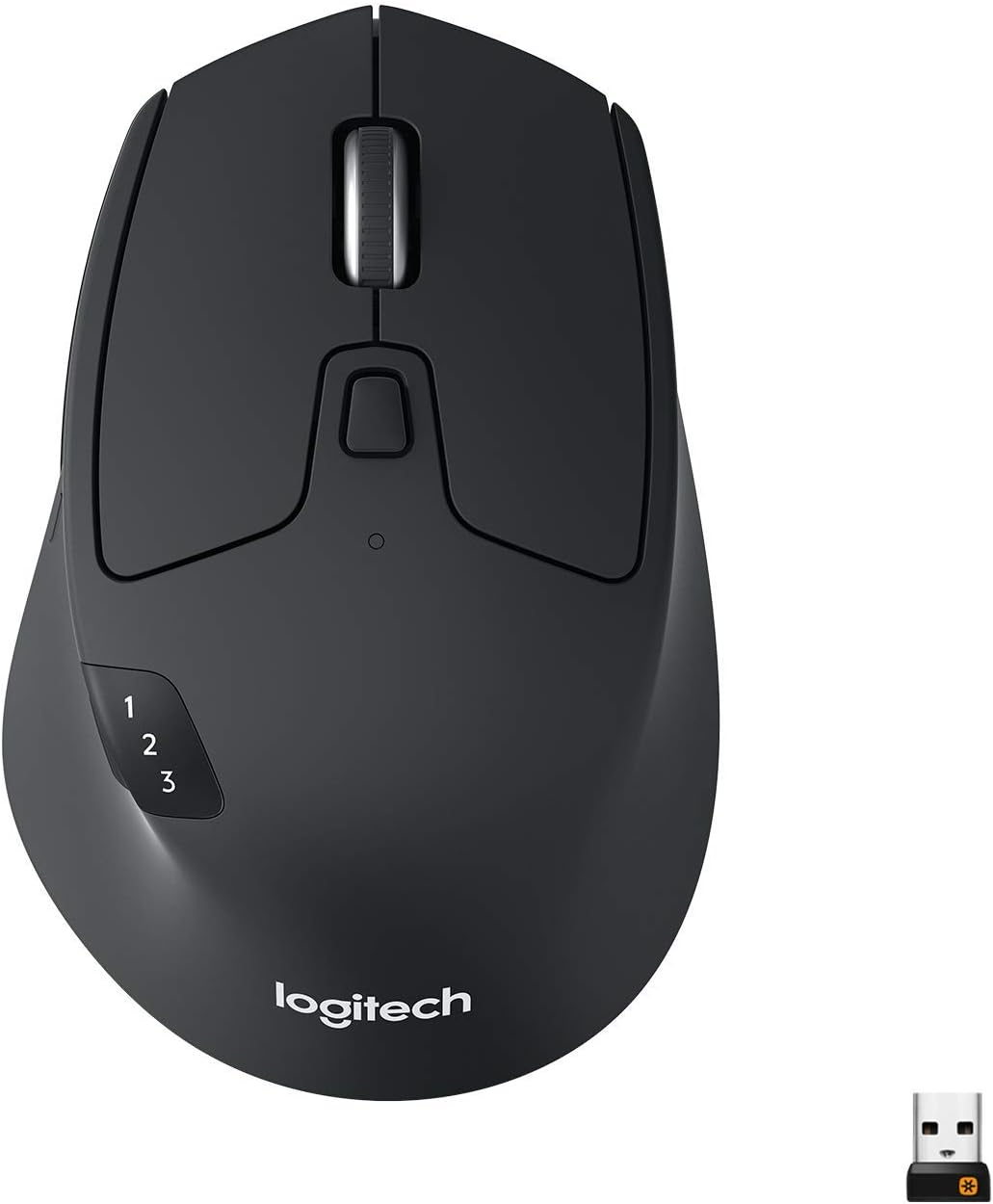
Logitech M720 Triathalon Multi-Device Wireless Mouse, Black
Want the best price and purchase timing?
Our AI advisor analyzes real-time pricing across all channels to find you the best deal.
AI Verdict
This 4.6-ounce optical mouse offers 24 months of battery life and connects to three devices, making it a productivity workhorse for multi-computer setups.
This mouse is a strong fit for productivity users managing multiple devices, thanks to its 3-device switching and 24-month battery life. Its ergonomic shape and customizable buttons enhance workflow across different operating systems.
If you need a mouse with silent clicks or a more modern Logi Bolt receiver, look for alternatives that explicitly list those features.
Regret Score™
Low RiskLower is better — measures purchase-regret risk from real buyer complaints, review credibility, and product maturity
Issues discovered after purchase
Critically weak dimension
Amazon rating vs actual quality
Chance this product isn't for you
Pros
- Connects to three devices via Bluetooth or Unifying receiver, with a top-mounted button for quick switching.
- Offers 24 months of battery life from a single AA battery.
- Features a dual-mode scroll wheel with both ratcheted and free-spinning modes, plus tilt functionality for horizontal scrolling.
- Ergonomic design with a soft-touch rubberized material provides a comfortable palm grip, especially for larger hands.
- Includes customizable buttons, including a 'secret' thumb button for gesture controls on macOS.
- Supports major operating systems including Mac, Windows, Chrome OS, and Linux.
Cons
- Rubberized coating can become sticky or peel after about a year or two of use.
- Unifying receiver connection can be inconsistent with USB 2.0 ports or over distances exceeding one meter, requiring a USB 3.0 port for smoother movement.
- Scroll wheel's free-spinning mode can be overly sensitive for some users.
- Loud traditional clicks and scroll sounds, lacking silent click functionality.
- Does not support iOS devices.
Dimension Scores
The optical sensor provides 1,000 DPI tracking, which is standard for productivity but not high-precision.
Its contoured shape and soft-touch rubberized material are comfortable for palm grip users, especially those with larger hands.
Offers multi-device connectivity for three devices via both Unifying receiver and Bluetooth, with an easily accessible top-mounted switch button.
While some components last years, the rubberized coating is prone to deteriorating and becoming sticky or peeling after 1-2 years of use.
Best For
- Users who frequently switch between two or three computers or devices (e.g., desktop, laptop, tablet).
- Individuals with larger hands who prefer a palm grip.
- Productivity tasks requiring horizontal scrolling, like navigating large spreadsheets.
- Anyone needing a long-lasting wireless mouse that runs on a single AA battery.
Not Recommended For
- Competitive gamers due to its low, non-adjustable DPI.
- Users who require silent clicks or a silent scroll wheel.
- Travelers prioritizing a lightweight mouse, as it weighs 4.6 ounces.
Watch Out For
- The rubberized coating on the side of the mouse has been reported to get 'melty' or peel off after extended use, sometimes within a year.
- Unifying receiver performance can be unsatisfactory with USB 2.0 ports, leading to non-smooth movement, and may require a USB 3.0 port for optimal tracking.
- The scroll wheel's hyper-fast free-spinning mode is often described as too sensitive, making precise scrolling difficult for some.
- The thumb button, while customizable, is sometimes awkwardly placed and not as easy to press as it could be.
- Some users experience connection issues with the mouse, with devices disconnecting or becoming unreliable after 3-4 years of use.
Full Specifications
| ASIN | B01LF37K80 |
| Brand | Logitech |
| Color | Black |
| Series | M720 Triathlon Multi-device Wireless Mouse |
| Batteries | 1 AA batteries required. (included) |
| Item Weight | 4.6 ounces |
| Manufacturer | Logitech |
| Power Source | Battery Powered |
| Wireless Type | 2.4 GHz Radio Frequency |
| Special Feature | Wireless |
| Operating System | ['Windows', 'Mac', 'Chrome OS', 'Linux', 'iPadOS'] |
| Hardware Platform | Laptop, PC |
| Item model number | 910-004790 |
| Product Dimensions | 2.91 x 4.53 x 1.77 inches |
| Item Dimensions LxWxH | 2.91 x 4.53 x 1.77 inches |
| Movement Detection Technology | Optical |
| Average Battery Life (in hours) | 24 months |
| Is Discontinued By Manufacturer | No |
What Buyers Say
The most surprising finding is how consistently users praise the 3-device switching, with the button conveniently located on top of the mouse, making it genuinely useful for multi-computer workflows. Many highlight the long battery life, often exceeding a year, as a significant convenience. However, a recurring complaint centers on the rubberized side grip, which tends to degrade and become sticky over time. The scroll wheel's dual-mode functionality is appreciated, but its hyper-fast setting can be too sensitive for some, and the clicks are audibly traditional.
“Man, this mouse is a lifesaver for my work setup, switching between my laptop and desktop is instant, but seriously, that rubber on the side is getting all gross and sticky after a year, what gives Logitech?!”
Common Praise
- Easy and quick switching between up to three connected devices.
- Exceptional battery life, often lasting well over a year on a single AA battery.
- Comfortable ergonomic shape, particularly for palm grip and larger hands.
- Dual-mode scroll wheel with both precise ratcheting and fast free-spinning options.
- Customizable buttons, including the 'secret' thumb button, enhance productivity.
- Horizontal scrolling via the tilt wheel is useful for spreadsheets.
Common Complaints
- The rubberized side grip becomes sticky, melts, or peels off after 1-2 years of use.
- Unifying receiver connection can be unreliable with USB 2.0 ports or over distance.
- The free-spinning scroll wheel is often too sensitive, making it difficult to stop precisely.
- Loud traditional mouse clicks and scroll wheel sounds.
- Not suitable for gaming due to low DPI and lack of on-the-fly adjustment.
- The thumb button placement is awkward for some users, making it hard to press easily.
Ownership Tips
- The 24-month battery life is actually achievable, sometimes even longer, making battery changes infrequent.
- The device switching button on top is a game-changer for multi-device users, far more convenient than buttons on the bottom.
- The 'secret' thumb button, once customized, becomes an indispensable tool for navigation or gestures.
- The texture of the plastic, while initially pleasant, can feel a bit coarse compared to more premium mice.
- The Unifying receiver can be finicky; ensuring it's in a USB 3.0 port or closer to the mouse improves connection stability.
Frequently Asked Questions
Does the Logitech M720 Triathlon work with Mac and Windows?
Yes, the M720 Triathlon is compatible with Windows, Mac, Chrome OS, and Linux operating systems.
How long does the battery last in the M720 Triathlon?
The mouse is rated for 24 months of battery life on a single AA battery.
Can I customize the buttons on the M720 Triathlon?
Yes, the buttons, including the side buttons and the 'secret' thumb button, are customizable using Logitech's Options Plus software on Windows and Mac.
Does this mouse have a free-spinning scroll wheel?
Yes, it features a dual-mode scroll wheel that can switch between a precise ratcheted mode and a hyper-fast free-spinning mode with a button press.
Is the M720 Triathlon suitable for gaming?
No, it is not recommended for gaming due to its low and non-adjustable DPI, which is not ideal for fast-paced games.
What kind of wireless connection does it use?
The M720 Triathlon connects wirelessly via Logitech's Unifying USB receiver (2.4 GHz) or Bluetooth.
Buying Guide
When you're looking at mice, especially for productivity, think about how many devices you use daily and how you hold the mouse. If you're constantly jumping between a work laptop and a personal desktop, multi-device switching is a huge time-saver. Also, consider if you prefer a full palm grip or a fingertip grip, as mouse shapes vary wildly. Don't forget about battery life; a mouse that lasts months on a single battery means less hassle.
Multi-Device Connectivity
This isn't just marketing jargon; it means you can pair your mouse with multiple computers or tablets and switch between them instantly. Imagine having one remote for three TVs – that's what this does for your mouse, saving you from juggling multiple peripherals.
Battery Life (24 months)
A 24-month battery life means you'll rarely think about replacing batteries. It's like your car getting 500 miles to the tank; you just fill it up and forget about it for a long, long time, avoiding interruptions during important tasks.
Optical Sensor
An optical sensor uses light to track movement. It's generally accurate for everyday tasks and works on most surfaces. Think of it like a basic camera for your mouse; it captures enough detail for smooth navigation, but isn't designed for pixel-perfect precision needed in competitive gaming.
Dual-Mode Scroll Wheel
This gives you two ways to scroll: a precise, clicky mode for careful document navigation, and a super-fast, free-spinning mode for zipping through long web pages. It's like having a bike with both geared and freewheel options, letting you choose the right speed for the terrain.
Alternatives
If this mouse doesn't fit, look for alternatives with silent click switches and a Logi Bolt receiver for enhanced security and connection stability, or a higher DPI sensor with on-the-fly adjustment if you need gaming precision.
You Might Also Like

Magnetic Charging Mouse Pad 31.5x15.75, 15W Fast Wireless Charging Desk Mat, XXL Desk Pad RGB Gaming Mousepad, Home Office Large Keyboard Pad with Ultra-Smooth Surface, Non-Slip Base
$50-$99This 31.5" x 15.75" RGB desk mat with 15W magnetic phone charging and a Qi headphone charging zone is for users wanting to declutter and illuminate their workstation.

Mouse Pad Desk Mat Full Moon Desk Pad Black Red Large Mouse Pad Gaming Mousepad Extended Laptop Computer Mouse Keyboard Mat-11.8 x 31.5 in
Price range unavailableThis is a 11.8 x 31.5 inch desk mat for users needing a large, undefined surface to cover their desk, but with no available product details or user feedback.

SteelSeries QcK Gaming Mouse Pad - Small Cloth - Optimized For Gaming Sensors
A 250 x 210 x 2mm cloth pad with a non-slip rubber base, ideal for high DPI users or those with limited desk space.

SteelSeries QcK Large Gaming Mousepad — Black — Non-Slip Silicone Rubber Base — Peak Tracking and Stability — Optimized for Gaming Sensors — 490 mm x 420 mm — FPS, MOBAs, RTS, MMO
A 450 mm x 400 mm x 2 mm cloth mousepad designed for precise control in gaming, especially for budget-conscious players.