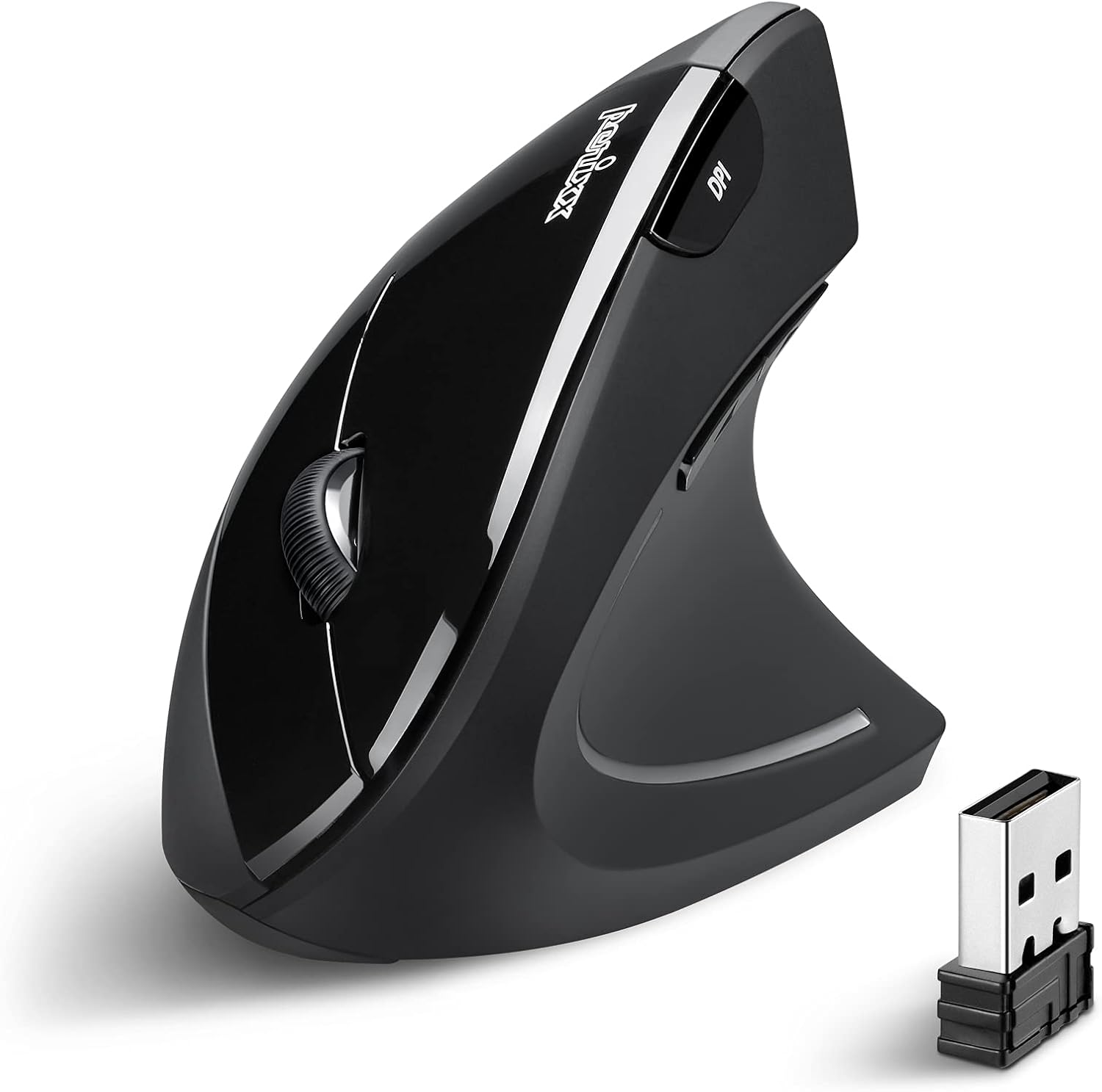
Perixx PERIMICE-713 Wireless Ergonomic Vertical Mouse - 800/1200/1600 DPI - Right Handed - Recommended with RSI User
Want the best price and purchase timing?
Our AI advisor analyzes real-time pricing across all channels to find you the best deal.
AI Verdict
This is a 3.17-ounce, right-handed, 6-button optical mouse with 800/1200/1600 DPI and 100 hours of battery life, designed to promote a natural hand posture.
This mouse is a situational fit because its vertical ergonomic design specifically addresses wrist and forearm strain for right-handed users, making it a targeted solution for discomfort. However, its effectiveness is highly dependent on hand size, with some users finding it too thin for a comfortable grip.
If hand size is a concern, look for ergonomic mice with adjustable sizing or more substantial palm support to ensure a proper fit.
Regret Score™
Low RiskLower is better — measures purchase-regret risk from real buyer complaints, review credibility, and product maturity
Issues discovered after purchase
Critically weak dimension
Amazon rating vs actual quality
Chance this product isn't for you
Pros
- Its vertical shape promotes a natural handshake posture, reducing wrist twisting and forearm strain during extended use.
- Features 6 buttons, including a dedicated DPI control button and forward/backward navigation, for increased productivity.
- Offers three adjustable DPI levels (800/1200/1600) for customizable cursor sensitivity.
- Operates on a 2.4GHz wireless connection with a 10-meter range, providing freedom of movement.
- Includes a power ON/OFF switch and automatic power-saving function, entering sleep mode after six minutes of inactivity to conserve battery life.
- The nano USB receiver has a storage compartment within the mouse, preventing loss when traveling.
Cons
- Requires two AAA batteries, which are not included in the package.
- Some users with larger hands report the mouse feels too thin, leading to a 'pinching' hand position and pressure on the Pisiform bone.
- The mouse is specifically designed for right-handed users, excluding left-handed individuals.
- The 100-hour battery life is relatively short compared to some wireless mice that offer months or years of use.
Dimension Scores
The optical sensor provides 800/1200/1600 DPI, which is standard for basic navigation, but lacks the precision or higher DPI options of more advanced mice.
Its vertical design promotes a natural 'handshake' posture, reducing wrist strain for many users, but some with larger hands find it too thin, causing discomfort.
It offers basic 2.4GHz wireless USB connectivity with a 10-meter range, but lacks Bluetooth or multi-device pairing capabilities.
The mouse features soft-touch plastic finishes and hard plastic buttons, with user feedback indicating it 'feels well made' for its price point.
Best For
- Individuals experiencing wrist discomfort or forearm strain from traditional mice.
- Right-handed users seeking a more natural hand posture for long computer sessions.
- Work-from-home setups where a simple, functional ergonomic mouse is needed without complex features.
- Users who prioritize a budget-friendly entry into vertical ergonomic mice.
Not Recommended For
- Left-handed individuals, as the design is exclusively for right hands.
- Users with very large hands who require a fuller palm grip to avoid a 'pinching' sensation.
- Anyone needing multi-device connectivity or Bluetooth pairing.
Watch Out For
- The mouse requires two AAA batteries that are not included in the box, so you'll need to buy them separately.
- Users with larger hands have reported that the mouse's thin profile can lead to a 'pinching' hand position, causing discomfort around the Pisiform bone.
- The 100-hour battery life means you'll be changing or recharging AAA batteries more frequently than with mice offering longer durations.
Full Specifications
| ASIN | B00GZIA5EW |
| Brand | Perixx |
| Color | Black |
| Series | PERIMICE-513 N |
| Language | English, English, English, English, English |
| Batteries | 2 AAA batteries required. |
| Item Weight | 3.17 ounces |
| Manufacturer | Perixx Computer GmbH |
| Power Source | Battery Powered |
| Wireless Type | 2.4 GHz Radio Frequency, 802.11a/b/g/n |
| Special Feature | Portable, Wireless |
| Operating System | Linux, Windows 10, Windows 7 |
| Item model number | 11167 |
| Product Dimensions | 4.92 x 2.44 x 3.03 inches |
| Item Dimensions LxWxH | 4.92 x 2.44 x 3.03 inches |
| Connectivity Technology | USB |
| Movement Detection Technology | Optical |
| Average Battery Life (in hours) | 100 Hours |
| Is Discontinued By Manufacturer | No |
What Buyers Say
Many users report a significant reduction in wrist and forearm pain after switching to this mouse, often within a short period. The vertical angle is generally easy to adapt to, and the mouse tracks reliably on various surfaces without issues. However, a recurring complaint is that the mouse's dimensions aren't universally comfortable, particularly for those with larger hands, who describe a 'pinching' sensation. The need for AAA batteries, which aren't included, is a minor but consistent point of friction for new owners.
“Okay, so my wrist was killing me with my old mouse, like actual pain. This thing felt weird for a day, but now it's just natural and my wrist feels so much better. Only bummer is I gotta remember to buy AAA batteries, they don't come with it!”
Common Praise
- Reduces wrist and forearm strain by promoting a natural hand posture.
- The vertical angle is easy to get used to for most users.
- Tracks accurately on both wooden desks and mousepads.
- The 6-button layout, including forward/backward buttons, improves browsing efficiency.
- The built-in storage compartment for the USB receiver is convenient for portability.
Common Complaints
- The mouse's thin profile can cause a 'pinching' hand position for users with larger hands.
- Requires two AAA batteries that are not included in the package.
- The 100-hour battery life means more frequent battery changes.
- Some users find the overall shape doesn't provide enough palm support, resting weight on the Pisiform bone.
Ownership Tips
- The power-saving mode kicks in after six minutes of inactivity, which is helpful for battery life but can cause a slight delay when resuming use.
- The soft-touch plastic coating feels comfortable initially but might show wear or collect grime over longer periods of use.
- The DPI button is handy for switching sensitivity on the fly, especially when moving between different tasks.
- The forward and backward buttons are positioned well and quickly become essential for web browsing.
Frequently Asked Questions
Does this mouse require special drivers to work?
No, the Perixx PERIMICE-713 is plug-and-play. It connects via a nano USB receiver and is compatible with Windows 7, 8, 10, and 11 without needing additional software.
Can I use this mouse with a Mac?
While the official product specs only list Windows compatibility, some Perixx documentation indicates it is functionally compatible with MacOS Monterey 12.2 and higher, as well as Linux and ChromeOS.
What type of batteries does it use and are they included?
The mouse uses two AAA batteries. These batteries are not included in the package, so you will need to purchase them separately.
How do I change the cursor speed?
You can adjust the cursor sensitivity using the dedicated DPI control button on the mouse. It cycles through three levels: 800, 1200 (default), and 1600 DPI.
Is this mouse suitable for left-handed users?
No, this specific model, the PERIMICE-713, is designed exclusively for right-handed users to promote a natural hand posture.
Buying Guide
When you're looking at a vertical mouse like this, the main thing is how it feels in your hand. It's all about getting your wrist into a more natural 'handshake' position to avoid strain. Don't just look at the features; think about your hand size and how it will sit on the mouse. If it feels too small or too thin, it might not give you the ergonomic benefits you're hoping for.
DPI (Dots Per Inch)
This tells you how sensitive the mouse is. Higher DPI means the cursor moves further on your screen with a smaller physical movement of the mouse. For everyday tasks, 800-1600 DPI is usually plenty, but if you do precise graphic design or gaming, you might want higher numbers for fine control.
Ergonomic Design
For vertical mice, 'ergonomic' means it's shaped to keep your wrist and forearm in a neutral, untwisted position, like shaking hands. This is crucial if you experience wrist pain or want to prevent it, as it reduces pressure points and muscle strain.
Wireless Connectivity (2.4GHz)
This means the mouse connects to your computer using a small USB receiver, giving you freedom from cables. The 2.4GHz frequency is standard and generally reliable, but it's different from Bluetooth, so you'll need an available USB port for the receiver.
Alternatives
If this mouse doesn't fit your hand or you need more advanced features, look for vertical ergonomic mice with adjustable sizes, Bluetooth connectivity, or higher DPI ranges for more precision.
You Might Also Like

Magnetic Charging Mouse Pad 31.5x15.75, 15W Fast Wireless Charging Desk Mat, XXL Desk Pad RGB Gaming Mousepad, Home Office Large Keyboard Pad with Ultra-Smooth Surface, Non-Slip Base
$50-$99This 31.5" x 15.75" RGB desk mat with 15W magnetic phone charging and a Qi headphone charging zone is for users wanting to declutter and illuminate their workstation.

Mouse Pad Desk Mat Full Moon Desk Pad Black Red Large Mouse Pad Gaming Mousepad Extended Laptop Computer Mouse Keyboard Mat-11.8 x 31.5 in
Price range unavailableThis is a 11.8 x 31.5 inch desk mat for users needing a large, undefined surface to cover their desk, but with no available product details or user feedback.

SteelSeries QcK Gaming Mouse Pad - Small Cloth - Optimized For Gaming Sensors
A 250 x 210 x 2mm cloth pad with a non-slip rubber base, ideal for high DPI users or those with limited desk space.

SteelSeries QcK Large Gaming Mousepad — Black — Non-Slip Silicone Rubber Base — Peak Tracking and Stability — Optimized for Gaming Sensors — 490 mm x 420 mm — FPS, MOBAs, RTS, MMO
A 450 mm x 400 mm x 2 mm cloth mousepad designed for precise control in gaming, especially for budget-conscious players.