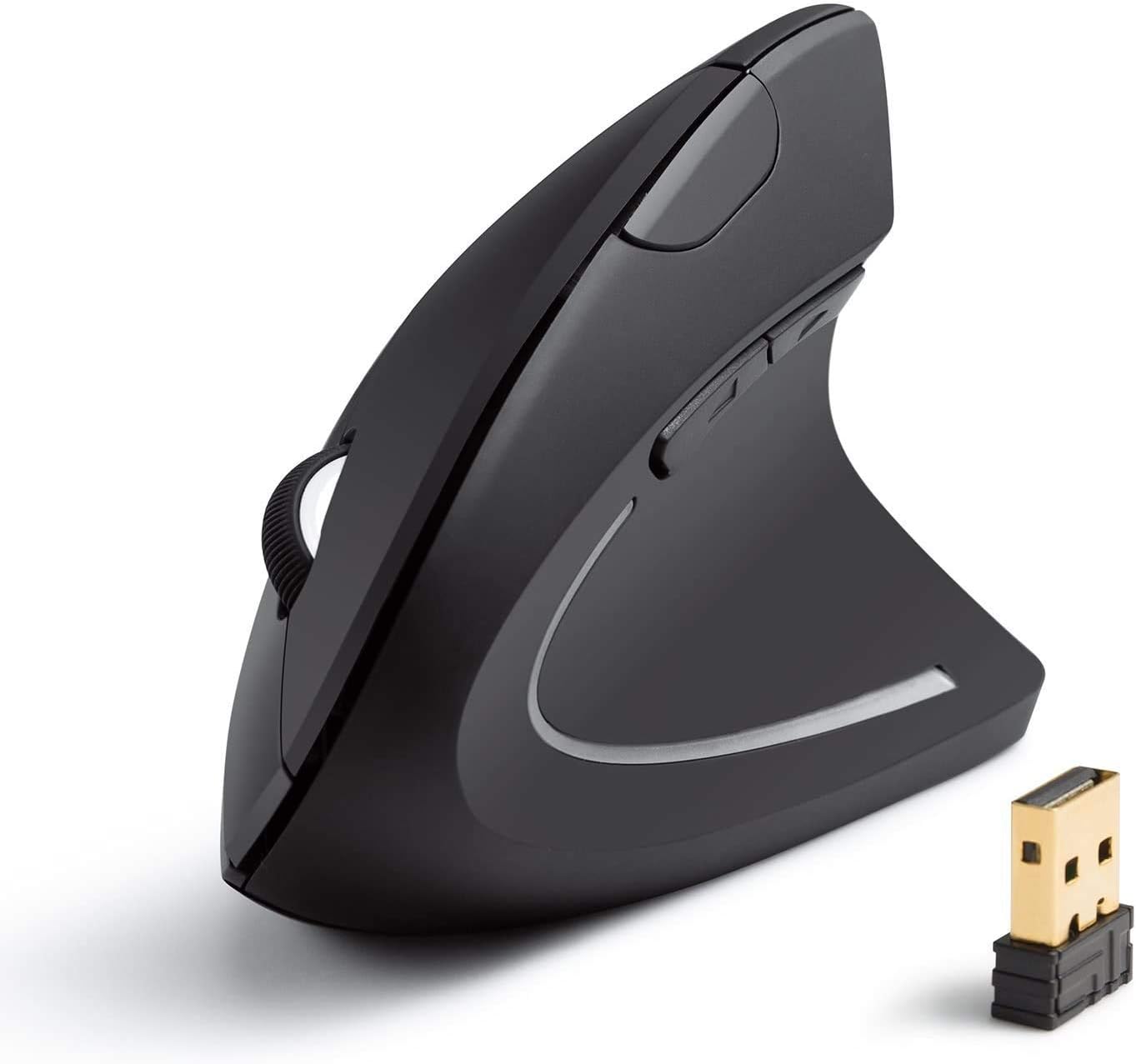
Anker 2.4G Wireless Vertical Ergonomic Optical Mouse for Work, Multi-Device Connectivity, 800/1200 /1600 DPI, 5 Buttons for Laptop, Desktop, PC, MacBook - Black
Want the best price and purchase timing?
Our AI advisor analyzes real-time pricing across all channels to find you the best deal.
AI Verdict
This 2.4G wireless vertical optical mouse with 800/1200/1600 DPI and 5 buttons is for budget-conscious users seeking wrist strain relief.
This mouse is a situational fit because its vertical ergonomic design and adjustable DPI offer comfort and basic functionality for general use, especially for those with wrist strain. However, the 2.4G wireless connectivity and optical sensor have reported limitations in range and precision, making it less suitable for demanding tasks.
If you need more consistent tracking or multi-device Bluetooth connectivity, look for mice with higher-end optical or laser sensors and dual-mode wireless options.
Regret Score™
Medium RiskLower is better — measures purchase-regret risk from real buyer complaints, review credibility, and product maturity
Issues discovered after purchase
Critically weak dimension
Amazon rating vs actual quality
Chance this product isn't for you
Pros
- Scientific ergonomic design promotes a neutral "handshake" wrist position, reducing strain.
- Adjustable 800, 1200, or 1600 DPI resolution allows for sensitivity customization.
- Dedicated next/previous buttons offer convenience for web browsing.
- Enters a power-saving mode after 8 minutes of inactivity to conserve battery.
- Weighs 3.4 ounces, making it lightweight for handling.
- Comes with an 18-month hassle-free warranty.
Cons
- The next/previous thumb buttons do not function on Mac OS X.
- Requires two AAA batteries, which are not included and are not rechargeable.
- Users report the wireless range can be short, causing mouse stuttering outside a close proximity.
- Sensor performance can be inconsistent for fine movements, especially when moving the mouse to the right.
- Designed exclusively for right-handed users.
Dimension Scores
The optical sensor offers 800/1200/1600 DPI, but users report inconsistent tracking and difficulty with fine movements, particularly to the right.
Its vertical 'handshake' design is specifically intended to reduce wrist strain, and many users find it comfortable for extended periods.
It uses a 2.4G USB receiver for wireless connectivity, but user feedback indicates a very short wireless range that causes stuttering.
For its budget price, the mouse generally feels sturdy, though some users have noted occasional issues like scroll wheel problems on refurbished units.
Best For
- Office workers experiencing wrist discomfort from traditional mice.
- Individuals who primarily browse the web and benefit from dedicated navigation buttons.
- Users prioritizing ergonomic design on a budget.
- People needing a lightweight mouse for travel at 3.4 ounces.
Not Recommended For
- Mac users who rely on forward/back buttons for navigation.
- Graphic designers or gamers requiring precise, consistent sensor tracking.
- Left-handed individuals.
Watch Out For
- The wireless range is VERY short; users report the mouse stutters hard when slightly outside of close proximity to the receiver.
- The next/previous thumb buttons are not recognized on Mac OS X, limiting functionality for Apple users.
- Fine movements, like navigating Excel spreadsheets, can require significant effort, particularly when moving the mouse to the right.
- It requires two AAA batteries, which are not included and are not rechargeable, meaning you'll need to keep spares on hand.
Full Specifications
| ASIN | B00BIFNTMC |
| Brand | Anker |
| Color | Black |
| Series | Anker 2.4G Wireless Vertical Ergonomic Optical Mouse |
| Batteries | 2 AAA batteries required. |
| Item Weight | 4.5 ounces |
| Manufacturer | Anker |
| Power Source | Battery Powered |
| Special Feature | Wireless |
| Operating System | Linux, Windows 10 |
| Hardware Platform | Mac |
| Item model number | AK-98ANWVM-UBA |
| Product Dimensions | 3.98 x 3.23 x 3.15 inches |
| Item Dimensions LxWxH | 3.98 x 3.23 x 3.15 inches |
| Connectivity Technology | USB |
| Movement Detection Technology | Optical |
| Average Battery Life (in hours) | 8 minutes |
| Is Discontinued By Manufacturer | No |
What Buyers Say
Many users switch to this Anker vertical mouse specifically to alleviate wrist pain, and a significant number report success with its 'handshake' grip. However, the experience isn't universally smooth; some find the sensor struggles with precise movements, especially when navigating horizontally. The lack of Mac compatibility for the side buttons is a recurring frustration for Apple users. Despite these issues, its affordability and ergonomic benefits make it a popular entry point into vertical mice.
“Okay, so my wrist was killing me, and this mouse actually helped, like, a lot, but seriously, those side buttons are useless on my MacBook, and sometimes the cursor just jumps around if I move too far from the USB stick, which is annoying.”
Common Praise
- The vertical orientation significantly reduces wrist and forearm strain.
- The 'handshake' grip feels natural and comfortable after an adjustment period.
- The adjustable DPI settings (800/1200/1600) provide adequate sensitivity for daily tasks.
- The next/previous buttons are convenient for web browsing on Windows PCs.
- The power-saving mode effectively extends battery life, with batteries lasting months for some users.
Common Complaints
- The wireless connection can be unreliable with a very short range, leading to stuttering.
- The forward and back buttons do not work on Mac OS X, limiting functionality.
- The optical sensor can be imprecise, particularly for fine cursor movements or horizontal tracking.
- Requires non-rechargeable AAA batteries, which are not included.
- The learning curve for the vertical grip can be awkward for the first few days.
Ownership Tips
- The vertical shape takes a few days to get used to, but then it feels natural.
- You'll need to keep spare AAA batteries around, as it's not rechargeable.
- The tiny USB receiver stores inside the mouse, which is handy for transport but easy to misplace.
- The mouse needs to be relatively close to the USB receiver to avoid connectivity issues.
- The DPI button is useful for quickly switching sensitivity for different tasks.
Frequently Asked Questions
Does this mouse work with Mac computers?
Yes, the Anker Wireless Vertical Ergonomic Mouse works with Mac computers, but the back and forward buttons do not function on Mac OS X.
How do you change the DPI settings?
You can change the DPI settings by pressing the DPI switcher button located on the mouse. It offers three options: 800, 1200, and 1600 DPI.
Is the mouse rechargeable?
No, the mouse requires two AAA batteries and does not have a rechargeable battery.
What type of batteries does it use?
The mouse operates on two AAA batteries, which are not included in the package.
Is this mouse suitable for left-handed users?
No, this mouse is specifically designed for right-handed use due to its contoured ergonomic shape.
What is the weight of the mouse?
The mouse weighs 3.4 ounces (approximately 96 grams).
What are the dimensions of the mouse?
The product dimensions are 120 x 62.8 x 74.8 mm.
Buying Guide
When looking at vertical mice like this Anker, you're primarily buying for ergonomics to reduce wrist strain, not cutting-edge performance. The 'handshake' grip is the main draw, so make sure your hand size fits the mouse dimensions (120x62.8x74.8 mm). Understand that a budget wireless mouse with a 2.4G USB receiver might have range limitations, meaning you need to keep your computer's USB port relatively close.
Vertical Ergonomic Design
This isn't just a gimmick; it positions your hand and wrist in a more natural, neutral 'handshake' posture. Think of it like holding a joystick instead of laying your hand flat, which can significantly reduce pressure on your wrist and forearm over long work sessions.
DPI (Dots Per Inch)
DPI determines how sensitive your mouse is. A higher DPI means the cursor moves further on screen for a smaller physical mouse movement. This mouse offers 800, 1200, and 1600 DPI, letting you adjust it for tasks like precise editing (lower DPI) or quick navigation across large screens (higher DPI).
2.4G Wireless Connectivity
This means the mouse connects to your computer using a small USB receiver, providing a cable-free experience. It's generally reliable but can sometimes suffer from interference or limited range compared to Bluetooth, so keep the receiver close to the mouse for the best connection.
5 Buttons
Beyond the standard left, right, and scroll wheel click, this mouse includes two extra buttons, typically for 'forward' and 'back' navigation in web browsers. These can speed up your workflow by reducing the need to reach for keyboard shortcuts or on-screen arrows.
Alternatives
If this mouse doesn't fit, consider models with Bluetooth for multi-device pairing, rechargeable batteries for convenience, or a higher-precision sensor for tasks like graphic design or gaming.
You Might Also Like

Magnetic Charging Mouse Pad 31.5x15.75, 15W Fast Wireless Charging Desk Mat, XXL Desk Pad RGB Gaming Mousepad, Home Office Large Keyboard Pad with Ultra-Smooth Surface, Non-Slip Base
$50-$99This 31.5" x 15.75" RGB desk mat with 15W magnetic phone charging and a Qi headphone charging zone is for users wanting to declutter and illuminate their workstation.

Mouse Pad Desk Mat Full Moon Desk Pad Black Red Large Mouse Pad Gaming Mousepad Extended Laptop Computer Mouse Keyboard Mat-11.8 x 31.5 in
Price range unavailableThis is a 11.8 x 31.5 inch desk mat for users needing a large, undefined surface to cover their desk, but with no available product details or user feedback.

SteelSeries QcK Gaming Mouse Pad - Small Cloth - Optimized For Gaming Sensors
A 250 x 210 x 2mm cloth pad with a non-slip rubber base, ideal for high DPI users or those with limited desk space.

SteelSeries QcK Large Gaming Mousepad — Black — Non-Slip Silicone Rubber Base — Peak Tracking and Stability — Optimized for Gaming Sensors — 490 mm x 420 mm — FPS, MOBAs, RTS, MMO
A 450 mm x 400 mm x 2 mm cloth mousepad designed for precise control in gaming, especially for budget-conscious players.