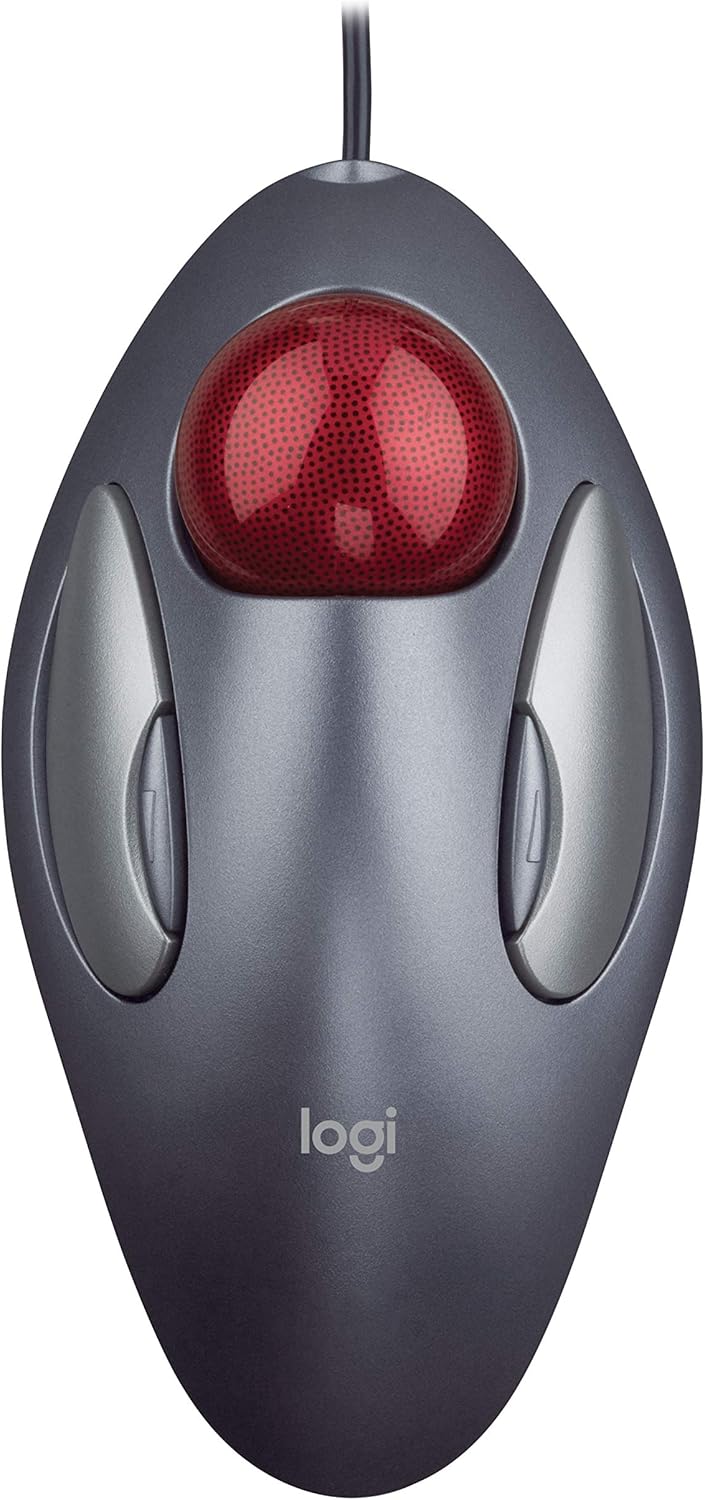
Logitech Trackman Marble Trackball Mouse – Wired USB Ergonomic Mouse for Computers, with 4 Programmable Buttons, Dark Gray
Want the best price and purchase timing?
Our AI advisor analyzes real-time pricing across all channels to find you the best deal.
AI Verdict
A wired optical trackball mouse with 4 programmable buttons, designed for ambidextrous use and stationary cursor control without arm movement.
This trackball is a strong fit for specific use cases where its ambidextrous design and stationary operation are prioritized, such as for users with wrist discomfort or limited desk space. However, the lack of a physical scroll wheel is a significant omission that makes it a less ideal choice for general computing tasks that frequently involve scrolling.
If scrolling is a frequent activity, look for trackballs that include a dedicated scroll ring or wheel.
Regret Score™
Medium RiskLower is better — measures purchase-regret risk from real buyer complaints, review credibility, and product maturity
Issues discovered after purchase
Critically weak dimension
Amazon rating vs actual quality
Chance this product isn't for you
Pros
- Ambidextrous design supports both right and left hands for comfort.
- Cursor movement is achieved without moving the arm, keeping the device stationary.
- Features 4 programmable buttons for custom actions like switching applications or opening browser windows.
- Optical sensor technology provides smooth tracking.
- Zero setup required with plug-and-play USB or PS/2 wired connectivity.
Cons
- Lacks a physical scroll wheel, which significantly impacts daily usability for tasks requiring scrolling.
- The back/forward buttons are described as mushy and not satisfying to click.
- Wired-only connectivity limits placement flexibility.
- Some users report initial friction at low speeds, making precision work difficult until the bearings are worn in.
- No stated DPI adjustment, limiting sensitivity customization.
Dimension Scores
The optical trackball technology provides smooth tracking, though some users report initial friction at low speeds that improves with use.
The ambidextrous, sculpted design supports either hand and allows cursor movement without arm motion, which many find comfortable and beneficial for wrist strain.
It offers simple, plug-and-play wired USB and PS/2 connectivity, but lacks modern wireless options.
The device is generally described as feeling solid and sturdy for its price, though some users have reported issues with button switches or plastic parts failing after extended use.
Best For
- Users with limited desk space who cannot move a traditional mouse.
- Individuals experiencing wrist or arm strain from repetitive mouse movements.
- Those who prefer an ambidextrous input device.
- Users needing specific tasks automated via programmable buttons.
Not Recommended For
- Gamers requiring rapid, precise movements and high DPI settings.
- Users who rely heavily on a physical scroll wheel for navigation.
- Individuals seeking wireless freedom for their input device.
Watch Out For
- The absence of a scroll wheel is a major functional limitation, requiring users to program buttons for scrolling or use software workarounds that are not as intuitive.
- The back and forward buttons are often described as 'mushy' and lack a satisfying tactile click.
- New units may exhibit friction at low speeds, making fine cursor control challenging until the bearing nubs smooth out with use over several weeks.
- Some users have reported that the left-click button's plastic part or microswitch can fail after a few years of use.
Full Specifications
| ASIN | B001F42MKG |
| Brand | Logitech |
| Color | Dark Gray, Red |
| Language | English |
| Batteries | 2 AA batteries required. |
| Item Weight | 3.14 ounces |
| Manufacturer | Logitech |
| Special Feature | Ergonomic Design, Programmable Buttons |
| Item model number | 910-000806 |
| Product Dimensions | 9 x 3 x 8 inches |
| National Stock Number | 7025-01-501-0424, 7025-01-549-9832 |
| Connectivity Technology | PS/2, USB, Wired |
| Movement Detection Technology | Optical, Trackball |
| Is Discontinued By Manufacturer | No |
What Buyers Say
The most consistent feedback revolves around the Trackman Marble's unique ergonomic comfort and the glaring omission of a scroll wheel. Many users express deep affection for its ambidextrous design and the relief it provides from wrist and arm pain, often having used it for years or even decades. However, the absence of a physical scroll wheel is a recurring complaint, forcing users to adapt by programming buttons or using software workarounds, which are often described as inadequate substitutes. The back/forward buttons also receive criticism for their mushy feel.
“I've had this thing forever, it saves my wrist, but seriously, Logitech, why no scroll wheel? It's 2026, come on!”
Common Praise
- Ambidextrous design provides comfort for both left and right-handed users.
- Eliminates arm movement, reducing wrist and arm strain during extended use.
- Programmable buttons allow for customization of common tasks.
- The ball rolls very fluidly and smoothly, especially after a break-in period.
- Simple plug-and-play setup with wired USB connectivity.
Common Complaints
- Absence of a physical scroll wheel is a significant drawback for daily use.
- The back and forward buttons feel mushy and lack a satisfying click.
- Initial friction at low speeds can make precise cursor control difficult until the bearings wear in.
- Wired-only connection limits desk arrangement and mobility.
- Some users report that the left-click button or internal plastic parts can fail after several years.
Ownership Tips
- You'll likely need to program one of the smaller buttons to act as a scroll function, which takes some getting used to.
- Regular cleaning of the trackball and its housing is necessary to maintain smooth operation.
- The ambidextrous design means you can switch hands if one gets tired, which is a subtle but impactful benefit.
- Expect a learning curve to achieve precision, especially if you're transitioning from a traditional mouse.
- The cable length is generous, which can be a minor annoyance for cable management but offers flexibility.
Frequently Asked Questions
Does the Logitech Trackman Marble have a scroll wheel?
No, this trackball does not feature a physical scroll wheel. Users typically program two of the four buttons to act as up and down scrollers, or use software to enable ball-based scrolling when a button is held.
Is this trackball suitable for left-handed users?
Yes, its sculpted ambidextrous shape is designed to support both right and left hands comfortably.
How do you clean the trackball?
The large marble ball can be easily popped out for cleaning, allowing access to the internal sensors and ball housing.
Can the buttons be customized?
Yes, the four buttons are programmable using Logitech Control Center software, allowing users to assign functions like switching applications or opening browser windows.
Is this a wireless mouse?
No, the Logitech Trackman Marble is a wired mouse that connects via USB or PS/2 port.
Is it good for gaming?
While some users have played games with it, it is generally not recommended for gaming due to the different control scheme and the lack of a scroll wheel, which can hinder fast-paced or precision-dependent gameplay.
Buying Guide
When considering a trackball like this, you're trading traditional mouse movement for stationary cursor control, which can be a game-changer for wrist comfort and desk space. You'll move the cursor with your fingers on the ball instead of moving your entire hand. Be aware that this specific model lacks a scroll wheel, so you'll need to adapt to using programmable buttons for scrolling.
Sensor: Optical, Trackball
This means the mouse uses light to track the movement of the ball, translating it into cursor movement on your screen. Unlike a traditional mouse, you only move the ball, not the entire device, which is key for its ergonomic benefits.
Connectivity: Wired USB/PS/2
This trackball connects directly to your computer with a cable, either via a USB port (common on all modern computers) or an older PS/2 port. Wired connections offer reliable, lag-free performance but mean you're tethered to your machine.
Special Feature: Programmable Buttons
The four buttons on this trackball aren't just for left and right clicks. You can customize them using software to perform specific actions, like opening applications or navigating web pages, which can significantly speed up your workflow.
Alternatives
If this model doesn't fit your needs, look for trackballs with an integrated scroll wheel or ring for easier document navigation, or consider wireless trackballs for greater freedom of movement.
You Might Also Like

Magnetic Charging Mouse Pad 31.5x15.75, 15W Fast Wireless Charging Desk Mat, XXL Desk Pad RGB Gaming Mousepad, Home Office Large Keyboard Pad with Ultra-Smooth Surface, Non-Slip Base
$50-$99This 31.5" x 15.75" RGB desk mat with 15W magnetic phone charging and a Qi headphone charging zone is for users wanting to declutter and illuminate their workstation.

Mouse Pad Desk Mat Full Moon Desk Pad Black Red Large Mouse Pad Gaming Mousepad Extended Laptop Computer Mouse Keyboard Mat-11.8 x 31.5 in
Price range unavailableThis is a 11.8 x 31.5 inch desk mat for users needing a large, undefined surface to cover their desk, but with no available product details or user feedback.

SteelSeries QcK Gaming Mouse Pad - Small Cloth - Optimized For Gaming Sensors
A 250 x 210 x 2mm cloth pad with a non-slip rubber base, ideal for high DPI users or those with limited desk space.

SteelSeries QcK Large Gaming Mousepad — Black — Non-Slip Silicone Rubber Base — Peak Tracking and Stability — Optimized for Gaming Sensors — 490 mm x 420 mm — FPS, MOBAs, RTS, MMO
A 450 mm x 400 mm x 2 mm cloth mousepad designed for precise control in gaming, especially for budget-conscious players.