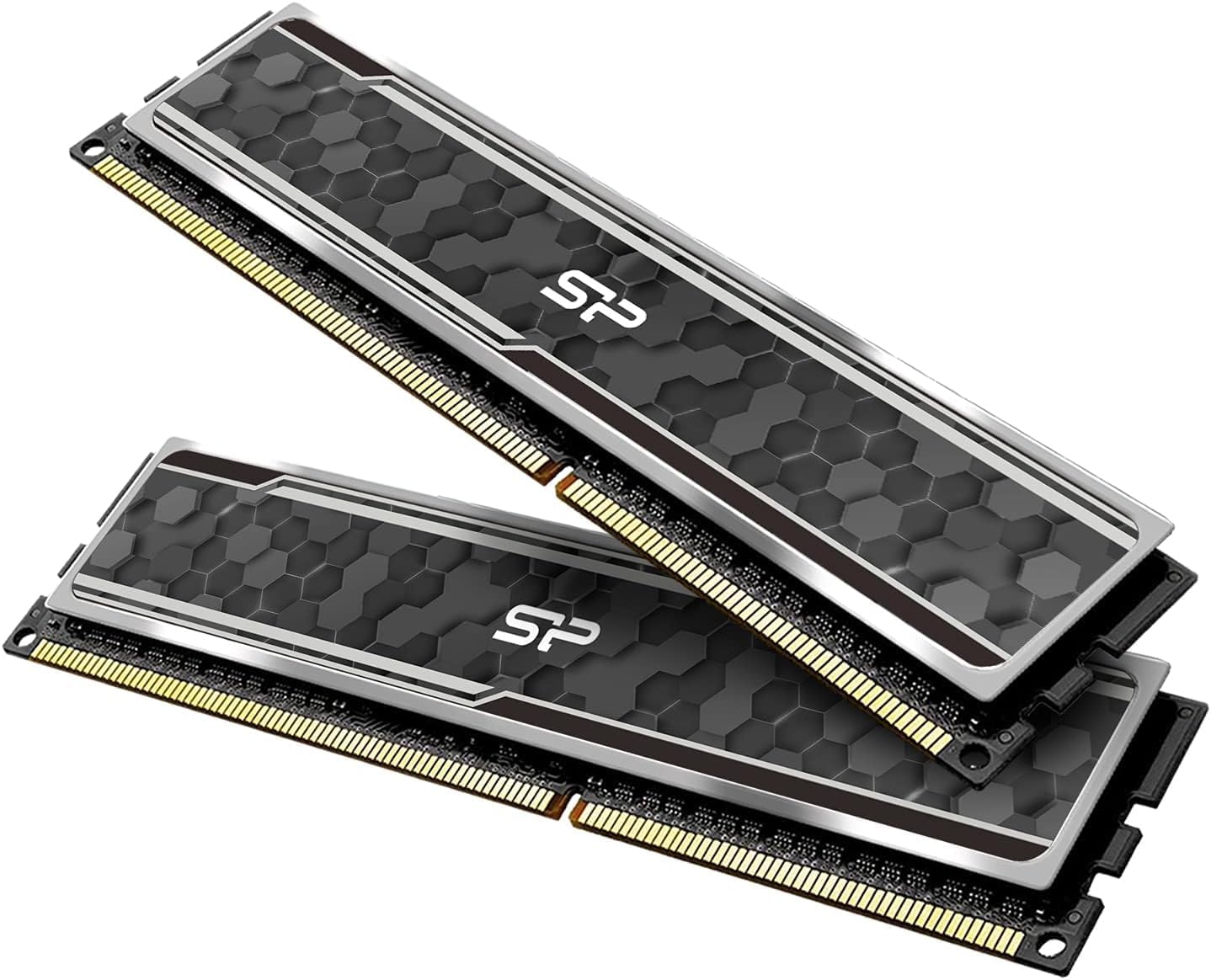
Silicon Power Value Gaming DDR4 RAM 16GB (2x8GB) 3200MHz (PC4 25600) 288-pin CL16 1.35V UDIMM Desktop Memory Module with Heatsink Grey SU016GXLZU320BDAJ5
Want the best price and purchase timing?
Our AI advisor analyzes real-time pricing across all channels to find you the best deal.
AI Verdict
This 16GB (2x8GB) 3200MHz CL16 DDR4 kit is for desktop users seeking XMP-enabled performance without breaking the bank.
This 16GB 3200MHz CL16 kit offers a compelling balance of speed and capacity for many desktop users, particularly those with Intel XMP-compatible systems. However, its full performance hinges on enabling XMP, and checking your motherboard's QVL is crucial to avoid potential compatibility headaches. It's not a guaranteed 'just works' at max speed out of the box.
If you need more guaranteed performance or higher capacities, look for kits with lower CL timings at 3200MHz or higher speeds like 3600MHz CL16, and always check your motherboard's Qualified Vendor List.
Regret Score™
Medium RiskLower is better — measures purchase-regret risk from real buyer complaints, review credibility, and product maturity
Issues discovered after purchase
Critically weak dimension
Amazon rating vs actual quality
Chance this product isn't for you
Pros
- Achieves 3200MHz speed with CL16-18-18-38 timings after XMP activation.
- Operates at a low 1.35V, contributing to efficient heat dissipation.
- Features an aluminum heatsink for thermal management and a clean aesthetic.
- Intel XMP certified, simplifying the process to reach advertised speeds.
- Backed by a lifetime warranty, offering long-term support.
Cons
- Advertised 3200MHz speeds require manual XMP activation in BIOS; it defaults to lower JEDEC speeds otherwise.
- Potential for system instability or boot issues on motherboards not explicitly on the Qualified Vendor List (QVL).
- Actual performance is dependent on specific motherboard and CPU compatibility.
- No explicit mention of AMD EXPO support, which can optimize performance on AMD platforms.
Dimension Scores
3200MHz CL16 is a widely adopted sweet spot for DDR4 performance, offering above-average speed for its price band.
While standard DDR4 UDIMM, user reports of BSODs when not on a motherboard's QVL indicate it's not universally plug-and-play at advertised speeds.
XMP enables an overclock to 3200MHz, but there's no specific data suggesting significant manual overclocking potential beyond this advertised profile.
The inclusion of a lifetime warranty is a strong indicator of manufacturer confidence and provides excellent long-term user assurance.
Best For
- Budget-conscious PC builders aiming for 16GB DDR4.
- Gamers targeting 1080p or 1440p resolutions who need 3200MHz CL16 RAM.
- Users with Intel Coffee Lake or newer processors looking for XMP compatibility.
- Systems where XMP profiles can be easily enabled in the BIOS.
Not Recommended For
- Users unwilling to enable XMP in their BIOS for full speed.
- Extreme overclockers seeking significant headroom beyond advertised XMP profiles.
- Systems with motherboards known for strict QVL adherence without prior verification.
Watch Out For
- The RAM may cause 'PC wouldn't boot or BSOD' errors on specific motherboards, like the Gigabyte 450M DS3H, if not listed on the QVL.
- Advertised 3200 MT/s speeds are not plug-and-play; you must enable XMP in your BIOS, or it will run at a slower JEDEC standard.
- Actual performance can vary significantly based on your specific motherboard and CPU configuration.
Full Specifications
| RAM | 8 GB DDR4 |
| ASIN | B0FYPC2MK5 |
| Brand | SP Silicon Power |
| Color | Dual-Channel (Camouflage Grey) |
| Series | Value Gaming |
| Item Weight | 2.39 ounces |
| Manufacturer | SP Silicon Power |
| Memory Speed | 3200 MT/s |
| Compatible Devices | Desktop |
| Package Dimensions | 5.87 x 3.98 x 0.55 inches |
| Computer Memory Size | 8 GB |
| RAM Memory Technology | DDR4 |
What Buyers Say
While generally well-received for its value, some users have reported system instability, including blue screens and boot failures, when this RAM is paired with certain motherboards, especially if the motherboard's QVL isn't consulted. Many users find it performs as expected once XMP is enabled in the BIOS, delivering the advertised 3200MHz speed. The grey aluminum heatsink is a recurring positive mention for its aesthetic and cooling properties.
“Dude, this RAM is fast *if* you remember to turn on XMP in the BIOS, otherwise it's just... there. Had a scare with my old B450 board, but it's been solid since I swapped it out for a newer one. Lifetime warranty is cool though.”
Common Praise
- Reaches 3200MHz speed consistently after enabling XMP.
- The grey aluminum heatsink looks clean and helps with cooling.
- Offers a lifetime warranty, providing peace of mind.
- Provides a noticeable performance boost over slower, older RAM.
Common Complaints
- Requires manual XMP activation in BIOS for advertised speeds, not truly plug-and-play at full speed.
- Potential for boot issues or BSODs on motherboards not on the QVL.
Ownership Tips
- Enabling XMP is a necessary first step to achieve 3200MHz, it won't hit that speed automatically.
- Checking your motherboard's Qualified Vendor List (QVL) beforehand can save you compatibility headaches.
- The low-profile heatsink design generally fits well under most larger CPU air coolers.
- The grey color of the heatsink is a neutral aesthetic that blends into most builds.
Frequently Asked Questions
Does this RAM work with AMD Ryzen CPUs?
While this RAM supports Intel XMP, DDR4 is generally compatible with AMD Ryzen. For optimal performance on AMD systems, you might look for motherboards that support DOCP/A-XMP profiles, which are AMD's equivalents to XMP.
Do I need to do anything special to get 3200MHz?
Yes, you need to enable the XMP (Extreme Memory Profile) in your motherboard's BIOS to reach the advertised 3200MHz speed. Without XMP, it will run at a lower JEDEC standard speed.
Is 16GB enough for gaming?
For most current games at 1080p and 1440p, 16GB (2x8GB) is sufficient. If you frequently multitask with many applications, stream, or engage in heavy content creation, 32GB might be a more suitable choice.
Does this RAM have RGB lighting?
No, the product description and images indicate a grey heatsink without any mention of RGB lighting. It's a non-RGB module.
What is the voltage of this RAM?
This RAM operates at 1.35V, which is standard for performance DDR4 modules.
Buying Guide
When you're looking at RAM, you're balancing three main things: speed (MHz), timing (CL), and capacity (GB). Higher MHz means your CPU can grab data faster, and a lower CL means less delay in getting that data. For most people, 16GB is enough, but getting two sticks (like this 2x8GB kit) is super important for 'dual-channel' mode, which makes your system way faster than just one stick.
3200MHz (Speed)
This is how many cycles per second the RAM can perform. Think of it like the speed limit on a highway; a higher number means data can move faster, which helps your CPU access information quickly, leading to smoother performance in games and applications.
CL16 (CAS Latency)
This is the delay, measured in clock cycles, between when the CPU requests data from the RAM and when the RAM actually provides it. Lower numbers are better, like a shorter wait time at a drive-thru. CL16 at 3200MHz is a common and efficient combination for DDR4.
1.35V (Voltage)
This is the power required to run the RAM at its advertised speed. 1.35V is standard for performance DDR4. Lower voltage can mean less heat and power consumption, but too low might limit stability at higher speeds.
UDIMM (Unbuffered DIMM)
This indicates it's standard RAM for desktop computers. 'Unbuffered' means the CPU directly accesses the memory modules, which is faster for consumer systems compared to 'buffered' (RDIMM) RAM typically used in servers.
Alternatives
If this kit doesn't quite fit your needs, consider looking for DDR4 kits with 3600MHz speed and CL16 or CL18 timings for a slight performance bump, or 32GB (2x16GB) kits if you need more capacity for demanding tasks like video editing or heavy multitasking.
You Might Also Like

Crucial 32GB DDR4 RAM Kit (2x16GB), 3200MHz (PC4-25600) CL22 Laptop Memory, SODIMM 260-Pin, Downclockable to 2933/2666MHz, Compatible with 13th Gen Intel Core and AMD Ryzen 7000 - CT2K16G4SFRA32A
A 32GB (2x16GB) DDR4 3200MHz CL22 SODIMM kit operating at 1.2V, designed for laptops needing a significant boost in multitasking and system responsiveness.

Crucial 16GB DDR4 RAM, 3200MHz CL22 (or 2933MHz or 2666MHz) Laptop Memory, SODIMM 260-Pin, Compatible with 13th Gen Intel Core and AMD Ryzen 7000 - CT16G4SFRA32A
This 16GB DDR4 SODIMM 260-pin module at 3200MHz CL22 is for laptop owners needing a straightforward performance boost for multitasking and application loading.

Corsair Vengeance LPX DDR4 RAM 16GB (2x8GB) 3200MHz CL16-18-18-36 1.35V Intel AMD Desktop Computer Memory - Black (CMK16GX4M2B3200C16)
This 16GB (2x8GB) DDR4 3200MHz CL16 RAM kit offers 1.35V operation and a 34mm low-profile design for most Intel and AMD desktop builds.

Crucial 8GB DDR4 RAM 3200MHz (PC4-25600), Downclockable to 2933/2666MHz Laptop Memory, SODIMM 260-Pin CL22, Compatible with 13th Gen Intel Core and AMD Ryzen 7000 - CT8G4SFRA32A
This 8GB DDR4 3200MHz CL22 SODIMM is a budget-friendly upgrade for laptops needing a performance bump for everyday tasks and light multitasking.