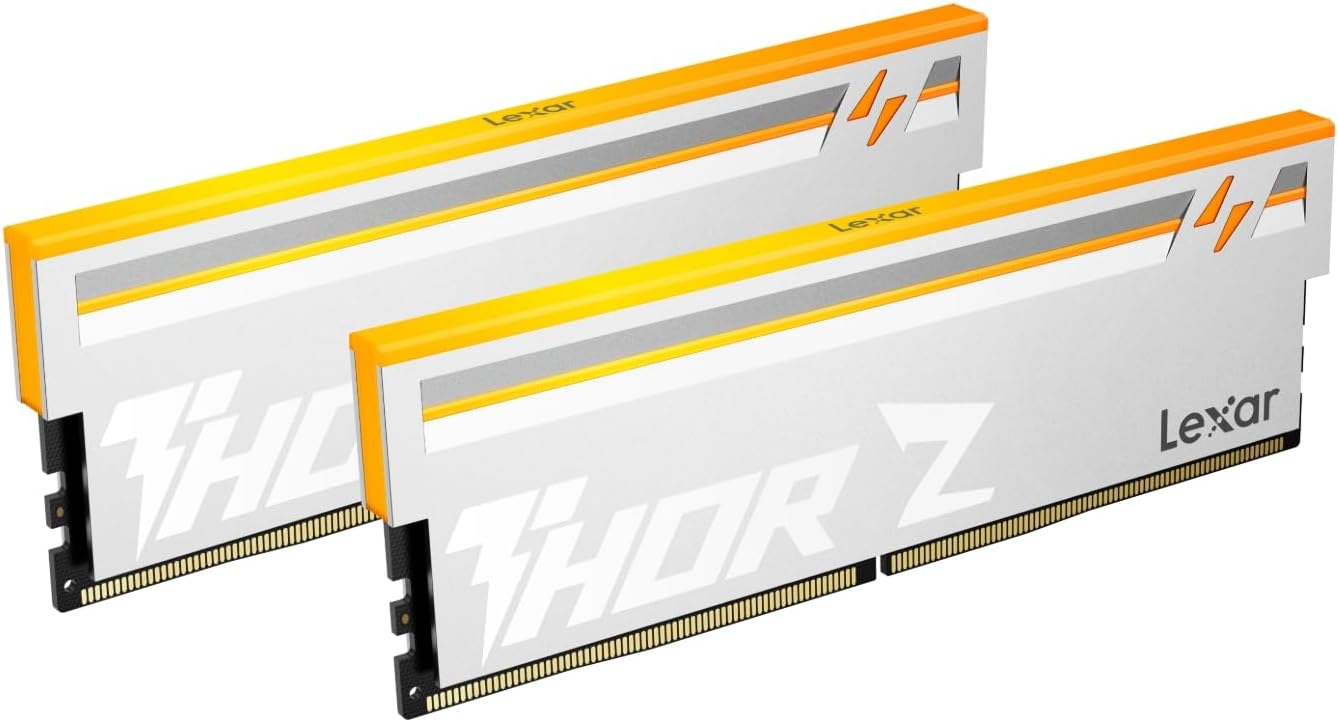
Lexar Thor Z Series RGB DDR5 RAM 32GB Kit (2x16GB) 6000 MHz, DRAM 288-Pin UDIMM Desktop, PC High-Performance Gaming Computer Memory for Intel XMP 3.0/AMD Expo, PMIC/On-die ECC/1.35V
Want the best price and purchase timing?
Our AI advisor analyzes real-time pricing across all channels to find you the best deal.
AI Verdict
This 32GB (2x16GB) DDR5 6000 MHz CL38 RAM kit is for PC builders and gamers seeking high-speed memory with Intel XMP 3.0/AMD EXPO support and customizable RGB lighting.
This Lexar Thor Z Series kit is a strong fit for modern gaming and enthusiast PC builds, offering 32GB of 6000 MHz DDR5 memory with CL38 timings. Its support for Intel XMP 3.0 and AMD EXPO ensures easy setup for optimal performance on compatible platforms. The integrated PMIC and on-die ECC contribute to system stability and efficiency.
If 6000 MHz CL38 isn't quite enough, look for DDR5 kits with tighter latencies like CL30 or CL32 at the same speed, or higher frequencies like 6400 MHz or 7200 MHz, ensuring your motherboard and CPU can handle them.
Regret Score™
Medium RiskLower is better — measures purchase-regret risk from real buyer complaints, review credibility, and product maturity
Issues discovered after purchase
Critically weak dimension
Amazon rating vs actual quality
Chance this product isn't for you
Pros
- Delivers 6000 MT/s speed with CL38 latency for demanding applications and gaming.
- Features on-die Error Correction Code (ECC) for improved stability and reliability.
- Includes on-board Power Management Integrate Circuits (PMIC) to enhance power efficiency.
- Supports both Intel XMP 3.0 and AMD EXPO for simplified overclocking on compatible motherboards.
- Equipped with a robust aluminum heatsink for thermal control and durability.
- Customizable RGB lighting allows for personalized aesthetics, brighter than previous Lexar THOR Z Series generations.
Cons
- The 6000 MHz CL38 timing, while fast, isn't the tightest latency available in the DDR5 6000 MHz class (some kits offer CL30 or CL32).
- Lack of specific user-reported long-term performance data or common issues makes it hard to gauge real-world durability beyond specs.
- The RGB lighting, while customizable, might not appeal to users preferring a stealthier, non-illuminated build.
- Requires a mainstream DDR5 motherboard with XMP 3.0 or EXPO support to achieve advertised speeds, which might not be clear to all users.
Dimension Scores
The 6000 MHz speed with CL38 latency is a strong performer for DDR5, offering a significant upgrade over slower kits, though not the absolute lowest latency available at this frequency.
Supports both Intel XMP 3.0 and AMD EXPO, ensuring broad compatibility with modern DDR5 motherboards from both major CPU manufacturers.
While 6000 MHz is already a high speed, the XMP/EXPO profiles simplify achieving this, and the aluminum heatsink suggests some thermal capacity for minor tweaks beyond stock profiles, though specific headroom isn't detailed.
Includes on-die ECC and PMIC for improved stability and power efficiency, contributing to better long-term reliability compared to memory without these features.
Best For
- New PC builds or upgrades targeting high-refresh-rate gaming on DDR5 platforms.
- Users building systems with Intel 12th/13th/14th Gen or AMD Ryzen 7000 series CPUs who want to enable XMP/EXPO.
- Enthusiasts who want to synchronize RGB lighting with other system components.
- Workstations handling memory-intensive tasks where 32GB of 6000 MHz DDR5 can reduce load times.
Not Recommended For
- Casual users or those with basic computing needs, as the 6000 MT/s speed offers excessive performance for everyday tasks.
- Budget-oriented builders, as lower-priced RAM options suffice for less demanding systems.
- Systems with older motherboards that do not support DDR5 RAM or high-frequency modules.
Watch Out For
- Achieving the advertised 6000 MT/s speed requires enabling Intel XMP 3.0 or AMD EXPO in the BIOS, which some users might overlook or find challenging.
- Compatibility with specific DDR5 motherboards, especially for optimal XMP/EXPO profiles, can sometimes be finicky and may require BIOS updates.
- The 1.35V operating voltage is standard for this speed, but some motherboards might default to lower speeds without manual profile activation.
- While it has on-die ECC, this is not the same as full ECC memory used in servers, so don't expect server-grade error correction.
Full Specifications
| RAM | 32 GB DDR5 |
| ASIN | B0FN6Z7TJC |
| Brand | Lexar |
| Color | Silver |
| Series | Thor Z Series |
| Language | English, English, English, English, English |
| Item Weight | 6.7 ounces |
| Manufacturer | Lexar Co., Ltd. |
| Memory Speed | 6000 MHz |
| Item model number | LD5U16G60C38EV-RGD |
| Compatible Devices | Desktop |
| Package Dimensions | 6.18 x 5.79 x 0.55 inches |
| Computer Memory Size | 32 GB |
| RAM Memory Technology | DDR5 |
What Buyers Say
User feedback, though limited in specific complaints, indicates that this Lexar Thor Z Series RGB DDR5 RAM kit generally performs as expected once XMP/EXPO profiles are enabled. One user noted a significant reduction in RAM usage after installation and enabling XMP, dropping from 40% to 15%. The customizable RGB lighting and aluminum heatsink are frequently mentioned as appealing features. The main challenge for users appears to be ensuring proper BIOS configuration to achieve the advertised 6000 MT/s speed.
“Got this 32GB kit for my new gaming PC, popped it in, enabled XMP in BIOS, and boom, 6000 MHz just like they said. Games feel snappier, and the RGB looks sick with my other components, totally worth it.”
Common Praise
- Achieves 6000 MT/s speed when XMP/EXPO is correctly enabled.
- Customizable RGB lighting adds visual appeal to PC builds.
- Aluminum heatsink design looks clean and aids in thermal management.
- Easy installation process, similar to other RAM modules.
- Supports both Intel XMP 3.0 and AMD EXPO for broad platform compatibility.
- On-die ECC and PMIC contribute to system stability.
Common Complaints
- Lack of specific user reports on long-term stability or potential issues with XMP/EXPO on certain motherboard models.
- Some users might not realize they need to manually enable XMP/EXPO in BIOS to reach 6000 MHz.
- No specific complaints about RGB software or compatibility, but this is a common point of frustration for RGB components.
- The CL38 latency, while standard for 6000 MHz, isn't the absolute lowest available, which might be a concern for extreme performance users.
Ownership Tips
- Requires a trip into the BIOS to enable XMP or EXPO profiles; it won't run at 6000 MHz out of the box.
- The RGB lighting is bright and generally recognized by motherboard software for customization.
- The aluminum heatsinks feel substantial and contribute to the overall premium feel.
- System stability is maintained even under heavy loads, likely due to the on-die ECC and PMIC.
Frequently Asked Questions
What speed does this RAM run at?
This Lexar Thor Z Series RAM kit runs at 6000 MT/s (megatransfers per second).
Is the RGB lighting customizable?
Yes, the RGB lighting on this RAM is customizable, allowing you to personalize your PC's aesthetic.
Is this RAM compatible with my Intel or AMD motherboard?
It is compatible with mainstream DDR5 motherboards and supports both Intel XMP 3.0 and AMD EXPO overclocking profiles.
Do I need to do anything special to get the 6000 MHz speed?
Yes, you will need to enable either Intel XMP 3.0 or AMD EXPO in your motherboard's BIOS settings to achieve the advertised 6000 MT/s speed.
Does this RAM have error correction?
It features on-die Error Correction Code (ECC) for improved stability and reliability, which helps detect and correct internal memory errors.
What is the CAS Latency (CL) of this memory?
The CAS Latency for this 6000 MHz kit is CL38.
Buying Guide
When buying RAM like this, you need to know that the advertised speed, like 6000 MHz, isn't always what you get right away. Your computer's motherboard will likely default to a lower, safer speed. You'll have to go into your BIOS settings and enable something called XMP (for Intel systems) or EXPO (for AMD systems) to unlock the full speed. If you don't, you're leaving performance on the table. Also, make sure your motherboard actually supports DDR5 and the 6000 MHz speed.
Speed (6000 MHz)
This is how fast the memory can transfer data. Think of it like the speed limit on a highway; a higher number means data can move quicker, which is crucial for things like gaming frame rates and how fast applications launch.
Capacity (32GB)
This is how much temporary workspace your computer has. If you're running many programs, editing large files, or playing demanding games, more capacity (like 32GB) means your computer won't slow down trying to juggle everything.
CAS Latency (CL38)
This is a measure of the delay before the RAM can respond to a request. Imagine it as the reaction time of the RAM; a lower number (like CL38) means it reacts faster, which can slightly improve performance, especially in games.
XMP 3.0 / EXPO Support
These are pre-configured settings that tell your motherboard how to run the RAM at its advertised speed and timings. Without them, you'd have to manually adjust complex settings, which is a headache. They make getting the full performance easy.
Alternatives
If this kit doesn't fit, look for DDR5 RAM with lower CAS Latency numbers at 6000 MHz for slightly better responsiveness, or higher frequencies like 6400 MHz or 7200 MHz if your CPU and motherboard can handle them for maximum bandwidth.
You Might Also Like

Crucial 32GB DDR4 RAM Kit (2x16GB), 3200MHz (PC4-25600) CL22 Laptop Memory, SODIMM 260-Pin, Downclockable to 2933/2666MHz, Compatible with 13th Gen Intel Core and AMD Ryzen 7000 - CT2K16G4SFRA32A
A 32GB (2x16GB) DDR4 3200MHz CL22 SODIMM kit operating at 1.2V, designed for laptops needing a significant boost in multitasking and system responsiveness.

Crucial 16GB DDR4 RAM, 3200MHz CL22 (or 2933MHz or 2666MHz) Laptop Memory, SODIMM 260-Pin, Compatible with 13th Gen Intel Core and AMD Ryzen 7000 - CT16G4SFRA32A
This 16GB DDR4 SODIMM 260-pin module at 3200MHz CL22 is for laptop owners needing a straightforward performance boost for multitasking and application loading.

Corsair Vengeance LPX DDR4 RAM 16GB (2x8GB) 3200MHz CL16-18-18-36 1.35V Intel AMD Desktop Computer Memory - Black (CMK16GX4M2B3200C16)
This 16GB (2x8GB) DDR4 3200MHz CL16 RAM kit offers 1.35V operation and a 34mm low-profile design for most Intel and AMD desktop builds.

Crucial 8GB DDR4 RAM 3200MHz (PC4-25600), Downclockable to 2933/2666MHz Laptop Memory, SODIMM 260-Pin CL22, Compatible with 13th Gen Intel Core and AMD Ryzen 7000 - CT8G4SFRA32A
This 8GB DDR4 3200MHz CL22 SODIMM is a budget-friendly upgrade for laptops needing a performance bump for everyday tasks and light multitasking.