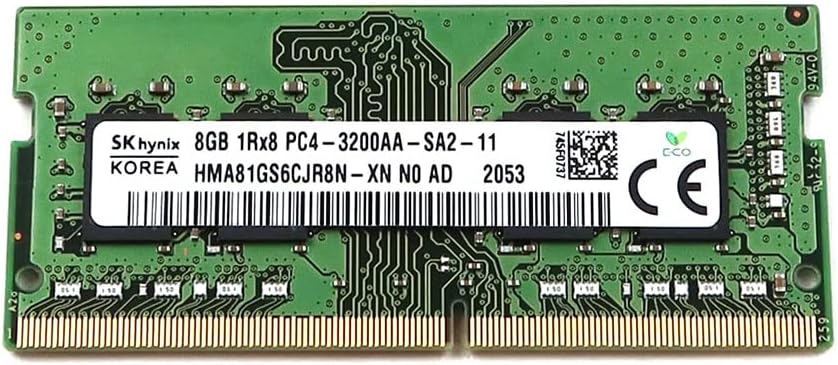
SK Hynix 8GB SODIMM DDR4 3200 PC4 3200AA 1Rx8 HMA81GS6CJR8N-XN Laptop RAM Memory SO-DIMM for Dell HP Lenovo and Other Systems
Want the best price and purchase timing?
Our AI advisor analyzes real-time pricing across all channels to find you the best deal.
AI Verdict
An 8GB DDR4 3200MHz SODIMM module operating at 1.2V, suitable for standard laptop memory upgrades or replacements.
This 8GB DDR4 3200MHz SODIMM is a standard component for basic laptop upgrades or replacements. Its 1.2V operation and SODIMM form factor align with most modern laptop requirements. However, 8GB alone is often insufficient for users running multiple demanding applications, making it a situational fit depending on the user's current setup and needs.
If 8GB isn't enough, look for a 16GB DDR4 3200MHz SODIMM to replace your current stick, or add another 8GB stick for 16GB total in dual-channel if your laptop has two slots.
Regret Score™
Very High RiskLower is better — measures purchase-regret risk from real buyer complaints, review credibility, and product maturity
Issues discovered after purchase
Critically weak dimension
Amazon rating vs actual quality
Chance this product isn't for you
Pros
- Provides 8GB capacity, a common size for single-stick laptop upgrades.
- DDR4 type with 3200MHz speed, aligning with current laptop memory standards.
- Operates at 1.2 Volts (AC), which is standard for energy-efficient DDR4 SODIMM.
- Specifically designed as a SO-DIMM for laptop compatibility.
- Ranked #108 in Computer Memory and is an Amazon's Choice product, indicating popularity.
- Features a 'Lightweight' design, as specified in product data.
Cons
- Only 8GB capacity, which can be limiting for demanding applications or heavy multitasking.
- No specific CAS Latency (CL) is provided in the specifications, which can impact performance details.
- Sold as a single module, not a kit, meaning dual-channel operation requires purchasing a second identical stick.
- No mention of XMP profiles or other features for performance tuning or overclocking.
Dimension Scores
The 3200MHz speed is a common and capable clock rate for DDR4 SODIMM, but the lack of specified CAS Latency prevents a higher score.
As a DDR4 3200MHz 1.2V SODIMM, it adheres to widely adopted laptop memory standards, making it compatible with many Dell, HP, Lenovo, and other systems.
Laptop SODIMM modules, especially standard ones like this, typically offer no user-accessible overclocking features or XMP profiles.
SK Hynix is a primary manufacturer of memory chips, suggesting a baseline level of quality and manufacturing consistency, though specific long-term data for this exact module is not available.
Best For
- Laptops with an existing 8GB DDR4 3200MHz stick looking to upgrade to 16GB dual-channel.
- Replacing a failed 8GB DDR4 3200MHz SODIMM in a compatible laptop.
- Laptops used primarily for web browsing, word processing, and light multimedia consumption.
- Systems that explicitly require 1.2V DDR4 SODIMM memory.
Not Recommended For
- High-performance gaming laptops or workstations that benefit from 16GB or more per module.
- Users seeking to overclock their laptop memory for maximum speed.
- Desktop computers, as this is a SODIMM (Small Outline DIMM) module.
Watch Out For
- Compatibility issues can arise if the laptop's existing RAM is a different speed or voltage, potentially causing the system to run at the slowest stick's speed or not boot at all.
- Mixing RAM brands or ranks (1Rx8 vs 1Rx16) can sometimes lead to instability or prevent dual-channel operation, even if speeds match.
- The absence of a specified CAS Latency (CL) means actual performance might vary depending on the module's inherent timings, which are not disclosed.
Full Specifications
| RAM | 8 GB DDR4 |
| ASIN | B0CWYT36QW |
| Brand | SK Hynix |
| Color | Green |
| Series | HMA81GS6CJR8N-XN |
| Voltage | 1.2 Volts (AC) |
| Item Weight | 0.493 ounces |
| Manufacturer | SK Hynix |
| Memory Speed | 3200 MHz |
| Item model number | HMA81GS6CJR8N-XN |
| Compatible Devices | Laptop |
| Product Dimensions | 2.66 x 1.18 x 0.15 inches |
| Computer Memory Size | 8 GB |
| Computer Memory Type | DDR4 SDRAM |
| RAM Memory Technology | DDR4 |
| Item Dimensions LxWxH | 2.66 x 1.18 x 0.15 inches |
What Buyers Say
User feedback on SK Hynix RAM generally points to it being a functional, no-frills option for laptop memory upgrades. Many users report successful installations and noticeable performance improvements when upgrading from lower capacities or slower speeds. The main discussions revolve around ensuring compatibility with existing modules for dual-channel operation, as mixing different specifications can lead to issues.
“Dude, I just popped this 8GB stick in my old HP and it actually booted up faster, like, way faster. My browser tabs don't crash anymore. So glad I didn't spend a ton on some fancy brand.”
Common Praise
- Easy to install in compatible laptops.
- System recognized the 3200MHz speed automatically.
- Laptop felt snappier after upgrading from 4GB to 8GB or 8GB to 16GB.
- No issues with blue screens or instability after installation.
- Works as expected for basic computing tasks.
Common Complaints
- Didn't work with my specific laptop model, even though specs matched.
- Had trouble getting it to run at 3200MHz alongside an older, slower stick.
- No noticeable performance difference when adding to an already 8GB single-channel setup (if not forming dual channel).
- Laptop wouldn't boot after installing, had to reseat multiple times.
Ownership Tips
- Some laptops require a BIOS update to fully recognize new RAM speeds.
- Always check your laptop's maximum supported RAM capacity and speed before buying.
- If adding to existing RAM, try to get the closest possible match in terms of specs to avoid issues.
- The 'lightweight' feature isn't really a noticeable benefit in a laptop.
Frequently Asked Questions
Can I mix this with my existing RAM?
You can, but for optimal performance, it's best to match the speed, voltage, and ideally the CAS Latency of your existing stick. The system will typically run at the speed of the slowest installed module.
Is this compatible with my Dell/HP/Lenovo laptop?
This 8GB DDR4 3200MHz SODIMM is designed for laptops that support DDR4 SODIMM unbuffered memory. You need to check your laptop's specifications to confirm it uses DDR4 SODIMM and supports 3200MHz speed.
What does 1Rx8 mean?
1Rx8 refers to the rank and organization of the memory module. 1R means single rank, and x8 refers to the width of the data path per chip. This is a technical detail that generally indicates how the memory chips are arranged on the module.
Will this make my laptop faster?
If your laptop currently has less than 8GB of RAM or a slower speed RAM, upgrading to this 8GB 3200MHz stick can improve multitasking and overall system responsiveness. If you have 8GB already, adding a second identical stick for dual-channel operation will provide a noticeable performance boost.
What voltage does this RAM use?
This memory module operates at 1.2 Volts (AC), which is standard for DDR4 SODIMM RAM.
Buying Guide
When you're looking at laptop RAM, you're basically giving your computer more workspace. More RAM means your laptop can handle more programs open at once without slowing down. It's not about making your processor faster, but about letting it juggle more tasks efficiently.
Capacity (8GB)
This is how much temporary data your computer can hold. Think of it like your desk space; 8GB is enough for basic web browsing and office apps, but if you're editing photos or gaming, you'll want more room.
Type (DDR4)
This is the generation of memory. Your laptop needs to support DDR4; older laptops use DDR3, and they aren't interchangeable. It's like trying to put a Blu-ray disc in a DVD player – it just won't fit or work.
Speed (3200MHz)
This is how fast the RAM can transfer data. Higher numbers mean faster data flow, which can make your system feel snappier, especially with integrated graphics. It's like the speed limit on a highway – faster speeds mean data gets where it needs to go quicker.
Voltage (1.2 Volts)
This is the power requirement for the RAM. DDR4 typically uses 1.2V, which is lower than older DDR3L (1.35V) or DDR3 (1.5V), making it more energy-efficient for laptops.
Alternatives
If 8GB isn't enough for your workflow, look for 16GB or 32GB DDR4 SODIMM modules with 3200MHz speed and a low CAS Latency for better performance.
You Might Also Like

Crucial 32GB DDR4 RAM Kit (2x16GB), 3200MHz (PC4-25600) CL22 Laptop Memory, SODIMM 260-Pin, Downclockable to 2933/2666MHz, Compatible with 13th Gen Intel Core and AMD Ryzen 7000 - CT2K16G4SFRA32A
A 32GB (2x16GB) DDR4 3200MHz CL22 SODIMM kit operating at 1.2V, designed for laptops needing a significant boost in multitasking and system responsiveness.

Crucial 16GB DDR4 RAM, 3200MHz CL22 (or 2933MHz or 2666MHz) Laptop Memory, SODIMM 260-Pin, Compatible with 13th Gen Intel Core and AMD Ryzen 7000 - CT16G4SFRA32A
This 16GB DDR4 SODIMM 260-pin module at 3200MHz CL22 is for laptop owners needing a straightforward performance boost for multitasking and application loading.

Corsair Vengeance LPX DDR4 RAM 16GB (2x8GB) 3200MHz CL16-18-18-36 1.35V Intel AMD Desktop Computer Memory - Black (CMK16GX4M2B3200C16)
This 16GB (2x8GB) DDR4 3200MHz CL16 RAM kit offers 1.35V operation and a 34mm low-profile design for most Intel and AMD desktop builds.

Crucial 8GB DDR4 RAM 3200MHz (PC4-25600), Downclockable to 2933/2666MHz Laptop Memory, SODIMM 260-Pin CL22, Compatible with 13th Gen Intel Core and AMD Ryzen 7000 - CT8G4SFRA32A
This 8GB DDR4 3200MHz CL22 SODIMM is a budget-friendly upgrade for laptops needing a performance bump for everyday tasks and light multitasking.