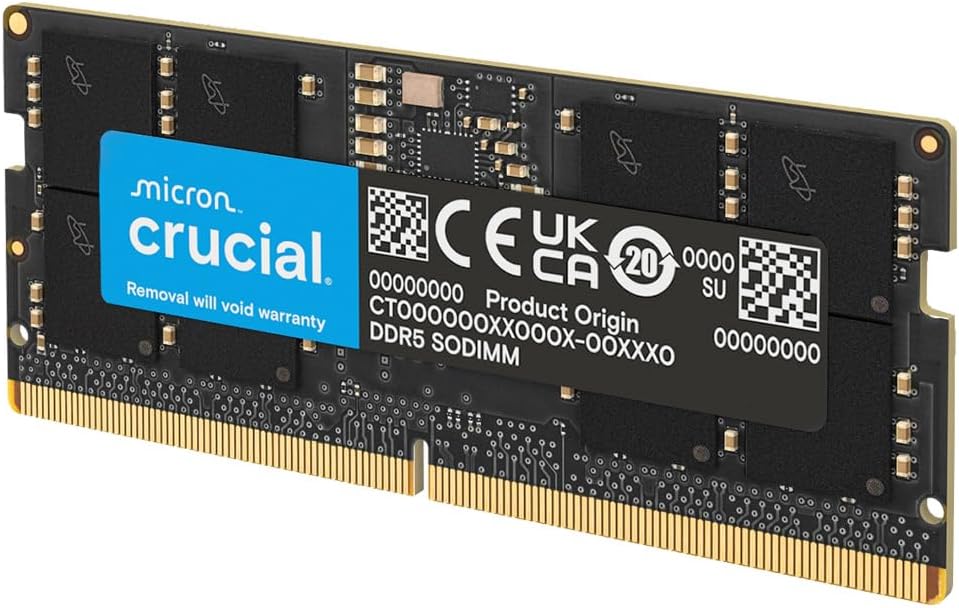
Crucial 16GB DDR5 RAM, 5600MHz (or 5200MHz or 4800MHz) Laptop Memory, SODIMM 262-Pin, Compatible with 13th Gen Intel Core and AMD Ryzen 7000 - CT16G56C46S5
Want the best price and purchase timing?
Our AI advisor analyzes real-time pricing across all channels to find you the best deal.
AI Verdict
This 16GB DDR5 5600MHz CL46 SODIMM module is for laptop owners needing a single stick upgrade for 12th/13th Gen Intel or Ryzen 7000.
This 16GB DDR5 5600MHz module is a direct, high-speed upgrade for compatible laptops, specifically those with 12th/13th Gen Intel Core or AMD Ryzen 7000 processors. Its 1.1V operation and SODIMM form factor ensure broad compatibility within its target laptop segment.
If 16GB isn't enough, look for a second identical 16GB 5600MHz CL46 SODIMM module to achieve 32GB total, or consider a single 32GB module if your laptop has only one slot.
Regret Score™
Very Low RiskLower is better — measures purchase-regret risk from real buyer complaints, review credibility, and product maturity
Issues discovered after purchase
Critically weak dimension
Amazon rating vs actual quality
Chance this product isn't for you
Pros
- Operates at 5600MHz, providing faster data transfers than 4800MHz DDR5 modules.
- Compatible with 12th/13th Gen Intel Core and AMD Ryzen 7000 Series processors.
- Supports Intel XMP 3.0 and AMD EXPO for optimized performance profiles.
- Features a 1.1V operating voltage, standard for DDR5 SODIMM.
- Rigorous testing at component and module levels ensures quality from Micron.
- Users report seamless plug-and-play installation and stability.
Cons
- CAS Latency of 46 is not the tightest available for DDR5 5600MHz.
- Can downclock to 5200MHz or 4800MHz if the system does not support 5600MHz.
- Only 16GB capacity, which might be insufficient for some heavy multitasking or specific games.
- Overclocking beyond JEDEC specifications may void the warranty.
Dimension Scores
5600MHz is a fast speed for laptop DDR5, but CL46 is on the higher side for this speed.
Designed for current-gen Intel (12th/13th) and AMD (Ryzen 7000) laptops, with XMP/EXPO support.
While some users report reaching 6000MHz, Crucial's warranty explicitly states that altering clock frequency or voltage beyond JEDEC specifications may void it.
Backed by Micron's 42 years of memory expertise and rigorous testing, with users reporting stability.
Best For
- Upgrading a laptop with a single 16GB DDR5 4800MHz stick to 32GB total for gaming.
- Users with 12th/13th Gen Intel or AMD Ryzen 7000 laptops needing a performance boost for demanding applications.
- Anyone seeking a straightforward, plug-and-play DDR5 SODIMM upgrade.
Not Recommended For
- Laptops that only support DDR4 memory.
- Users requiring the absolute lowest CAS latency for competitive gaming.
- Systems where 16GB is already the maximum supported capacity and a single stick upgrade isn't possible.
Watch Out For
- The module might run at 5200MHz or 4800MHz if the laptop's motherboard or CPU doesn't fully support 5600MHz, potentially negating the speed benefit.
- Altering clock frequency or voltage beyond JEDEC specifications can void the warranty.
- Some users might find 16GB insufficient for future-proofing or extremely heavy workloads, requiring a second stick for 32GB.
Full Specifications
| RAM | 16 GB DDR5 |
| ASIN | B0BLTGMCB7 |
| Brand | Crucial |
| Color | Black |
| Series | Crucial DDR5 5600MHz SODIMM |
| Voltage | 1.1 Volts |
| Language | English |
| Batteries | 1 AAAA batteries required. |
| Item Weight | 0.307 ounces |
| Manufacturer | Crucial |
| Memory Speed | 5600 MHz |
| Item model number | CT16G56C46S5 |
| Compatible Devices | Laptop |
| Product Dimensions | 2.74 x 0.15 x 1.18 inches |
| Computer Memory Size | 16 GB |
| Computer Memory Type | DDR5 SDRAM |
| Number of Processors | 1 |
| RAM Memory Technology | DDR5 |
| Item Dimensions LxWxH | 2.74 x 0.15 x 1.18 inches |
| Standing screen display size | 16 Inches |
What Buyers Say
Many users upgrading from 16GB 4800MHz DDR5 to 32GB (using two of these 16GB 5600MHz sticks) report noticeable performance gains, especially in gaming and heavy applications. The module is frequently praised for its easy installation and immediate recognition by systems. Some users appreciate the aesthetic of the matte black PCB. The main point of caution noted is the potential for the RAM to downclock if the laptop's system doesn't fully support 5600MHz.
“Dude, my laptop was chugging with 16GB 4800MHz, but throwing this 16GB 5600MHz stick in there made a real difference for my games, it just works!”
Common Praise
- Immediate recognition and plug-and-play functionality after installation.
- Noticeable performance improvement in games and demanding software when upgrading from slower or lower capacity RAM.
- Matte black PCB and heat spreader provide a clean, stealthy look.
- Stable operation with no reported crashes during use.
Common Complaints
- Module may run at 5200MHz or 4800MHz if the laptop's CPU or motherboard doesn't support 5600MHz.
- Some users wish for tighter CAS latencies at this speed.
- Warranty concerns if attempting to overclock beyond JEDEC specifications.
Ownership Tips
- Check your laptop's maximum supported RAM speed before buying to ensure it can utilize 5600MHz.
- If installing two sticks, ensure they are identical for optimal dual-channel performance.
- The performance boost is most apparent when upgrading from significantly slower or less capacity RAM.
- No fancy RGB, just a functional, low-profile design.
Frequently Asked Questions
Will this work in my older laptop that uses DDR4?
No, this is DDR5 SODIMM memory, designed only for laptops that specifically support DDR5. DDR4 and DDR5 modules are physically different and not interchangeable.
My laptop currently has 4800MHz DDR5 RAM. Will this 5600MHz module work with it?
Yes, it should work, but it will likely downclock to match the speed of the slower 4800MHz module, or the maximum speed supported by your system, which might be 4800MHz.
Is it difficult to install?
Installation is generally straightforward for SODIMM modules; it's a plug-and-play upgrade for most compatible laptops.
Does this RAM support XMP or EXPO?
Yes, this module supports both Intel XMP 3.0 and AMD EXPO for optimized performance profiles, provided your laptop's BIOS supports these features.
What does CL46 mean?
CL46 refers to the CAS Latency, which is 46 clock cycles. It's a measure of the delay between when the RAM controller requests data and when the data is available.
Buying Guide
When buying laptop RAM, you need to match the DDR generation (DDR5 in this case) and the form factor (SODIMM for laptops). While higher speeds like 5600MHz are appealing, your laptop's CPU and motherboard ultimately determine the maximum speed it can actually run at. Don't just buy the fastest if your system can't handle it, as it will simply run at a lower speed.
DDR5
This is the newest generation of RAM, offering higher speeds and efficiency compared to older DDR4, like upgrading from a regular road to a highway with more lanes.
5600MHz
This number indicates the speed at which the memory can transfer data. A higher number means faster processing, which is like having a faster speed limit on that highway, allowing your computer to access information quicker.
SODIMM
This is the physical size and pin configuration for laptop memory modules. It's smaller than desktop RAM (UDIMM) and ensures it fits into your laptop's memory slots.
CL46 (CAS Latency 46)
This is a measure of delay, specifically the time it takes for the RAM to respond to a request. Lower numbers are generally better, meaning less waiting time for your CPU to get data.
Alternatives
If you need more capacity, look for 32GB DDR5 SODIMM modules. If your laptop only supports 4800MHz, consider a 4800MHz DDR5 SODIMM to potentially save money without losing performance.
You Might Also Like

Crucial 32GB DDR4 RAM Kit (2x16GB), 3200MHz (PC4-25600) CL22 Laptop Memory, SODIMM 260-Pin, Downclockable to 2933/2666MHz, Compatible with 13th Gen Intel Core and AMD Ryzen 7000 - CT2K16G4SFRA32A
A 32GB (2x16GB) DDR4 3200MHz CL22 SODIMM kit operating at 1.2V, designed for laptops needing a significant boost in multitasking and system responsiveness.

Crucial 16GB DDR4 RAM, 3200MHz CL22 (or 2933MHz or 2666MHz) Laptop Memory, SODIMM 260-Pin, Compatible with 13th Gen Intel Core and AMD Ryzen 7000 - CT16G4SFRA32A
This 16GB DDR4 SODIMM 260-pin module at 3200MHz CL22 is for laptop owners needing a straightforward performance boost for multitasking and application loading.

Corsair Vengeance LPX DDR4 RAM 16GB (2x8GB) 3200MHz CL16-18-18-36 1.35V Intel AMD Desktop Computer Memory - Black (CMK16GX4M2B3200C16)
This 16GB (2x8GB) DDR4 3200MHz CL16 RAM kit offers 1.35V operation and a 34mm low-profile design for most Intel and AMD desktop builds.

Crucial 8GB DDR4 RAM 3200MHz (PC4-25600), Downclockable to 2933/2666MHz Laptop Memory, SODIMM 260-Pin CL22, Compatible with 13th Gen Intel Core and AMD Ryzen 7000 - CT8G4SFRA32A
This 8GB DDR4 3200MHz CL22 SODIMM is a budget-friendly upgrade for laptops needing a performance bump for everyday tasks and light multitasking.