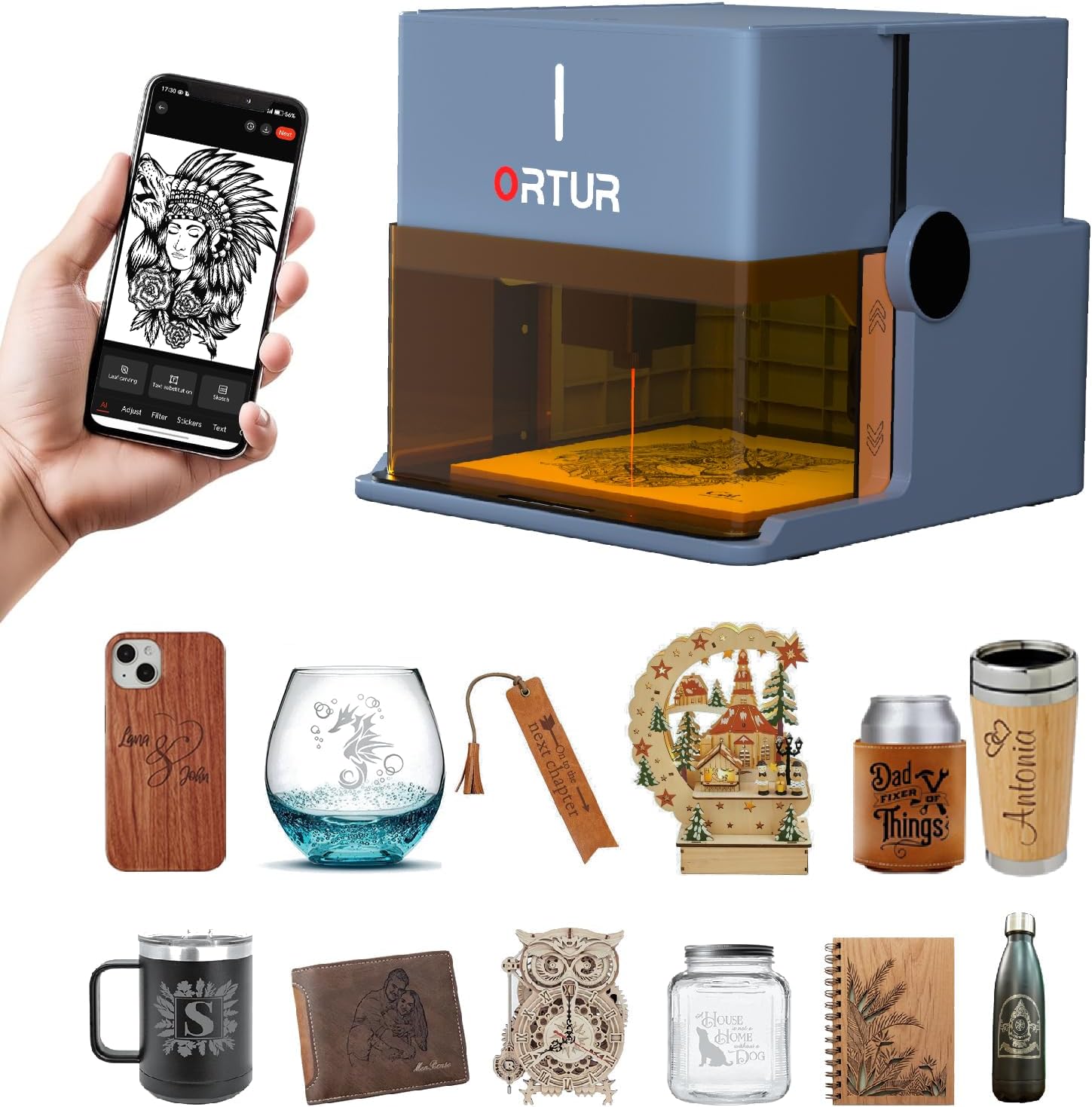
Ortur R1 5000mW Portable Laser Engraver and Cutter, Class 1 Foldable Laser Engraver, Exquisite Gift Box Packaging, APP Control Laser Engraver for Wood, Leather, Glass, Cloth (Misty Blue)
Want the best price and purchase timing?
Our AI advisor analyzes real-time pricing across all channels to find you the best deal.
AI Verdict
A 5000mW foldable laser engraver with a 100x100mm area and 0.05mm accuracy, designed for quick, app-controlled engraving on wood, leather, glass, and cloth.
This engraver is a situational fit for those prioritizing ease of use and safety for small-scale engraving projects, particularly for beginners or educational purposes. Its foldable design and app control simplify initial setup and operation, but the 5W laser's reported cutting limitations and small work area restrict its utility for more demanding tasks.
If you need more robust cutting performance or a larger work area, look for models with higher wattage lasers (e.g., 10W or 20W) and a minimum 200x200mm engraving bed.
Regret Score™
High RiskLower is better — measures purchase-regret risk from real buyer complaints, review credibility, and product maturity
Issues discovered after purchase
Critically weak dimension
Amazon rating vs actual quality
Chance this product isn't for you
Pros
- Foldable design requires no installation, ready for use upon unfolding.
- Class 1 laser classification with watchdog, auto shutdown, exposure limits, tilt detection, and lid-stop for safety.
- Supports online and offline modes, allowing remote control and file transfer.
- App control features AI algorithms for image generation, hand-drawn engraving, and puzzle mode.
- Engraving area of 100x100mm with an accuracy of up to 0.05mm and a laser speed of 5000mm/min.
- Includes an aluminum alloy base plate to protect the desktop during operation.
Cons
- The 5W laser struggles with clean cuts on thin plywood, with reports of scorching and charring even after multiple passes.
- The metal plate designed to protect the desktop does not protect the internal mechanics or laser head when folded.
- Requires a small, easily lost USB hardware key for operation, which can be inconvenient.
- The 100x100mm engraving area is relatively small for larger projects.
- Lacks a screen-printed grid on the base plate, making precise material alignment difficult without user-added solutions.
Dimension Scores
The 0.05mm accuracy and 0.025x0.11mm laser spot indicate fine engraving capabilities, but reported inconsistencies in detail and blurred lines in some tests prevent a higher score.
Its foldable, no-assembly design, 'Click' and 'Go' functionality, and intuitive app control make it exceptionally user-friendly for beginners.
It handles engraving on wood, leather, glass, and cloth, and claims to cut 3mm basswood, but the small 100x100mm area and reported struggles with clean cutting limit its applications.
Features an aluminum alloy base plate and comprehensive Class 1 safety mechanisms, but the unprotected laser head when folded and the easily lost USB key raise concerns about long-term robustness and user experience.
Best For
- Beginners exploring laser engraving due to its 'Click' and 'Go' setup and app control.
- Quick personalization of small items like gifts or craft fair products.
- Educational settings or home use with children, given its Class 1 safety features.
- Engraving on common materials such as wood, leather, glass, and cloth.
Not Recommended For
- Users requiring consistent, clean cutting of materials, especially plywood.
- Large-scale production or projects demanding an engraving area larger than 100x100mm.
- Professionals needing advanced, precise control beyond mobile app capabilities without relying on third-party software like LightBurn or LaserGRBL.
Watch Out For
- The 5W laser module reportedly struggles with cutting, failing to make clean linear cuts on thin plywood and instead causing scorching and charring after multiple passes.
- The included metal plate for desktop protection does not secure the laser head or internal components when the device is folded, leaving them vulnerable during transport.
- Operation requires a small USB hardware key, which is prone to being misplaced.
- The absence of a screen-printed grid on the base plate makes accurate positioning of materials a challenge.
Full Specifications
| ASIN | B0FL7BJKTG |
| Item Weight | 7.72 pounds |
| Manufacturer | Ortur |
| Item model number | R1 |
| Product Dimensions | 12.4 x 11.38 x 7.28 inches |
What Buyers Say
Early testers and reviewers highlight the Ortur R1's exceptional ease of use, particularly its 'Click' and 'Go' setup and friendly mobile app, making it approachable for beginners. However, the 5W laser's cutting performance is a recurring concern, with some reporting scorching and charring on thin plywood instead of clean cuts. The compact 100x100mm engraving area is noted as a limitation for larger projects, and minor design oversights like the unprotected laser head when folded and the easily lost USB key detract from an otherwise convenient package.
“Look, it's super easy to get started, which is awesome for someone like me who just wants to make little gifts, but don't expect it to cut anything serious; my plywood just got burnt, not sliced.”
Common Praise
- Unfolds and is ready to use in seconds, requiring no assembly.
- The mobile app is user-friendly and simplifies the design and engraving process.
- Class 1 safety features provide peace of mind, especially for home or classroom use.
- Portable and compact design makes it easy to move and store.
- Capable of fine engraving with 0.05mm accuracy on various materials.
Common Complaints
- The 5W laser struggles to achieve clean cuts on thin plywood, often resulting in scorching and charring.
- The metal base plate does not offer protection for the laser head or internal components when the unit is folded.
- A small, easily misplaced USB hardware key is required to start the machine.
- The 100x100mm engraving area is restrictive for anything beyond small-scale projects.
- Lack of a screen-printed grid on the base plate complicates precise material alignment.
Ownership Tips
- You'll probably want to mark a grid on the base plate yourself for easier material alignment.
- Keep that tiny USB key on a lanyard or it's gone forever.
- The app is genuinely helpful for quick designs, but for anything complex, you'll be looking at LightBurn or LaserGRBL.
- Don't count on this for cutting anything thicker than paper, despite the claims; it's more of an engraver.
- The foldable design is actually really handy for clearing desk space, but be careful when moving it so the head doesn't get snagged.
Frequently Asked Questions
What materials can the Ortur R1 engrave and cut?
It can engrave on wood, leather, glass, and cloth. The 5W laser is specified to cleanly cut 3mm basswood board in one pass, though some early tests indicate difficulty with clean cuts on plywood.
Is the Ortur R1 safe to use around children?
Yes, it is classified as a Class 1 laser product and includes comprehensive safety features like watchdog monitoring, auto shutdown, tilt detection, lid-stop, and a USB lock that prevents operation without the key, making it suitable for use around children.
What is the maximum engraving area?
The engraving area is 100x100mm.
Do I need a computer to operate it?
No, it supports APP control for both online and offline modes, allowing remote control and file transfer from your phone or tablet. It can also be connected to a PC via USB for use with software like LightBurn or LaserGRBL for more advanced control.
How accurate is the engraving?
It boasts an accuracy of up to 0.05mm with a 0.025x0.11mm laser spot.
Buying Guide
When you're looking at laser engravers, especially portable ones, you need to think about what you actually want to make. This isn't a heavy-duty workshop tool; it's for smaller, more artistic projects. Pay attention to the laser power and the work area. A 5W laser is generally for engraving and very light cutting, not for slicing through thick wood. The work area dictates the maximum size of your creations, so if you dream big, a 100x100mm space will feel cramped.
Laser Power (5000mW / 5W)
Engraving Area (100x100mm)
Accuracy (0.05mm)
Class 1 Laser
Alternatives
If you need to cut thicker materials or work on larger projects, look for engravers with 10W or higher laser modules and a work area of at least 200x200mm. For metal engraving, specifically search for models that include a 1064nm infrared laser.
You Might Also Like

xTool F2 Ultra UV Laser Engraver, 5W UV Laser, 3D Inner and Fine Glass Engraving, Dual 48MP Cameras, 15,000 mm/s High Speed, AI Powered 2D-to-3D Software, Ultra-Precise Detail on Glass Plastic Acrylic
$600+A 5W UV laser engraver with <10μm spot size for 3D inner glass engraving and cold processing heat-sensitive materials.

50W CO2 Laser Engraver, 16x16 inch Desktop Laser Cutter and Engraving Machine Compatible with CorelDRAW, Windows XP 7 8 10, EMF, JPG, PLT, WMF for Wood Acrylic Fabric (16"x16")
$600+This is a 50-60W CO2 laser engraver with a 300x200mm engraving area and 0.01mm positioning accuracy, designed for hobbyists and small businesses working with non-metallic materials.

LaserPecker LP5 Smart Dual 20W Fiber + Diode Laser Engraver Cutter with Rotary Extension, Slide Extension & Air Purifier, 3D Embossing, Color Engraving, Ideal for On-site Customization
$600+A dual 20W Fiber and 20W Diode laser engraver with 10,000mm/s speed, ideal for on-site customization across nearly all materials.

WIZMAKER 12W Laser Engraver Machine, Portable Carving Machine, 300x300mm Carving Area, 0.1mm High-Precision DIY Production, Suitable for Wood, Metal, Acrylic and Other Materials
$150-$299This is a 12W laser engraver with a 300x300mm carving area and 0.1mm precision, designed for DIY production on various materials.