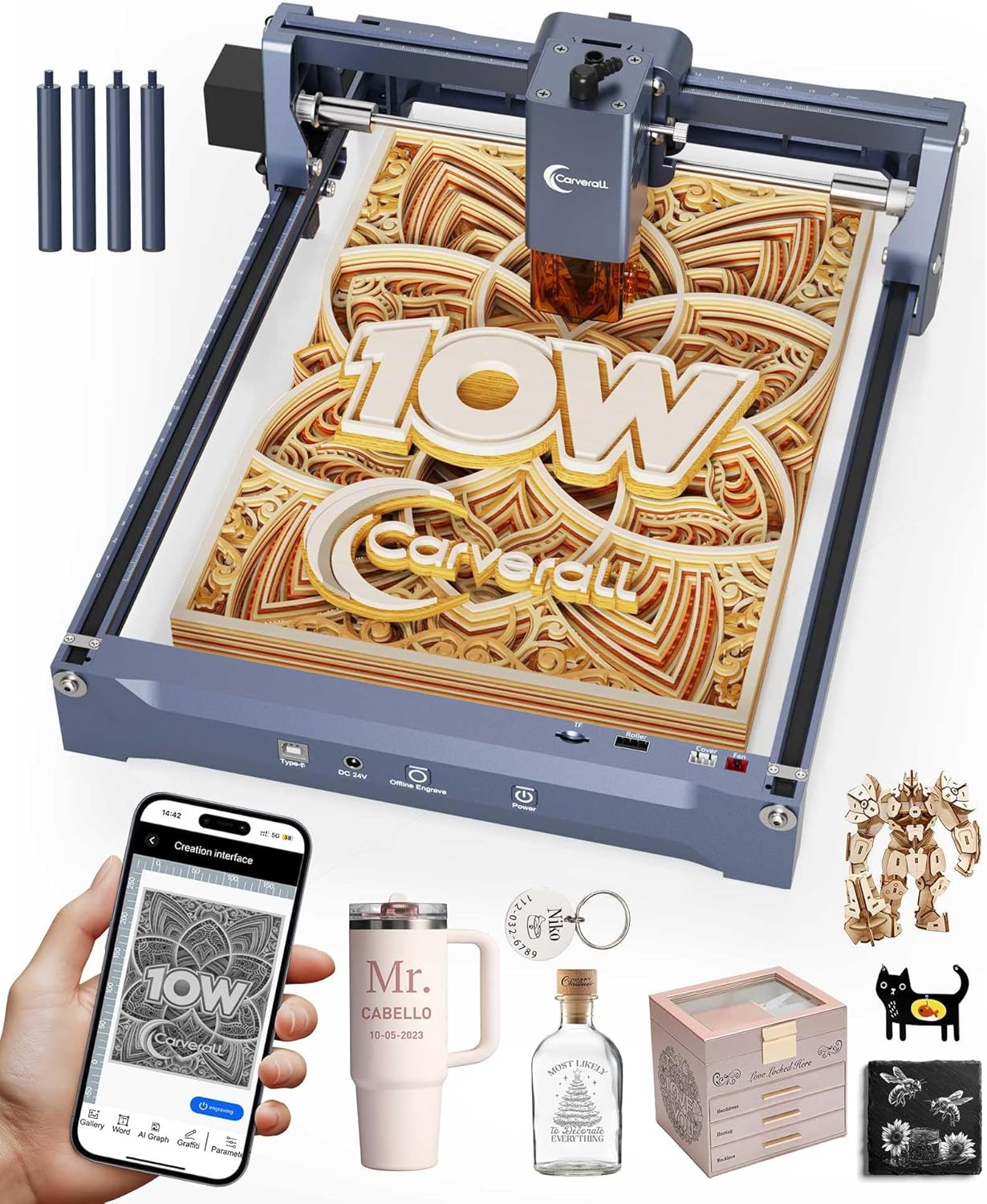
Laser Engraver 10W Laser Engraving Machine for Wood Metal Acrylic Glass Stone, Powerful DIY CNC Portable Laser Cutter 7.9" x 11.8" (Near A4) Offline Engraving Carverall K15 Pro, 10000mW, Class 1
Want the best price and purchase timing?
Our AI advisor analyzes real-time pricing across all channels to find you the best deal.
AI Verdict
This 10W diode laser engraver with 0.01mm precision and a 7.9" x 11.8" engraving area is for DIY enthusiasts needing to engrave or cut wood, acrylic, and coated metals.
This Carverall K15 Pro is a situational fit for those who prioritize a compact A4-sized engraving area and verified 10W diode power for materials like wood and acrylic. Its 0.01mm precision and 15,000mm/s engraving speed are strong for detailed craft projects. However, the lack of an included IR laser module for bare metal means an additional investment for full material versatility.
If you need to engrave bare metals out of the box, look for models that include an IR laser module or a higher-powered fiber laser.
Regret Score™
Medium RiskLower is better — measures purchase-regret risk from real buyer complaints, review credibility, and product maturity
Issues discovered after purchase
Critically weak dimension
Amazon rating vs actual quality
Chance this product isn't for you
Pros
- The 10W diode module delivers verified 10.36-10.58W power, capable of cutting 12mm plywood or 8mm acrylic.
- It offers 0.01mm precision and a 15,000mm/s minimum engraving speed for detailed work.
- The 7.9" x 11.8" (Near A4) engraving area is suitable for various projects and includes 4 detachable heightening columns for taller items.
- It includes the CutLabX app (Windows, Mac, Android, iOS) without subscription fees and is compatible with LightBurn and LaserGRBL.
- The machine supports upgradeable laser modules, allowing for a 1W IR laser module (sold separately) for bare metal engraving.
- Setup is quick, requiring only 6 screws for assembly in approximately 90 seconds.
Cons
- The 1W IR laser module for bare metal engraving is sold separately, requiring an additional purchase to expand material compatibility.
- At 5.9 pounds, it's not the lightest portable option, which might affect easy transport for some users.
- The product's 'Date First Available' is July 2, 2025, meaning there is no current user feedback available to assess real-world performance or common issues.
Dimension Scores
The machine boasts 0.01mm precision and a 15,000mm/s minimum engraving speed, outperforming many standard models.
It features a 90-second setup with only 6 screws, includes a beginner-friendly starter kit, and offers a no-subscription app (CutLabX) with LightBurn/LaserGRBL compatibility.
It can engrave over 100 materials and cut 12mm plywood or 8mm acrylic, with an upgrade path for bare metal via a separate IR module.
The 10W diode module has dual fans for 50% better heat dissipation, contributing to stable performance and a stated 10,000+ hour lifespan.
Best For
- DIY crafters and small business owners needing to engrave wood, acrylic, and coated metals.
- Users who require precise engraving for jewelry or custom gift creation.
- Makerspaces or home studios with limited space, due to its A4-sized engraving area and compact design.
- Beginners looking for an easy-to-set-up laser engraver with included software and safety features.
Not Recommended For
- Users who need to engrave bare metal without purchasing an additional 1W IR laser module.
- Professionals requiring a larger engraving area than 7.9" x 11.8" for production-scale projects.
- Individuals seeking extensive community-driven troubleshooting or real-world performance reviews, as the product is not yet released.
Watch Out For
- The product's 'Date First Available' is July 2, 2025, so there are no current user complaints or feedback regarding its operation, software stability, or longevity.
- While the 10W diode module is powerful for many materials, engraving bare metal requires a separate 1W IR laser module purchase, which is not included.
Full Specifications
| UPC | 716597842823 |
| ASIN | B0FGCDQJYP |
| Brand | Carverall |
| Color | Gray |
| Style | Industrial |
| Item Weight | 5.9 pounds |
| Manufacturer | Carverall |
| Power Source | Corded Electric |
| Special Feature | Lightweight, Multi Use, Variable Speed |
| Item model number | K15 Pro |
| Package Dimensions | 18.5 x 10.63 x 5.12 inches |
| Included Components | K15 Pro Engraver Machine & Laser Module, Plywood*2 & Cardboard*3, Tool Kit & Protective Goggles & Manual & Power Cord |
| Recommended Uses For Product | Cutting |
What Buyers Say
Since the Carverall K15 Pro has a 'Date First Available' of July 2, 2025, there are currently no real user reviews, complaints, or Reddit discussions available. All information is based on product specifications and promotional materials. Therefore, we cannot provide insights into actual user experiences, common issues, or long-term ownership discoveries at this time.
“Can't really say much yet, it's not even out! Specs sound cool, but I gotta wait for real people to try it first.”
Frequently Asked Questions
What materials can the Carverall K15 Pro engrave and cut?
It can engrave over 100 materials and cut 12mm plywood or 8mm acrylic. For bare metal, you'll need the separately sold 1W IR laser module.
What software is compatible with this laser engraver?
The Carverall K15 Pro includes the CutLabX app for Windows, Mac, Android, and iOS, and is also compatible with LightBurn and LaserGRBL.
How precise is the engraving?
The machine offers 0.01mm precision, which is significantly finer than standard 0.1mm models.
Is the laser module upgradeable?
Yes, you can start with the included 10W diode module and add a 1W IR laser module (sold separately) when you need to engrave bare metal.
What is the engraving area size?
The engraving area is 7.9" x 11.8", which is near A4 size. It also comes with 4 detachable heightening columns for taller items.
Buying Guide
When looking at laser engravers, you need to think about what you'll actually make. The laser's power dictates what materials it can handle and how fast it works. The engraving area needs to fit your projects, and software compatibility is key for ease of design and control. Don't forget safety features, as lasers can be dangerous.
10W Laser Power (10000mW)
This number tells you how strong the laser is. A 10W diode laser, like this one, is powerful enough to cut through materials like 12mm plywood or 8mm acrylic, and engrave many other surfaces. Higher wattage generally means faster cutting and engraving, and the ability to work with denser materials.
0.01mm Precision
This refers to how small and accurate the laser's spot can be. A 0.01mm precision means incredibly fine detail in your engravings, which is crucial for intricate designs, small text, or detailed images on things like jewelry or custom gifts. Think of it like the resolution of a printer – a smaller dot size means a clearer image.
7.9" x 11.8" (Near A4) Engraving Area
This is the maximum size of the material you can place under the laser to engrave or cut. An A4-sized area is a common and practical size for many DIY projects, allowing for items like small signs, leather wallets, or metal tags. If your projects are larger, you'll need a machine with a bigger work area.
Compatibility with LightBurn and LaserGRBL
These are popular software programs used to control laser engravers. Compatibility means you can use industry-standard tools to design your projects and send them to the machine, offering more features and community support than proprietary software might. It's like having a printer that works with common word processors rather than just one obscure program.
Alternatives
If this model doesn't fit, look for engravers with a larger work area (e.g., 400x400mm or more) for bigger projects, or models that include an IR laser module for immediate bare metal engraving capabilities.
You Might Also Like

xTool F2 Ultra UV Laser Engraver, 5W UV Laser, 3D Inner and Fine Glass Engraving, Dual 48MP Cameras, 15,000 mm/s High Speed, AI Powered 2D-to-3D Software, Ultra-Precise Detail on Glass Plastic Acrylic
$600+A 5W UV laser engraver with <10μm spot size for 3D inner glass engraving and cold processing heat-sensitive materials.

50W CO2 Laser Engraver, 16x16 inch Desktop Laser Cutter and Engraving Machine Compatible with CorelDRAW, Windows XP 7 8 10, EMF, JPG, PLT, WMF for Wood Acrylic Fabric (16"x16")
$600+This is a 50-60W CO2 laser engraver with a 300x200mm engraving area and 0.01mm positioning accuracy, designed for hobbyists and small businesses working with non-metallic materials.

LaserPecker LP5 Smart Dual 20W Fiber + Diode Laser Engraver Cutter with Rotary Extension, Slide Extension & Air Purifier, 3D Embossing, Color Engraving, Ideal for On-site Customization
$600+A dual 20W Fiber and 20W Diode laser engraver with 10,000mm/s speed, ideal for on-site customization across nearly all materials.

WIZMAKER 12W Laser Engraver Machine, Portable Carving Machine, 300x300mm Carving Area, 0.1mm High-Precision DIY Production, Suitable for Wood, Metal, Acrylic and Other Materials
$150-$299This is a 12W laser engraver with a 300x300mm carving area and 0.1mm precision, designed for DIY production on various materials.