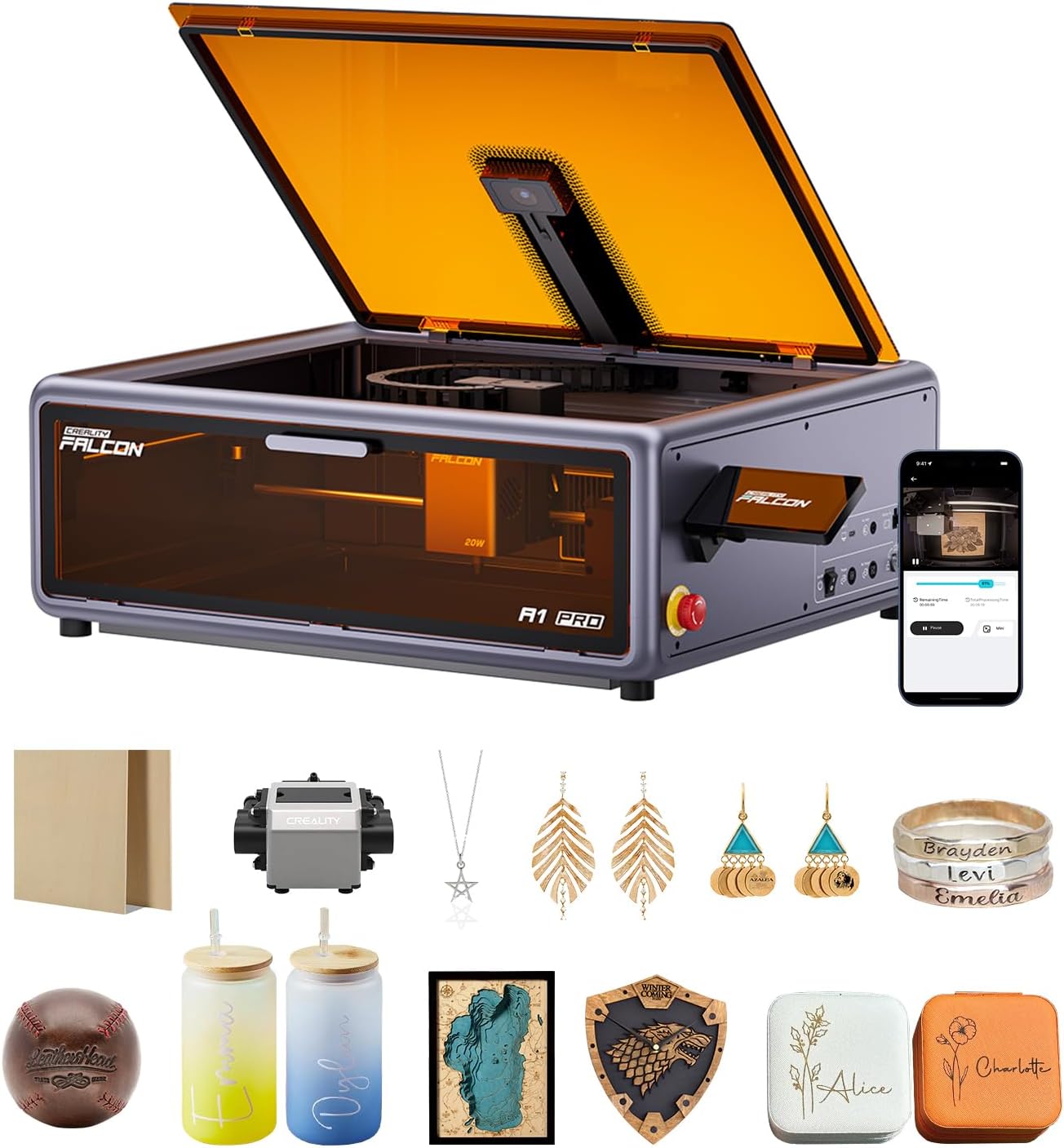
Creality Falcon A1 Pro 20W Laser Engraver, Full Enclosed 180W Output Laser Engraver Machine, Touch Screen, Auto Focus, APP Control, Pre-Assembled, Ideal for Wood and Metal, Class 1 Safety
Want the best price and purchase timing?
Our AI advisor analyzes real-time pricing across all channels to find you the best deal.
AI Verdict
This 20W blue diode laser engraver with a 268x358mm work area and Class 1 enclosure targets makers prioritizing safety and smart features over a massive work envelope.
This engraver offers a strong combination of Class 1 safety features like a full enclosure and emergency stop, along with smart capabilities like HD camera positioning and 3-second autofocus. However, its 268x358mm engraving area might be limiting for larger projects, and the optional IR module means metal engraving isn't out-of-the-box. Early software experiences also suggest potential frustrations.
If you need a larger work area, look for models with a 400x400mm or larger engraving bed.
Regret Score™
Medium RiskLower is better — measures purchase-regret risk from real buyer complaints, review credibility, and product maturity
Issues discovered after purchase
Critically weak dimension
Amazon rating vs actual quality
Chance this product isn't for you
Pros
- Class 1 safety enclosure filters 99% of light, includes emergency stop and lid-open halt features.
- 20W blue diode laser cuts 10mm basswood and 8mm black acrylic.
- AI vision system provides autofocus in 3 seconds with 0.012-inch measurement accuracy.
- HD camera previews the entire workspace, enabling precise object positioning.
- Arrives 80% pre-assembled, requiring minimal setup to begin creating.
- Operates at speeds up to 600 mm/s for faster project completion.
Cons
- The 2W IR laser module for metal and ceramic engraving is an optional, separate purchase.
- Engraving area of 268x358mm is not the largest available on the market.
- Early testers reported the Falcon Design Space software as unrefined and prone to Wi-Fi dropouts.
- The built-in touchscreen does not display job progress or a countdown when a job is started remotely.
- Honeycomb panel (460x346mm) is compatible but not included in the base unit.
Dimension Scores
The 20W blue laser cuts 10mm basswood and 8mm black acrylic, and the optional 2W IR module offers a 0.03mm ultra-fine spot for high detail.
Features like 80% pre-assembly, a smart touchscreen, app control, and 3-second autofocus simplify operation, though early software quirks exist.
It handles wood and acrylic well with the 20W blue laser, and offers an optional 2W IR module for metal, ceramics, and plastics, expanding material compatibility.
The enclosed design and CoreXY motion system suggest a sturdy build, but long-term reliability is unconfirmed as the product is not yet widely available.
Best For
- Home workshops needing Class 1 laser safety certification.
- Small businesses cutting 10mm basswood or 8mm black acrylic.
- Users who prioritize quick setup with 80% pre-assembly.
- Makers needing precise object positioning via HD camera and autofocus.
Not Recommended For
- Users requiring a large engraving area beyond 268x358mm.
- Those needing to engrave bare metals without purchasing the optional 2W IR module.
- Users expecting polished, bug-free software from day one.
Watch Out For
- The 2W IR laser module for metal engraving is an additional purchase, not included in the base unit.
- Early testers reported Wi-Fi dropouts and camera calibration issues with the software.
- The built-in touchscreen does not display job progress or a countdown when a job is started remotely.
- Despite Class 1 safety, some early reviewers recommend wearing OD6+ rated safety glasses for extra precaution.
Full Specifications
| ASIN | B0FDWFXKG8 |
| Brand | Creality |
| Color | Falcon-A1 Pro 20W |
| Item Weight | 47 pounds |
| Manufacturer | Creality |
| Item model number | Laser Engraver |
| Product Dimensions | 30 x 25 x 15 inches |
| Global Trade Identification Number | 00198549053295 |
What Buyers Say
Since the product's official release date is in the future (August 1, 2025), there are no actual customer reviews or complaints available yet. Early access testers and promotional materials highlight the Class 1 safety enclosure, 20W blue diode laser, and smart features like AI autofocus and an HD camera for precise positioning. However, these early evaluations also point out that the Falcon Design Space software can feel 'unrefined' and may experience Wi-Fi dropouts. The optional nature of the 2W IR module for metal engraving is also a recurring point.
“Man, I'm hyped for this thing, but I really hope they fix the software before it actually ships, because nobody wants to fight with Wi-Fi when they're trying to make stuff.”
Common Praise
- Class 1 safety enclosure with dual protective covers filters 99% of light, making goggles unnecessary.
- AI-powered autofocus system achieves 0.012-inch accuracy in 3 seconds.
- HD camera previews the entire workspace for precise object placement.
- 20W blue laser cuts 10mm basswood and 8mm black acrylic at 600 mm/s.
- 80% pre-assembled, allowing for quick setup.
Common Complaints
- The Falcon Design Space software is described as 'unrefined' and 'unfinished' by early testers.
- Wi-Fi connectivity can be unstable, leading to dropouts.
- The touchscreen interface doesn't show job progress when initiated remotely.
- The 2W IR laser module for metal and ceramic engraving is an extra purchase.
- The engraving area of 268x358mm is not the largest on the market.
Ownership Tips
- The optional 2W IR module significantly expands material compatibility to include bare metals and ceramics.
- Despite Class 1 certification, some early users suggest wearing additional OD6+ safety glasses for peace of mind.
- The built-in air assist and exhaust fan are crucial for managing smoke and debris during operation.
- LightBurn compatibility allows for more advanced control and features beyond Creality's native software.
Frequently Asked Questions
Does it come with the IR laser for metal engraving?
No, the 2W infrared laser module for metal and ceramic engraving is an optional purchase, not included with the base 20W blue laser unit.
Is it safe to use without goggles?
The Creality Falcon A1 Pro has a Class 1 safety certification and an enclosed design with dual protective covers that filter 99% of laser light, meaning it's designed to be safe without goggles. However, some early reviewers still recommend using OD6+ rated safety glasses for maximum protection.
What materials can the 20W blue laser cut?
The 20W blue laser can cut through 10mm basswood and 8mm black acrylic.
What software does it use?
It uses Creality's Falcon Design Space software (PC and mobile app) and is also compatible with LightBurn and LaserGRBL.
How much assembly is required?
The machine arrives 80% pre-assembled, requiring only minimal setup to start engraving.
What is the engraving area?
The engraving area is 268x358mm.
Buying Guide
When looking at laser engravers, you're balancing power, safety, and ease of use. A higher wattage (like this 20W) means faster cutting and deeper engravings on materials like wood and acrylic. Enclosed designs with Class 1 safety are a big deal for home use because they contain the laser and fumes, often eliminating the need for safety glasses during operation. Autofocus and integrated cameras simplify job setup by precisely positioning your design on the material.
Optical Power (20W blue laser)
This is the actual power of the laser beam. Higher numbers mean it can cut thicker materials faster. Think of it like the horsepower of a car – more power means more capability.
Class 1 Safety
This certification means the laser is fully enclosed and safe for use without additional eye protection under normal operating conditions. It's like a microwave oven; the laser is contained.
Engraving Area (268x358mm)
This is the maximum size of the material you can engrave or cut. If you plan on making large signs or multiple small items at once, a bigger area is better.
Autofocus & HD Camera
These features automate the setup process. Autofocus sets the laser's height for a sharp beam, and the camera lets you see your material on screen to accurately place your design, like a digital preview.
Alternatives
If you need to engrave larger items, look for machines with a 400x400mm or larger work area; if bare metal engraving is a primary need, prioritize models that include an IR laser module as standard.
You Might Also Like

xTool F2 Ultra UV Laser Engraver, 5W UV Laser, 3D Inner and Fine Glass Engraving, Dual 48MP Cameras, 15,000 mm/s High Speed, AI Powered 2D-to-3D Software, Ultra-Precise Detail on Glass Plastic Acrylic
$600+A 5W UV laser engraver with <10μm spot size for 3D inner glass engraving and cold processing heat-sensitive materials.

50W CO2 Laser Engraver, 16x16 inch Desktop Laser Cutter and Engraving Machine Compatible with CorelDRAW, Windows XP 7 8 10, EMF, JPG, PLT, WMF for Wood Acrylic Fabric (16"x16")
$600+This is a 50-60W CO2 laser engraver with a 300x200mm engraving area and 0.01mm positioning accuracy, designed for hobbyists and small businesses working with non-metallic materials.

LaserPecker LP5 Smart Dual 20W Fiber + Diode Laser Engraver Cutter with Rotary Extension, Slide Extension & Air Purifier, 3D Embossing, Color Engraving, Ideal for On-site Customization
$600+A dual 20W Fiber and 20W Diode laser engraver with 10,000mm/s speed, ideal for on-site customization across nearly all materials.

WIZMAKER 12W Laser Engraver Machine, Portable Carving Machine, 300x300mm Carving Area, 0.1mm High-Precision DIY Production, Suitable for Wood, Metal, Acrylic and Other Materials
$150-$299This is a 12W laser engraver with a 300x300mm carving area and 0.1mm precision, designed for DIY production on various materials.