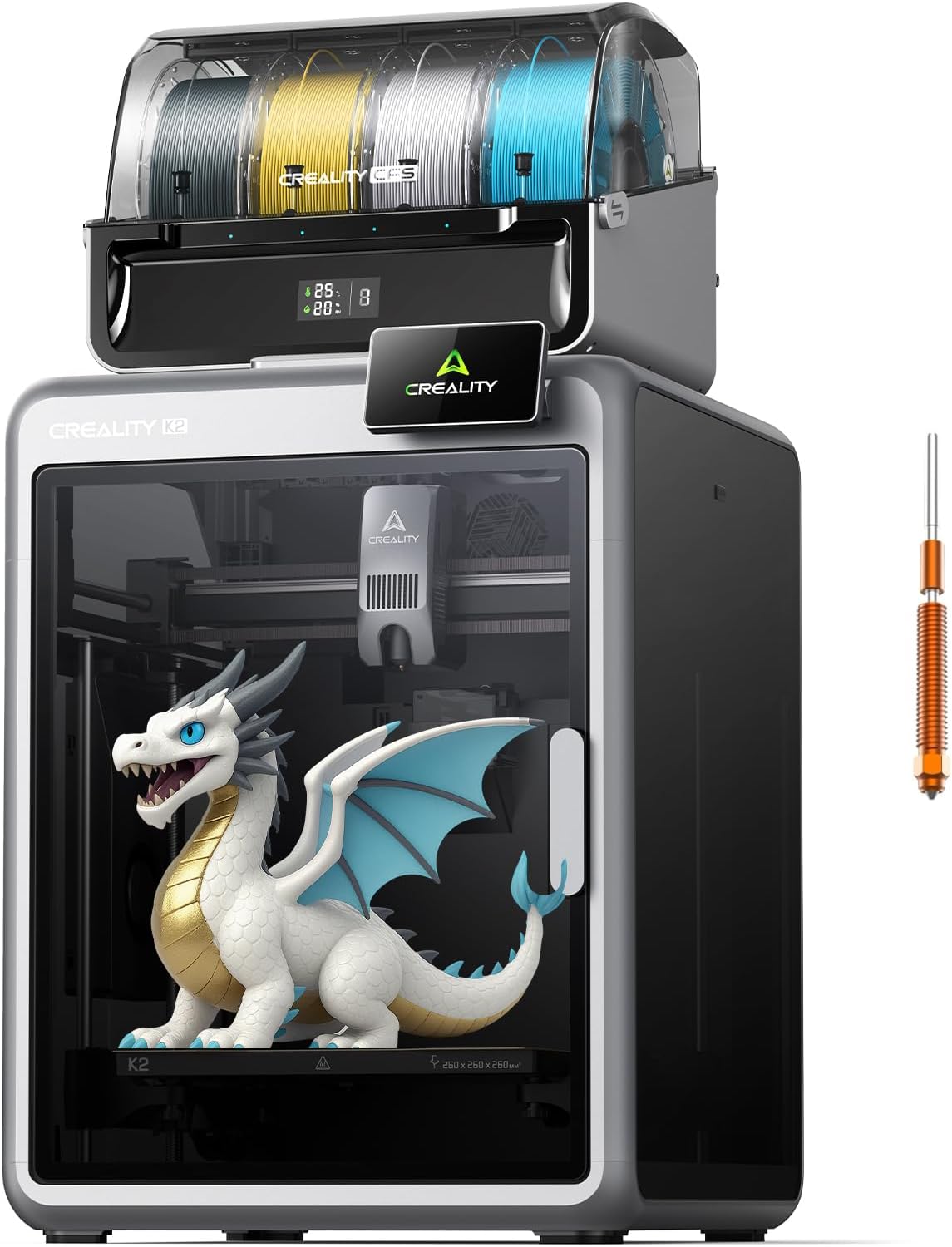
Creality K2 Combo 3D Printer, Multicolor Printing with CFS, High-Speed 600mm/s, Smart Auto Leveling, Quiet Printing, 300°C Nozzle, Dual AI Camera, Direct Drive Extruder, Build Volume 260x260x260mm
Want the best price and purchase timing?
Our AI advisor analyzes real-time pricing across all channels to find you the best deal.
AI Verdict
This is a 600mm/s 3D printer with a 260x260x260mm build volume and CFS for multicolor printing, designed for users wanting speed and multi-material capabilities.
This printer is a strong fit for users who prioritize high-speed printing and multi-color capabilities right out of the box. Its pre-assembled nature, smart auto-leveling, and CFS system simplify complex tasks, making it accessible even for those new to advanced 3D printing. The 260x260x260mm build volume is generous for most projects.
If printing with materials that absolutely require a consistently high ambient temperature, consider models with an actively heated build chamber, such as the Creality K2 Pro.
Regret Score™
Medium RiskLower is better — measures purchase-regret risk from real buyer complaints, review credibility, and product maturity
Issues discovered after purchase
Critically weak dimension
Amazon rating vs actual quality
Chance this product isn't for you
Pros
- Multicolor printing with one included CFS unit, expandable up to 4 units for 16 colors, offering automatic wire switching and vivid color transitions.
- Achieves print speeds up to 600 mm/s with 20,000 mm/s² acceleration, maintaining accuracy due to its aerospace-grade aluminum frame and steel X-axis rail.
- Features Smart Auto Leveling and guided calibration, making initial setup straightforward for various skill levels.
- Operates quietly, with Silent Mode keeping noise levels around 45 dB, thanks to dynamically balanced fans and a vibration-free design.
- Direct Drive Extruder with a 300°C hardened steel nozzle handles PLA, ABS, PETG, and engineering-grade filaments.
- Includes a Dual AI Camera for failure detection, time-lapse recording, and build plate monitoring, enhancing print safety and control.
Cons
- The CFS system, while functional, can have a 'small learning curve' for managing filament and ensuring proper secondary spool usage.
- Some users reported issues with the filament detection board, citing errors like FR0122 and TR2863, suggesting it might be a frequent point of failure.
- The K2 Combo does not feature an actively heated chamber, which limits its suitability for certain engineering-grade filaments that require specific ambient temperatures.
- Occasional nozzle blobs have been observed, potentially leading to layer shifts and bent nozzles, though replacements are inexpensive and easy to swap.
- The build plate has a textured surface, which some users might find less desirable compared to smoother alternatives.
Dimension Scores
The aerospace-grade aluminum frame, steel X-axis rail, and dual Z-axis contribute to ultra-smooth layer consistency and minimal wobble, even at 600 mm/s print speeds.
It's fully pre-assembled, features smart auto-leveling, guided calibration, and an RFID system for automatic filament identification, simplifying the user experience significantly.
The CFS enables up to 16-color printing, the 300°C nozzle supports a wide range of materials, and the dual AI camera adds failure detection and monitoring capabilities.
Constructed from aluminum and metal, with a hardened steel nozzle and a sturdy frame, it's built to withstand regular use, though some minor components like the filament detection board have reported issues.
Best For
- Beginners seeking a premium 3D printer that is largely pre-assembled and offers guided calibration for an easier start.
- Users specifically interested in multi-color 3D printing without the need for complex manual setups or modifications.
- Individuals requiring a 260x260x260mm build volume for printing larger objects, prototypes, or artistic pieces.
- Environments where quiet operation is essential, such as home offices or shared living spaces, due to its 45 dB Silent Mode.
Not Recommended For
- Users who only intend to print basic, single-color models and do not require or value multi-color capabilities.
- Those with a very tight budget who are primarily looking to learn the absolute basics of 3D printing at the lowest possible cost.
- Professionals or hobbyists who frequently print with advanced engineering-grade filaments that necessitate an actively heated print chamber for optimal results.
Watch Out For
- The filament detection board has been reported to break 'quite often,' leading to specific error codes like FR0122 and TR2863, which can interrupt prints.
- Nozzle blobs can occur, with one user experiencing layer shift and a bent nozzle, though they noted nozzle replacements are cheap and simple to install.
- The CFS system, while generally effective, requires a 'small learning curve' to master filament management and prevent issues like tangling during color changes.
- Instructions for setup and operation are primarily online, which can be inconvenient if internet access is limited during initial setup.
- The 'Date First Available' on Amazon is listed as July 31, 2025, which is in the future, making the current Amazon rating and review count potentially misleading or for a different product listing.
Full Specifications
| ASIN | B0FC2FLNK9 |
| Brand | Creality |
| Color | Black |
| Material | Aluminum, Metal |
| Item Weight | 55 pounds |
| Manufacturer | Creality |
| Item model number | K2 Combo 3D Printer |
| Product Dimensions | 21 x 25 x 20 inches |
What Buyers Say
Many users, especially those new to 3D printing or upgrading from older models, are genuinely impressed with the K2 Combo's performance. The CFS system generally works smoothly for multicolor prints, though some users noted a learning curve for optimal filament management. Print quality is consistently high, even when leveraging its 600 mm/s speed, and the printer's quiet operation is a frequently praised feature.
“I went from no knowledge to printing in my first day. By the second day I was doing multicolor prints. No issues, good quality output. And no always on requirements or software ecosystem lock. My only complaint is that the instructions require being online.”
Common Praise
- Easy and quick setup right out of the box, often printing on the first day.
- Remarkably quiet operation, with users noting it's barely audible even when running.
- Reliable and smooth multi-color printing with the CFS, producing clean color swaps without smudges.
- High print quality and detail, even on fast prints.
- Effective auto-leveling and calibration, reducing the need for manual adjustments.
- Good adhesion to the textured build plate.
Common Complaints
- Reports of the filament detection board breaking 'quite often,' leading to error codes like FR0122 and TR2863.
- Occasional nozzle blobs causing layer shifts and bent nozzles, though replacements are cheap and easy.
- The textured build plate is not preferred by all users, especially those accustomed to smoother surfaces.
- Instructions and necessary information often require being online.
- The CFS system can have a 'small learning curve' for new users to fully optimize.
Ownership Tips
- The filament detection board can be a weak point, with some users experiencing frequent failures.
- The CFS, while generally reliable, can occasionally lead to filament tangling, a common issue in 3D printing that requires user attention.
- Maintenance and cleaning of the printer's interior are straightforward due to accessible design, preventing debris accumulation in hard-to-reach areas.
- The textured build plate, while offering good adhesion, might not be ideal for all print types or user preferences.
- The lack of an actively heated chamber means certain advanced materials might not perform optimally without external environmental control.
Frequently Asked Questions
Is the Creality K2 Combo suitable for beginners?
Yes, it's considered beginner-friendly due to being fully pre-assembled, featuring smart auto-leveling, and guided calibration for an effortless setup.
How quiet is the K2 Combo during operation?
It's designed for quiet operation, with Silent Mode keeping noise levels around 45 dB, which is comparable to a laptop typing.
Can this printer produce multi-color prints?
Absolutely. The K2 Combo comes with one CFS unit for multi-color printing, and you can expand it with up to four CFS units for a total of 16 colors.
What types of filaments can the K2 Combo print?
Equipped with a 300°C hardened steel nozzle and direct drive extrusion, it can handle PLA, ABS, PETG, and various engineering-grade filaments.
Does the K2 Combo have an actively heated chamber?
No, the K2 Combo does not have an actively heated chamber, which is a feature found on some higher-end models like the K2 Pro.
What is the maximum print speed of this printer?
The K2 Combo can reach print speeds of up to 600 mm/s with an acceleration of 20,000 mm/s².
Is the setup process complicated?
No, the printer is fully pre-assembled and includes smart auto-leveling and guided calibration, making the setup process quick and easy.
Buying Guide
When looking at a 3D printer like the Creality K2 Combo, you should focus on how fast it can print, its ability to handle multiple colors, the size of objects it can create, and what materials it can use. High print speeds mean you spend less time waiting for your creations. Multicolor printing opens up a world of design possibilities, letting you make more complex and visually appealing models. The build volume dictates the maximum size of your projects, and material compatibility determines the strength and flexibility of your prints.
600mm/s print speed
This is how fast the printer can lay down filament. A speed of 600mm/s is exceptionally fast, meaning a print that might take hours on a slower machine could be finished in a fraction of the time, letting you iterate designs or produce more parts quickly.
CFS (Creality Filament System)
This system allows the printer to automatically switch between different spools of filament during a print. It's crucial for creating objects with multiple colors or using different materials within a single print without manual intervention.
300°C Nozzle
The maximum temperature the nozzle can reach. A 300°C nozzle means the printer can melt and extrude a wider variety of filaments, including more durable 'engineering-grade' plastics like ABS and PETG, which require higher temperatures than standard PLA.
260x260x260mm Build Volume
This measurement defines the maximum length, width, and height of an object you can print. A 260mm cube is a substantial size, allowing for larger functional parts, cosplay props, or multiple smaller items in one go.
Alternatives
If multi-color printing isn't a priority, look for printers with similar build volumes and direct drive extruders for material flexibility. If you need to print advanced materials that require a consistently warm environment, search for models that explicitly state they have an actively heated build chamber.
You Might Also Like

xTool F2 Ultra UV Laser Engraver, 5W UV Laser, 3D Inner and Fine Glass Engraving, Dual 48MP Cameras, 15,000 mm/s High Speed, AI Powered 2D-to-3D Software, Ultra-Precise Detail on Glass Plastic Acrylic
$600+A 5W UV laser engraver with <10μm spot size for 3D inner glass engraving and cold processing heat-sensitive materials.

50W CO2 Laser Engraver, 16x16 inch Desktop Laser Cutter and Engraving Machine Compatible with CorelDRAW, Windows XP 7 8 10, EMF, JPG, PLT, WMF for Wood Acrylic Fabric (16"x16")
$600+This is a 50-60W CO2 laser engraver with a 300x200mm engraving area and 0.01mm positioning accuracy, designed for hobbyists and small businesses working with non-metallic materials.

LaserPecker LP5 Smart Dual 20W Fiber + Diode Laser Engraver Cutter with Rotary Extension, Slide Extension & Air Purifier, 3D Embossing, Color Engraving, Ideal for On-site Customization
$600+A dual 20W Fiber and 20W Diode laser engraver with 10,000mm/s speed, ideal for on-site customization across nearly all materials.

WIZMAKER 12W Laser Engraver Machine, Portable Carving Machine, 300x300mm Carving Area, 0.1mm High-Precision DIY Production, Suitable for Wood, Metal, Acrylic and Other Materials
$150-$299This is a 12W laser engraver with a 300x300mm carving area and 0.1mm precision, designed for DIY production on various materials.