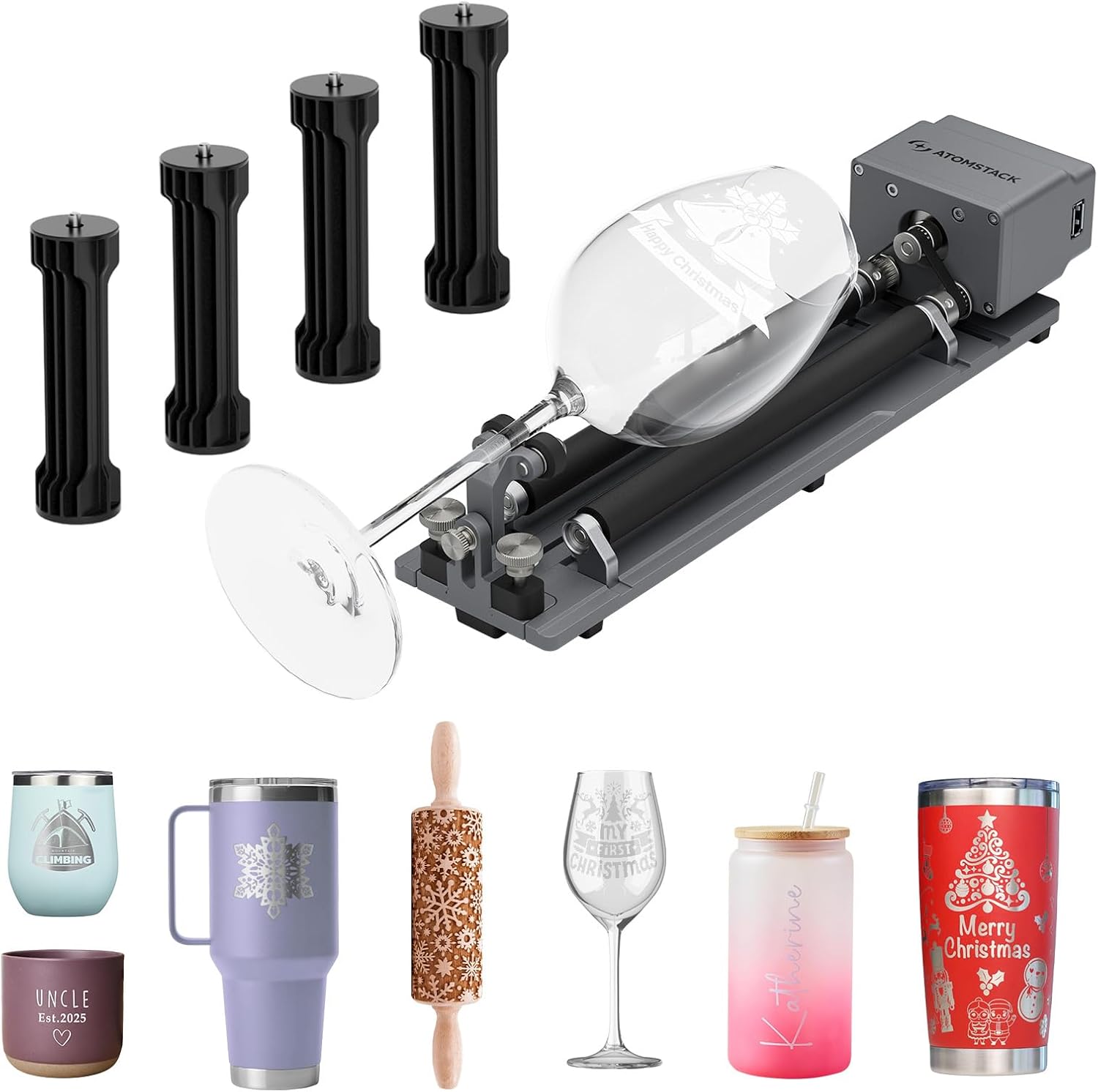
ATOMSTACK R6 Laser Rotary Roller Laser Engraver Multi-Function Compatible with P1 K2 Laser Engraver Roller Rotator Y-axis Rotary Engraving Module for Cylindrical Objects Bottles Cups
Want the best price and purchase timing?
Our AI advisor analyzes real-time pricing across all channels to find you the best deal.
AI Verdict
This 3.03-pound rotary roller handles cylindrical objects up to 120mm diameter and 1.5kg load, making it for hobbyists wanting to engrave bottles and irregular cups.
This rotary roller is a specific tool for a specific job: engraving cylindrical and irregular objects. Its tool-free setup and wide compatibility are helpful, but the requirement for software configuration and additional riser bases for some engravers means it's not a plug-and-play solution for everyone. It fits well if your projects involve items like tumblers and bottles, and you're comfortable with software adjustments.
If you need to engrave smaller, more intricate items or require higher clamping force, look for a chuck-style rotary attachment with a wider range of jaw options.
Regret Score™
Very High RiskLower is better — measures purchase-regret risk from real buyer complaints, review credibility, and product maturity
Issues discovered after purchase
Critically weak dimension
Amazon rating vs actual quality
Chance this product isn't for you
Pros
- Engraves a variety of irregular cylindrical objects, including balls, rings, and cups with handles, with an adjustment angle up to 180° and 360° rotation capability.
- Requires no assembly and allows tool-free adjustment of roller distance, simplifying setup.
- Supports a wide range of laser engraver brands and software like LaserGRBL and LightBurn, compatible with 95% of desktop engravers.
- Includes four 100mm raised footpads specifically for ATOMSTACK P1 K2 engravers to ensure proper fit.
Cons
- Requires modification of laser software configuration parameters before use.
- Specific riser bases (like Kraft H4 or Hurricane H3) are required for use with AtomStack Kraft or Hurricane engravers, which are separate purchases.
- Not recommended for intricate objects like jewelry; the R8 Rotary Chuck is suggested for those items.
- Limited to objects with an engraving diameter of 0-120 mm and a maximum load capacity of 1.5 kg.
Dimension Scores
The high-quality rotary chuck ensures smooth and stable rotation, contributing to improved engraving accuracy on cylindrical objects.
It features no assembly and tool-free roller distance adjustment, but requires software parameter modification for operation.
It handles a wide range of irregular cylindrical objects with 180° adjustment and 360° rotation, and is compatible with 95% of desktop engravers.
No specific user feedback on long-term durability was found, suggesting an average expectation for its construction.
Best For
- Hobbyists and small businesses customizing tumblers, bottles, and larger cylindrical objects.
- Engraving irregular shapes like cups with handles or spherical items.
- Users who already own a compatible laser engraver from brands like ATOMSTACK, Creality, or XTOOL.
- Makers looking to expand their laser engraver's capabilities beyond flat materials.
Not Recommended For
- Engraving very small, intricate jewelry pieces where a chuck-style rotary offers more precise holding.
- Users unwilling to adjust laser software parameters for rotary functionality.
- Industrial applications requiring engraving on objects heavier than 1.5 kg or larger than 120 mm diameter.
Watch Out For
- Requires manual adjustment of laser software parameters before initial use.
- AtomStack Kraft and Hurricane engraver owners need to purchase specific riser bases separately to use this rotary roller.
- The 1.5 kg load capacity means you can't engrave very heavy items.
- Objects must fit within the 0-120 mm engraving diameter, limiting the size of items you can process.
Full Specifications
| ASIN | B0F5WSJLG6 |
| Size | R6 Laser Rotary Roller(Upgrade) |
| Color | Silver |
| Item Weight | 3.03 pounds |
| Part Number | R1 Pro |
| Manufacturer | ATOMSTACK |
| Power Source | ac_dc |
| Item model number | AH243101 |
| Product Dimensions | 11.8 x 9.84 x 5.12 inches |
| Batteries Included? | No |
| Batteries Required? | No |
| Included Components | 1 |
What Buyers Say
This rotary roller is all about opening up new possibilities for your laser engraver, specifically for things that aren't flat. It's designed to make engraving on tumblers, bottles, and even irregular shapes like cups with handles a straightforward process. The fact that it arrives pre-assembled and lets you adjust roller spacing without tools is a big plus, getting you to engraving faster. However, you'll definitely need to dive into your laser software settings to get it dialed in, and if you're rocking an AtomStack Kraft or Hurricane, be ready to shell out for a separate riser base.
“Dude, I finally got this thing and now I can engrave all my tumblers and even those weird-shaped coffee mugs! Setup was mostly easy, just had to mess with LightBurn settings for a bit, but totally worth it for custom gifts.”
Common Praise
- Allows engraving on irregular cylindrical objects with up to 180° adjustment and 360° rotation.
- No assembly required, making it ready to use quickly.
- Roller distance can be adjusted without needing any tools.
- Compatible with a broad range of laser engraver brands and software, covering most desktop setups.
Common Complaints
- Requires manual modification of laser software parameters before first use.
- Owners of AtomStack Kraft or Hurricane engravers must purchase additional riser bases for proper integration.
- Not the best choice for very small or intricate items like jewelry; a chuck-style rotary is more suitable for those.
- The 1.5 kg load limit and 120 mm diameter restriction might be too small for some larger projects.
Ownership Tips
- You'll spend some time in your laser software (LightBurn or LaserGRBL) configuring the rotary settings for the first few uses.
- Ensure you have enough vertical clearance under your engraver; the included 100mm footpads are crucial for P1/K2 users.
- The 3.03-pound weight makes it easy to move and store when not in use.
- For consistent results, make sure your cylindrical objects are properly centered and secured on the rollers.
Frequently Asked Questions
Do I need to assemble the ATOMSTACK R6 Rotary Roller?
No, the upgraded rotary roller requires no assembly. You can also adjust the roller distance without tools.
What types of objects can I engrave with this rotary roller?
It's designed for a variety of irregular cylindrical objects, including balls, rings, spherical objects, and cups with handles, offering 180° adjustment and 360° rotation.
Is the ATOMSTACK R6 compatible with my laser engraver?
It supports LaserGRBL and LightBurn, making it suitable for 95% of desktop laser engravers, including brands like ATOMSTACK, Creality, XTOOL, and ORTUR.
Are there any special setup steps required?
Yes, you need to modify the configuration parameters of your laser software before using the rotary roller.
What is the maximum size and weight of objects it can handle?
The rotary roller can handle objects with an engraving diameter of 0-120 mm and a maximum load capacity of 1.5 kg.
Buying Guide
When you're looking at a rotary roller like this, you're essentially adding a new dimension to your laser engraving. It lets you engrave on round or oddly shaped items that wouldn't fit under a flat laser bed. Think about what you want to engrave – if it's mostly tumblers, bottles, or even spherical objects, a roller like the R6 is what you need. If you're planning on tiny rings or delicate jewelry, you might want a chuck-style rotary for a firmer grip.
Engraving Diameter (0-120 mm)
This tells you the range of object sizes, from thin pens to wider bottles, that the roller can physically accommodate and rotate. If your favorite mug is wider than 120mm, it won't fit.
Load Capacity (1.5 kg)
This is the maximum weight of an object the rotary can spin accurately. Trying to engrave something heavier than 1.5 kg could strain the motor or lead to inconsistent engraving.
Compatibility (95% desktop engravers, LaserGRBL/LightBurn)
This is crucial – it means the rotary will 'talk' to your existing laser engraver and its software. If it's not compatible, it simply won't work with your setup.
Alternatives
If this roller doesn't fit your needs, look for a chuck-style rotary for engraving very small or irregular objects that need to be clamped, or a heavy-duty rotary with a higher load capacity and larger diameter range for industrial-scale projects.
You Might Also Like

xTool F2 Ultra UV Laser Engraver, 5W UV Laser, 3D Inner and Fine Glass Engraving, Dual 48MP Cameras, 15,000 mm/s High Speed, AI Powered 2D-to-3D Software, Ultra-Precise Detail on Glass Plastic Acrylic
$600+A 5W UV laser engraver with <10μm spot size for 3D inner glass engraving and cold processing heat-sensitive materials.

50W CO2 Laser Engraver, 16x16 inch Desktop Laser Cutter and Engraving Machine Compatible with CorelDRAW, Windows XP 7 8 10, EMF, JPG, PLT, WMF for Wood Acrylic Fabric (16"x16")
$600+This is a 50-60W CO2 laser engraver with a 300x200mm engraving area and 0.01mm positioning accuracy, designed for hobbyists and small businesses working with non-metallic materials.

LaserPecker LP5 Smart Dual 20W Fiber + Diode Laser Engraver Cutter with Rotary Extension, Slide Extension & Air Purifier, 3D Embossing, Color Engraving, Ideal for On-site Customization
$600+A dual 20W Fiber and 20W Diode laser engraver with 10,000mm/s speed, ideal for on-site customization across nearly all materials.

WIZMAKER 12W Laser Engraver Machine, Portable Carving Machine, 300x300mm Carving Area, 0.1mm High-Precision DIY Production, Suitable for Wood, Metal, Acrylic and Other Materials
$150-$299This is a 12W laser engraver with a 300x300mm carving area and 0.1mm precision, designed for DIY production on various materials.