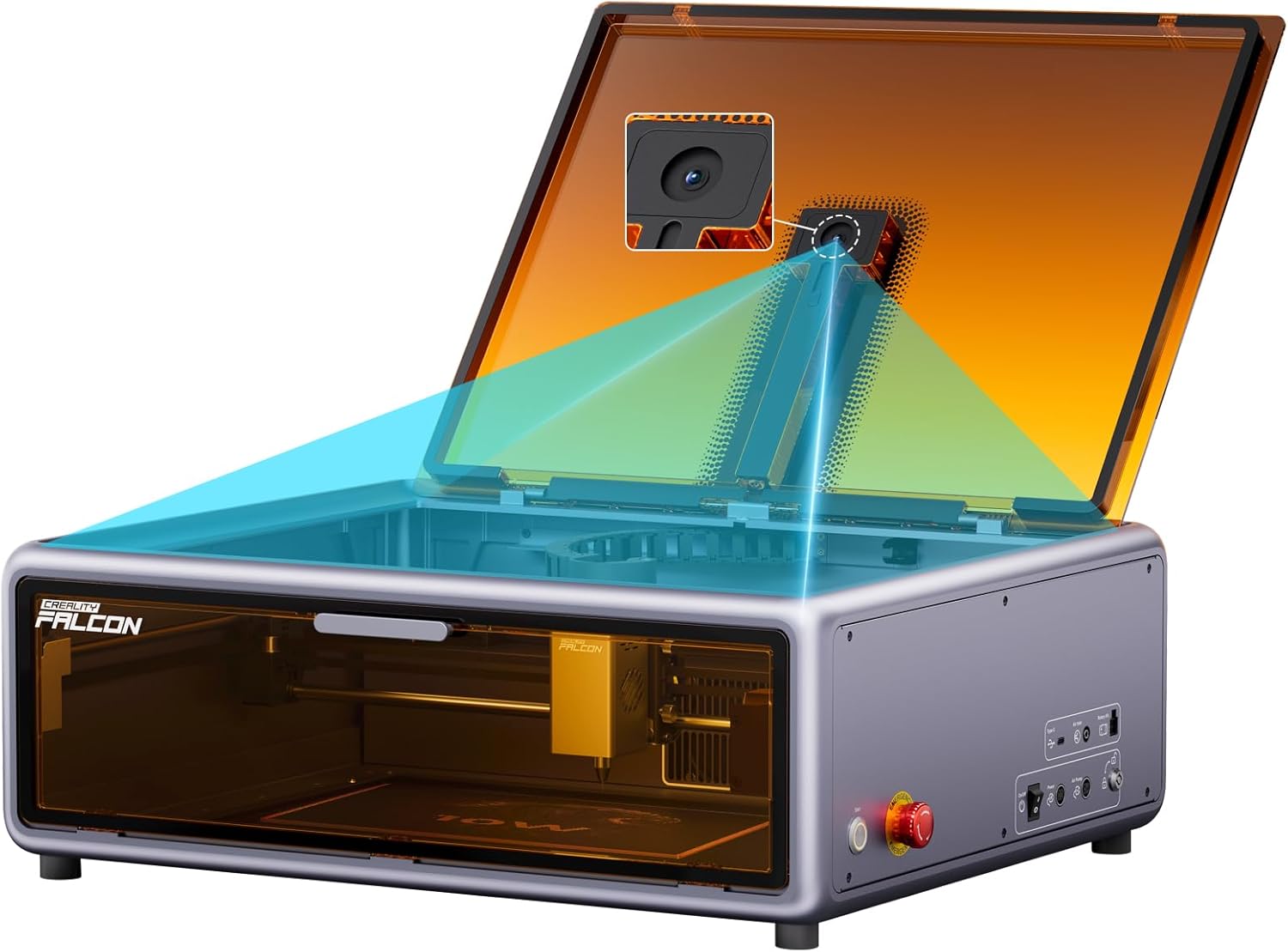
Creality Laser Engraver Falcon A1 10W with Fully Enclosed Design High Compatibility & Easy Assembly,Speed up to 600mm/s, Precision Engraving Machine
Want the best price and purchase timing?
Our AI advisor analyzes real-time pricing across all channels to find you the best deal.
AI Verdict
This 10W laser engraver, with its 600mm/s speed and 0.01mm precision, is for beginners wanting a safe, enclosed system with minimal setup.
This engraver is a strong fit for beginners and hobbyists due to its zero assembly requirement and intuitive three-step operation. The fully enclosed design and Class 1 Laser Safety compliance make it suitable for home use, addressing common safety concerns for new users.
If you need to cut thicker materials or engrave metals, look for models with higher wattage CO2 or fiber lasers.
Regret Score™
Medium RiskLower is better — measures purchase-regret risk from real buyer complaints, review credibility, and product maturity
Issues discovered after purchase
Critically weak dimension
Amazon rating vs actual quality
Chance this product isn't for you
Pros
- Zero assembly means it's ready to engrave right out of the box.
- The smart HD full-frame camera allows for precise design placement via drag-and-drop and one-click batch fill.
- It operates at speeds up to 600mm/s with 0.01mm precision, achieving 0 to 600mm/s acceleration in 0.03 seconds.
- The fully enclosed design includes Class 1 Laser Safety compliance, an eye-protection cover, and an emergency stop button for user safety.
- It can cut 9.6mm black acrylic and 5mm wood in a single pass.
- The aerospace-grade aluminum construction provides a tensile strength of ≥205MPa and Brinell hardness of ≥75HBW.
Cons
- The 10W diode laser cannot cut transparent materials or metals of any thickness.
- Some users report connection issues with both Mac and Windows, and difficulty getting support from Creality.
- It requires a wired connection to a laptop to send tasks, limiting wireless operation.
- The included exhaust hose is about 4 feet long, and the internal fan may not be sufficient for heavy cutting without additional ventilation.
- A honeycomb work surface, considered essential for cutting by some users, is not included.
Dimension Scores
The 0.01mm precision and 0.06 × 0.08mm laser spot deliver intricate details and sharp contrasts.
Zero assembly, intuitive three-step operation, and a smart camera for precise design placement make it beginner-friendly.
It handles wood up to 5mm and black acrylic up to 9.6mm in a single pass, but cannot process transparent materials or metals.
Constructed with aerospace-grade aluminum, it boasts a tensile strength of ≥205MPa and Brinell hardness of ≥75HBW.
Best For
- Beginners new to laser engraving who prioritize safety and ease of setup.
- Hobbyists needing precise engraving for intricate designs with a 0.06 × 0.08mm laser spot.
- Users with limited workspace, due to its 47% more efficient footprint compared to similar models.
- Small projects involving wood up to 5mm or black acrylic up to 9.6mm in a single pass.
Not Recommended For
- Professionals requiring high-power cutting of thick or transparent materials, or metals.
- Users who need a completely wireless workflow, as it requires a wired connection for tasks.
- Individuals who expect extensive post-purchase support for technical issues.
Watch Out For
- The 10W diode laser is limited to marking metals and cannot cut them, requiring specialized fiber lasers for such tasks.
- Cutting thicker plywood (e.g., 5mm) often requires multiple passes, despite its stated cutting power.
- The included 4-foot exhaust hose and integrated fan might not adequately clear fumes during intensive cutting, potentially requiring an external fume extractor.
- Some users experienced disconnections during operation on both Mac and Windows, indicating potential software or connectivity instability.
- The camera system sometimes needs multiple calibrations to achieve ultimate accuracy for design placement.
Full Specifications
| ASIN | B0DRJMK12Z |
| Item Weight | 43.4 pounds |
| Manufacturer | Creality 3D |
| Item model number | Creality Falcon A1 |
| Product Dimensions | 22.25 x 18.12 x 7.49 inches |
What Buyers Say
Many users highlight the Falcon A1's immediate usability, praising the zero-assembly design that gets you engraving quickly. The integrated camera and intuitive software are frequently mentioned for simplifying design placement and workflow. However, some buyers have reported frustrating connection issues with their computers and a lack of responsive customer support from Creality. The absence of a honeycomb bed is a recurring point of contention for those focused on cutting, as it's seen as a necessary accessory not included in the package.
“Okay, so I just pulled this thing out of the box and it actually worked right away, which is a miracle for me with these kinds of gadgets! But seriously, the camera is kinda finicky, I had to mess with it a few times to get my design exactly where I wanted it, and the smoke is still a bit much even with the hose, so I'm thinking I need to rig something else up.”
Common Praise
- Ready to use out of the box with no assembly required.
- The smart camera makes positioning designs on materials straightforward and accurate.
- The enclosed design and multiple safety features provide peace of mind during operation.
- The Falcon Design Space software is user-friendly and includes a library of project files.
- Capable of cutting 9.6mm black acrylic and 5mm wood in a single pass.
Common Complaints
- Reports of connectivity problems with both Mac and Windows operating systems.
- Creality customer support is sometimes unresponsive when issues arise.
- A honeycomb work surface, often needed for cutting, is not included.
- The 10W laser is not powerful enough for efficient cutting of thicker plywood, requiring multiple passes.
- The exhaust system might not be adequate for heavy use without additional ventilation.
Ownership Tips
- The included exhaust hose is short, often necessitating placement near a window or an additional fan for proper fume extraction.
- While the camera is helpful, achieving perfect alignment often requires multiple calibration attempts.
- The 10W laser performs well for engraving, but cutting anything beyond thin wood or acrylic can be a slow process with multiple passes.
- Cleaning the laser module periodically is recommended, but instructions for disassembly are not provided.
- The machine's weight of 43.4 pounds makes it less portable than expected for a 'desktop' unit.
Frequently Asked Questions
Does the Creality Falcon A1 require assembly?
No, the Falcon A1 requires zero assembly and is ready to use immediately after unboxing.
What materials can the 10W laser cut?
The 10W laser can cut 9.6mm black acrylic and 5mm wood in a single pass. It is primarily suitable for wood and some plastics, but cannot cut transparent materials or metals.
Is the Creality Falcon A1 safe for home use?
Yes, it features Class 1 Laser Safety compliance, an eye-protection cover, efficient smoke extraction, laser leak protection, an emergency stop button, and a safety lock, making it suitable for home environments.
What software does the Falcon A1 use?
It works seamlessly with Creality's free Falcon Design Space software and is also compatible with popular programs like LightBurn and LaserGRBL.
Does it come with a honeycomb work surface?
No, a honeycomb work surface is not included, which some users consider a necessity for effective cutting.
How precise is the engraving?
The Falcon A1 offers 0.01mm precision with an ultra-fine 0.06 × 0.08mm laser spot, allowing for intricate details and sharp contrasts.
Buying Guide
When looking at laser engravers, you need to think about what you're actually going to make. The laser's power, measured in watts, tells you how well it can cut and engrave different materials. A higher wattage usually means faster cutting and the ability to work with thicker or harder stuff. Also, consider the work area size – that's how big your projects can be. Finally, safety features are a big deal, especially if you're using it at home, so look for enclosed designs and emergency stops.
Laser Power (10W)
This number tells you how strong the laser beam is. A 10W diode laser, like this one, is good for engraving and cutting thinner materials like wood up to 5mm or black acrylic, but it won't cut through metal or clear plastics. Think of it like the horsepower of a car – more means more capability.
Speed (600mm/s)
This indicates how fast the laser head can move across your material. Faster speeds mean your projects finish quicker, which is especially useful for large engravings or batch processing. It's like the print speed on a regular printer; a higher number means less waiting.
Precision (0.01mm)
This refers to how accurately the laser can place its beam. A smaller number here means finer details and sharper lines in your engravings. It's crucial for intricate designs where every tiny dot matters, similar to the resolution of a camera.
Enclosed Design
This means the laser is housed within a protective casing. It's a major safety feature, blocking harmful laser light and containing fumes, making it much safer for use in a home or shared workspace. It's like having a safety guard on a power tool.
Alternatives
If you need to cut thicker wood or engrave metals, search for laser engravers with higher wattage CO2 lasers (for thicker non-metals) or fiber lasers (for metals). For larger projects, look for models with a bigger working area than 400x400mm.
You Might Also Like

xTool F2 Ultra UV Laser Engraver, 5W UV Laser, 3D Inner and Fine Glass Engraving, Dual 48MP Cameras, 15,000 mm/s High Speed, AI Powered 2D-to-3D Software, Ultra-Precise Detail on Glass Plastic Acrylic
$600+A 5W UV laser engraver with <10μm spot size for 3D inner glass engraving and cold processing heat-sensitive materials.

50W CO2 Laser Engraver, 16x16 inch Desktop Laser Cutter and Engraving Machine Compatible with CorelDRAW, Windows XP 7 8 10, EMF, JPG, PLT, WMF for Wood Acrylic Fabric (16"x16")
$600+This is a 50-60W CO2 laser engraver with a 300x200mm engraving area and 0.01mm positioning accuracy, designed for hobbyists and small businesses working with non-metallic materials.

LaserPecker LP5 Smart Dual 20W Fiber + Diode Laser Engraver Cutter with Rotary Extension, Slide Extension & Air Purifier, 3D Embossing, Color Engraving, Ideal for On-site Customization
$600+A dual 20W Fiber and 20W Diode laser engraver with 10,000mm/s speed, ideal for on-site customization across nearly all materials.

WIZMAKER 12W Laser Engraver Machine, Portable Carving Machine, 300x300mm Carving Area, 0.1mm High-Precision DIY Production, Suitable for Wood, Metal, Acrylic and Other Materials
$150-$299This is a 12W laser engraver with a 300x300mm carving area and 0.1mm precision, designed for DIY production on various materials.