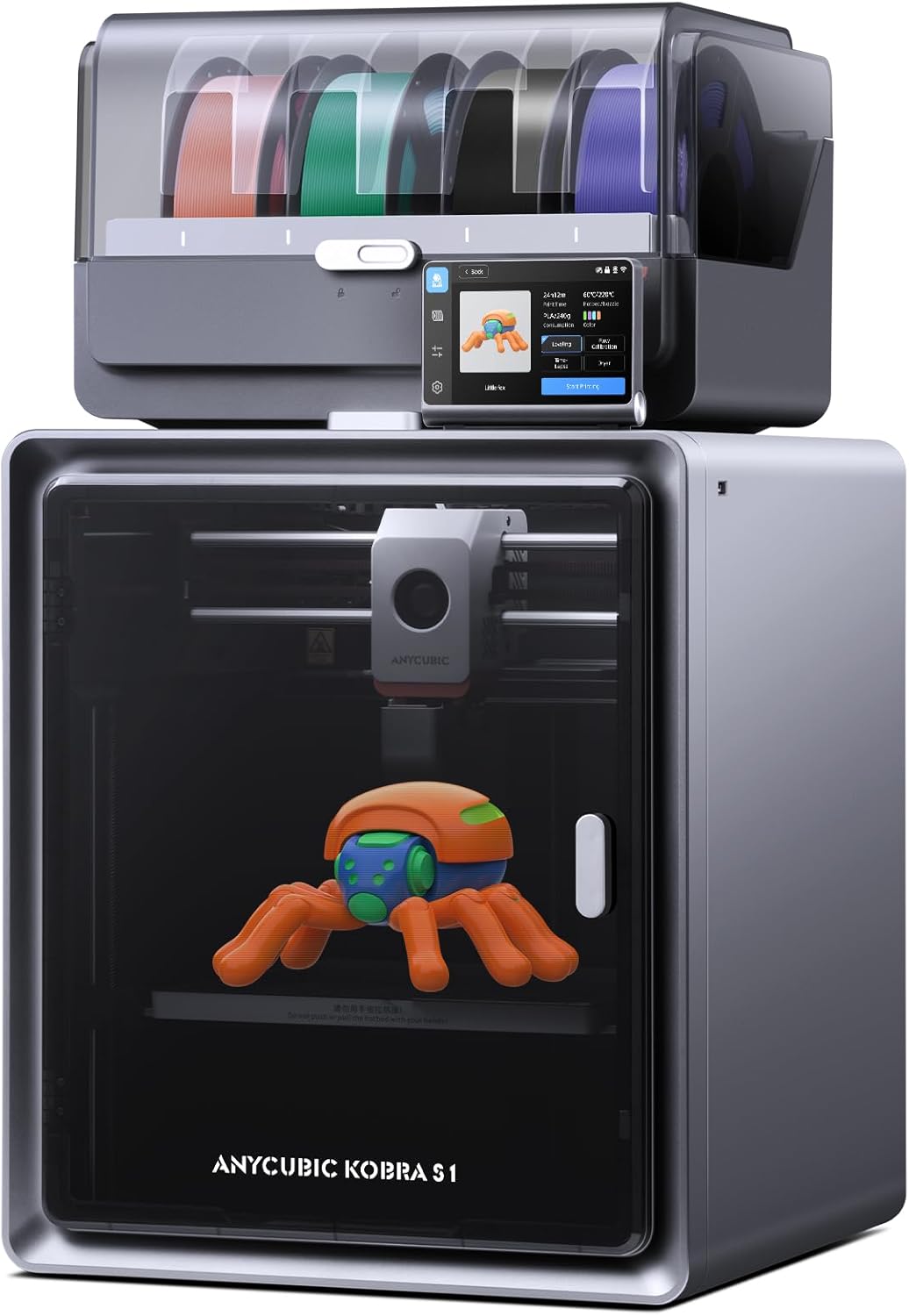
Anycubic Multicolor 3D Printer, Kobra S1 Combo Core XY Stable Structure with Sealed Printing High Precision 600mm/s Fast Speed Auto Calibration Ideal for Precision and Efficiency 9.8"x9.8"x9.8"
Want the best price and purchase timing?
Our AI advisor analyzes real-time pricing across all channels to find you the best deal.
AI Verdict
This is a 250x250x250mm CoreXY 3D printer with 600mm/s speed and 4-color printing, for users prioritizing speed and multi-material capabilities.
This printer is a situational fit because its 600mm/s speed and 4-color capability are compelling, but the reported print imperfections and filament waste for multicolor prints mean it's not a perfect plug-and-play solution for everyone. The built-in filament dryer and enclosed design are definite pluses for specific material types.
If you need consistently flawless multi-color prints right out of the box, look for systems with more advanced multi-material units that minimize filament purge waste.
Regret Score™
Low RiskLower is better — measures purchase-regret risk from real buyer complaints, review credibility, and product maturity
Issues discovered after purchase
Critically weak dimension
Amazon rating vs actual quality
Chance this product isn't for you
Pros
- Achieves print speeds up to 600mm/s with 20,000mm/s² acceleration, significantly faster than standard FDM printers.
- Supports 4-color printing out of the box, expandable to 8 colors with an additional ACE unit.
- Includes a built-in filament dryer in the ACE Pro, heating up to 55°C, to prevent moisture-related printing issues.
- Features a 4.3-inch capacitive touchscreen that is responsive and angle-adjustable for easier control.
- Offers automatic bed leveling (LeviQ 3.0), Z-offset, and vibration/dynamic flow compensation for consistent first layers.
- The hotend reaches 320°C and uses a ceramic-based design with a tool-free quick release, reducing clogging.
Cons
- Automatic filament changes are slower compared to higher-end multi-material systems.
- Multicolor printing generates excessive filament waste during color changes.
- The 0.4mm brass hotend nozzle is not hardened, requiring an upgrade for printing abrasive materials.
- Proprietary components and enclosed electronics make customization and repairs more difficult.
- The plastic door and lid can feel less premium than the rest of the metal-framed enclosure.
Dimension Scores
While capable of 600mm/s speeds, print quality can range from 'okay to good' with some imperfections, requiring tuning for optimal results.
Features like auto bed leveling, a responsive 4.3-inch touchscreen, and easy filament loading contribute to a user-friendly experience.
The ability to print with 4 colors (expandable to 8), a wide range of filament types, and a built-in filament dryer offers significant material versatility.
It features a sturdy CoreXY construction with metal side panels, but the plastic door and lid, along with internal rubbing issues, detract slightly from perceived long-term durability.
Best For
- Hobbyists wanting to experiment with multi-color 3D prints without manual painting.
- Users needing faster print times for functional prototypes or larger models.
- Makers printing with moisture-sensitive filaments like PETG or ABS due to the enclosed chamber and filament dryer.
Not Recommended For
- Users who frequently print with abrasive filaments without planning a nozzle upgrade.
- Tinkerers who want extensive hardware modifications or open-source firmware control.
- Those with limited space, as the printer weighs 56 pounds and has a 250x250x250mm build volume.
Watch Out For
- Print quality can show imperfections, requiring slower speeds and software tuning to improve.
- The PTFE tube inside the print head can rub against the casing, and the lid can get scratched by the PTFE tube movement.
- The color selection options for the ACE Pro on the printer's control screen are limited, making it hard to precisely match loaded filament colors.
- Some users report slight warping on printed models, particularly near tail ends.
Full Specifications
| ASIN | B0DBDTW2RK |
| Brand | ANYCUBIC |
| Color | Black |
| Material | PLA, PLA+, TPU, ABS, ASA, PETG、Matte PLA、Silk PLA |
| Item Weight | 56 pounds |
| Manufacturer | ANYCUBIC |
| Product Dimensions | 19.06 x 19.29 x 22.56 inches |
What Buyers Say
Users frequently point out that while the Kobra S1 Combo is fast and offers multi-color printing, you'll need to be prepared for some tuning to get the best print quality. The integrated filament dryer in the ACE Pro is a recurring highlight, keeping moisture-sensitive filaments in top condition. However, the multi-color system does generate a noticeable amount of filament waste, and some minor design quirks like internal tube rubbing have been observed.
“Honestly, this thing prints fast, like REALLY fast, but I gotta mess with the settings a bit to get those perfect multi-color prints, and man, the filament waste for color changes is real. Still, the dryer is a lifesaver for my PETG.”
Common Praise
- The 4.3-inch touchscreen is responsive and easy to navigate.
- Filament loading into the ACE Pro is a straightforward process.
- First layer adhesion is consistently strong, even with the door closed.
- The printer operates quietly, even during faster prints.
- The enclosed design helps maintain a stable temperature for materials like ABS and PETG.
- Default profiles work well for PLA, PLA+, and Silk filaments without much tweaking.
Common Complaints
- Automatic color changes are slow, impacting overall print time for multi-color projects.
- Multicolor prints result in a lot of wasted filament due to purging.
- The PTFE tube can rub against the print head casing, and the lid can get scratched.
- The hotend's brass nozzle isn't hardened, which means it wears down quickly with abrasive filaments.
- The on-screen color selection for the ACE Pro is limited, making it hard to accurately represent loaded filament.
- Some prints show slight warping, especially on larger or more complex models.
Ownership Tips
- The built-in camera is useful for remote monitoring, but the 480P resolution isn't for detailed inspection.
- The modular build makes some repairs easier, but accessing internal electronics for upgrades is a hassle.
- You'll likely want to print or buy a PTFE tube protector to prevent wear and tear inside the print head.
- The Anycubic slicer, based on Orca Slicer, is functional but might require some learning if you're used to other software.
- The RFID detection for Anycubic filament spools works reliably, simplifying material identification.
Frequently Asked Questions
What is the maximum printing speed?
The Kobra S1 Combo can reach print speeds of up to 600mm/s, with a recommended typical speed of 300mm/s.
How many colors can it print?
It supports 4-color printing with the included ACE Pro unit, and can be expanded to 8 colors by adding a second ACE unit.
Does it have a filament dryer?
Yes, the ACE Pro unit includes a built-in filament dryer that actively dries filament up to 55°C, even during printing.
What materials can this printer use?
It is compatible with PLA, PLA+, TPU, ABS, ASA, PETG, Matte PLA, and Silk PLA filaments.
Is the printer noisy?
The printer operates at ≤46dB in standard mode and ≤44dB in quiet mode, which is relatively quiet for a 3D printer.
Buying Guide
When looking at a 3D printer like this, you're balancing speed and multi-color features against potential setup and tuning time. A CoreXY design means faster, more precise movements, but multi-color systems can introduce complexity and filament waste. The enclosed chamber is a big deal if you plan to print with materials that need stable temperatures, like ABS, or if you want to reduce noise. Don't just look at the 'max speed' number; consider the 'recommended speed' for consistent quality.
600mm/s Print Speed
This isn't just a number; it means your prints finish much faster than on a standard FDM printer, which typically runs at 50-100mm/s. Think of it like a sports car versus a regular sedan – both get you there, but one is significantly quicker.
4-Color Printing
Instead of printing a single-color object, this allows you to create models with up to four different colors in one go, without having to paint them afterward. It's like having multiple colored pens for one drawing, adding visual complexity directly during the printing process.
Built-In Filament Dryer
Filament absorbs moisture from the air, which can ruin prints by causing bubbles, stringing, and weak layers. A built-in dryer keeps your filament dry, ensuring smoother, stronger prints, especially for materials like PETG and nylon, which are very hygroscopic.
CoreXY Stable Structure
This refers to the printer's mechanical design, where the print head moves on a fixed bed, using a specific belt arrangement. It generally results in more stable, faster, and often quieter printing compared to other designs, because the moving parts are lighter and more balanced.
Alternatives
If this printer doesn't quite fit, look for models with hardened steel nozzles for abrasive materials, or multi-material systems with lower filament purge waste if multi-color efficiency is your top priority.
You Might Also Like

xTool F2 Ultra UV Laser Engraver, 5W UV Laser, 3D Inner and Fine Glass Engraving, Dual 48MP Cameras, 15,000 mm/s High Speed, AI Powered 2D-to-3D Software, Ultra-Precise Detail on Glass Plastic Acrylic
$600+A 5W UV laser engraver with <10μm spot size for 3D inner glass engraving and cold processing heat-sensitive materials.

50W CO2 Laser Engraver, 16x16 inch Desktop Laser Cutter and Engraving Machine Compatible with CorelDRAW, Windows XP 7 8 10, EMF, JPG, PLT, WMF for Wood Acrylic Fabric (16"x16")
$600+This is a 50-60W CO2 laser engraver with a 300x200mm engraving area and 0.01mm positioning accuracy, designed for hobbyists and small businesses working with non-metallic materials.

LaserPecker LP5 Smart Dual 20W Fiber + Diode Laser Engraver Cutter with Rotary Extension, Slide Extension & Air Purifier, 3D Embossing, Color Engraving, Ideal for On-site Customization
$600+A dual 20W Fiber and 20W Diode laser engraver with 10,000mm/s speed, ideal for on-site customization across nearly all materials.

WIZMAKER 12W Laser Engraver Machine, Portable Carving Machine, 300x300mm Carving Area, 0.1mm High-Precision DIY Production, Suitable for Wood, Metal, Acrylic and Other Materials
$150-$299This is a 12W laser engraver with a 300x300mm carving area and 0.1mm precision, designed for DIY production on various materials.