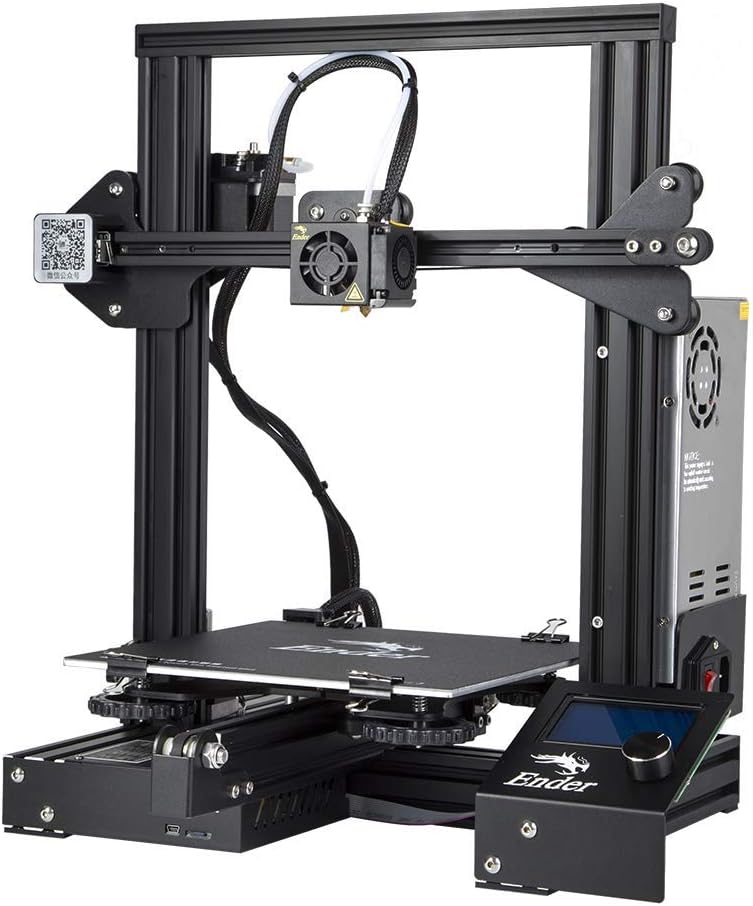
Official Creality Ender 3 3D Printer with Resume Printing Function and Stable Power Supply, High Precision Printing and High-standard V-profiles DIY 3D Printers Printing Size 8.66*8.66*9.84 inches
Want the best price and purchase timing?
Our AI advisor analyzes real-time pricing across all channels to find you the best deal.
AI Verdict
This is a 220 x 220 x 250 mm build volume 3D printer with ±0.1mm accuracy, best for tinkerers ready to upgrade and troubleshoot.
This printer is a situational fit because its low price and open-source nature attract many, but it demands significant user involvement for assembly, calibration, and potential safety upgrades. The 220 x 220 x 250 mm build volume and ±0.1mm accuracy are functional, but achieving consistent results often requires troubleshooting and modifications.
If you need a more reliable experience with fewer initial headaches, look for models with a 32-bit board and silent stepper drivers out of the box.
Regret Score™
Very High RiskLower is better — measures purchase-regret risk from real buyer complaints, review credibility, and product maturity
Issues discovered after purchase
Critically weak dimension
Amazon rating vs actual quality
Chance this product isn't for you
Pros
- The 220 x 220 x 250 mm build volume allows for medium-sized prototypes and parts.
- It features a resume printing function that restarts projects after power interruptions.
- The heated bed reaches 110°C in five minutes, which helps with material adhesion.
- The open-source design means extensive community support and available modifications.
- The upgraded extruder minimizes clogging risks and ensures consistent filament flow.
- Achieves print accuracy up to ±0.1mm for detailed models.
Cons
- The original motherboard can be problematic, with reports of hardware failure and uncontrolled heating.
- Older units often lack a bootloader, making firmware updates difficult without an Arduino Uno.
- The print bed frequently arrives warped, requiring manual leveling or additional upgrades for consistent first layers.
- Stock wiring for the heating element has been cited as cheap and a potential fire hazard.
- The printer's stepper motors produce noticeable noise during operation.
Dimension Scores
The printer is capable of ±0.1mm printing accuracy, but achieving this consistently often requires significant calibration and upgrades due to issues like warped beds.
Assembly takes about two hours, but frequent bed leveling, troubleshooting, and potential firmware flashing make it less user-friendly for beginners.
The 220 x 220 x 250 mm build volume, heated bed up to 110°C, and ability to print PLA, PETG, and modified ABS offer good material and project flexibility.
Reports of cheap wiring, motherboard failures, and components like the Bowden tube coming loose indicate durability concerns with stock components.
Best For
- Hobbyists who enjoy tinkering and modifying hardware.
- Users on a strict budget willing to invest time in learning and troubleshooting.
- Educational settings for teaching 3D printing fundamentals and problem-solving.
- Printing mostly PLA and PETG, with modifications for ABS.
Not Recommended For
- Beginners expecting a plug-and-play experience without any technical challenges.
- Users who need a printer for unattended operation due to reported safety concerns.
- Anyone requiring consistently perfect prints right out of the box without calibration or upgrades.
Watch Out For
- The stock mainboard in some units has been reported to fail, causing heating elements to heat uncontrollably and creating a fire risk.
- Many users report a warped print bed, making it difficult to achieve a stable first layer without constant manual adjustment or a bed leveling sensor.
- Firmware updates on older models require buying an Arduino Uno and connecting it to the board to install a bootloader.
- The Bowden tube connecting to the hot nozzle can come loose, leading to extrusion issues and failed prints.
- Thermal runaway protection, a safety feature, was not included in older firmware versions, increasing fire risk if heating elements fail.
Full Specifications
| ASIN | B07D218NX3 |
| Brand | Creality |
| Color | Black |
| Material | Acrylic |
| Item Weight | 15.4 pounds |
| Manufacturer | Creality 3D |
| Item model number | Ender-3 |
| Product Dimensions | 8.66 x 8.66 x 9.84 inches |
| Is Discontinued By Manufacturer | No |
What Buyers Say
Many users found that while the Ender 3 is affordable, it often requires immediate upgrades and significant tinkering to function reliably and safely. The community support is a major plus, helping users navigate common issues like warped beds and the need for firmware updates. However, some experienced critical hardware failures, including motherboards overheating, which raised serious safety concerns.
“Man, this thing is cheap but you gotta be ready to spend another hundred bucks and a bunch of hours just to make it not burn your house down, my bed was so bent it was a joke.”
Common Praise
- The large 220 x 220 x 250 mm print volume is frequently mentioned as a strong point for the price.
- The active and helpful online community provides extensive resources and upgrade ideas.
- The resume printing function is appreciated for saving long prints from power interruptions.
- With upgrades and tuning, it can produce high-quality prints.
- Assembly is relatively quick, taking around two hours.
Common Complaints
- The print bed is often warped, making consistent first-layer adhesion difficult.
- Some units have a cheap motherboard that can fail and cause uncontrolled heating, posing a fire risk.
- Updating firmware can be complicated, often requiring an additional Arduino Uno for older models.
- The stock Bowden tube and extruder can lead to clogging and extrusion problems.
- It can be noisy during operation due to the stepper motors.
Ownership Tips
- You'll probably spend a lot of time leveling the bed, possibly needing to buy a glass bed or auto-leveling sensor.
- Expect to flash custom firmware to enable safety features like thermal runaway protection.
- You'll likely be printing numerous upgrades for the printer itself, like filament guides or fan shrouds.
- Learning about G-code and slicer settings becomes essential for getting good prints.
- You might need to replace the stock Bowden tube with a higher-quality one to prevent clogs.
Frequently Asked Questions
How long does it take to assemble the Ender 3?
Assembly typically takes around two hours, as it comes with several pre-assembled parts.
Can the Ender 3 print different types of filament?
Yes, it primarily prints PLA and PETG out of the box. With minimal modifications, it can also print ABS, though ABS produces fumes and requires ventilation.
Is the Ender 3 noisy during operation?
The Ender 3 makes typical 3D printer noise from its stepper motors. A 'silent board' upgrade is available to reduce this noise.
What is the build volume of this printer?
It offers a build volume of 220 x 220 x 250 mm, which is suitable for medium-sized prints.
Does it have a feature to resume printing after a power outage?
Yes, it includes a resume printing function that allows it to continue from the last recorded position after a power interruption.
Buying Guide
When looking at 3D printers like this, you need to understand that 'DIY' isn't just about assembly; it's about ongoing calibration and modification. You're not just buying a tool; you're buying into a hobby that requires patience and a willingness to troubleshoot. Don't expect perfect prints on day one without some effort on your part.
Build Volume (220 x 220 x 250 mm)
This is the maximum size of an object you can print. Think of it like the size of your oven; a bigger oven lets you bake a bigger cake. For 3D printers, this volume dictates the largest single piece you can create without splitting it into multiple parts.
Printing Accuracy (±0.1mm)
This tells you how close the printed object's dimensions will be to the digital model. A ±0.1mm accuracy means your printed part could be off by a tenth of a millimeter in any direction. For functional parts that need to fit together precisely, a smaller number here is better, like a ruler with finer markings.
Heated Bed (up to 110°C in 5 minutes)
A heated bed keeps the first layers of your print warm, which helps them stick to the print surface and prevents warping, especially with materials like ABS. It's like baking on a warm cookie sheet to keep the dough from sticking and curling up at the edges.
Alternatives
If this printer seems too hands-on, look for models with features like automatic bed leveling, silent stepper drivers, and 32-bit mainboards for a smoother initial experience.
You Might Also Like

xTool F2 Ultra UV Laser Engraver, 5W UV Laser, 3D Inner and Fine Glass Engraving, Dual 48MP Cameras, 15,000 mm/s High Speed, AI Powered 2D-to-3D Software, Ultra-Precise Detail on Glass Plastic Acrylic
$600+A 5W UV laser engraver with <10μm spot size for 3D inner glass engraving and cold processing heat-sensitive materials.

50W CO2 Laser Engraver, 16x16 inch Desktop Laser Cutter and Engraving Machine Compatible with CorelDRAW, Windows XP 7 8 10, EMF, JPG, PLT, WMF for Wood Acrylic Fabric (16"x16")
$600+This is a 50-60W CO2 laser engraver with a 300x200mm engraving area and 0.01mm positioning accuracy, designed for hobbyists and small businesses working with non-metallic materials.

LaserPecker LP5 Smart Dual 20W Fiber + Diode Laser Engraver Cutter with Rotary Extension, Slide Extension & Air Purifier, 3D Embossing, Color Engraving, Ideal for On-site Customization
$600+A dual 20W Fiber and 20W Diode laser engraver with 10,000mm/s speed, ideal for on-site customization across nearly all materials.

WIZMAKER 12W Laser Engraver Machine, Portable Carving Machine, 300x300mm Carving Area, 0.1mm High-Precision DIY Production, Suitable for Wood, Metal, Acrylic and Other Materials
$150-$299This is a 12W laser engraver with a 300x300mm carving area and 0.1mm precision, designed for DIY production on various materials.