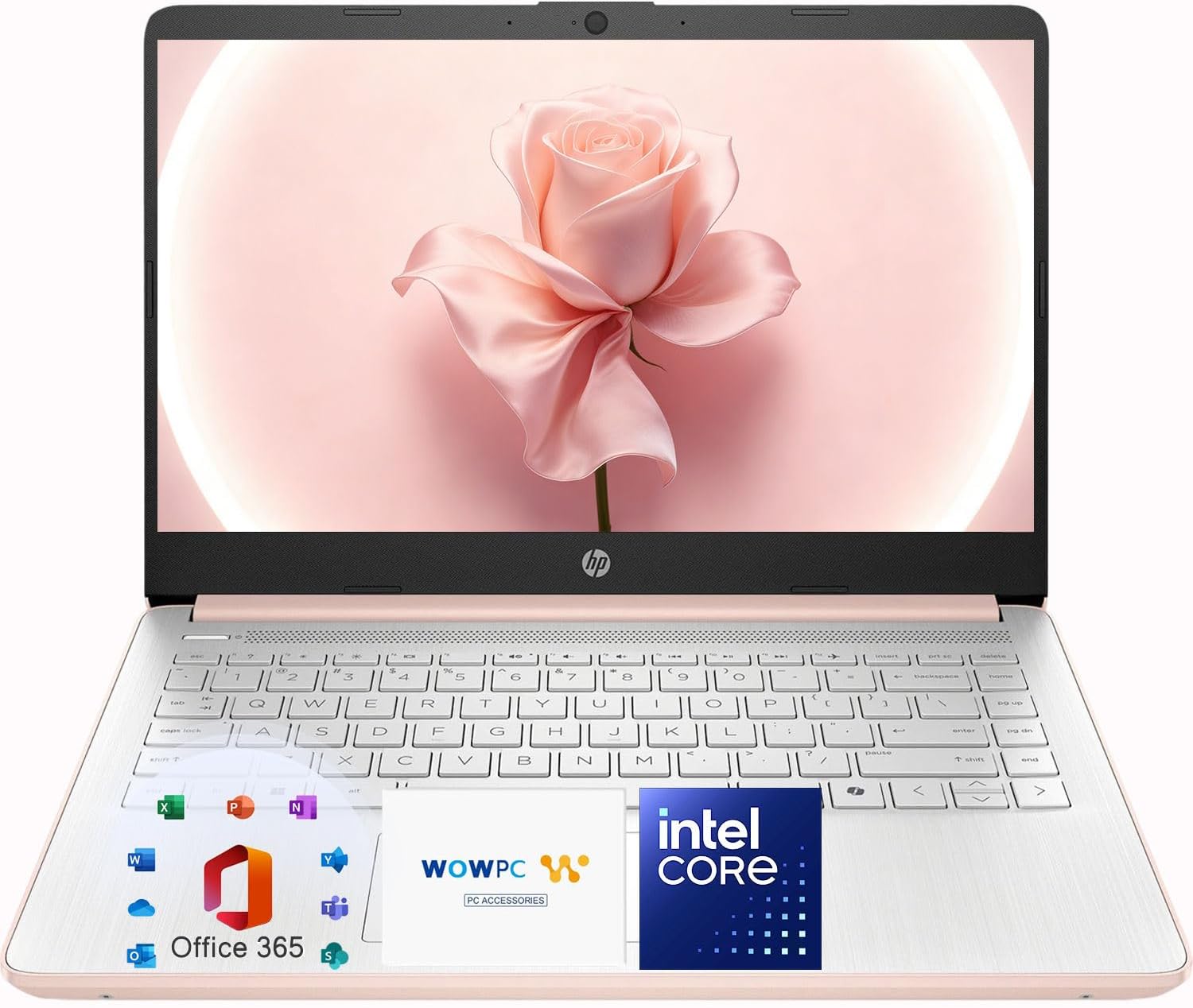
HP 14″ Rose Gold Lightweight Laptop, Intel 4-Core Processor, 4GB On-Board Memory, 128GB SSD + 1TB Cloud Storage, Microsoft 365 Web Apps
Want the best price and purchase timing?
Our AI advisor analyzes real-time pricing across all channels to find you the best deal.
AI Verdict
This 14-inch laptop with a 3.6 GHz Celeron processor, 4GB DDR4 RAM, and a 1366 x 768 display is for basic web browsing and cloud-based tasks.
This laptop is a situational fit, primarily due to its combination of a low-power Intel Celeron processor and 4GB of RAM, which limits it to very basic computing tasks. While the 128GB SSD provides quick boot times, the 1TB OneDrive cloud storage is essential for managing files given the limited local capacity. Its 5-pound weight also contradicts its 'lightweight' marketing.
If your budget allows, prioritize a laptop with at least 8GB of RAM, an Intel Core i3 (or equivalent) processor, and a 1920x1080 (Full HD) display.
Regret Score™
Very High RiskLower is better — measures purchase-regret risk from real buyer complaints, review credibility, and product maturity
Issues discovered after purchase
Critically weak dimension
Amazon rating vs actual quality
Chance this product isn't for you
Pros
- The Rose Gold finish offers a modern and aesthetic look.
- Features 128GB SSD for faster system startup and quick application access.
- Includes 1TB OneDrive cloud storage for backing up documents and files.
- Preloaded with Windows 11 and Copilot AI for productivity assistance.
- Equipped with a HP True Vision 720p HD camera and dual array digital mic for video calls.
- Comes with WiFi 802.11 and Bluetooth 5.4 for wireless connectivity.
Cons
- The 4GB DDR4 on-board memory is restrictive for multitasking beyond basic web browsing.
- The 1366 x 768 resolution on a 14-inch display results in a low-resolution viewing experience.
- The Intel Celeron processor struggles with heavier multitasking or demanding software.
- Weighs 5 pounds, which is heavy for a 14-inch laptop marketed as lightweight.
- The keyboard is non-backlit, making it difficult to use in low-light conditions.
- The display offers only 220 nits brightness and 45% NTSC color coverage, leading to a dim and less vibrant picture.
Dimension Scores
The 3.6 GHz Intel Celeron processor and 4GB DDR4 RAM are only adequate for very light, single-task computing and will struggle with anything more demanding.
The 14-inch 1366 x 768 resolution display with 220 nits brightness and 45% NTSC offers a low-resolution, dim, and less vibrant visual experience.
User reports indicate a battery life of around 9-11 hours with moderate use, which is above average for its category.
While it has a Rose Gold finish, the 5-pound weight is heavy for a 14-inch laptop, and the plastic build feels fragile according to user feedback.
Best For
- Students needing a device for online learning and document editing.
- Users who primarily rely on web browsing and cloud-based applications like Microsoft 365 Web Apps.
- Individuals seeking a secondary home device for light, single-task productivity.
- People who prioritize a specific aesthetic with the Rose Gold design.
Not Recommended For
- Anyone expecting to run demanding software, perform video editing, or engage in gaming.
- Users who frequently multitask with many applications or browser tabs open simultaneously.
- Professionals requiring a high-resolution display or a powerful processor for complex work.
Watch Out For
- The Intel Celeron processor can cause lag when attempting heavier multitasking or using real software beyond basic web browsing.
- The 1366x768 screen resolution feels like a downgrade if you're accustomed to Full HD (1080p) or higher.
- The keyboard is silver with faint silver letters and lacks a backlight, making it a struggle to see keys in anything less than full daylight.
- The build quality feels mostly plastic and fragile, suggesting it might not withstand accidental drops.
- With only 4GB of RAM, the system can feel restrictive and slow for anything more than basic email and document work.
Full Specifications
| RAM | 4 GB DDR4 |
| ASIN | B0GLWW1Y4Z |
| Brand | HP |
| Color | Rose Gold |
| Series | UltraBook |
| CPU Model | Celeron |
| Processor | 3.6 GHz celeron |
| Hard Drive | 1.1 TB SSD |
| Model Name | UltraBook |
| Item Weight | 5 pounds |
| Screen Size | 14 Inches |
| Wireless Type | 802.11ac, 802.11ax, Bluetooth |
| Hard Disk Size | 1.1 TB |
| Processor Brand | Intel |
| Special Feature | Anti Glare Coating, HD Audio, Memory Card Slot, Spill Resistant |
| Card Description | Integrated |
| Operating System | Windows 11 Home |
| Hardware Platform | PC |
| Item model number | UltraBook |
| Screen Resolution | 1366 x 768 pixels |
| Product Dimensions | 12.7 x 8.8 x 0.7 inches |
| Computer Memory Type | DDR4 SDRAM |
| Graphics Coprocessor | Intel Graphics |
| Hard Drive Interface | PCIE x 4 |
| Number of Processors | 4 |
| Max Screen Resolution | 1366x768 Pixels |
| Item Dimensions LxWxH | 12.7 x 8.8 x 0.7 inches |
| Graphics Card Description | Integrated |
| Ram Memory Installed Size | 4 GB |
| Standing screen display size | 14 Inches |
What Buyers Say
Many users highlight the laptop's attractive Rose Gold color and its suitability for basic tasks like web browsing and document editing. However, a recurring complaint centers on the low-resolution 1366x768 screen, which feels outdated and dim. The Intel Celeron processor and 4GB RAM are frequently cited as performance bottlenecks, leading to lag with multiple tabs or heavier applications. The non-backlit keyboard with faint silver letters is another common frustration, especially in low-light conditions.
“Honestly, I bought this for my kid for school, thinking 'lightweight' meant actually light. It's 5 pounds! And the screen looks like something from 2010. It's fine for homework, but don't expect to watch Netflix without squinting. Should've spent a bit more for a real screen.”
Common Praise
- The Rose Gold finish is frequently mentioned for its modern and elegant appearance.
- Users find it suitable for basic productivity tasks like email and word processing.
- The inclusion of 1TB OneDrive cloud storage is appreciated for file backup and accessibility.
- The 128GB SSD provides faster boot times and application launches compared to traditional hard drives.
- Battery life is often reported as lasting 9-11 hours with moderate use.
Common Complaints
- The 1366x768 display resolution is often described as low and a noticeable downgrade from higher-resolution screens.
- The Intel Celeron processor and 4GB RAM lead to noticeable slowdowns when multitasking or running anything beyond light applications.
- The non-backlit keyboard with silver letters makes typing difficult in low-light environments.
- The plastic build quality is perceived as cheap and fragile, raising concerns about durability.
- The 5-pound weight is considered heavy for a 14-inch laptop, despite being marketed as lightweight.
Ownership Tips
- After a few weeks, the 4GB RAM really starts to show its limits, even with just a few browser tabs open, causing noticeable stuttering.
- The non-backlit keyboard becomes a major annoyance when trying to work in the evening, making it hard to see the keys.
- The 128GB SSD fills up surprisingly fast, even with the 1TB OneDrive, if you install a few applications or save local files.
- The display's low brightness and resolution make it difficult to use comfortably outdoors or in brightly lit rooms.
- The 'lightweight' claim feels misleading once you carry it around daily; 5 pounds is heavier than expected for its size.
Frequently Asked Questions
Can this laptop handle multiple browser tabs and applications at once?
No, with only 4GB of RAM and an Intel Celeron processor, this laptop will likely lag and struggle with heavy multitasking or running multiple demanding applications simultaneously.
Is the screen quality suitable for watching movies or detailed work?
The 1366 x 768 resolution and 220 nits brightness mean the display is low-resolution and dim, making it less ideal for detailed work or an immersive movie-watching experience compared to Full HD screens.
How much local storage does this laptop actually have?
It comes with 128GB of local SSD storage. While it also includes 1TB of OneDrive cloud storage, your physical storage on the device is 128GB.
Does the keyboard light up for use in the dark?
No, the keyboard is non-backlit, which can make typing challenging in dimly lit environments.
What kind of performance can I expect from the Intel Celeron processor?
The Intel Celeron processor is designed for basic tasks like web browsing, email, and document editing. It is not suitable for gaming, video editing, or other processor-intensive applications.
Buying Guide
When you're looking at budget laptops like this, you need to set your expectations for performance. You're trading raw power and premium features for a lower price. Think about what you'll *actually* use it for, because trying to push these machines beyond basic tasks will lead to frustration. Don't get swayed by 'lightweight' claims without checking the actual weight, and always look at the screen resolution.
Processor (Intel Celeron)
This is the 'brain' of the laptop. An Intel Celeron is like a small, efficient engine – it's great for cruising on flat roads (basic tasks like email or web browsing), but it will struggle and slow down significantly if you try to climb a steep hill (run complex software or many programs at once).
RAM (4GB DDR4)
RAM is like your laptop's short-term memory or workspace. 4GB is a very small desk; you can only have a few 'papers' (browser tabs, applications) open before things get cluttered and slow. More RAM means a bigger desk, allowing you to multitask more smoothly without the laptop freezing up.
Storage (128GB SSD + 1TB OneDrive)
This laptop has two types of storage. The 128GB SSD is like a small, very fast closet for your most important clothes (operating system and frequently used apps). The 1TB OneDrive is like a huge storage unit off-site (cloud storage) – great for backups and files you don't need instantly, but accessing things takes an internet connection.
Resolution (1366 x 768 pixels)
This describes how many pixels make up the image on your screen. 1366 x 768 is a low number, meaning images and text won't be as sharp or detailed as on a Full HD (1920 x 1080) screen. It's like watching a standard definition TV versus a high-definition one – the difference in clarity is noticeable.
Alternatives
If this laptop doesn't meet your needs, look for models with at least 8GB of RAM, an Intel Core i3 or AMD Ryzen 3 processor, and a 1920x1080 (Full HD) display for a significantly better user experience.
You Might Also Like

Apple 2026 MacBook Air 13-inch Laptop with M5 chip: Built for AI, 13.6-inch Liquid Retina Display, 16GB Unified Memory, 512GB SSD, 12MP Center Stage Camera, Touch ID, Wi-Fi 7; Midnight
$600+This 2.71-pound MacBook Air with a 13.6-inch Liquid Retina display and M5 chip is for users needing powerful AI capabilities and up to 18 hours of battery life.

Apple 2026 MacBook Pro Laptop with Apple M5 Pro chip with 18-core CPU and 20-core GPU: Built for AI, 16.2-inch Liquid Retina XDR Display, 24GB Unified Memory, 1TB SSD, Wi-Fi 7; Space Black
$600+This 16.2-inch MacBook Pro with an 18-core M5 Pro CPU and 20-core GPU is for professionals needing extreme AI performance and up to 27 hours of battery life.

Apple 2026 MacBook Air 15-inch Laptop with M5 chip: Built for AI, 15.3-inch Liquid Retina Display, 16GB Unified Memory, 512GB SSD, 12MP Center Stage Camera, Touch ID, Wi-Fi 7; Midnight
$600+This 3.32-pound MacBook Air with an M5 chip and 15.3-inch Liquid Retina display is for users needing powerful AI capabilities and up to 18 hours of battery life.

HP OmniBook 5 16” Touchscreen AI Laptop – Intel Core Ultra 7 Processor, 16GB RAM, 1TB SSD, Windows 11, Copilot AI, Wi-Fi 6E, Backlit Keyboard, Silver
$600+This 16-inch touchscreen laptop with an Intel Core Ultra 7, 16GB LPDDR5 RAM, and 1TB SSD is for users needing a mid-range AI-accelerated machine for productivity and light creative tasks.