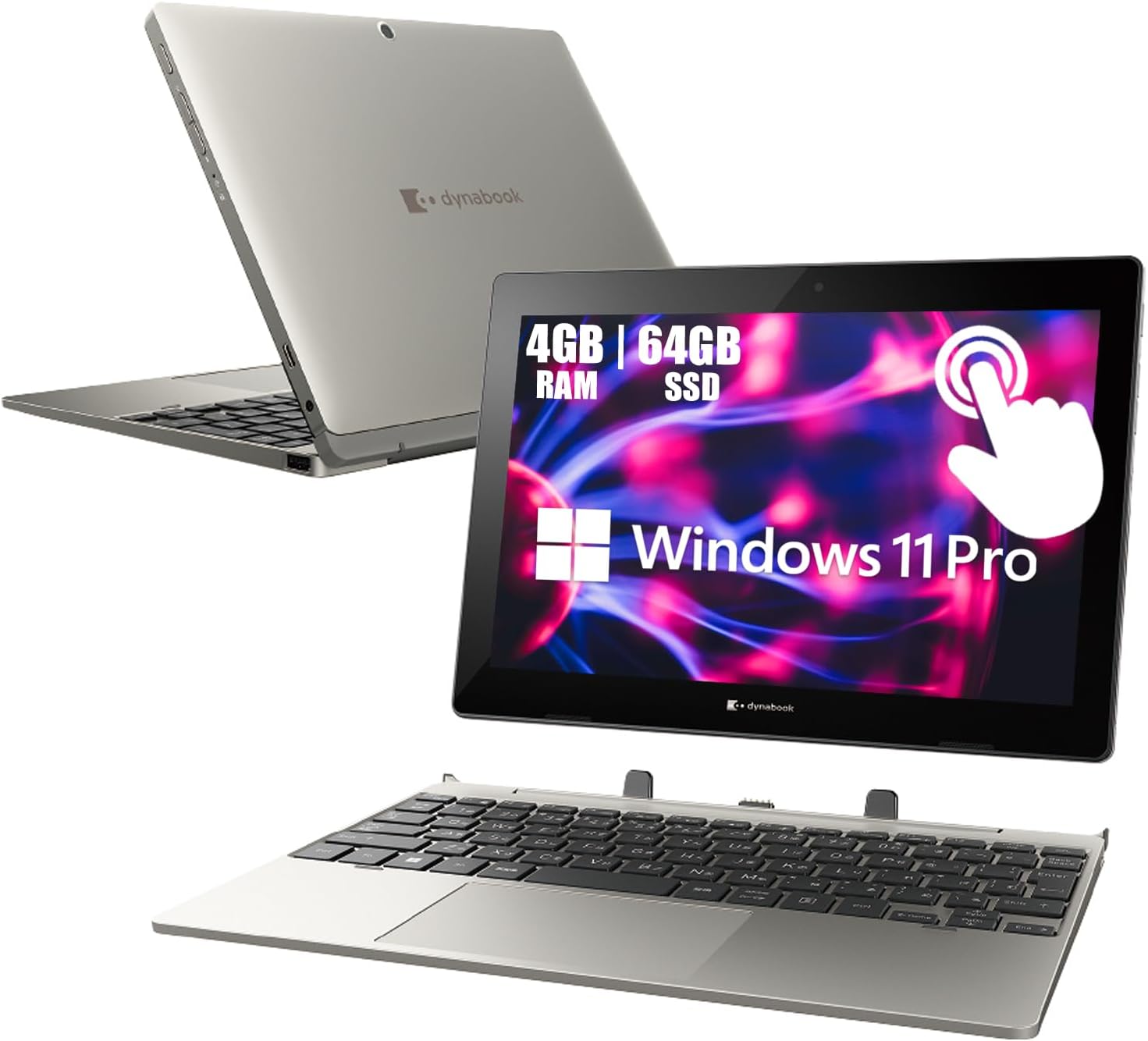
TOSHIBA Dynabook K50 2-in-1 Touchscreen Laptop, 10.1" Tablet, Intel Celeron N4020, 4GB RAM, 64GB SSD, 2 Camera, Type-C, Japanese Keyboard, Windows 11 Pro (Renewed)
Want the best price and purchase timing?
Our AI advisor analyzes real-time pricing across all channels to find you the best deal.
AI Verdict
This is a renewed 10.1-inch 2-in-1 with an Intel Celeron N4020, 4GB RAM, and 64GB SSD, best for basic web browsing and light tasks.
Regret Score™
Very High RiskLower is better — measures purchase-regret risk from real buyer complaints, review credibility, and product maturity
Issues discovered after purchase
Critically weak dimension
Amazon rating vs actual quality
Chance this product isn't for you
Pros
- Includes Windows 11 Pro, offering enhanced security and remote management features not found in Windows 11 Home.
- The 2-in-1 design with a 10.1-inch touchscreen allows for tablet and laptop modes, providing flexibility for different uses.
- Features multiple connectivity options including USB Type-C, USB Type-A, Audio Jack, microSD card slot, and HDMI (on dock).
- Weighs 1.18kg (approximately 2.6 pounds), making it relatively light for portability.
- Equipped with two cameras (front 720p HD, rear 1080p FHD) for video conferencing and basic photography.
Cons
- The Intel Celeron N4020 processor (1.1 GHz) with 4GB RAM will struggle with anything beyond basic web browsing and light document editing.
- The 64GB SSD offers very limited storage space, especially after Windows 11 Pro installation, restricting application installs and file storage.
- The 1280 x 800 pixel resolution on a 10.1-inch screen is below current standards for visual clarity and screen real estate.
- The Japanese keyboard layout can be confusing and less efficient for users accustomed to a standard US English layout.
- As a renewed product, battery life and overall longevity may be inconsistent compared to a new device.
Dimension Scores
The Intel Celeron N4020 processor with 4GB RAM provides minimal processing power, suitable only for the most undemanding tasks.
The 10.1-inch 1280 x 800 pixel touchscreen offers a low resolution for its size, resulting in less sharp visuals compared to most modern displays.
The 34.5 Wh battery capacity is modest, and as a renewed unit, its actual performance will likely be below average for a new device in its category.
Weighing 1.18kg (2.6 pounds) and featuring a 2-in-1 design, it offers good portability and flexibility for its price point.
Best For
- Children needing a device for basic educational apps and web-based learning.
- Travelers requiring a compact, lightweight device for email and media consumption.
- Users on a strict budget needing a secondary device for very light tasks like checking social media.
Not Recommended For
- Anyone needing to run multiple applications simultaneously or perform demanding tasks like video editing or graphic design.
- Users who require significant local storage for large files, games, or extensive software installations.
- Individuals expecting a high-resolution display for detailed work or immersive media viewing.
Watch Out For
- The 64GB SSD will quickly fill up, leaving less than 30GB free after Windows 11 Pro and essential updates, requiring constant storage management.
- The Intel Celeron N4020 processor and 4GB RAM will cause noticeable slowdowns and stuttering when opening more than a few browser tabs or running multiple background processes.
- The 1280 x 800 display resolution means text and images will appear less sharp than on higher-resolution screens, impacting readability over long periods.
- The Japanese keyboard layout can lead to frequent typing errors and frustration for users unfamiliar with the different key placements and additional characters.
- As a renewed device, the 7.7V ~ 34.5 Wh battery's actual capacity and lifespan are unpredictable, potentially offering significantly less runtime than a new unit.
Full Specifications
| RAM | DDR4 |
| ASIN | B0GGZTDQRN |
| Brand | TOSHIBA |
| Series | Dynabook K50 |
| CPU Model | Mobile Intel Celeron Processor |
| CPU Speed | 1.1 GHz |
| Processor | 1.1 GHz mobile_celeron |
| Hard Drive | 64 GB SSD |
| Model Name | Dynabook K50 |
| Item Weight | 4 pounds |
| Screen Size | 10.1 Inches |
| Chipset Brand | Intel |
| Wireless Type | 802.11ac, Bluetooth |
| Hard Disk Size | 64 GB |
| Processor Brand | Intel |
| Special Feature | Webcam |
| Card Description | Integrated |
| Operating System | Windows 11 Pro |
| Item model number | TOSHIBA Dynabook K50 |
| Screen Resolution | 1280 x 800 pixels |
| Product Dimensions | 10.3 x 6.7 x 0.5 inches |
| Computer Memory Type | DDR4 SDRAM |
| Number of Processors | 1 |
| Max Screen Resolution | 1280x800 Pixels |
| Item Dimensions LxWxH | 10.3 x 6.7 x 0.5 inches |
| Number of USB 3.0 Ports | 1 |
| Graphics Card Description | Integrated |
| Ram Memory Installed Size | 4 GB |
| Standing screen display size | 10.1 Inches |
What Buyers Say
Due to its recent availability and renewed status, specific user reviews for this exact Toshiba Dynabook K50 are scarce. However, based on its entry-level specifications, potential buyers should anticipate a device best suited for very light, single-task usage. The 10.1-inch touchscreen and Windows 11 Pro are appealing features for the price, but the Celeron N4020, 4GB RAM, and 64GB SSD point to significant performance and storage limitations. The presence of a Japanese keyboard is a specific detail that will impact usability for many.
“I bought this for my kid for school, and honestly, it's barely holding up. Windows updates take forever, and she can only have one tab open without it freezing. Should've saved up for something better.”
Common Praise
- The 2-in-1 form factor provides flexibility between laptop and tablet modes.
- Includes Windows 11 Pro, which is a full operating system with advanced features.
- The compact 10.1-inch size makes it easy to carry around.
- Multiple ports, including USB-C and HDMI (on dock), offer good connectivity for peripherals.
Common Complaints
- Performance is sluggish, even for basic web browsing, due to the Celeron N4020 and 4GB RAM.
- The 64GB SSD fills up quickly, making it difficult to install many applications or store files.
- The 1280x800 display resolution is low, leading to a less crisp visual experience.
- The Japanese keyboard layout is inconvenient and slows down typing for non-Japanese users.
- As a renewed product, there's an inherent risk of variable battery health and overall condition.
Ownership Tips
- Windows 11 Pro updates consume a significant portion of the 64GB SSD, requiring frequent disk cleanup.
- The small screen size and low resolution can cause eye strain during extended use, especially for reading text.
- The keyboard dock connection can sometimes be finicky, requiring re-attachment to register inputs.
- Battery life degrades noticeably over a few months of use, typical for renewed devices.
- Finding compatible accessories or replacement parts for a renewed Japanese model can be challenging.
Frequently Asked Questions
Can I upgrade the RAM or storage on this laptop?
No, the 4GB RAM is likely soldered and the 64GB SSD is eMMC, meaning neither component is user-upgradable. You're stuck with the installed memory and storage.
Is the Japanese keyboard difficult to use for English speakers?
Yes, the Japanese keyboard has a different physical layout and additional keys for Japanese characters. While you can set Windows to an English layout, the physical keys won't match, which can be confusing for touch typists.
What kind of performance can I expect from the Intel Celeron N4020 processor?
The Celeron N4020 is an entry-level processor designed for basic tasks. Expect it to handle web browsing, email, and light document work, but it will be slow with multiple applications or demanding websites.
Does this 2-in-1 come with a stylus?
The product specifications do not mention a stylus, so it's safe to assume one is not included. Any stylus functionality would rely on standard capacitive touch.
How long does the battery last on a single charge?
The device has a 7.7V ~ 34.5 Wh battery. As a renewed product, actual battery life will vary, but with these specs, you might see 4-6 hours of light use, not all-day power.
Buying Guide
When looking at a 2-in-1 device like this, you're balancing portability with functionality. You need to understand that a smaller screen and lower-end processor mean compromises. Don't expect it to replace your main computer for anything beyond the absolute basics. The 'renewed' status means it's been used before, so manage your expectations regarding battery life and cosmetic condition.
Intel Celeron N4020 Processor
This is a very basic processor, like a small engine in a car. It's fine for cruising slowly on a flat road (simple tasks), but it will struggle and feel very slow if you try to go uphill or carry a heavy load (multiple apps, complex websites).
4GB RAM
RAM is like your computer's short-term memory. 4GB is the bare minimum for Windows 11 Pro. Think of it as a small desk; you can only have a couple of things open at once before you run out of space and everything slows down.
64GB SSD
This is your computer's storage, like a small closet. Windows 11 Pro itself takes up a lot of space, leaving very little for your apps and files. You'll constantly be running out of room, like trying to fit a whole wardrobe into a tiny closet.
Alternatives
If this device doesn't meet your needs, look for laptops with at least 8GB of RAM, 128GB or 256GB of SSD storage, and an Intel Core i3/i5 or AMD Ryzen 3/5 processor for a smoother experience.
You Might Also Like

Apple 2026 MacBook Air 13-inch Laptop with M5 chip: Built for AI, 13.6-inch Liquid Retina Display, 16GB Unified Memory, 512GB SSD, 12MP Center Stage Camera, Touch ID, Wi-Fi 7; Midnight
$600+This 2.71-pound MacBook Air with a 13.6-inch Liquid Retina display and M5 chip is for users needing powerful AI capabilities and up to 18 hours of battery life.

Apple 2026 MacBook Pro Laptop with Apple M5 Pro chip with 18-core CPU and 20-core GPU: Built for AI, 16.2-inch Liquid Retina XDR Display, 24GB Unified Memory, 1TB SSD, Wi-Fi 7; Space Black
$600+This 16.2-inch MacBook Pro with an 18-core M5 Pro CPU and 20-core GPU is for professionals needing extreme AI performance and up to 27 hours of battery life.

Apple 2026 MacBook Air 15-inch Laptop with M5 chip: Built for AI, 15.3-inch Liquid Retina Display, 16GB Unified Memory, 512GB SSD, 12MP Center Stage Camera, Touch ID, Wi-Fi 7; Midnight
$600+This 3.32-pound MacBook Air with an M5 chip and 15.3-inch Liquid Retina display is for users needing powerful AI capabilities and up to 18 hours of battery life.

HP OmniBook 5 16” Touchscreen AI Laptop – Intel Core Ultra 7 Processor, 16GB RAM, 1TB SSD, Windows 11, Copilot AI, Wi-Fi 6E, Backlit Keyboard, Silver
$600+This 16-inch touchscreen laptop with an Intel Core Ultra 7, 16GB LPDDR5 RAM, and 1TB SSD is for users needing a mid-range AI-accelerated machine for productivity and light creative tasks.