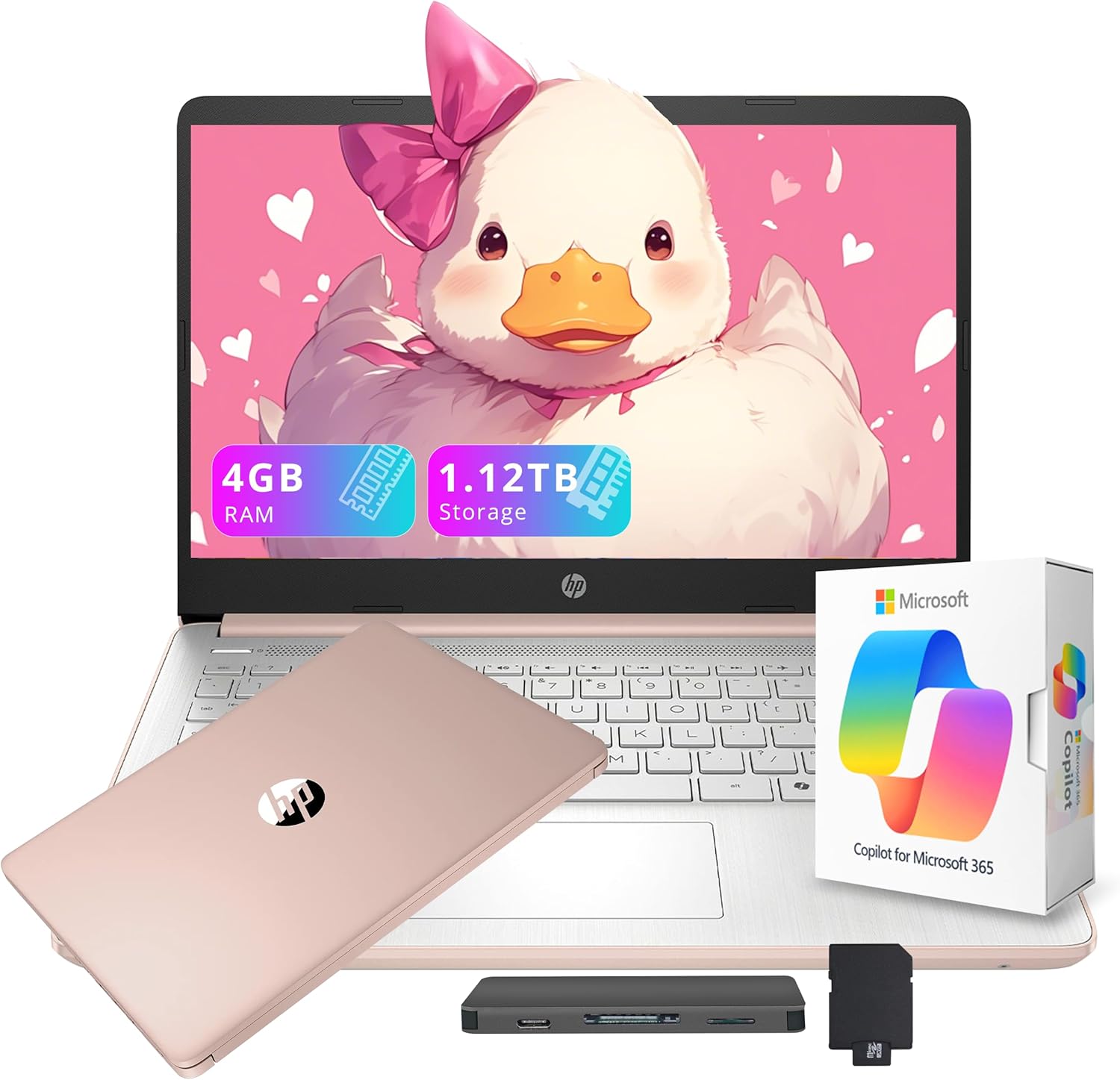
HP Flagship 14" HD Student&Business Laptop with AI Copilot, 13th Gen Intel 4-Core, 4GB RAM, 1.12TB Storage (128GB UFS + 1TB Docking Station), 1 Year Office 365, Wi-Fi 6, Win 11 S, Pale Rose Gold
Want the best price and purchase timing?
Our AI advisor analyzes real-time pricing across all channels to find you the best deal.
AI Verdict
This is a 14-inch laptop with an Intel N150 processor, 4GB RAM, 128GB UFS storage, and a 1366 x 768 display, best for extremely basic computing tasks.
Regret Score™
Very High RiskLower is better — measures purchase-regret risk from real buyer complaints, review credibility, and product maturity
Issues discovered after purchase
Critically weak dimension
Amazon rating vs actual quality
Chance this product isn't for you
Pros
- Includes a 1-year subscription to Microsoft Office 365, providing essential productivity software.
- Comes with a 1TB docking station set, expanding storage significantly beyond the internal 128GB UFS.
- Features Wi-Fi 6 for faster wireless speeds and more reliable connections.
- Weighs 3.24 pounds and measures 0.71 inches thick, making it portable for on-the-go use.
- Equipped with a USB Type-C port, two USB Type-A ports, HDMI 1.4b, and a media card reader for connectivity.
Cons
- The 4GB DDR4 RAM is insufficient for modern multitasking and will cause slowdowns with multiple applications or browser tabs open.
- The 1366 x 768 pixel resolution on a 14-inch screen results in a lack of sharpness and limited screen real estate.
- Windows 11 S mode restricts app installations to the Microsoft Store, limiting software compatibility unless switched out.
- The internal 128GB UFS storage is very small for Windows 11 and applications, requiring heavy reliance on the external 1TB docking station.
- The Intel Processor N150 is an entry-level chip, providing only dependable performance for basic tasks and struggling with anything demanding.
Dimension Scores
The Intel Processor N150 and 4GB DDR4 RAM provide only minimal performance for basic tasks, struggling with multitasking.
The 1366 x 768 pixel resolution on a 14-inch screen is below current standards, resulting in a less sharp and detailed visual experience.
While no specific battery life is stated, the power-efficient Intel N150 processor suggests average battery longevity for its class.
Weighing 3.24 pounds and measuring 0.71 inches thick, the laptop is lightweight and portable, suitable for carrying around.
Best For
- Students needing a laptop for basic web browsing, email, and Office 365 document creation.
- Users with extremely light workloads who primarily use web-based applications and need a portable device.
- Individuals on a strict budget who prioritize included software (Office 365) and external storage over raw performance.
Not Recommended For
- Anyone requiring smooth multitasking with more than a few browser tabs or applications open simultaneously.
- Users who need to run creative software, edit media, or engage in any form of gaming.
- Professionals or students who depend on specific desktop applications not available in the Microsoft Store.
Watch Out For
- The 4GB RAM will lead to noticeable lag and stuttering when attempting to run multiple applications or even just a few browser tabs concurrently.
- The 128GB UFS internal storage will fill up quickly with Windows updates and essential applications, making the 1TB docking station a necessity rather than an optional extra.
- The 1366 x 768 display resolution means text and images will appear less sharp, and you'll have less space to arrange windows compared to a 1080p screen.
- Windows 11 S mode prevents installation of applications from outside the Microsoft Store, which can be a significant hurdle for specific software needs.
Full Specifications
| RAM | 4 GB DDR4 |
| ASIN | B0G5NVS67H |
| Brand | HP |
| Color | Gold |
| Series | HP Stream |
| CPU Model | Others |
| Processor | 3.6 GHz others |
| Hard Drive | 128 GB UFS |
| Model Name | HP Stream |
| Item Weight | 3.24 pounds |
| Screen Size | 14 Inches |
| Wireless Type | 802.11ax |
| Hard Disk Size | 128 GB |
| Processor Brand | Intel |
| Special Feature | Anti Glare Coating |
| Card Description | Integrated |
| Operating System | Windows 11 S |
| Hardware Platform | PC |
| Item model number | HP Stream |
| Screen Resolution | 1366 x 768 pixels |
| Product Dimensions | 19 x 12 x 3 inches |
| Computer Memory Type | DDR4 SDRAM |
| Graphics Coprocessor | Intel Graphics |
| Hard Drive Interface | Solid State |
| Number of Processors | 4 |
| Max Screen Resolution | 1366x768 Pixels |
| Item Dimensions LxWxH | 19 x 12 x 3 inches |
| Graphics Card Description | Integrated |
| Ram Memory Installed Size | 4 GB |
| Standing screen display size | 14 Inches |
What Buyers Say
User impressions from around the web highlight that this HP laptop is a trade-off, offering included software and external storage at a low price, but severely limited by its core specifications. The 4GB RAM and 1366x768 screen resolution are consistently pointed out as significant drawbacks for modern use. While it's pitched for students and business, its actual utility is constrained to very light, single-tasking scenarios.
“I bought this 'flagship' for my kid for school because of the Office 365 and the price, but it's so slow just opening a few tabs, it's already freezing up. The screen looks blurry too. Should've saved up for something with more RAM.”
Common Praise
- The inclusion of a 1-year Microsoft Office 365 subscription adds value for productivity.
- The bundled 1TB docking station provides ample storage capacity for files and media.
- Its lightweight and portable design makes it easy to carry for students or mobile professionals.
- Wi-Fi 6 connectivity offers faster and more stable internet access.
Common Complaints
- The 4GB RAM is frequently cited as a major bottleneck, causing the system to feel slow and unresponsive during multitasking.
- The 1366 x 768 HD display is considered low-resolution, lacking the sharpness and detail expected in a 14-inch laptop.
- Windows 11 S mode restricts application choice, forcing users to rely solely on the Microsoft Store or switch out of S mode.
- The 128GB UFS internal storage is quickly consumed by the operating system and essential programs, necessitating the use of external storage.
- The Intel N150 processor, while power-efficient, struggles with anything beyond basic web browsing and document editing.
Ownership Tips
- The laptop slows down considerably after installing a few essential applications and system updates.
- You'll constantly be managing internal storage, often needing to move files to the external 1TB docking station.
- Switching out of Windows 11 S mode is almost a necessity for broader software compatibility, but it might make the already limited performance feel even slower.
- The display's low resolution becomes more apparent during extended use, particularly when viewing text or detailed images.
- The 'AI Copilot' features, while present, are often hampered by the laptop's limited RAM and processor, making them less responsive than on higher-spec machines.
Frequently Asked Questions
Can I install programs not from the Microsoft Store?
No, not directly. The laptop comes with Windows 11 S, which only allows apps from the Microsoft Store. You can switch out of S mode to full Windows 11 Home, but this is a one-way process and might impact security and performance.
Is the 1TB storage internal?
No, the laptop has 128GB of internal UFS storage. The additional 1TB is provided via an included external docking station set.
What does 'AI Copilot' mean for this laptop?
AI Copilot refers to integrated AI assistance, likely through Windows 11 features, designed to help with tasks like writing, generating ideas, and summarizing content to streamline workflow.
Is the 4GB RAM upgradeable?
The product specifications do not indicate that the 4GB DDR4 RAM is upgradeable. In many budget laptops, RAM is soldered directly to the motherboard, making upgrades impossible.
Is this laptop suitable for gaming?
No, this laptop is not suitable for gaming. The Intel Processor N150, 4GB RAM, and integrated graphics are designed for basic productivity tasks, not demanding games.
What is the actual processor model?
The processor is an Intel Processor N150, which is a 13th Gen Intel 4-Core chip designed for entry-level performance and power efficiency.
Buying Guide
When looking at laptops like this, you need to understand that the price often reflects significant compromises in core components. Don't get swayed by terms like 'Flagship' or 'AI Copilot' without checking the actual specs. For a laptop, the amount of RAM, the type of processor, and the screen resolution are huge indicators of daily usability. A low amount of RAM means your laptop will feel sluggish even with simple tasks, and a low-resolution screen makes everything look less clear.
RAM (4GB DDR4)
Think of RAM as your laptop's short-term memory. 4GB is like having a tiny desk; you can only have one or two things open at a time before you run out of space and everything slows down. For Windows 11, 8GB is generally the minimum for comfortable use, and 16GB is better for smooth multitasking.
Storage (128GB UFS + 1TB Docking Station)
The 128GB UFS is where your operating system and main programs live. It's like a small closet. Windows 11 alone takes up a chunk, leaving very little for your apps. The 1TB docking station is external, like a separate storage shed; you'll need to plug it in to access that extra space, which isn't as convenient as internal storage.
Resolution (1366 x 768 pixels)
This is how many pixels are on your screen. 1366 x 768 is a low count for a 14-inch screen, meaning images and text won't be as sharp as on a Full HD (1920 x 1080) screen. It's like watching a standard definition TV when everyone else has HD; things look a bit pixelated.
Alternatives
If this laptop doesn't meet your needs, search for models with at least 8GB of RAM, 256GB or 512GB of internal SSD storage, and a 1920 x 1080 (Full HD) display for a noticeably better experience.
You Might Also Like

Apple 2026 MacBook Air 13-inch Laptop with M5 chip: Built for AI, 13.6-inch Liquid Retina Display, 16GB Unified Memory, 512GB SSD, 12MP Center Stage Camera, Touch ID, Wi-Fi 7; Midnight
$600+This 2.71-pound MacBook Air with a 13.6-inch Liquid Retina display and M5 chip is for users needing powerful AI capabilities and up to 18 hours of battery life.

Apple 2026 MacBook Pro Laptop with Apple M5 Pro chip with 18-core CPU and 20-core GPU: Built for AI, 16.2-inch Liquid Retina XDR Display, 24GB Unified Memory, 1TB SSD, Wi-Fi 7; Space Black
$600+This 16.2-inch MacBook Pro with an 18-core M5 Pro CPU and 20-core GPU is for professionals needing extreme AI performance and up to 27 hours of battery life.

Apple 2026 MacBook Air 15-inch Laptop with M5 chip: Built for AI, 15.3-inch Liquid Retina Display, 16GB Unified Memory, 512GB SSD, 12MP Center Stage Camera, Touch ID, Wi-Fi 7; Midnight
$600+This 3.32-pound MacBook Air with an M5 chip and 15.3-inch Liquid Retina display is for users needing powerful AI capabilities and up to 18 hours of battery life.

HP OmniBook 5 16” Touchscreen AI Laptop – Intel Core Ultra 7 Processor, 16GB RAM, 1TB SSD, Windows 11, Copilot AI, Wi-Fi 6E, Backlit Keyboard, Silver
$600+This 16-inch touchscreen laptop with an Intel Core Ultra 7, 16GB LPDDR5 RAM, and 1TB SSD is for users needing a mid-range AI-accelerated machine for productivity and light creative tasks.