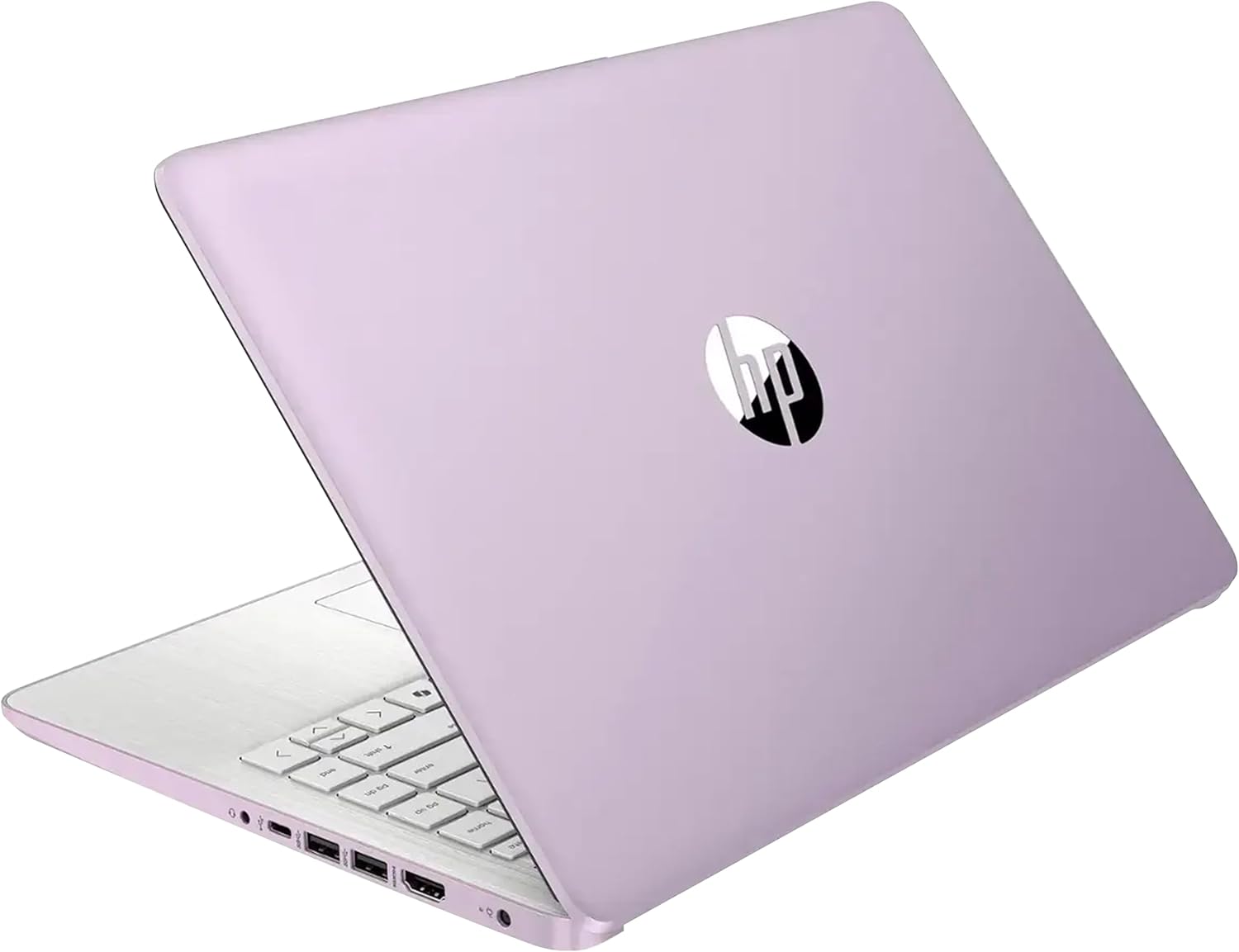
HP Stream 14" HD Laptop, Intel Processor N150, 4GB RAM, 128GB UFS, Intel Graphics, Webcam, Bluetooth, Windows 11s, Purple (Renewed)
Want the best price and purchase timing?
Our AI advisor analyzes real-time pricing across all channels to find you the best deal.
AI Verdict
This is a 14-inch laptop with an Intel N150 processor, 4GB RAM, and 128GB UFS storage, suitable only for extremely light web browsing and document editing.
This HP Stream 14 is a situational fit, primarily due to its low-power Intel N150 processor and 4GB RAM, which only support extremely light tasks like basic web browsing and document editing. Its 3.24 lbs weight and 0.71-inch thickness make it highly portable, but the 1280 x 720 display and Windows 11 S mode limit its utility for anything beyond the bare essentials.
If you need more than basic web browsing and document editing, look for a laptop with at least an Intel Core i3 or AMD Ryzen 3 processor, 8GB of RAM, and a 256GB SSD.
Regret Score™
Very High RiskLower is better — measures purchase-regret risk from real buyer complaints, review credibility, and product maturity
Issues discovered after purchase
Critically weak dimension
Amazon rating vs actual quality
Chance this product isn't for you
Pros
- Weighs 3.24 lbs and is 0.71 inches thin, making it portable for carrying around.
- Includes 1x USB Type-C, 2x USB Type-A, 1x HDMI 1.4b, and a media card reader for peripheral connectivity.
- Offers Wi-Fi 6 and Bluetooth for modern wireless connections.
- Features a 720p HD camera for video calls and online interactions.
- Users report it handles basic web browsing, streaming, and homework apps smoothly.
- Battery life is reported to last a full school or workday with light usage.
Cons
- The Intel N150 processor and 4GB DDR4 RAM struggle with multitasking and can feel sluggish, with settings taking up to 2 minutes to open in Windows 11 S mode.
- The 1280 x 720 pixel display is described as having washed-out colors and terrible contrast, resembling older laptop screens.
- Windows 11 S mode restricts software installation to Microsoft Store apps unless manually opted out, limiting flexibility.
- The 128GB UFS storage, while faster than eMMC, is still limited in capacity and speed compared to an SSD.
- Some users report issues with connecting additional monitors despite the HDMI port.
Dimension Scores
The Intel N150 processor and 4GB RAM are frequently reported to be sluggish, with Windows 11 S mode settings taking up to 2 minutes to open.
The 1280 x 720 pixel display is criticized for washed-out colors, poor contrast, and a dark screen, resembling older, low-quality panels.
Users report the laptop offers long battery life, often lasting a full school or workday with light usage.
At 3.24 lbs and 0.71 inches thin, it is lightweight and portable, though its plastic construction is not considered premium.
Best For
- Students needing a very basic, lightweight device for cloud-based assignments and note-taking.
- Users who primarily need to browse the web and check email.
- As a secondary, highly portable device for travel or simple media consumption.
Not Recommended For
- Anyone needing to run multiple applications simultaneously or perform resource-intensive tasks.
- Users who require a high-quality display for media editing or detailed viewing.
- Individuals who need significant local storage or fast file transfer speeds.
Watch Out For
- The N150 processor and 4GB RAM cause significant slowdowns, with one user reporting Windows 11 S mode settings took 2 minutes to open.
- The 1280 x 720 pixel display has been criticized for washed-out colors and poor contrast, making visuals appear horrible.
- Windows 11 S mode limits app installations to the Microsoft Store, requiring a manual switch out of S mode for other software.
- Despite having an HDMI port, some users have reported an inability to use additional monitors.
- The plastic construction, while contributing to its light weight, does not offer a premium feel.
Full Specifications
| RAM | 4 GB DDR4 |
| ASIN | B0G2WZNGP5 |
| Brand | HP |
| Color | Purple |
| Series | HP Stream |
| CPU Model | Others |
| Processor | 3.6 GHz others |
| Hard Drive | 128 GB UFS |
| Model Name | HP Stream |
| Item Weight | 5 pounds |
| Screen Size | 14 Inches |
| Wireless Type | 802.11ax |
| Hard Disk Size | 128 GB |
| Processor Brand | Intel |
| Special Feature | Anti Glare Coating |
| Card Description | Integrated |
| Operating System | Windows 11 S |
| Flash Memory Size | 4 GB |
| Hardware Platform | PC |
| Item model number | HP Stream |
| Screen Resolution | 1280 x 720 pixels |
| Product Dimensions | 19 x 12 x 3 inches |
| Computer Memory Type | DDR4 SDRAM |
| Graphics Coprocessor | Intel Graphics |
| Hard Drive Interface | Solid State |
| Number of Processors | 4 |
| Max Screen Resolution | 1366x768 Pixels |
| Item Dimensions LxWxH | 19 x 12 x 3 inches |
| Graphics Card Description | Integrated |
| Ram Memory Installed Size | 4 GB |
| Standing screen display size | 14 Inches |
What Buyers Say
Many users find this HP Stream 14 to be frustratingly slow, with Windows 11 S mode exacerbating performance issues, making even basic tasks like opening settings take an excessive amount of time. The display is consistently called out for its poor visual quality, described as having washed-out colors and low contrast. While its light weight and included ports are appreciated, the core computing experience is often hampered by the underpowered processor and limited RAM.
“OMG, this thing is so slow, I swear it takes forever just to open a new tab! The screen looks like something from 2010, all dull and blurry. I regret buying it for anything more than just checking emails, seriously.”
Common Praise
- Lightweight and thin design, making it easy to carry.
- Includes a variety of ports, including USB-C, USB-A, and HDMI.
- Battery life is sufficient for a full day of light use.
- Keyboard is user-friendly and feels decent.
- Handles basic tasks like web browsing and homework apps smoothly.
Common Complaints
- Performance is sluggish, struggling with multiple browser tabs and basic operations.
- The 1280 x 720 pixel display has poor color reproduction and contrast.
- Windows 11 S mode can be restrictive, and switching out is a one-way street.
- Some users experienced critical memory errors and crashes.
- The fans can get loud during heavier tasks.
Ownership Tips
- The initial setup can take 30-45 minutes.
- The trackpad can feel spongy and less precise than expected.
- Even after switching out of S mode, the performance limitations remain due to the hardware.
- The included Microsoft 365 subscription adds value for productivity, but doesn't fix the performance issues.
- The laptop might experience critical memory errors and blue screens of death, especially if moved.
Frequently Asked Questions
Can I upgrade the RAM or storage on this laptop?
The 4GB DDR4 RAM is likely soldered and not upgradeable. The 128GB UFS storage is also typically integrated and not user-replaceable, though some models might support an SD card for expansion.
Is Windows 11 S Mode a problem?
Windows 11 S Mode restricts you to apps from the Microsoft Store for security and performance. You can switch out of S Mode to install any Windows application, but you cannot switch back to S Mode afterward.
Is the screen quality acceptable for watching videos?
The 1280 x 720 pixel HD display is functional for video playback, but users have described it as having washed-out colors and poor contrast, so it won't offer a vibrant viewing experience.
How long does the battery last?
The laptop is designed for long battery life, with users reporting it can last a full school or workday under light usage conditions.
Can this laptop run Microsoft Office applications?
Yes, it comes with Windows 11 S, and a one-year Microsoft 365 subscription is often bundled, making it suitable for Word, Excel, and PowerPoint.
Buying Guide
When looking at budget laptops like this HP Stream, you need to understand that performance is severely limited. You're paying for portability and basic functionality, not speed or a premium experience. Expect to use it for one or two simple tasks at a time, like browsing the web or typing a document. Don't expect to run demanding software or have a visually rich experience.
Intel Processor N150
This is an entry-level processor, like a small engine in a car. It's designed for efficiency and basic tasks, not for speed or handling many things at once. Think of it as suitable for a leisurely drive, not a race.
4GB RAM
RAM is like your computer's short-term memory or workspace. 4GB is the bare minimum for Windows 11. It means you can only have a few browser tabs or one application open comfortably before things start to slow down, like trying to juggle too many items at once.
128GB UFS Storage
This is where your files and operating system live. UFS is faster than older eMMC storage but still significantly slower and smaller than a modern SSD. It's like having a small, slightly faster hard drive compared to a super-fast, larger one. You'll fill it up quickly if you save many photos or videos.
Windows 11 S
This is a locked-down version of Windows that only lets you install apps from the Microsoft Store. It's more secure and can run faster on low-end hardware, but it limits your software choices. It's like having a smartphone that only lets you download apps from its official app store.
Alternatives
If this laptop doesn't meet your needs, consider alternatives with at least 8GB of RAM, a 256GB SSD for faster storage and more space, and a Full HD (1920x1080) display for clearer visuals.
You Might Also Like

Apple 2026 MacBook Air 13-inch Laptop with M5 chip: Built for AI, 13.6-inch Liquid Retina Display, 16GB Unified Memory, 512GB SSD, 12MP Center Stage Camera, Touch ID, Wi-Fi 7; Midnight
$600+This 2.71-pound MacBook Air with a 13.6-inch Liquid Retina display and M5 chip is for users needing powerful AI capabilities and up to 18 hours of battery life.

Apple 2026 MacBook Pro Laptop with Apple M5 Pro chip with 18-core CPU and 20-core GPU: Built for AI, 16.2-inch Liquid Retina XDR Display, 24GB Unified Memory, 1TB SSD, Wi-Fi 7; Space Black
$600+This 16.2-inch MacBook Pro with an 18-core M5 Pro CPU and 20-core GPU is for professionals needing extreme AI performance and up to 27 hours of battery life.

Apple 2026 MacBook Air 15-inch Laptop with M5 chip: Built for AI, 15.3-inch Liquid Retina Display, 16GB Unified Memory, 512GB SSD, 12MP Center Stage Camera, Touch ID, Wi-Fi 7; Midnight
$600+This 3.32-pound MacBook Air with an M5 chip and 15.3-inch Liquid Retina display is for users needing powerful AI capabilities and up to 18 hours of battery life.

HP OmniBook 5 16” Touchscreen AI Laptop – Intel Core Ultra 7 Processor, 16GB RAM, 1TB SSD, Windows 11, Copilot AI, Wi-Fi 6E, Backlit Keyboard, Silver
$600+This 16-inch touchscreen laptop with an Intel Core Ultra 7, 16GB LPDDR5 RAM, and 1TB SSD is for users needing a mid-range AI-accelerated machine for productivity and light creative tasks.