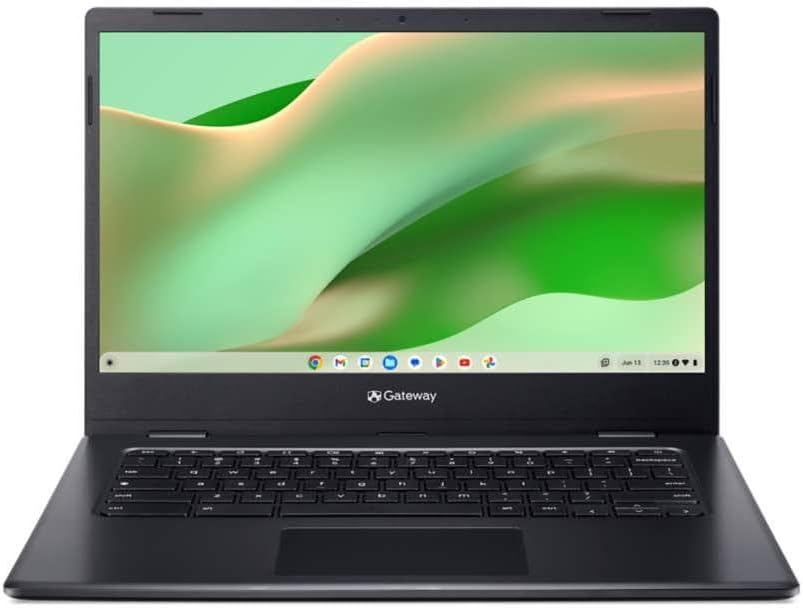
acer Gateway Chromebook 314 NX.Y5VAA.001 – 14″ Full HD Laptop – Intel Celeron N4500 – 4GB LPDDR4X – 128GB eMMC – Wi-Fi 5 – ChromeOS (Renewed)
Want the best price and purchase timing?
Our AI advisor analyzes real-time pricing across all channels to find you the best deal.
AI Verdict
This is a renewed 14-inch Chromebook with an Intel Celeron N4500, 4GB LPDDR4X, and 128GB eMMC storage, designed for basic web browsing and Chrome OS tasks.
This Chromebook is a situational fit for users with extremely basic computing needs and a tight budget. Its Intel Celeron N4500 processor, 4GB RAM, and 128GB eMMC are sufficient for single-task web browsing and streaming, but will quickly hit limits with more demanding use. The 10.5-hour battery life is a plus for portability.
If you need more fluid multitasking or plan to keep many tabs open, look for Chromebooks with at least 8GB of RAM and an Intel Core i3 or AMD Ryzen 3 processor.
Regret Score™
Very High RiskLower is better — measures purchase-regret risk from real buyer complaints, review credibility, and product maturity
Issues discovered after purchase
Critically weak dimension
Amazon rating vs actual quality
Chance this product isn't for you
Pros
- Full HD (1920 x 1080) ComfyView display with a matte finish reduces glare.
- Chrome OS provides fast startup times, often under 10 seconds.
- Auto Update Expiration (AUE) for the Intel Celeron N4500 platform extends until June 2031.
- Offers up to 10.5 hours of battery life on a single charge.
- Includes Wi-Fi 5 (802.11ac) and Bluetooth 5.0 for wireless connectivity.
- Features USB Type-C and USB 3.2 ports for peripheral connections.
Cons
- The Intel Celeron N4500 processor and 4GB LPDDR4X RAM struggle with more than a few browser tabs open.
- 128GB eMMC storage is soldered and cannot be upgraded.
- The 3.9-pound weight is heavier than many competing 14-inch Chromebooks.
- Speakers have been described as 'terrible' by users of similar Gateway Chromebook models.
- The screen is 'low grade' and may require color temperature adjustments for a balanced display.
Dimension Scores
The Intel Celeron N4500 processor and 4GB LPDDR4X RAM are entry-level, limiting it to basic web browsing and light Chrome OS tasks.
The 14-inch Full HD (1920 x 1080) resolution is standard for its size, but user feedback indicates the panel itself is 'low grade'.
With up to 10.5 hours of battery life, it performs above average for a Chromebook in this price range.
Weighing 3.9 pounds, it's heavier than many 14-inch Chromebooks, and renewed status introduces potential build quality inconsistencies.
Best For
- Light web browsing and email on a budget.
- Streaming video and online learning with minimal multitasking.
- A secondary device for quick access to Chrome OS apps.
Not Recommended For
- Running resource-intensive applications or virtual machines.
- Users who frequently multitask with many browser tabs or demanding web apps.
- Anyone needing robust audio quality without external speakers.
Watch Out For
- The 4GB RAM limits performance, with users recommending 8GB as a minimum for smoother Chrome OS use.
- Renewed condition means potential for cosmetic imperfections or components like the touchpad detaching, as reported by one user with a similar model.
- The screen's 'low grade' quality might result in a blue cast, requiring manual color temperature adjustments.
- The listed 'Date First Available' of November 6, 2025, for a renewed product is unusual and might indicate a data discrepancy.
Full Specifications
| RAM | LPDDR4X |
| ASIN | B0G16HH68S |
| Brand | acer |
| Color | Pink |
| Series | Chromebook 314 |
| CPU Model | Intel Celeron D |
| Processor | 1.1 GHz intel_celeron_d |
| Hard Drive | 128 GB SSD |
| Model Name | Chromebook 314 |
| Item Weight | 3.9 pounds |
| Screen Size | 14 |
| Chipset Brand | Intel |
| Wireless Type | 802.11ac |
| Hard Disk Size | 128 GB |
| Processor Brand | Intel |
| Special Feature | Anti Glare Coating |
| Card Description | Integrated |
| Operating System | Chrome OS |
| Flash Memory Size | 128 GB |
| Item model number | NX.Y5VAA.001 |
| Screen Resolution | 1920 x 1080 pixels |
| Product Dimensions | 12.8 x 8.9 x 0.78 inches |
| Computer Memory Type | DDR4 SDRAM |
| Number of Processors | 1 |
| Max Screen Resolution | 1920x1080 |
| Item Dimensions LxWxH | 12.8 x 8.9 x 0.78 inches |
| Number of USB 3.0 Ports | 2 |
| Graphics Card Description | Integrated |
| Ram Memory Installed Size | 4 GB |
| Standing screen display size | 14 |
What Buyers Say
The biggest takeaway is that this renewed Chromebook is a mixed bag, heavily dependent on the quality of the refurbished unit. While some users report receiving units that are 'like-new' with strong battery health, others have experienced issues like 'terrible' speakers and even detached touchpads on similar Gateway models. The 4GB of RAM is a recurring concern, with many suggesting it's barely adequate for Chrome OS, especially if you tend to open multiple tabs. The screen, while Full HD, is noted as 'low grade' and might need color calibration to look its best.
“Look, I needed something cheap for my kid's schoolwork and YouTube, and this renewed one was a gamble. It starts up fast, which is cool, but seriously, the speakers are garbage and if you open more than like, five tabs, it just chugs. For the price, it's okay, but don't expect a miracle.”
Common Praise
- Fast startup times, often under 10 seconds.
- Adequate for basic web browsing, YouTube, and online documents.
- Long battery life, up to 10.5 hours on a single charge.
- Comes with a Full HD (1920 x 1080) matte display.
- Auto Update Expiration (AUE) until June 2031 provides extended software support.
Common Complaints
- 4GB RAM is insufficient for multitasking or many open browser tabs.
- Speakers are of poor quality.
- Screen quality is 'low grade' with potential for a blue color cast.
- The touchpad on similar models has been reported to detach.
- Not suitable for resource-intensive applications like virtual machines.
Ownership Tips
- The 'renewed' condition can be a lottery; some units arrive looking new, others might have noticeable wear or functional issues.
- You'll quickly learn to manage your open tabs to keep performance snappy with only 4GB of RAM.
- External headphones or speakers are almost a necessity for any media consumption.
- Adjusting the display's color temperature can make a noticeable difference in visual comfort.
Frequently Asked Questions
What is the Auto Update Expiration (AUE) date for this Chromebook?
The Intel Celeron N4500 processor platform has an AUE date of June 2031, meaning it will receive Chrome OS updates until then.
Is the storage expandable on this Chromebook?
No, the 128GB eMMC storage is soldered onto the motherboard and cannot be upgraded.
Can this Chromebook run Windows applications?
No, this device runs on Chrome OS and cannot natively run Windows applications. You would need to use web-based alternatives or cloud services.
How is the display quality for watching videos?
It features a 14-inch Full HD (1920 x 1080) ComfyView display with a matte finish, which is suitable for video streaming, though some users note the screen is 'low grade' and might need color adjustments.
Does this Chromebook have a touchscreen?
The product specifications do not mention a touchscreen, so it is assumed to have a standard non-touch display.
Buying Guide
When you're looking at a Chromebook like this, especially a renewed one, you need to think about what you'll actually do with it. It's not a powerhouse. You're buying into the Chrome OS ecosystem, which is fast and secure for web-based tasks, but it's not going to run heavy software. The 'renewed' part means it's been inspected and repaired, but it's not brand new, so manage your expectations on cosmetic perfection.
Intel Celeron N4500 Processor
This is the brain of the Chromebook. The Celeron N4500 is like a small, efficient engine – it's fine for cruising on the highway (web browsing, email), but it'll struggle if you try to tow a heavy load (lots of tabs, complex web apps).
4GB LPDDR4X RAM
RAM is like your computer's short-term memory. 4GB is a small workspace. You can only have a few things open and running smoothly at once. Think of it like a small desk; you can only spread out a couple of papers before it gets cluttered and slow.
128GB eMMC Storage
This is where your files and the operating system live. 128GB is enough for Chrome OS and some documents, but it's not a lot for downloading large files or many apps. eMMC is also slower than an SSD, so things won't load as instantly as on pricier laptops.
Chrome OS
This is the operating system. It's designed for speed and simplicity, relying heavily on web applications and cloud storage. It's like having a car that's optimized for city driving – quick starts, easy to navigate, but not built for off-roading (heavy software).
Alternatives
If this Chromebook doesn't quite cut it, look for models with at least 8GB of RAM and an Intel Core i3 or AMD Ryzen 3 processor for better multitasking, or consider a device with an actual SSD for faster storage.
You Might Also Like

Apple 2026 MacBook Air 13-inch Laptop with M5 chip: Built for AI, 13.6-inch Liquid Retina Display, 16GB Unified Memory, 512GB SSD, 12MP Center Stage Camera, Touch ID, Wi-Fi 7; Midnight
$600+This 2.71-pound MacBook Air with a 13.6-inch Liquid Retina display and M5 chip is for users needing powerful AI capabilities and up to 18 hours of battery life.

Apple 2026 MacBook Pro Laptop with Apple M5 Pro chip with 18-core CPU and 20-core GPU: Built for AI, 16.2-inch Liquid Retina XDR Display, 24GB Unified Memory, 1TB SSD, Wi-Fi 7; Space Black
$600+This 16.2-inch MacBook Pro with an 18-core M5 Pro CPU and 20-core GPU is for professionals needing extreme AI performance and up to 27 hours of battery life.

Apple 2026 MacBook Air 15-inch Laptop with M5 chip: Built for AI, 15.3-inch Liquid Retina Display, 16GB Unified Memory, 512GB SSD, 12MP Center Stage Camera, Touch ID, Wi-Fi 7; Midnight
$600+This 3.32-pound MacBook Air with an M5 chip and 15.3-inch Liquid Retina display is for users needing powerful AI capabilities and up to 18 hours of battery life.

HP OmniBook 5 16” Touchscreen AI Laptop – Intel Core Ultra 7 Processor, 16GB RAM, 1TB SSD, Windows 11, Copilot AI, Wi-Fi 6E, Backlit Keyboard, Silver
$600+This 16-inch touchscreen laptop with an Intel Core Ultra 7, 16GB LPDDR5 RAM, and 1TB SSD is for users needing a mid-range AI-accelerated machine for productivity and light creative tasks.