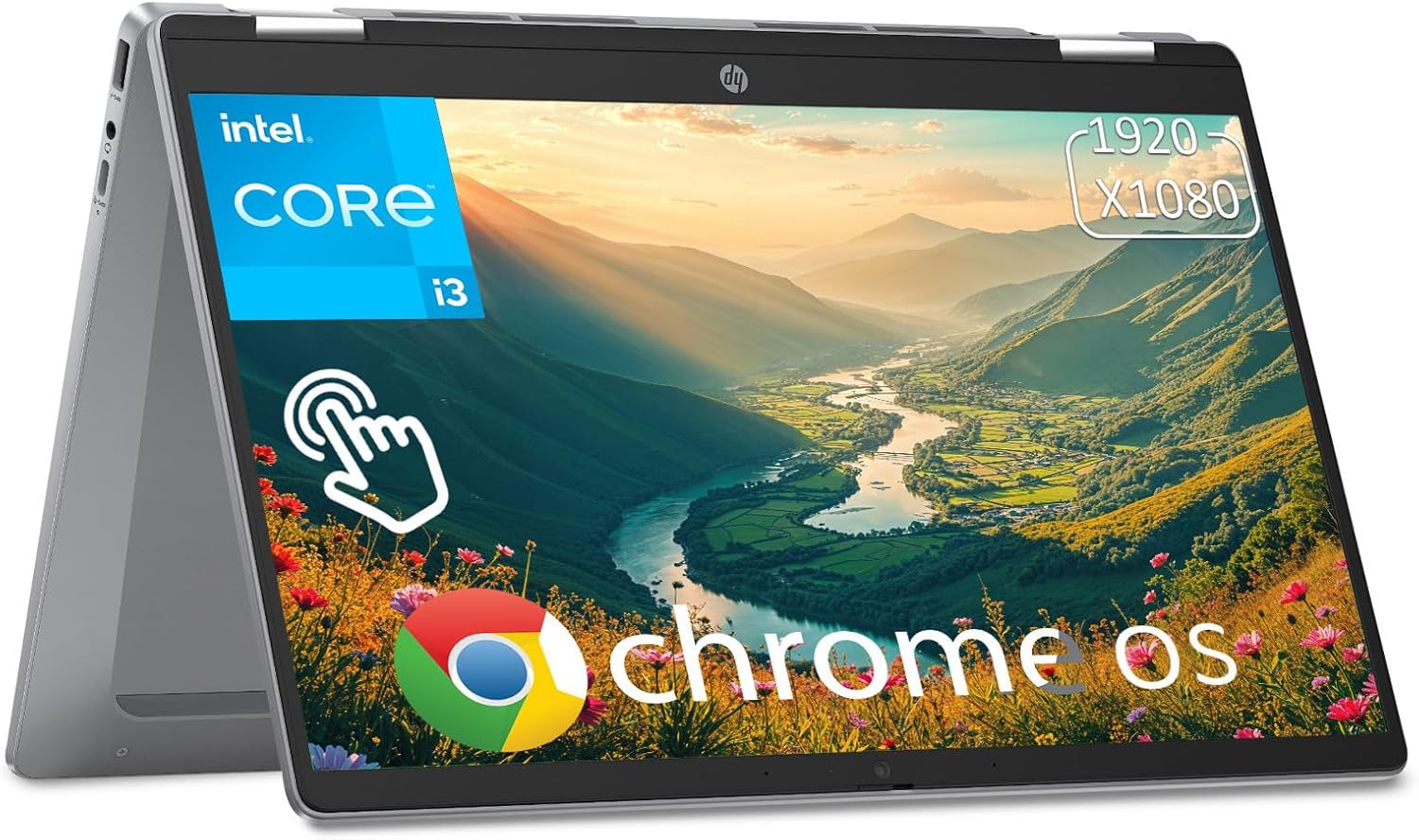
HP Chromebook Plus x360 Laptop 14" 2 in 1 Touchscreen Business Laptop for Student Intel Core i3 N305 8GB RAM 256GB UFS Backlit KB Wi-Fi 6 Chrome OS w/Google AI
Want the best price and purchase timing?
Our AI advisor analyzes real-time pricing across all channels to find you the best deal.
AI Verdict
This 14-inch 2-in-1 Chromebook with an Intel Core i3-N305, 8GB LPDDR5 RAM, and 256GB UFS storage is for students and light users needing Chrome OS with Google AI.
This Chromebook is a situational fit, offering solid Chrome OS performance with its Intel Core i3-N305 processor and 8GB LPDDR5 RAM for everyday tasks and Google AI features. However, its 250-nit display and 3.11-pound weight mean it's not ideal for all environments or users prioritizing extreme portability.
If you need a brighter screen or lighter device, look for Chromebooks with 300+ nits brightness and weights under 3 pounds.
Regret Score™
Very High RiskLower is better — measures purchase-regret risk from real buyer complaints, review credibility, and product maturity
Issues discovered after purchase
Critically weak dimension
Amazon rating vs actual quality
Chance this product isn't for you
Pros
- Intel Core i3-N305 processor with 8-core power up to 3.8GHz provides snappy performance for Chrome OS tasks.
- 8GB LPDDR5 RAM ensures smooth operation and multitasking within Chrome OS.
- 256GB UFS storage offers instant wake-up capability and faster performance than eMMC.
- 14-inch FHD IPS touchscreen with a 360° hinge allows for versatile laptop, tent, flip, and tablet modes.
- Includes Wi-Fi 6 and Bluetooth 5.3 for modern wireless connectivity.
- Features a backlit keyboard and a 1080p webcam with a privacy shutter.
Cons
- The 250 nits display brightness is below average, making it dim in brighter environments.
- Weighing 3.11 pounds, it's on the heavier side for a 14-inch Chromebook.
- Lacks a dedicated HDMI port, requiring a USB-C hub for external monitor connections.
- Reported battery life of 7:25 hours in some tests is significantly lower than the advertised 10 hours.
- Some users report a 'mushy keyboard feel', impacting typing comfort.
Dimension Scores
The Intel Core i3-N305 (8-core, up to 3.8GHz) and 8GB LPDDR5 RAM provide above-average performance for Chrome OS tasks.
The 14-inch FHD IPS display is limited by its 250 nits brightness, which is below category average and can appear dim.
While advertised at 10 hours, tested battery life around 7 hours and 25 minutes places it at category average.
The 360° hinge offers good versatility, but the 3.11-pound weight is slightly heavier than ideal for a 14-inch convertible Chromebook.
Best For
- Students needing a convertible device for web-based learning and Google Workspace apps.
- Users primarily browsing the web, streaming media, and using Android applications.
- Individuals seeking a secure, low-maintenance laptop with automatic cloud backups.
- Light productivity tasks that benefit from Google AI features like Gemini.
Not Recommended For
- Users requiring a bright display for outdoor use or color-sensitive work.
- Anyone needing to connect directly to an external monitor via HDMI or DisplayPort.
- Heavy multitaskers or users running demanding applications outside of Chrome OS.
- Users prioritizing a lightweight device for frequent travel.
Watch Out For
- The 14-inch FHD IPS display is limited to 250 nits brightness, which can make outdoor or brightly lit indoor use challenging.
- Despite the product title, some reviews indicate a 'mushy keyboard feel', which could affect long typing sessions.
- There is no built-in HDMI port, meaning you'll need a USB-C adapter or dock to connect to most external displays.
- While advertised for 10 hours, actual battery life can be closer to 7 hours and 25 minutes under real-world usage.
- The 3.11-pound weight is heavier than some competing 14-inch Chromebooks, making it less ideal for constant portability.
Full Specifications
| RAM | LPDDR5 |
| ASIN | B0FV89H1NV |
| Brand | HP |
| Color | Silver |
| Series | HP Chromebook x360 |
| CPU Model | Intel Core i3 |
| Processor | 1.25 GHz apple_ci3 |
| Hard Drive | 256 GB UFS |
| Model Name | HP Chromebook x360 |
| Item Weight | 5 pounds |
| Screen Size | 14 Inches |
| Chipset Brand | Intel |
| Wireless Type | 802.11ax, Bluetooth |
| Hard Disk Size | 256 GB |
| Processor Brand | Intel |
| Special Feature | Backlit Keyboard |
| Card Description | Integrated |
| Operating System | Chrome OS |
| Flash Memory Size | 8 GB |
| Item model number | HP Chromebook x360 |
| Screen Resolution | 1920 x 1080 pixels |
| Optical Drive Type | No Optical Drive |
| Product Dimensions | 12.72 x 8.28 x 0.81 inches |
| Computer Memory Type | DDR5 RAM |
| Graphics Coprocessor | Intel UHD Graphics |
| Hard Drive Interface | USB 3.0 |
| Number of Processors | 8 |
| Max Screen Resolution | 1920x1080 Pixels |
| Graphics Card Ram Size | 8 GB |
| Item Dimensions LxWxH | 12.72 x 8.28 x 0.81 inches |
| Number of USB 3.0 Ports | 3 |
| Graphics Card Description | Integrated |
| Ram Memory Installed Size | 8 GB |
| Standing screen display size | 14 Inches |
What Buyers Say
Users generally find the HP Chromebook Plus x360 to be a capable machine for its price, especially appreciating the responsive performance from the Intel Core i3-N305 processor and 8GB of RAM for everyday Chrome OS use. The convertible design is a definite plus, allowing for flexible usage modes. However, the display's 250 nits brightness is a recurring point of criticism, often described as dim and lacking vibrancy. The absence of an HDMI port is also a common complaint for those needing external display connectivity.
“Honestly, it's pretty fast for a Chromebook, but man, this screen is kinda dull, and I really wish it had an HDMI port built in so I didn't have to carry another dongle.”
Common Praise
- Snappy and reactive performance for web applications and Android apps.
- Convertible 2-in-1 design with a sturdy hinge offers flexible usage.
- Backlit keyboard is useful for typing in low-light conditions.
- Chrome OS with Google AI features like Gemini simplifies daily tasks.
- 1080p webcam with a privacy shutter is a practical addition.
Common Complaints
- The 250 nits display is dim and struggles with vibrant colors, making it less enjoyable for media consumption.
- Lack of an HDMI port means needing an adapter for external monitors.
- Keyboard can feel 'mushy', affecting the typing experience for some users.
- Battery life, while advertised at 10 hours, is often closer to 7 hours and 25 minutes in real-world use.
- At 3.11 pounds, it's not the lightest 14-inch Chromebook available.
Ownership Tips
- The 360-degree hinge feels sturdy even after repeated transformations between modes.
- Chrome OS updates are seamless and frequent, keeping the system secure and up-to-date.
- The integrated Intel UHD Graphics handles casual games and streaming without issues.
- The UFS storage is noticeably quicker than older eMMC Chromebooks, especially during boot-up and app loading.
- The webcam with a privacy shutter is a small but appreciated detail for privacy-conscious users.
Frequently Asked Questions
What kind of performance can I expect from the Intel Core i3-N305 processor?
The Intel Core i3-N305, with its 8 cores and up to 3.8GHz clock speed, provides snappy and reactive performance for web browsing, streaming, and running Android apps on Chrome OS.
Is the 256GB UFS storage enough for a Chromebook?
Yes, 256GB UFS storage is ample for Chrome OS, which relies heavily on cloud storage. UFS also offers faster read/write speeds than traditional eMMC storage found in many budget Chromebooks.
Does this Chromebook come with a stylus?
No, while it has a touchscreen and 2-in-1 functionality, a stylus is not included with this model.
Can I connect this Chromebook to an external monitor?
You can, but it lacks a dedicated HDMI port. You'll need to use one of the USB-C ports with a compatible adapter or docking station to connect to an external display.
How long does the battery really last?
HP advertises up to 10 hours of battery life. However, independent tests have shown real-world usage closer to 7 hours and 25 minutes, depending on your tasks.
Buying Guide
When you're looking at a Chromebook like this, you need to understand it's built for web-based tasks and Android apps, not heavy Windows software. The 'Plus' designation means it has better specs and Google AI features than a basic Chromebook. Think about how much time you spend online versus using desktop applications, and if a 2-in-1 design actually fits your workflow.
Intel Core i3-N305 processor
This isn't a powerhouse chip like in a gaming laptop, but for Chrome OS, it's like having a zippy engine in a lightweight car. It handles multiple browser tabs and common apps without feeling sluggish.
8GB LPDDR5 RAM
RAM is your computer's short-term memory. 8GB is plenty for Chrome OS, letting you jump between apps and browser tabs smoothly without constant reloading, unlike 4GB models that can feel cramped.
256GB UFS storage
This is where your files and apps live. UFS is faster than the older eMMC storage in many Chromebooks, meaning quicker boot times and app launches. Since Chrome OS is cloud-centric, 256GB is usually more than enough local space.
2-in-1 Touchscreen
This means the screen folds all the way back, turning your laptop into a tablet. The touchscreen lets you interact directly with apps, which is super handy for Android apps or just swiping through content.
Alternatives
If this doesn't quite fit, look for Chromebooks with 300+ nits display brightness for better outdoor visibility, or models under 3 pounds if portability is your absolute top priority. For external display needs, prioritize models with a dedicated HDMI port.
You Might Also Like

Apple 2026 MacBook Air 13-inch Laptop with M5 chip: Built for AI, 13.6-inch Liquid Retina Display, 16GB Unified Memory, 512GB SSD, 12MP Center Stage Camera, Touch ID, Wi-Fi 7; Midnight
$600+This 2.71-pound MacBook Air with a 13.6-inch Liquid Retina display and M5 chip is for users needing powerful AI capabilities and up to 18 hours of battery life.

Apple 2026 MacBook Pro Laptop with Apple M5 Pro chip with 18-core CPU and 20-core GPU: Built for AI, 16.2-inch Liquid Retina XDR Display, 24GB Unified Memory, 1TB SSD, Wi-Fi 7; Space Black
$600+This 16.2-inch MacBook Pro with an 18-core M5 Pro CPU and 20-core GPU is for professionals needing extreme AI performance and up to 27 hours of battery life.

Apple 2026 MacBook Air 15-inch Laptop with M5 chip: Built for AI, 15.3-inch Liquid Retina Display, 16GB Unified Memory, 512GB SSD, 12MP Center Stage Camera, Touch ID, Wi-Fi 7; Midnight
$600+This 3.32-pound MacBook Air with an M5 chip and 15.3-inch Liquid Retina display is for users needing powerful AI capabilities and up to 18 hours of battery life.

HP OmniBook 5 16” Touchscreen AI Laptop – Intel Core Ultra 7 Processor, 16GB RAM, 1TB SSD, Windows 11, Copilot AI, Wi-Fi 6E, Backlit Keyboard, Silver
$600+This 16-inch touchscreen laptop with an Intel Core Ultra 7, 16GB LPDDR5 RAM, and 1TB SSD is for users needing a mid-range AI-accelerated machine for productivity and light creative tasks.