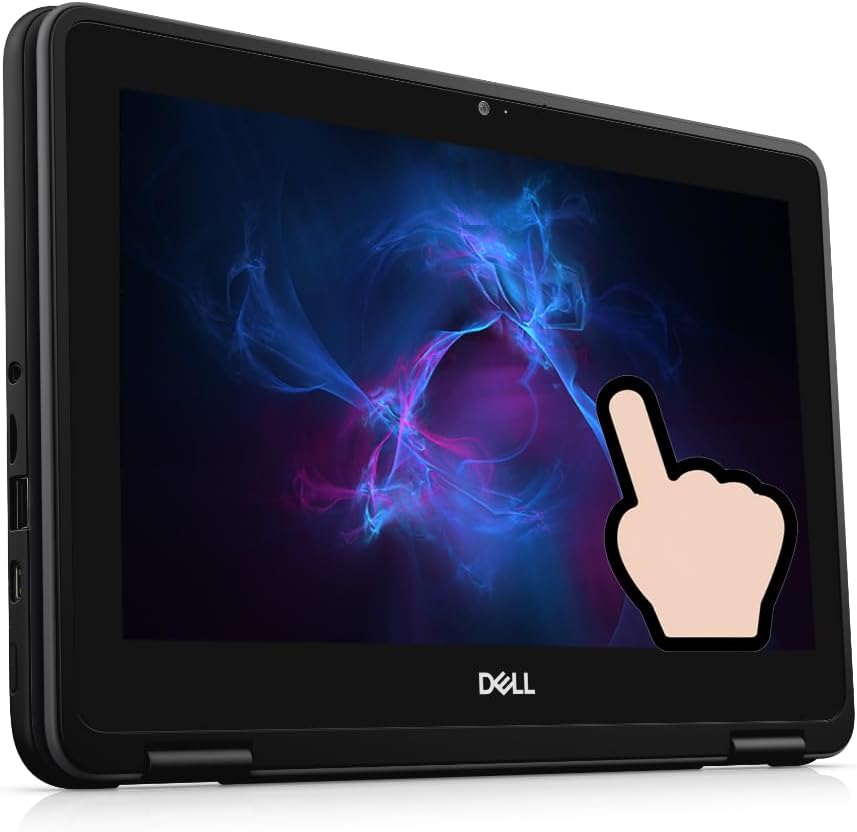
Dell Chromebook 3100 2-in-1 Laptop, 11.6" Touchscreen Notebook, Intel Celeron N4000, 4 GB RAM, 32GB eMMC, Chrome OS(Renewed)
Want the best price and purchase timing?
Our AI advisor analyzes real-time pricing across all channels to find you the best deal.
AI Verdict
This 11.6" 1366x768 touchscreen 2-in-1 with a Celeron N4000 and 32GB eMMC is for basic web browsing and cloud-based tasks.
This renewed Dell Chromebook 3100 2-in-1 is a situational fit for users with extremely basic computing needs, primarily web-based tasks, due to its Celeron N4000 processor, 4GB RAM, and 32GB eMMC storage. Its ruggedized design and 2-in-1 touchscreen make it suitable for specific environments like classrooms, but its limited internal storage and low-resolution TN panel restrict its utility for anything beyond simple consumption.
If you need more storage or better display quality, look for Chromebooks with at least 64GB eMMC or SSD storage and an IPS display.
Regret Score™
Very High RiskLower is better — measures purchase-regret risk from real buyer complaints, review credibility, and product maturity
Issues discovered after purchase
Critically weak dimension
Amazon rating vs actual quality
Chance this product isn't for you
Pros
- 2-in-1 design with an 11.6" 1366x768 touchscreen allows for tablet and laptop modes.
- Ruggedized construction with rubber bumpers is designed to withstand classroom use.
- Chrome OS with a Celeron N4000 processor provides power efficiency for extended use.
- Integrated Intel Dual Band Wireless AC 9560 (802.11AC) 2x2 and Bluetooth 5.0 for wireless connectivity.
Cons
- 32GB eMMC storage is severely limited, with Chrome OS consuming a significant portion.
- The 1366x768 display is a TN panel, resulting in washed-out colors and restricted viewing angles.
- The Intel Celeron N4000 processor with 4GB RAM struggles with intensive multitasking or demanding applications.
- Weighs 4.58 pounds, which is heavy for an 11.6-inch device.
Dimension Scores
The Intel Celeron N4000 processor with 4GB RAM struggles with more than a few browser tabs open and demanding applications.
The 11.6" 1366x768 TN panel has washed-out colors and restricted viewing angles.
The power-efficient Celeron processor and Chrome OS allow for extended use, often lasting a full school workday.
Its ruggedized design with rubber bumpers is built for durability, but the 4.58 pounds weight is heavy for an 11.6-inch device.
Best For
- Elementary school students for basic online learning.
- Light web browsing and cloud document editing.
- As a secondary device for travel where durability is key.
- Watching videos in tent mode.
Not Recommended For
- Users requiring local storage for large files or many applications.
- Anyone needing to run demanding Android or Linux applications.
- Graphic design or tasks requiring accurate color reproduction.
Watch Out For
- The 32GB eMMC storage leaves minimal space for user files after Chrome OS installation.
- The 1366x768 TN display has poor viewing angles and color reproduction.
- Some renewed units arrive with non-original chargers or cosmetic imperfections like peeling stickers.
- The Intel Celeron N4000 processor and 4GB RAM will cause slowdowns with more than a few browser tabs open.
- The Auto Update Expiration (AUE) date for this model is June 2029, meaning it will stop receiving official Chrome OS updates after that.
Full Specifications
| RAM | LPDDR4 |
| ASIN | B0FNM7SGYL |
| Brand | Dell |
| Color | Black |
| Series | Dell Chromebook 3100 |
| CPU Model | Celeron N4000 |
| Processor | 1.1 celeron_n4000 |
| Hard Drive | 32 GB Emmc |
| Model Name | Dell Chromebook 3100 |
| Item Weight | 4.58 pounds |
| Screen Size | 11.6 |
| Chipset Brand | Intel |
| Wireless Type | 802.11ac |
| Hard Disk Size | 32 GB |
| Processor Brand | Intel |
| Special Feature | Support Stylus |
| Card Description | Integrated |
| Operating System | Chrome OS |
| Item model number | Intel Celeron N4000 |
| Screen Resolution | 1366 x 768 pixels |
| Optical Drive Type | NO |
| Product Dimensions | 11.96 x 8.19 x 0.85 inches |
| Computer Memory Type | DDR4 SDRAM |
| Hard Drive Interface | Solid State |
| Number of Processors | 2 |
| Max Screen Resolution | 1366x768 |
| Item Dimensions LxWxH | 11.96 x 8.19 x 0.85 inches |
| Number of USB 3.0 Ports | 2 |
| Graphics Card Description | Integrated |
| Ram Memory Installed Size | 4 GB |
| Standing screen display size | 11.6 |
What Buyers Say
Many users acquiring this Chromebook find it to be a basic, functional device suitable for simple web tasks, often noting its origins as a school-issued model. The limited 32GB eMMC storage is a recurring frustration, with users quickly running out of space for anything beyond core Chrome OS functions. While the rugged build is appreciated for its durability, the low-resolution TN display often receives criticism for its poor viewing angles and color reproduction. The "renewed" status means buyers should expect non-original chargers and potentially minor cosmetic flaws.
“This thing is fine for my kid's homework but don't expect to save anything on it, the storage is a joke and the screen looks kinda dull.”
Common Praise
- Durable construction with rubberized edges withstands drops and bumps.
- Extended battery life supports a full day of use on a single charge.
- Chrome OS provides a simple, secure environment for web-based tasks.
- The 2-in-1 touchscreen functionality is useful for interactive learning or media consumption.
Common Complaints
- 32GB eMMC storage is insufficient after Chrome OS installation, limiting local file storage.
- The 1366x768 TN display has poor viewing angles and washed-out colors.
- Intel Celeron N4000 processor and 4GB RAM lead to slow performance with multiple tabs or apps.
- Renewed units may have cosmetic issues like peeling stickers or non-original chargers.
- The 4.58 pounds weight is cumbersome for an 11.6-inch device.
Ownership Tips
- The keyboard is spill-resistant, a practical feature for student use.
- The small trackpad is responsive but might feel cramped for extended use.
- The Auto Update Expiration (AUE) date is June 2029, meaning it will eventually stop receiving updates.
- It can drive an external 1080p monitor via USB-C, despite its own low-resolution screen.
Frequently Asked Questions
Can I upgrade the storage or RAM?
No, the 32GB eMMC storage and 4GB RAM are soldered and cannot be upgraded internally.
Is the screen resolution clear enough for reading?
The 11.6" 1366x768 display provides sufficient clarity for web browsing and document editing, but it's not a high-resolution panel.
How long does the battery last?
The power-efficient Celeron processor and Chrome OS allow for extended battery life, often lasting a full school workday on a single charge.
Is this Chromebook durable?
Yes, it features a ruggedized design with rubber bumpers, built to withstand the rigors of classroom use.
Does it support Android apps?
Yes, Chrome OS supports Android apps, but the Celeron N4000 and 4GB RAM may struggle with demanding applications.
What does "renewed" mean for this product?
Renewed means the product has been professionally inspected, tested, and cleaned by Amazon qualified vendors, though the charger and packaging may not be original.
Buying Guide
When looking at a Chromebook like this, you're buying into a cloud-first experience. This means most of your work and files will live online, not on the device itself. The "renewed" tag means you're getting a device that's been checked out, but don't expect a factory-fresh unboxing experience or original accessories. Its rugged build is a big plus if it's going to be handled roughly.
32GB eMMC Storage
This is tiny. Think of it like a small USB stick. Chrome OS takes up a chunk, leaving very little room for your downloads or offline files. If you need to save anything locally, you'll run out of space fast.
Intel Celeron N4000 Processor & 4GB RAM
This is like having a small engine in a car. It's enough to get around town (basic web browsing, one or two tabs), but try to go on a long trip or carry a heavy load (many tabs, complex apps), and it will slow down significantly.
11.6" 1366x768 Touchscreen
This screen is small and has a lower resolution than most phones. It's fine for basic text, but images and videos won't look as sharp or vibrant, and viewing angles are limited, meaning colors shift if you're not looking straight on.
Alternatives
If you need more local storage, look for Chromebooks with at least 64GB or 128GB of eMMC or SSD storage. For better visual quality, search for models with an IPS display and a resolution of 1920x1080 pixels or higher.
You Might Also Like

Apple 2026 MacBook Air 13-inch Laptop with M5 chip: Built for AI, 13.6-inch Liquid Retina Display, 16GB Unified Memory, 512GB SSD, 12MP Center Stage Camera, Touch ID, Wi-Fi 7; Midnight
$600+This 2.71-pound MacBook Air with a 13.6-inch Liquid Retina display and M5 chip is for users needing powerful AI capabilities and up to 18 hours of battery life.

Apple 2026 MacBook Pro Laptop with Apple M5 Pro chip with 18-core CPU and 20-core GPU: Built for AI, 16.2-inch Liquid Retina XDR Display, 24GB Unified Memory, 1TB SSD, Wi-Fi 7; Space Black
$600+This 16.2-inch MacBook Pro with an 18-core M5 Pro CPU and 20-core GPU is for professionals needing extreme AI performance and up to 27 hours of battery life.

Apple 2026 MacBook Air 15-inch Laptop with M5 chip: Built for AI, 15.3-inch Liquid Retina Display, 16GB Unified Memory, 512GB SSD, 12MP Center Stage Camera, Touch ID, Wi-Fi 7; Midnight
$600+This 3.32-pound MacBook Air with an M5 chip and 15.3-inch Liquid Retina display is for users needing powerful AI capabilities and up to 18 hours of battery life.

HP OmniBook 5 16” Touchscreen AI Laptop – Intel Core Ultra 7 Processor, 16GB RAM, 1TB SSD, Windows 11, Copilot AI, Wi-Fi 6E, Backlit Keyboard, Silver
$600+This 16-inch touchscreen laptop with an Intel Core Ultra 7, 16GB LPDDR5 RAM, and 1TB SSD is for users needing a mid-range AI-accelerated machine for productivity and light creative tasks.