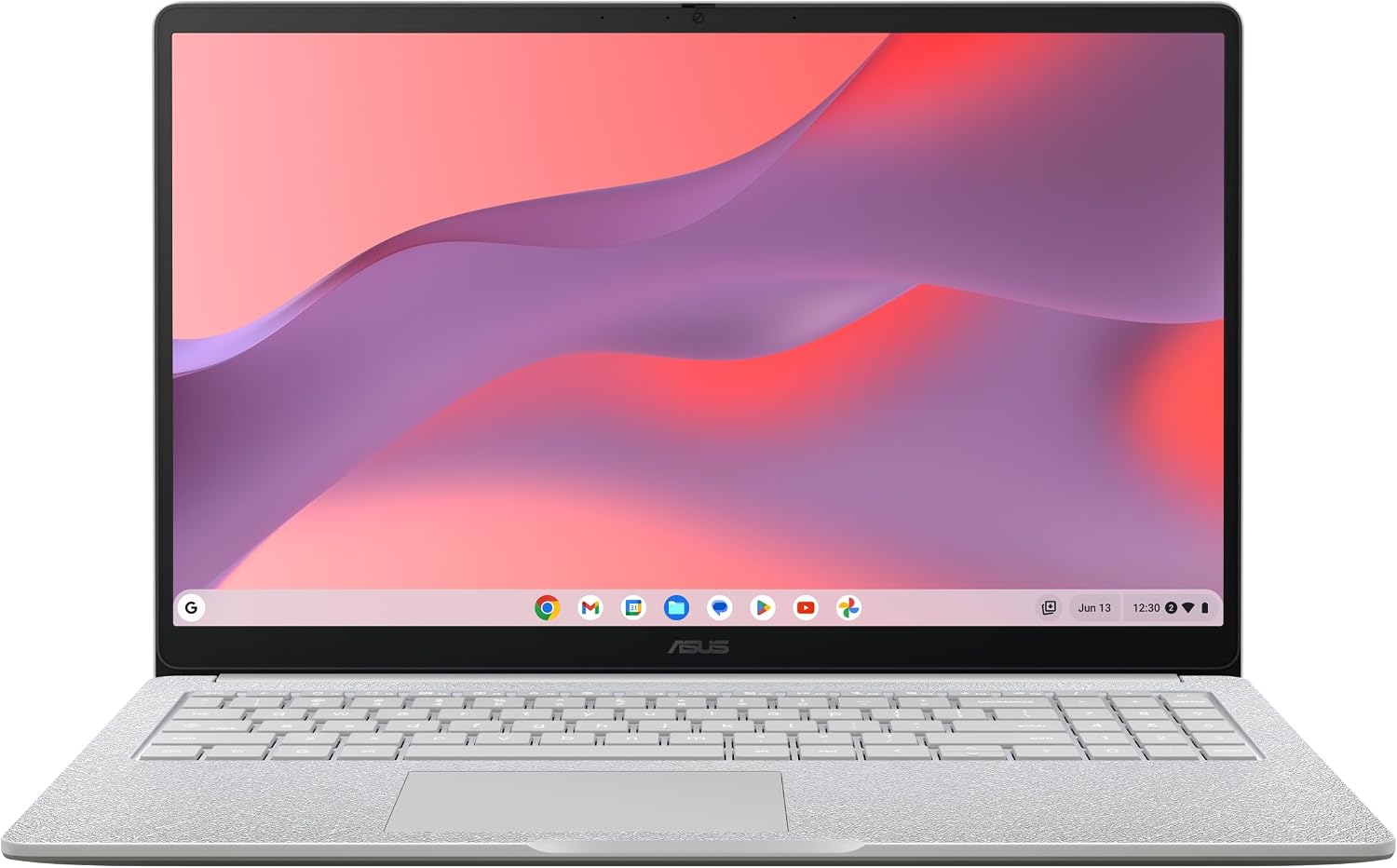
ASUS Chromebook CX15 Laptop, 15.6" FHD Anti-Glare Display, Intel Celeron N4500 Processor, 128GB Storage, 8GB RAM, ChromeOS, Pure Grey, CX1505CKA-AS88F-PG
Want the best price and purchase timing?
Our AI advisor analyzes real-time pricing across all channels to find you the best deal.
AI Verdict
This 3.51-pound Chromebook with a 15.6" FHD anti-glare display and Intel Celeron N4500 processor is for basic web browsing and document work, not heavy multitasking.
This Chromebook is a situational fit for users who need a large 15.6-inch 1080p screen and 8GB RAM for basic web-based tasks and document editing, especially given its 3.51-pound weight. Its Intel Celeron N4500 processor and integrated graphics mean it struggles with anything beyond light use.
If you need to run more than a few browser tabs or light applications, look for a Chromebook with an Intel Core i3 or i5 processor.
Regret Score™
Medium RiskLower is better — measures purchase-regret risk from real buyer complaints, review credibility, and product maturity
Issues discovered after purchase
Critically weak dimension
Amazon rating vs actual quality
Chance this product isn't for you
Pros
- 15.6-inch 1920 x 1080 pixel display provides more screen real estate than many budget options.
- 8GB LPDDR4X RAM allows for more open tabs and applications compared to 4GB models.
- Full-size keyboard with number pad offers comfortable typing for extended periods.
- ChromeOS starts in under 10 seconds and receives automatic updates.
- Includes 1x USB-C 3.2 with DisplayPort and Power Delivery, 1x USB-A 3.2, 1x HDMI 1.4, and a 3.5mm combo audio jack.
Cons
- Intel Celeron N4500 processor struggles with heavy multitasking or demanding applications.
- Display is not especially bright and has limited viewing angles.
- Touchpad is small and feels plasticky.
- Port selection is limited to one USB-A and one USB-C, both on the left side, with USB-C used for charging.
- Integrated Intel UHD Graphics cannot handle 3D games or 4K content streaming.
Dimension Scores
The Intel Celeron N4500 processor is suitable only for basic web browsing and light document work, struggling with multitasking.
The 15.6-inch 1920 x 1080 pixel anti-glare display is 1080p, but it's not especially bright and has limited viewing angles.
It offers around 7-10 hours of battery life with light use, which is average for a Chromebook in this category.
Weighing 3.51 pounds, it feels sturdy with no noticeable flex, but the plastic construction feels less premium.
Best For
- Students needing a laptop for web-based assignments and Google Workspace.
- Users primarily browsing the internet, checking email, and streaming video.
- Individuals on a strict budget who need a 15.6-inch screen.
- As a secondary, portable device for light tasks.
Not Recommended For
- Anyone requiring performance for video editing, graphic design, or coding.
- Users who frequently run many applications simultaneously or demanding software.
- Gamers expecting to play anything beyond very light, browser-based titles.
Watch Out For
- The Intel Celeron N4500 processor is only fast enough for basic web browsing and light photo editing, not for serious multitasking or 3D applications.
- The 15.6-inch 1920 x 1080 pixel display is not particularly bright and has limited viewing angles, making it less ideal for outdoor use or sharing content.
- The touchpad measures "a little under 5x3 in" and feels plasticky, which can impact user experience.
- All USB ports, including the USB-C, are limited to 5 Gbps data transfer speeds.
- The single USB-C port is also used for charging, meaning it's unavailable for other peripherals when the laptop is plugged in.
Full Specifications
| RAM | LPDDR4X |
| ASIN | B0F113YD2M |
| Brand | ASUS |
| Color | Pure Grey |
| Series | CX1505CKA-AS88F-PG |
| CPU Model | Celeron |
| Processor | 2.8 GHz celeron |
| Hard Drive | 128 GB SSD |
| Model Name | CX1505CKA-AS88F-PG |
| Item Weight | 3.51 pounds |
| Screen Size | 15.6 Inches |
| Chipset Brand | Intel |
| Wireless Type | 802.11ax |
| Hard Disk Size | 128 GB |
| Processor Brand | Intel |
| Special Feature | Anti Glare Coating, Spill Resistant |
| Card Description | Integrated |
| Operating System | Chrome OS |
| Flash Memory Size | 128 GB |
| Item model number | CX1505CKA-AS88F-PG |
| Screen Resolution | 1920 x 1080 pixels |
| Product Dimensions | 14.15 x 0.79 x 9.14 inches |
| Computer Memory Type | DDR5 SDRAM |
| Number of Processors | 2 |
| Max Screen Resolution | 1920x1080 |
| Item Dimensions LxWxH | 14.15 x 0.79 x 9.14 inches |
| Number of USB 3.0 Ports | 1 |
| Graphics Card Description | Integrated |
| Ram Memory Installed Size | 8 GB |
| Standing screen display size | 15.6 Inches |
What Buyers Say
The most surprising finding is that despite its low-end Intel Celeron N4500 processor, the 8GB RAM configuration makes it surprisingly capable for basic web tasks, preventing the typical slowdowns seen in 4GB models. Users frequently point out the value of a 1080p display at this price point, even if its brightness and viewing angles are limited. The keyboard is often praised for its comfort and inclusion of a number pad, which is a rare find in this category. However, the plasticky, small touchpad is a recurring complaint, and the limited port selection with USB-C used for charging is a practical drawback.
“Look, for what I paid, it's fine for my kid's school stuff and watching YouTube, but don't even think about trying to open too many tabs or it'll choke, and that touchpad feels like a toy.”
Common Praise
- 15.6-inch 1920 x 1080 pixel display is a significant advantage over lower-resolution competitors.
- 8GB RAM provides a smoother experience for multiple browser tabs and light applications.
- Keyboard is large, comfortable, and often includes a number pad.
- ChromeOS boots quickly, typically under 10 seconds.
- Build feels sturdy with minimal flex despite being plastic.
Common Complaints
- Intel Celeron N4500 processor struggles with anything beyond basic web browsing.
- Display is not bright enough for outdoor use and has poor viewing angles.
- Touchpad is small and has a plasticky feel.
- Limited port selection, with only one USB-A and one USB-C, both on the left side.
- USB-C port is occupied for charging, reducing available connectivity.
Ownership Tips
- The anti-glare display helps a bit with reflections, but it's still hard to see in bright sunlight.
- You'll probably want an external mouse because the built-in touchpad is just not comfortable for long sessions.
- Keeping the number of open tabs and apps to a minimum is key to keeping it running smoothly.
- The single USB-C port being used for charging means you'll need a hub if you want to connect a monitor and other USB-C accessories simultaneously.
- The speakers are loud enough for casual listening, but don't expect any depth or bass.
Frequently Asked Questions
Can this Chromebook handle video editing?
No, the Intel Celeron N4500 processor and integrated graphics are not powerful enough for video editing software. It's designed for basic tasks.
What is the battery life like?
You can generally expect around 7 to 10 hours of battery life with light use, such as web browsing and document editing.
Does it have a touchscreen?
The product specifications do not mention a touchscreen, only a 15.6" FHD Anti-Glare Display. Some similar models might have a touchscreen, but this specific model does not list it.
Is the storage expandable?
The product data specifies 128GB SSD storage. While ChromeOS integrates well with cloud storage, the physical storage is not typically user-expandable on Chromebooks.
Can I play games on this Chromebook?
You can play very light, browser-based games, but the integrated Intel UHD Graphics cannot handle 3D games or more demanding titles.
Does it come with Microsoft Office?
No, this Chromebook runs ChromeOS and comes with Google apps like Docs and Sheets. You can use web-based versions of Microsoft Office or Android apps if available.
Buying Guide
When you're looking at a Chromebook in this price range, you're buying a machine for specific, light tasks. Don't expect it to replace a more powerful laptop. Focus on the screen resolution, RAM, and processor. A 1080p screen is a must, and 8GB of RAM will make a huge difference in how many browser tabs you can juggle without frustration. The processor will dictate how quickly those tabs load and how smoothly simple apps run.
Intel Celeron N4500 Processor
8GB RAM
15.6" FHD Anti-Glare Display (1920 x 1080 pixels)
Alternatives
If you need more power for multitasking or light creative work, look for Chromebooks with an Intel Core i3 or i5 processor and at least 8GB of RAM. If portability is a higher priority, consider models with smaller screen sizes and lighter weights.
You Might Also Like

Apple 2026 MacBook Air 13-inch Laptop with M5 chip: Built for AI, 13.6-inch Liquid Retina Display, 16GB Unified Memory, 512GB SSD, 12MP Center Stage Camera, Touch ID, Wi-Fi 7; Midnight
$600+This 2.71-pound MacBook Air with a 13.6-inch Liquid Retina display and M5 chip is for users needing powerful AI capabilities and up to 18 hours of battery life.

Apple 2026 MacBook Pro Laptop with Apple M5 Pro chip with 18-core CPU and 20-core GPU: Built for AI, 16.2-inch Liquid Retina XDR Display, 24GB Unified Memory, 1TB SSD, Wi-Fi 7; Space Black
$600+This 16.2-inch MacBook Pro with an 18-core M5 Pro CPU and 20-core GPU is for professionals needing extreme AI performance and up to 27 hours of battery life.

Apple 2026 MacBook Air 15-inch Laptop with M5 chip: Built for AI, 15.3-inch Liquid Retina Display, 16GB Unified Memory, 512GB SSD, 12MP Center Stage Camera, Touch ID, Wi-Fi 7; Midnight
$600+This 3.32-pound MacBook Air with an M5 chip and 15.3-inch Liquid Retina display is for users needing powerful AI capabilities and up to 18 hours of battery life.

HP OmniBook 5 16” Touchscreen AI Laptop – Intel Core Ultra 7 Processor, 16GB RAM, 1TB SSD, Windows 11, Copilot AI, Wi-Fi 6E, Backlit Keyboard, Silver
$600+This 16-inch touchscreen laptop with an Intel Core Ultra 7, 16GB LPDDR5 RAM, and 1TB SSD is for users needing a mid-range AI-accelerated machine for productivity and light creative tasks.