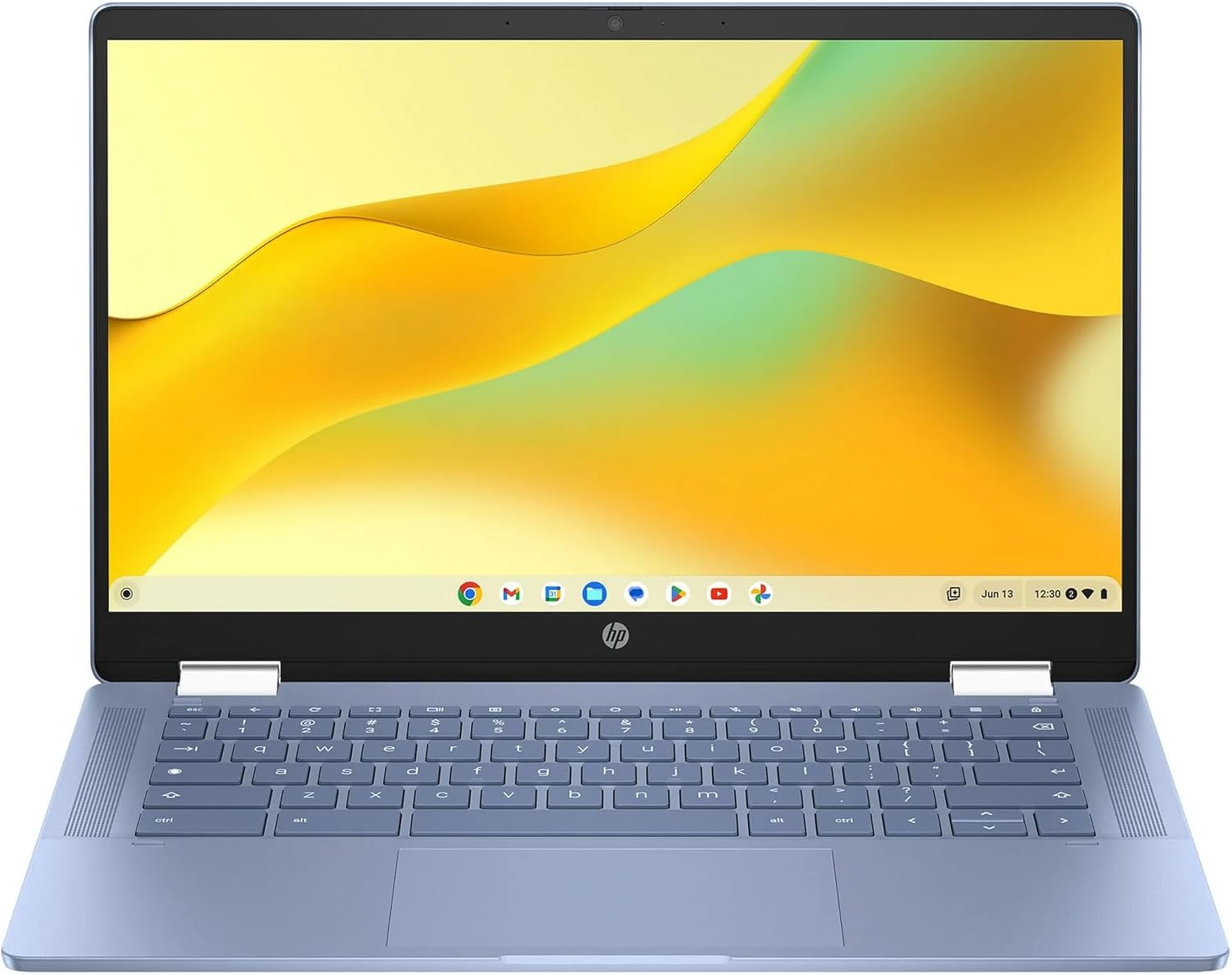
HP Chromebook x360 14 inch FHD IPS Touch 2-in-1 Laptop, Intel Processor N100, 4GB RAM, 64GB eMMC, Chrome OS, Sky Blue, 14b-cd0130wm
Want the best price and purchase timing?
Our AI advisor analyzes real-time pricing across all channels to find you the best deal.
AI Verdict
This 14-inch FHD IPS touchscreen 2-in-1 Chromebook with an Intel N100 processor and 4GB LPDDR5 RAM is for light web browsing and Google Workspace tasks.
This Chromebook is a situational fit because its Intel N100 processor and 4GB LPDDR5 RAM are sufficient for basic web browsing and cloud-based productivity, but the limited 64GB eMMC storage and RAM capacity will restrict heavy multitasking or local software installations. It excels as a secondary device or for users with minimal computing demands.
If you need more local storage or smoother multitasking, look for Chromebooks with at least 8GB RAM and 128GB NVMe SSD storage.
Regret Score™
Very High RiskLower is better — measures purchase-regret risk from real buyer complaints, review credibility, and product maturity
Issues discovered after purchase
Critically weak dimension
Amazon rating vs actual quality
Chance this product isn't for you
Pros
- Features a 1920 x 1080 pixel Full HD IPS touchscreen display for clear visuals and touch interaction.
- The 2-in-1 design allows for use as a laptop or tablet, adapting to different viewing needs.
- Equipped with an Intel Processor N100, capable of boosting up to 3.40 GHz for everyday computing.
- Offers up to 10 hours and 15 minutes of mixed usage battery life, minimizing recharge frequency.
- Includes 4GB LPDDR5 RAM, providing faster memory performance compared to older DDR4 types.
- Chrome OS ensures quick boot times and a streamlined, cloud-centric user experience.
Cons
- The 4GB RAM configuration can lead to performance slowdowns with more than 10 browser tabs open.
- 64GB eMMC flash storage is limited for local file storage and installing numerous Android or Linux applications.
- Display brightness may be lower than competing models, potentially impacting outdoor visibility.
- Integrated Intel UHD Graphics are suitable only for basic tasks and not demanding visual applications.
- Speakers often provide adequate volume but lack audio depth and can vibrate at higher levels.
Dimension Scores
The Intel N100 processor and 4GB RAM are adequate for basic web tasks but will struggle with heavy multitasking or demanding applications.
The 1920 x 1080 pixel FHD IPS touchscreen offers clear visuals, but similar models have been noted for lower brightness and muted colors.
The stated 10 hours and 15 minutes of mixed usage battery life is above average for its category, offering extended use away from power outlets.
The 2-in-1 design and generally solid chassis are positives, but at 4.55 pounds, it's on the heavier side for a 14-inch Chromebook.
Best For
- Students needing a portable device for online classes and document editing.
- Individuals primarily using web-based applications like Google Docs and Gmail.
- Casual users who stream video content and browse the internet.
- Travelers seeking a lightweight device for basic productivity and entertainment on the go.
Not Recommended For
- Users requiring extensive local storage for large files or software installations.
- Anyone needing to run demanding applications like video editing or advanced photo manipulation.
- Gamers looking for a device to play graphically intensive titles.
- Professionals who multitask heavily with many applications and browser tabs simultaneously.
Watch Out For
- The 4GB RAM often results in noticeable lag when managing more than 10 browser tabs or multiple Android apps.
- Display brightness on similar models has been reported as not very bright, making it challenging to use in well-lit environments.
- The 64GB eMMC storage fills up quickly if you download many files or install several Android applications, necessitating reliance on cloud storage.
- Some users of similar models have experienced touchpads that are inconsistent or slow to respond, impacting navigation precision.
- The speakers, while having adequate volume, often deliver so-so sound quality and can cause chassis vibration at higher volumes.
Full Specifications
| RAM | LPDDR5 |
| ASIN | B0DKN96Q1W |
| Brand | HP |
| Color | Blue |
| Series | 14b-cd0130wm |
| Batteries | 1 12V batteries required. |
| CPU Model | Intel N100 |
| Processor | 1.8 GHz intel_n100 |
| Hard Drive | 64 GB Emmc |
| Model Name | 14b-cd0130wm |
| Item Weight | 4.55 pounds |
| Screen Size | 14 Inches |
| Chipset Brand | Intel |
| Wireless Type | 802.11ax |
| Hard Disk Size | 64 GB |
| Processor Brand | Intel |
| Special Feature | 2-in-1 Design, Support Stylus |
| Card Description | Integrated |
| Operating System | Chrome OS |
| Flash Memory Size | 64 GB |
| Item model number | 14b-cd0130wm |
| Screen Resolution | 1920 x 1080 pixels |
| Optical Drive Type | No |
| Product Dimensions | 8.28 x 12.72 x 0.81 inches |
| Computer Memory Type | DDR5 RAM |
| Number of Processors | 1 |
| Max Screen Resolution | 1920x1080 |
| Item Dimensions LxWxH | 8.28 x 12.72 x 0.81 inches |
| Number of USB 3.0 Ports | 3 |
| Graphics Card Description | Integrated |
| Ram Memory Installed Size | 4 GB |
| Standing screen display size | 14 Inches |
What Buyers Say
It's important to note that this specific model (ASIN B0DKN96Q1W) has a 'Date First Available' in October 2024, so direct user reviews are not yet available. The provided rating and social proof likely reflect similar, currently available HP Chromebook x360 14 models. Feedback for these similar models highlights quick boot times and a smooth experience for basic web browsing and Android apps. However, the 4GB RAM is a recurring bottleneck, causing slowdowns with multiple browser tabs. The display, while FHD, often receives comments about lacking brightness, and the speakers are generally considered adequate but not exceptional.
“Look, if you just need something for emails and YouTube, this thing is probably fine. But seriously, 4GB RAM? I opened like 8 tabs and it started chugging, felt like my old phone. And the screen isn't exactly popping, kinda dim. But hey, it turns into a tablet, so that's kinda cool for Netflix on the couch.”
Common Praise
- Chrome OS boots up very quickly, often within 9 seconds to the login screen.
- The 2-in-1 design with a touchscreen is convenient for various modes of use.
- Performance is snappy for general web browsing and light Android applications.
- The keyboard is backlit and provides an adequate typing experience.
- USB-C ports on both sides are handy for charging flexibility.
Common Complaints
- Performance noticeably degrades when more than 10 browser tabs are open due to 4GB RAM.
- The display, despite being FHD, is often not very bright, impacting visibility in brighter environments.
- The 64GB eMMC storage is quickly consumed, requiring heavy reliance on cloud services.
- Speakers are described as having so-so sound quality and can vibrate the chassis at higher volumes.
- Some users have reported inconsistent or unresponsive touchpads on similar models.
Ownership Tips
- The fan runs infrequently during light use, keeping noise levels low.
- The 360-degree hinge, while allowing tablet mode, can sometimes feel a bit loose over time.
- Linux applications can be enabled and installed, but the limited storage and RAM will constrain their utility.
- The power adapter is a 45-watt USB-C type, offering relatively fast charging.
- The webcam is adequate for basic video calls but struggles in low-light conditions.
Frequently Asked Questions
Can I install Windows on this Chromebook?
No, this device runs on Chrome OS and is not designed to run Windows. Chrome OS is a lightweight, cloud-based operating system.
Is the keyboard backlit?
Yes, similar HP Chromebook x360 14 models feature a backlit keyboard, which is helpful for typing in low-light conditions.
How well does it handle Android apps?
It runs Android apps, but with 4GB RAM, performance can slow down if you have many apps open or are running demanding ones.
Can I use a stylus with the touchscreen?
While it has a touchscreen, the product specifications do not mention active stylus support. You might be able to use a capacitive stylus, but it won't offer pressure sensitivity.
Is the storage expandable?
The 64GB eMMC storage is not internally expandable. You can use cloud storage services or external USB drives for additional space.
Buying Guide
When looking at a Chromebook like this, you need to understand it's built for the web. It's not a powerhouse for heavy software. The '2-in-1' means the screen flips around, so you can use it like a tablet, which is handy for media. The 'Chrome OS' means it's fast to start up and generally secure, but you'll mostly be using browser-based apps and Android apps.
Intel Processor N100
This is a low-power processor designed for efficiency, not raw speed. Think of it like a fuel-efficient car engine; it gets you where you need to go for basic tasks but won't win any races. It's fine for browsing, email, and light document work.
4GB LPDDR5 RAM
RAM is like your computer's short-term memory. 4GB is the minimum for a smooth Chrome OS experience. It's enough for a few browser tabs or one or two apps, but if you open too many things, it's like trying to juggle too many balls – things will slow down. LPDDR5 is a newer, faster type of RAM, which helps a bit.
64GB eMMC Storage
This is where your files and apps live. 64GB is not much, especially if you're used to traditional laptops. eMMC is slower than SSDs found in more expensive laptops. Think of it like a small, efficient garage for your car; it holds the essentials, but you'll need external storage or cloud services for anything extra.
14 inch FHD IPS Touch 2-in-1 Display
The '14 inch' is the screen size. 'FHD' (Full High Definition) means 1920x1080 pixels, which is sharp enough for most content. 'IPS' means you get wider viewing angles, so the picture looks consistent even if you're not looking straight on. 'Touch' means you can interact directly with the screen, and '2-in-1' means it can fold into a tablet.
Alternatives
If you need more speed for multitasking or plan to store many files locally, look for Chromebooks with 8GB of RAM and at least 128GB of NVMe SSD storage.
You Might Also Like

Apple 2026 MacBook Air 13-inch Laptop with M5 chip: Built for AI, 13.6-inch Liquid Retina Display, 16GB Unified Memory, 512GB SSD, 12MP Center Stage Camera, Touch ID, Wi-Fi 7; Midnight
$600+This 2.71-pound MacBook Air with a 13.6-inch Liquid Retina display and M5 chip is for users needing powerful AI capabilities and up to 18 hours of battery life.

Apple 2026 MacBook Pro Laptop with Apple M5 Pro chip with 18-core CPU and 20-core GPU: Built for AI, 16.2-inch Liquid Retina XDR Display, 24GB Unified Memory, 1TB SSD, Wi-Fi 7; Space Black
$600+This 16.2-inch MacBook Pro with an 18-core M5 Pro CPU and 20-core GPU is for professionals needing extreme AI performance and up to 27 hours of battery life.

Apple 2026 MacBook Air 15-inch Laptop with M5 chip: Built for AI, 15.3-inch Liquid Retina Display, 16GB Unified Memory, 512GB SSD, 12MP Center Stage Camera, Touch ID, Wi-Fi 7; Midnight
$600+This 3.32-pound MacBook Air with an M5 chip and 15.3-inch Liquid Retina display is for users needing powerful AI capabilities and up to 18 hours of battery life.

HP OmniBook 5 16” Touchscreen AI Laptop – Intel Core Ultra 7 Processor, 16GB RAM, 1TB SSD, Windows 11, Copilot AI, Wi-Fi 6E, Backlit Keyboard, Silver
$600+This 16-inch touchscreen laptop with an Intel Core Ultra 7, 16GB LPDDR5 RAM, and 1TB SSD is for users needing a mid-range AI-accelerated machine for productivity and light creative tasks.