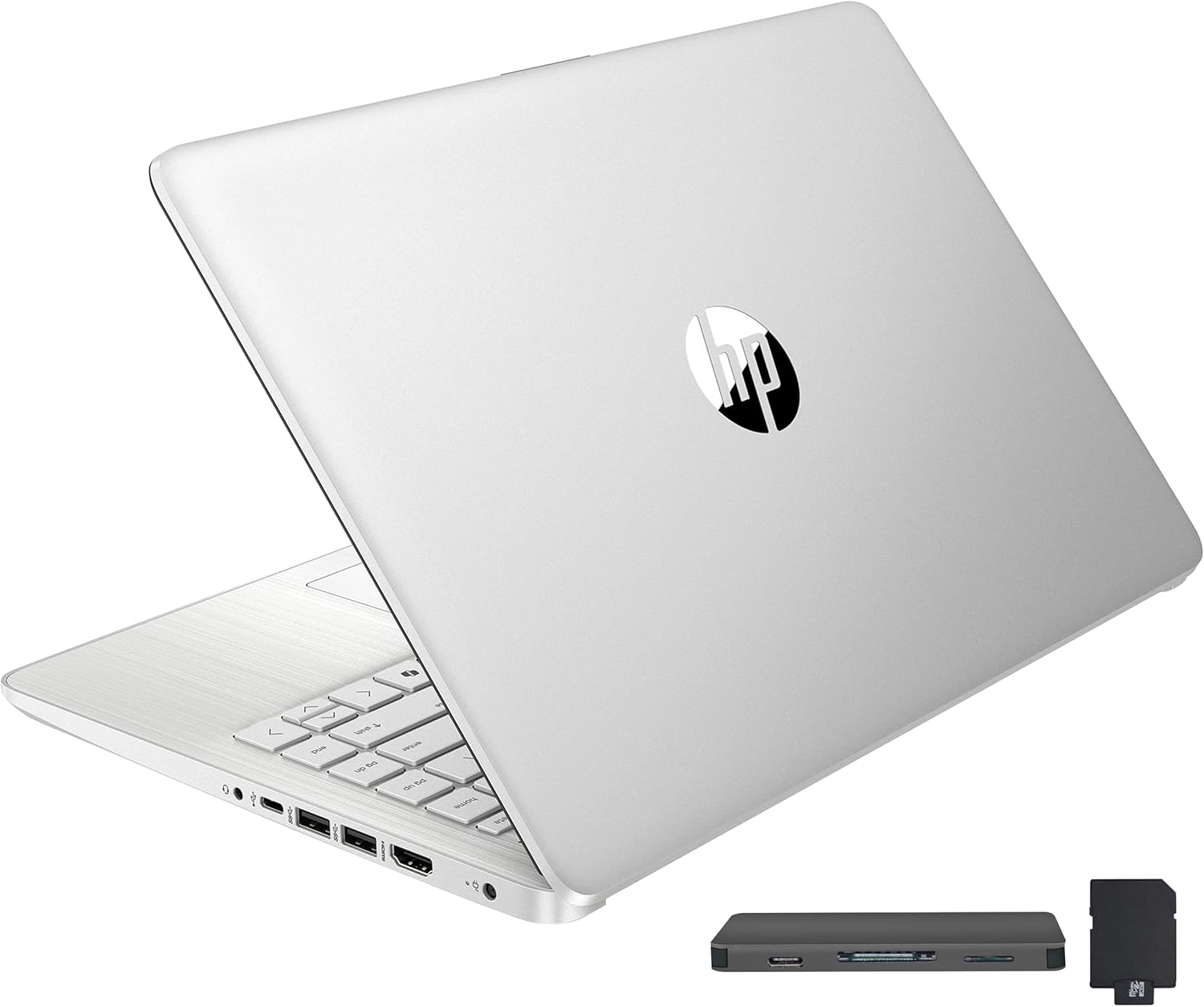
HP Stream 14" HD BrightView Laptop, Intel Celeron N150, 16GB RAM, 288GB Storage (128GB UFS + 160GB Docking Station Set), Intel UHD Graphics, 720p Webcam, Wi-Fi, 1 Year Office 365, Win 11 S, Silver
Want the best price and purchase timing?
Our AI advisor analyzes real-time pricing across all channels to find you the best deal.
AI Verdict
This 14-inch laptop with a Celeron N150, 16GB RAM, and 288GB hybrid storage is for light tasks and basic productivity on a tight budget.
This laptop is a situational fit because its 16GB RAM and included docking station offer more than typical budget laptops, but the Celeron N150 processor and 1366 x 768 display limit it to basic computing. It's built for efficiency over raw power.
If you need more processing power or a sharper display, look for laptops with an Intel Core i3 or i5 processor and a 1920 x 1080 (Full HD) screen.
Regret Score™
Medium RiskLower is better — measures purchase-regret risk from real buyer complaints, review credibility, and product maturity
Issues discovered after purchase
Critically weak dimension
Amazon rating vs actual quality
Chance this product isn't for you
Pros
- 16GB DDR4 RAM allows for running multiple applications without slowdowns, which is uncommon for its price point.
- Included 7-in-1 docking station adds 160GB storage, USB ports, and a card reader, expanding functionality beyond the base laptop.
- Weighs 3.24 lbs and is 0.71 inches thick, making it easy to carry for daily use.
- Comes with a 1-year Office 365 subscription, providing access to essential productivity software.
Cons
- The Intel Celeron N150 processor struggles with resource-intensive tasks like large spreadsheets or creative software.
- The 1366 x 768 HD display is not Full HD and can appear glossy in bright environments.
- Windows 11 Home in S Mode restricts software installation to Microsoft Store apps unless switched out.
- The 128GB eMMC internal storage is limited for installing many applications or storing large files directly on the laptop.
Dimension Scores
The Intel Celeron N150 processor is an entry-level chip that struggles with anything beyond light, everyday tasks.
The 14-inch 1366 x 768 HD BrightView display is not Full HD and can be glossy, limiting clarity and viewing experience.
The laptop offers a stated 11 hours of battery life, which is above average for its category.
Weighing 3.24 lbs and measuring 0.71 inches thick, it's lightweight and portable, though its plastic construction is not premium.
Best For
- Students needing a portable device for web browsing, document editing, and online classes.
- Casual users for streaming 720p video and managing email.
- Individuals requiring a secondary device for basic productivity with included Office 365.
Not Recommended For
- Users who need to run demanding applications like video editing or advanced data analysis.
- Anyone expecting a crisp, high-resolution display for detailed visual work.
- Gamers or those requiring powerful graphics performance.
Watch Out For
- The Celeron N150 processor quickly reaches its performance limit under anything more than light multitasking.
- The 1366 x 768 display resolution means text and images won't be as sharp as on Full HD screens.
- Windows 11 S Mode prevents installing programs outside the Microsoft Store, potentially limiting software choices.
- The screen's BrightView finish can cause reflections, making it harder to see in brightly lit rooms.
Full Specifications
| RAM | 16 GB DDR4 |
| ASIN | B0CZKPF2QH |
| Brand | HP |
| Color | Silver |
| Series | HP Stream |
| Voltage | 12 Volts |
| CPU Model | Celeron |
| Processor | 3.6 GHz celeron |
| Hard Drive | 128 GB 128GB eMMC |
| Model Name | HP Stream |
| Item Weight | 4.88 pounds |
| Screen Size | 14 Inches |
| Chipset Brand | Intel |
| Wireless Type | 802.11ac |
| Hard Disk Size | 128 GB |
| Processor Brand | Intel |
| Special Feature | Anti Glare Coating |
| Card Description | Integrated |
| Operating System | Windows 11 S |
| Flash Memory Size | 128 GB |
| Hardware Platform | PC |
| Item model number | HP Stream N4120 |
| Screen Resolution | 1366 x 768 pixels |
| Product Dimensions | 12.76 x 8.86 x 0.71 inches |
| Computer Memory Type | DDR4 SDRAM |
| Graphics Coprocessor | Intel Graphics |
| Hard Drive Interface | Solid State |
| Number of Processors | 4 |
| Max Screen Resolution | 1366x768 Pixels |
| Graphics Card Ram Size | 16 GB |
| Item Dimensions LxWxH | 12.76 x 8.86 x 0.71 inches |
| Graphics Card Description | Integrated |
| Ram Memory Installed Size | 16 GB |
| Standing screen display size | 14 Inches |
| Average Battery Life (in hours) | 11 Hours |
What Buyers Say
The biggest surprise for many users is the 16GB of RAM, which helps keep things moving for basic tasks, even with the Celeron processor. The included docking station with extra storage is also a recurring highlight, adding real utility. However, the 1366 x 768 screen resolution is a frequent point of contention, with users wishing for a sharper display. The laptop is often seen as a functional, portable option for very specific, light-duty needs.
“Look, I needed something cheap for my kid's homework and YouTube, and this thing actually works for that, the RAM helps, but don't even think about trying to game on it, the screen is kinda fuzzy too.”
Common Praise
- The 16GB DDR4 RAM keeps multiple browser tabs and office apps running without freezing.
- The bonus 7-in-1 docking station provides useful extra storage and connectivity options.
- It's lightweight at 3.24 lbs, making it easy to carry around all day.
- The 1-year Office 365 subscription is a practical inclusion for productivity.
Common Complaints
- The 1366 x 768 display resolution makes images and text appear less detailed.
- The Celeron N150 processor struggles with anything beyond basic web browsing and document editing.
- Windows 11 S Mode is restrictive, forcing users to switch out to install non-Microsoft Store apps.
- The screen's glossy finish creates reflections, especially near windows or bright lights.
Ownership Tips
- You'll probably want to switch out of Windows S Mode pretty quickly to install regular desktop apps.
- The included docking station really does make up for the small internal storage, just remember to use it.
- Don't expect to do any serious photo editing or anything that needs a lot of processing power; it will just lag.
- The screen is okay for watching videos, but you'll notice the lower resolution if you're used to Full HD.
Frequently Asked Questions
Can I install programs not from the Microsoft Store?
Yes, but you'll need to switch Windows 11 Home out of S Mode. This is a straightforward process, but it's a one-way change.
Is the 288GB storage all on the laptop?
No, the laptop has 128GB eMMC internal storage. The additional 160GB comes from the included docking station set, which typically includes a flash module and a microSD card.
How long does the battery last?
HP states an 11-hour battery life. Actual usage will vary depending on tasks and screen brightness.
Is the screen Full HD?
No, the screen has a 1366 x 768 HD resolution. It's suitable for everyday content but not as sharp as Full HD.
What kind of performance can I expect from the Intel Celeron N150?
The Celeron N150 is designed for basic tasks like web browsing, word processing, and 720p video streaming. It will be slow for demanding applications.
Buying Guide
When looking at budget laptops like this, you need to understand that compromises are made to hit the price point. You're trading raw power and display crispness for portability and basic functionality. Focus on what you absolutely need it to do, not what you wish it could do. This isn't a powerhouse, it's a tool for specific, light tasks.
Processor (Intel Celeron N150)
RAM (16GB DDR4)
Storage (128GB eMMC + 160GB Docking Station)
Resolution (1366 x 768 pixels)
Alternatives
If this laptop doesn't cut it, look for models with at least an Intel Core i3 or AMD Ryzen 3 processor, 8GB RAM, and a 256GB SSD for faster performance and more internal storage.
You Might Also Like

Apple 2026 MacBook Air 13-inch Laptop with M5 chip: Built for AI, 13.6-inch Liquid Retina Display, 16GB Unified Memory, 512GB SSD, 12MP Center Stage Camera, Touch ID, Wi-Fi 7; Midnight
$600+This 2.71-pound MacBook Air with a 13.6-inch Liquid Retina display and M5 chip is for users needing powerful AI capabilities and up to 18 hours of battery life.

Apple 2026 MacBook Pro Laptop with Apple M5 Pro chip with 18-core CPU and 20-core GPU: Built for AI, 16.2-inch Liquid Retina XDR Display, 24GB Unified Memory, 1TB SSD, Wi-Fi 7; Space Black
$600+This 16.2-inch MacBook Pro with an 18-core M5 Pro CPU and 20-core GPU is for professionals needing extreme AI performance and up to 27 hours of battery life.

Apple 2026 MacBook Air 15-inch Laptop with M5 chip: Built for AI, 15.3-inch Liquid Retina Display, 16GB Unified Memory, 512GB SSD, 12MP Center Stage Camera, Touch ID, Wi-Fi 7; Midnight
$600+This 3.32-pound MacBook Air with an M5 chip and 15.3-inch Liquid Retina display is for users needing powerful AI capabilities and up to 18 hours of battery life.

HP OmniBook 5 16” Touchscreen AI Laptop – Intel Core Ultra 7 Processor, 16GB RAM, 1TB SSD, Windows 11, Copilot AI, Wi-Fi 6E, Backlit Keyboard, Silver
$600+This 16-inch touchscreen laptop with an Intel Core Ultra 7, 16GB LPDDR5 RAM, and 1TB SSD is for users needing a mid-range AI-accelerated machine for productivity and light creative tasks.