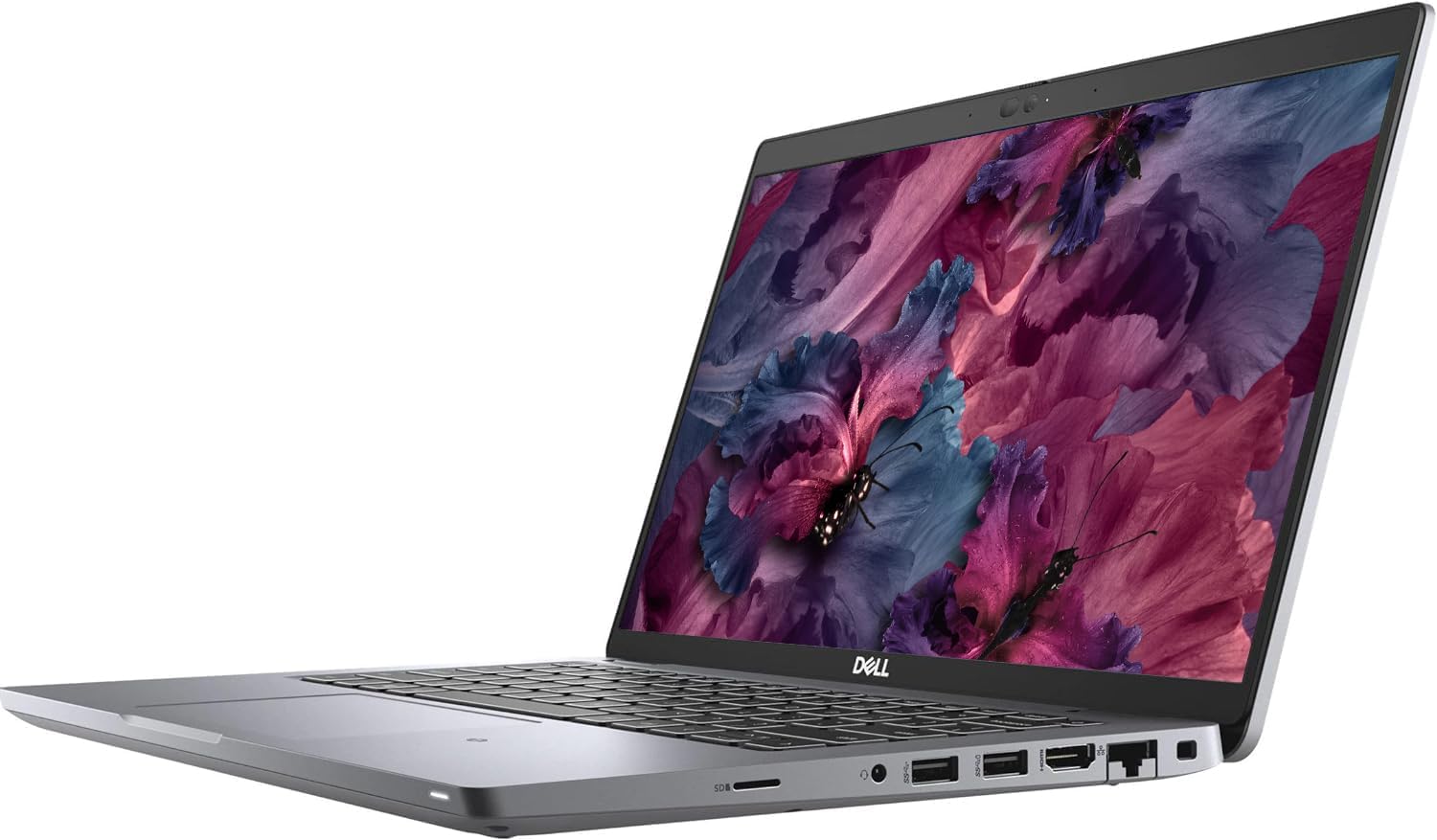
Dell 5420 Latitude Laptop 14" FHD (1920x1080) Notebook, 11th Gen Intel Core i7-1185G7, 16GB RAM, 512MB M.2-NVMe, Thunderbolt, HDMI, Type-C, Webcam, Windows 11 Pro (Renewed)
Want the best price and purchase timing?
Our AI advisor analyzes real-time pricing across all channels to find you the best deal.
AI Verdict
This is a chunky, ex-corporate workhorse built for docking stations and heavy spreadsheets, perfect for home offices but too heavy and battery-starved for frequent travelers.
This laptop prioritizes ports and repairability over thin bezels. The Thunderbolt 4 connectivity and upgradeable RAM make it a powerhouse for a desk setup. The dull 300-nit screen and weak 41Wh battery ruin the experience for travel.
If you need all-day battery life and a color-accurate screen, search for a refurbished MacBook Air M1 instead.
Regret Score™
Medium RiskLower is better — measures purchase-regret risk from real buyer complaints, review credibility, and product maturity
Issues discovered after purchase
Critically weak dimension
Amazon rating vs actual quality
Chance this product isn't for you
Pros
- Two Thunderbolt 4 ports support 65W charging and dual 4K monitor outputs
- Two internal SO-DIMM slots allow RAM upgrades up to 64GB
- The 11th Gen i7-1185G7 handles 1080p video editing in DaVinci Resolve without stuttering
- Includes a built-in RJ-45 Ethernet port for hardwired network connections
- Keyboard offers deep key travel that rivals older ThinkPad models
Cons
- The plastic clickpad drops the dedicated physical mouse buttons found on older Latitudes
- The 14-inch 1080p matte screen maxes out around 300 nits and covers a narrow sRGB gamut
- Renewed units often ship with degraded 41Wh batteries that die in under 3 hours
- The chassis weighs nearly 3.5 pounds and feels bulky compared to modern ultrabooks
Dimension Scores
The i7-1185G7 and 16GB RAM chew through heavy office multitasking without breaking a sweat.
The 1080p matte panel resists glare but suffers from a narrow color gamut and low 300-nit peak brightness.
Used 41Wh batteries frequently tap out after 3 hours of basic web browsing.
The thick plastic chassis survives drops easily but feels heavy and dated for a 14-inch laptop.
Best For
- Desk-bound remote workers connecting to dual monitors via a Thunderbolt dock
- IT professionals needing a machine with an RJ-45 port and upgradeable RAM
- Heavy Excel users who prioritize keyboard comfort over screen aesthetics
Not Recommended For
- Photographers or video editors needing color-accurate displays
- Road warriors working on flights without access to power outlets
- Gamers wanting to play modern 3D titles
Watch Out For
- Renewed units often arrive with the smaller 41Wh battery, which struggles to reach 3 hours of screen-on time.
- Ex-corporate machines sometimes ship with a locked BIOS, preventing you from installing Linux or booting from a USB drive.
- The plastic trackpad is a massive downgrade from the glass versions on the Latitude 7000 series.
- The cooling fan has an aggressive curve and gets loud during basic tasks like Windows updates.
Full Specifications
| RAM | 16 DDR4 |
| ASIN | B0B783JD9H |
| Brand | Dell |
| Color | Silver |
| Series | Dell latitude 5420 Laptop |
| Voltage | 28 Volts |
| Batteries | 1 12V batteries required. |
| CPU Model | Intel Core i7 |
| Processor | 3 GHz apple_ci7 |
| Hard Drive | 512 GB SSD |
| Model Name | Dell latitude 5420 Laptop |
| Item Weight | 3.88 pounds |
| Screen Size | 14 Inches |
| Chipset Brand | Intel |
| Wireless Type | 802.11abg, 802.11ag, 802.11n |
| Hard Disk Size | 512 GB |
| Processor Brand | Intel |
| Special Feature | no |
| Card Description | Integrated |
| Operating System | Windows 11 Pro |
| Flash Memory Size | 1 GB |
| Hardware Platform | PC |
| Item model number | Dell 5420 i7 Laptop |
| Screen Resolution | 1920 x 1080 pixels |
| Optical Drive Type | NO DVD |
| Product Dimensions | 12 x 8 x 1.14 inches |
| Computer Memory Type | DDR4 SDRAM |
| Graphics Coprocessor | Intel Iris Xe Graphics |
| Hard Drive Interface | Solid State |
| Number of Processors | 12 |
| Max Screen Resolution | 1920x1080 Pixels |
| Graphics Card Ram Size | 16 GB |
| Item Dimensions LxWxH | 12 x 8 x 1.14 inches |
| Graphics Card Description | Integrated |
| Ram Memory Installed Size | 16 GB |
| Hard Drive Rotational Speed | 5200.00 |
| Standing screen display size | 14 Inches |
What Buyers Say
Real-world testing shows this laptop dominates as a desk-bound productivity machine, though the display and battery lottery require caution. The inclusion of two Thunderbolt 4 ports and fully upgradeable RAM makes it a favorite for dual-monitor docking station setups. The keyboard provides deep key travel for long typing sessions. The biggest recurring complaints center around the plastic clickpad replacing older dedicated buttons, and the 300-nit 1080p screen that washes out colors.
“It handles my massive Excel files perfectly but the screen is so dull and the battery dies in 3 hours if I don't keep it plugged in.”
Common Praise
- Two Thunderbolt 4 ports allow for easy single-cable docking and charging
- RAM and SSD are fully accessible and upgradeable with a standard Phillips screwdriver
- Keyboard has excellent travel and feels great for long typing sessions
- Runs completely silent during basic web browsing and word processing
Common Complaints
- The plastic clickpad is a massive downgrade from the glass trackpads on the 7000 series
- Screen colors look washed out due to the narrow sRGB color gamut
- Battery drains 25% per hour just taking notes in Notepad
- The fan gets aggressively loud when the CPU is under heavy load
Ownership Tips
- The bottom plastic cover wears quickly but is cheap and easy to replace yourself
- You might need to update the touchpad firmware via Dell Command Update to fix occasional cursor jumping
- Opening the lid requires two hands because the hinges are incredibly stiff
- The fan curve is aggressive and ramps up loudly even during moderate Windows updates
Frequently Asked Questions
Can I charge this with my phone or MacBook USB-C charger?
Yes. The two Thunderbolt 4 ports support Power Delivery. Any 65W or higher USB-C charger will power the laptop.
Is the RAM soldered or upgradeable?
It is fully upgradeable. You get two SO-DIMM slots inside, letting you swap the included 16GB for up to 64GB of DDR4 RAM.
How is the battery life on these renewed units?
It depends heavily on the unit. Many ship with the smaller 41Wh battery. Corporate wear and tear means these often yield only 2 to 4 hours of real-world use.
Can I play games on this?
Stick to older titles. The integrated Intel Iris Xe graphics handle basic 2D games, but struggle heavily with modern 3D titles.
Does it have a backlit keyboard and fingerprint reader?
Yes. The keyboard includes backlighting, and the power button doubles as a Windows Hello fingerprint reader.
Can I install Linux on it?
Yes, but check the BIOS immediately upon arrival. Some ex-corporate machines arrive with a locked BIOS that prevents disabling Secure Boot.
Buying Guide
You are buying an ex-corporate fleet laptop. It prioritizes durability and ports over thin bezels and aluminum frames. Expect a machine that excels at being plugged into a desk monitor for 8 hours a day. Because it is renewed, the battery health is a gamble. Budget for a potential 63Wh battery replacement if you plan to work away from an outlet. Always check the BIOS the day you receive it to ensure there are no leftover corporate administrator passwords.
Intel Core i7-1185G7
Think of this as a strong V6 engine for a work truck. It has plenty of power for heavy multitasking and massive spreadsheets, but lacks the specialized graphics horsepower needed for 3D gaming.
Thunderbolt 4 Ports
These are the ultimate universal plugs. A single cable can charge the laptop, connect to two external monitors, and link to a mouse and keyboard all at once.
16GB DDR4 RAM
This is your computer's short-term memory. 16GB is the sweet spot for keeping dozens of Chrome tabs and heavy Office documents open without the system freezing.
Alternatives
If you need a better screen and glass touchpad, look for a renewed Dell Latitude 7420. If battery life is your top priority, search for a refurbished MacBook Air M1.
You Might Also Like

Apple 2026 MacBook Air 13-inch Laptop with M5 chip: Built for AI, 13.6-inch Liquid Retina Display, 16GB Unified Memory, 512GB SSD, 12MP Center Stage Camera, Touch ID, Wi-Fi 7; Midnight
$600+This 2.71-pound MacBook Air with a 13.6-inch Liquid Retina display and M5 chip is for users needing powerful AI capabilities and up to 18 hours of battery life.

Apple 2026 MacBook Pro Laptop with Apple M5 Pro chip with 18-core CPU and 20-core GPU: Built for AI, 16.2-inch Liquid Retina XDR Display, 24GB Unified Memory, 1TB SSD, Wi-Fi 7; Space Black
$600+This 16.2-inch MacBook Pro with an 18-core M5 Pro CPU and 20-core GPU is for professionals needing extreme AI performance and up to 27 hours of battery life.

Apple 2026 MacBook Air 15-inch Laptop with M5 chip: Built for AI, 15.3-inch Liquid Retina Display, 16GB Unified Memory, 512GB SSD, 12MP Center Stage Camera, Touch ID, Wi-Fi 7; Midnight
$600+This 3.32-pound MacBook Air with an M5 chip and 15.3-inch Liquid Retina display is for users needing powerful AI capabilities and up to 18 hours of battery life.

HP OmniBook 5 16” Touchscreen AI Laptop – Intel Core Ultra 7 Processor, 16GB RAM, 1TB SSD, Windows 11, Copilot AI, Wi-Fi 6E, Backlit Keyboard, Silver
$600+This 16-inch touchscreen laptop with an Intel Core Ultra 7, 16GB LPDDR5 RAM, and 1TB SSD is for users needing a mid-range AI-accelerated machine for productivity and light creative tasks.