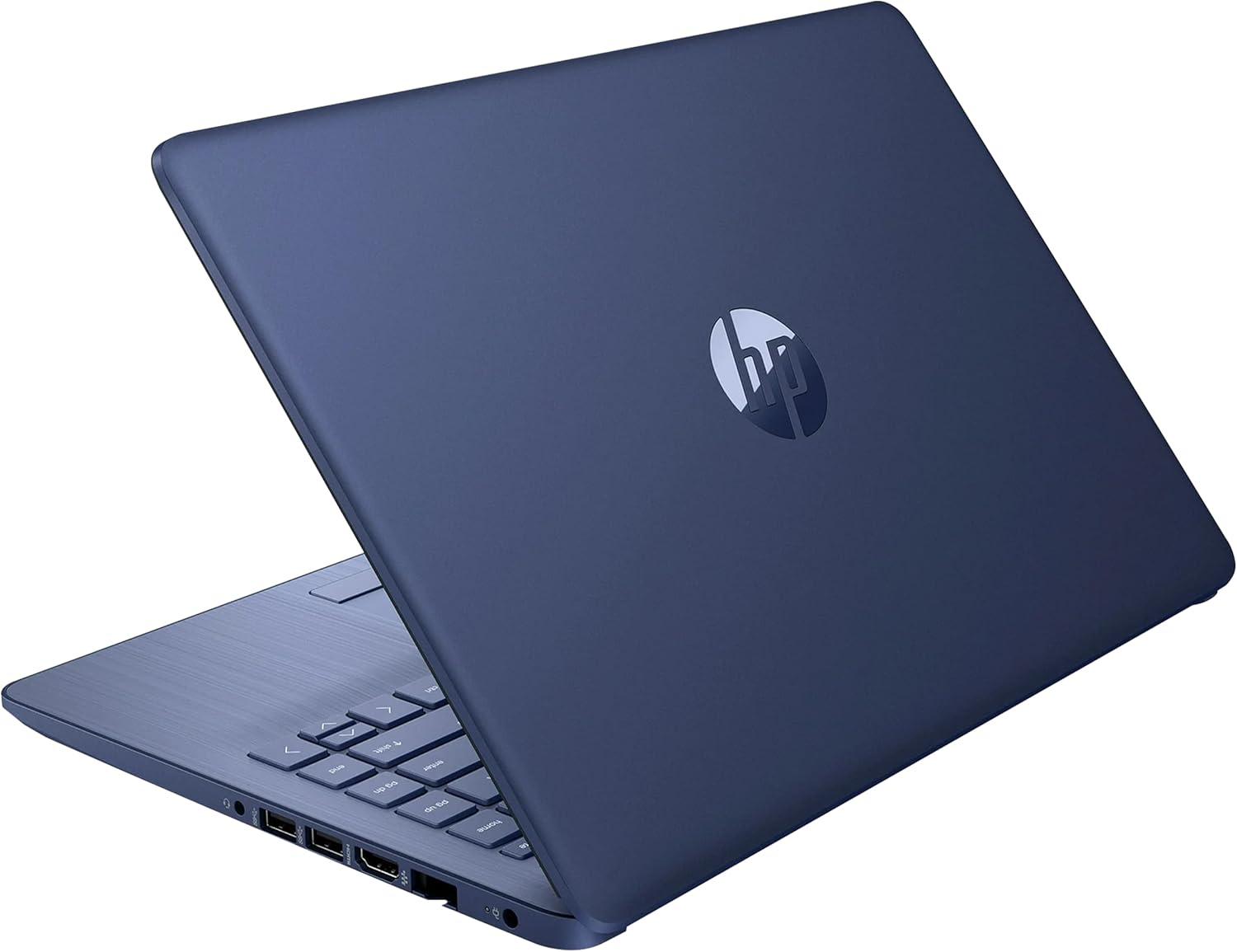
HP 14" HD Laptop, Windows 11, Intel Celeron Dual-Core Processor Up to 2.60GHz, 4GB RAM, 64GB SSD, Webcam, Dale Blue (Renewed)
Want the best price and purchase timing?
Our AI advisor analyzes real-time pricing across all channels to find you the best deal.
AI Verdict
This is a bare-bones survival machine for typing documents and checking email, but the 4GB of RAM will choke if you try to multitask.
The Celeron N4020 and 4GB of RAM create a hard ceiling on usability. It handles one lightweight task at a time, like typing a document or reading an article. Pushing it to juggle a video call and a web browser simultaneously results in system freezes.
Look for a machine with at least 8GB of RAM and an Intel Core i3 or Ryzen 3 processor to handle basic multitasking without lagging.
Regret Score™
High RiskLower is better — measures purchase-regret risk from real buyer complaints, review credibility, and product maturity
Issues discovered after purchase
Critically weak dimension
Amazon rating vs actual quality
Chance this product isn't for you
Pros
- Dale Blue plastic shell hides fingerprints and smudges better than matte black finishes.
- 6W TDP Celeron processor sips power, easily hitting 7 to 8 hours of real-world web browsing.
- Includes a full-size SD card reader to expand the restrictive 64GB internal drive.
- Fanless design means the laptop runs completely silent even when the CPU is maxed out at 100%.
Cons
- 4GB of soldered DDR4 RAM cannot be upgraded and maxes out with just three Chrome tabs open.
- 1366 x 768 resolution TN panel washes out colors and shifts contrast when tilted past 15 degrees.
- 64GB internal drive leaves less than 20GB of usable space after Windows 11 installs its mandatory updates.
- Lacks a USB-C port entirely, relying strictly on three older USB Type-A connections.
Dimension Scores
The Celeron N4020 scores lower on multi-core benchmarks than most modern smartphone chips.
The 1366 x 768 resolution leaves text looking jagged, and the TN panel suffers from severe color shifting at off-angles.
The low-power 6W processor allows the 41Wh battery to stretch past 8 hours of continuous text editing.
The plastic chassis flexes under heavy typing pressure, but the 4.45-pound weight is manageable for a backpack.
Best For
- Single-tab web browsing and reading emails on the couch.
- Typing offline Word documents for middle school homework.
- Running a single full-screen YouTube video at 720p resolution.
Not Recommended For
- Running Zoom calls while screen-sharing a presentation.
- Playing any 3D games released after 2010.
- Keeping multiple browser windows and background apps open simultaneously.
Watch Out For
- Windows 11 S Mode blocks you from downloading Chrome or Zoom directly from the web — you have to dig into settings to permanently disable S Mode first.
- 64GB of storage fills up immediately — Windows updates will literally fail to install within a month unless you buy an external SD card.
- The 1366 x 768 screen uses a TN panel — if you tilt the screen back even slightly, the text becomes unreadable.
- The Celeron N4020 processor stutters on 1080p 60fps video streams — you have to manually drop YouTube quality to 720p to stop the buffering.
Full Specifications
| RAM | 4 GB DDR4 |
| ASIN | B09VZR2BGN |
| Brand | HP |
| Color | Blue |
| Series | HP 14inch Laptop |
| Batteries | 1 Lithium Ion batteries required. (included) |
| CPU Model | Celeron |
| Processor | 2.6 GHz celeron |
| Hard Drive | 64 GB SSD |
| Model Name | HP 14inch Laptop |
| Item Weight | 4.45 pounds |
| Screen Size | 14 Inches |
| Memory Speed | 2.6 GHz |
| Power Source | Corded Electric |
| Chipset Brand | Intel |
| Wireless Type | 802.11a, Bluetooth |
| Hard Disk Size | 64 GB |
| Processor Brand | Intel |
| Special Feature | Anti Glare Coating |
| Card Description | Integrated |
| Operating System | Windows 11 |
| Hardware Platform | PC |
| Item model number | HP 14" Laptop |
| Screen Resolution | 1366 x 768 pixels |
| Optical Drive Type | No Optical Sotrage Device |
| Product Dimensions | 12.9 x 8.9 x 0.9 inches |
| Computer Memory Type | DDR4 SDRAM |
| Graphics Coprocessor | Intel |
| Hard Drive Interface | Solid State |
| Number of Processors | 2 |
| Max Screen Resolution | 1366x768 Pixels |
| Graphics Card Ram Size | 4 GB |
| Item Dimensions LxWxH | 12.9 x 8.9 x 0.9 inches |
| Number of USB 3.0 Ports | 3 |
| Graphics Card Description | Integrated |
| Ram Memory Installed Size | 4 GB |
| Standing screen display size | 14 Inches |
| Average Battery Life (in hours) | 9 Hours |
What Buyers Say
The 64GB storage drive causes the most immediate headaches, as Windows 11 updates consume nearly all the free space within weeks. The fanless design keeps the chassis dead silent during operation. The Dale Blue plastic shell resists greasy fingerprints far better than standard black models. The 4GB memory limit forces a strict one-task-at-a-time workflow, as opening Spotify alongside a web browser causes noticeable mouse lag.
“Bought this just to check emails and it still freezes if I open too many tabs, plus the hard drive was full after one windows update.”
Common Praise
- Battery easily lasts through a full 8-hour school day of typing.
- Dale Blue color stands out and hides smudges.
- Completely silent operation due to the fanless cooling design.
- Keyboard has decent travel and doesn't feel mushy.
Common Complaints
- Windows updates fail due to the tiny 64GB internal drive filling up.
- Mouse cursor physically stutters when a web page is loading.
- Screen looks washed out unless viewed from a perfectly straight angle.
- Webcam is grainy and struggles heavily in dim indoor lighting.
Ownership Tips
- Disabling Windows 11 S Mode is practically mandatory to install basic apps like Google Chrome.
- An SD card is required on day one just to have a place to save downloaded PDF files.
- The plastic hinges loosen up after a few weeks, causing the screen to wobble if you type aggressively.
- Boot times slow down significantly after the first month as background processes eat up the 4GB of RAM.
Frequently Asked Questions
Can I play Minecraft or Roblox on this?
No. The integrated Intel UHD 600 graphics run at 650 MHz and will struggle to hit 15 frames per second even on the lowest possible settings.
Does this laptop have a backlit keyboard?
No. The keys are standard printed plastic without any LED backlighting for night typing.
Can I upgrade the RAM or storage later?
The 4GB of RAM is soldered directly to the motherboard and cannot be changed. You can add storage using the SD card slot on the side.
Will this run full Windows 11 or just S Mode?
It ships in Windows 11 S Mode, restricting you to Microsoft Store apps. You can switch to full Windows 11 Home in the settings, but the 4GB of RAM will struggle with heavy desktop apps.
Does it charge via USB-C?
No. It uses a proprietary HP barrel charger and lacks a USB-C port entirely.
Buying Guide
You are buying a digital typewriter, not a multitasking machine. The combination of 4GB of RAM and a Celeron processor means you must close apps when you finish using them. The 64GB storage drive is too small to hold large photo libraries or multiple heavy programs. You will need to rely heavily on cloud storage like Google Drive or buy an SD card to hold your files.
4GB RAM
RAM is your computer's short-term memory. 4GB is the absolute bare minimum for Windows 11, meaning your laptop will forget background tasks and freeze if you open too many browser tabs.
64GB SSD Storage
This is the filing cabinet for your apps and documents. Windows 11 takes up more than half of this space right out of the box, leaving you very little room for your own files.
1366 x 768 Resolution
This dictates how sharp the screen looks. At 14 inches, this low resolution makes text look fuzzy around the edges compared to a standard 1080p display.
Alternatives
Search for a laptop with 8GB of RAM and a 256GB SSD if you want to keep multiple browser tabs open and save files without relying on cloud storage.
You Might Also Like

Apple 2026 MacBook Air 13-inch Laptop with M5 chip: Built for AI, 13.6-inch Liquid Retina Display, 16GB Unified Memory, 512GB SSD, 12MP Center Stage Camera, Touch ID, Wi-Fi 7; Midnight
$600+This 2.71-pound MacBook Air with a 13.6-inch Liquid Retina display and M5 chip is for users needing powerful AI capabilities and up to 18 hours of battery life.

Apple 2026 MacBook Pro Laptop with Apple M5 Pro chip with 18-core CPU and 20-core GPU: Built for AI, 16.2-inch Liquid Retina XDR Display, 24GB Unified Memory, 1TB SSD, Wi-Fi 7; Space Black
$600+This 16.2-inch MacBook Pro with an 18-core M5 Pro CPU and 20-core GPU is for professionals needing extreme AI performance and up to 27 hours of battery life.

Apple 2026 MacBook Air 15-inch Laptop with M5 chip: Built for AI, 15.3-inch Liquid Retina Display, 16GB Unified Memory, 512GB SSD, 12MP Center Stage Camera, Touch ID, Wi-Fi 7; Midnight
$600+This 3.32-pound MacBook Air with an M5 chip and 15.3-inch Liquid Retina display is for users needing powerful AI capabilities and up to 18 hours of battery life.

HP OmniBook 5 16” Touchscreen AI Laptop – Intel Core Ultra 7 Processor, 16GB RAM, 1TB SSD, Windows 11, Copilot AI, Wi-Fi 6E, Backlit Keyboard, Silver
$600+This 16-inch touchscreen laptop with an Intel Core Ultra 7, 16GB LPDDR5 RAM, and 1TB SSD is for users needing a mid-range AI-accelerated machine for productivity and light creative tasks.