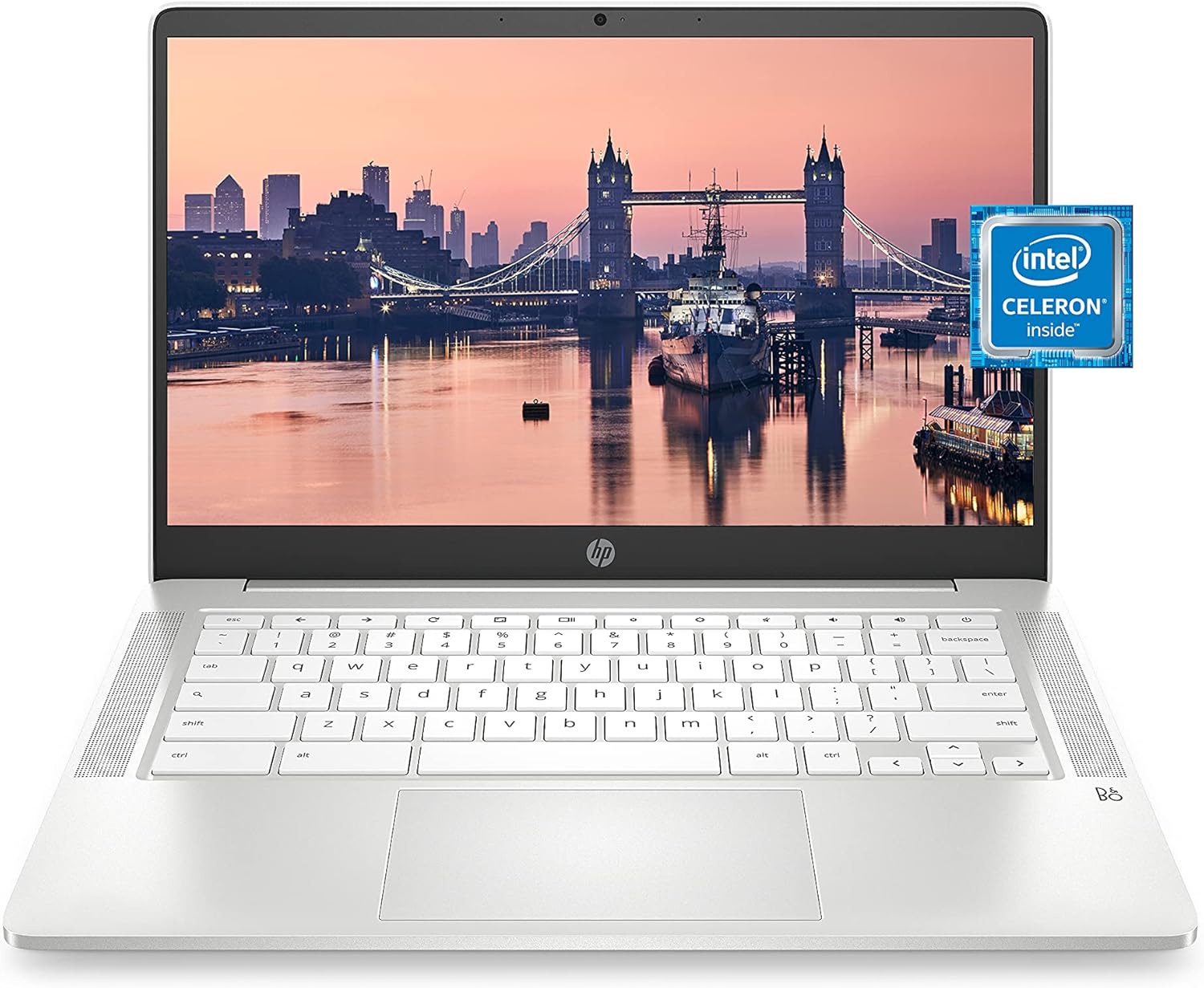
HP Chromebook 14 Laptop, Intel Celeron N4000 Processor, 4 GB RAM, 32 GB eMMC, 14” HD Display, Chrome, Lightweight Computer with Webcam and Dual Mics, Home, School, Music, Movies (14a-na0021nr, 2021)
Want the best price and purchase timing?
Our AI advisor analyzes real-time pricing across all channels to find you the best deal.
AI Verdict
This is a bare-bones, fanless web browser disguised as a laptop, perfect for students or remote workers who just need Google Docs and 12-hour battery life on a strict budget.
The Celeron N4000 and 4GB of RAM restrict this strictly to single-tasking web browsing and cloud-based document editing. The 13.5-hour battery and 3.24-pound chassis make it highly portable, but the dim 220-nit 1366x768 TN display limits its usefulness in bright environments.
If you want to use Android apps or watch movies, look for a model with a 1080p IPS touchscreen and at least 64GB of storage.
Regret Score™
Medium RiskLower is better — measures purchase-regret risk from real buyer complaints, review credibility, and product maturity
Issues discovered after purchase
Critically weak dimension
Amazon rating vs actual quality
Chance this product isn't for you
Pros
- Fanless design runs completely silent even when pushing the Celeron N4000 processor
- Battery easily hits 10+ hours of real-world web browsing, matching the 13.5-hour claim
- Includes two USB-C ports with Power Delivery, so you can charge it from either side
- Matte anti-glare coating prevents harsh reflections from overhead office lights
- Upward-facing speakers prevent audio from getting muffled when resting on your lap
Cons
- 1366 x 768 TN panel looks washed out and has narrow vertical viewing angles
- No touchscreen makes navigating Android apps from the Google Play Store frustrating
- 32GB of eMMC storage leaves less than 20GB usable after Chrome OS updates
- Lacks a dedicated HDMI port, requiring a USB-C dongle for external monitors
Dimension Scores
The dual-core Celeron N4000 handles basic web browsing but stutters if you open more than a dozen tabs or heavy web apps.
The 1366x768 TN panel is low-resolution, washes out at angles, and maxes out at a dim 220 nits.
The low-power chip and 47Wh battery easily deliver 10 to 12 hours of real-world use on a single charge.
At 3.24 pounds and 0.7 inches thick, it is easy to carry, though the all-plastic chassis feels hollow.
Best For
- Middle school students needing a cheap, lightweight laptop for Google Classroom
- Writing or data entry in coffee shops where you need all-day battery without a charger
- Seniors or tech-novices who just want to check email and watch YouTube without Windows update headaches
Not Recommended For
- Anyone wanting to play Android games, since the lack of a touchscreen makes them unplayable
- Working outdoors or by bright windows, as the 220-nit screen is too dim to read
- Heavy multitaskers who keep 20+ Chrome tabs open, which will choke the 4GB of RAM
Watch Out For
- No touchscreen — many Android apps in the Play Store are designed for swiping and are incredibly clunky with a trackpad.
- Low-resolution TN panel — the 1366x768 screen looks pixelated on a 14-inch display, and colors shift dramatically if you tilt the screen even slightly.
- Tiny local storage — Chrome OS and system files eat up a chunk of the 32GB out of the box, leaving you reliant on cloud storage or external drives.
- No dedicated video out — you need to buy a separate USB-C to HDMI adapter if you want to connect this to a TV or standard desktop monitor.
Full Specifications
| RAM | 4 GB DDR4 |
| ASIN | B08YKGZF7P |
| Brand | HP |
| Color | Ceramic White |
| Series | 14a-na0021nr |
| Voltage | 24 Volts |
| Batteries | 1 Lithium Metal batteries required. (included) |
| CPU Model | Celeron N4000 |
| Processor | 1.1 GHz celeron_n4000 |
| Hard Drive | 32 GB SSD |
| Model Name | 14a-na0021nr |
| Item Weight | 3.24 pounds |
| Screen Size | 14 Inches |
| Memory Speed | 2400 MHz |
| Power Source | Battery Powered |
| Chipset Brand | Intel |
| Wireless Type | 802.11a/b/g/n/ac, Bluetooth |
| Hard Disk Size | 32 GB |
| Processor Brand | Intel |
| Special Feature | Anti Glare Coating |
| Card Description | Integrated |
| Operating System | Chrome OS |
| Flash Memory Size | 4 |
| Hardware Platform | Chromebook |
| Item model number | 14a-na0021nr |
| Screen Resolution | 1366 x 768 pixels |
| Optical Drive Type | No Optical Drive |
| Product Dimensions | 12.82 x 8.6 x 0.7 inches |
| Computer Memory Type | DDR4 SDRAM |
| Graphics Coprocessor | Intel UHD Graphics 600 |
| Hard Drive Interface | Solid State |
| Number of Processors | 2 |
| Max Screen Resolution | 1366x768 Pixels |
| Graphics Card Ram Size | 4 GB |
| Item Dimensions LxWxH | 12.82 x 8.6 x 0.7 inches |
| Graphics Card Description | Integrated |
| Ram Memory Installed Size | 4 GB |
| Standing screen display size | 14 Inches |
| Average Battery Life (in hours) | 12 Hours |
What Buyers Say
The upward-facing speakers perform surprisingly well compared to the otherwise budget-tier hardware. The battery life easily survives a full school day without needing the charger, hitting the 10-hour mark routinely. The display remains a major pain point; the 1366x768 TN panel looks washed out and is difficult to read unless angled perfectly. Android apps from the Play Store prove incredibly awkward to use without a touchscreen. The lack of a dedicated HDMI port catches many remote workers off guard when trying to connect a second monitor.
“Bought this for my daughter's homework but the screen is so washed out you have to sit perfectly still to read it, battery lasts forever though.”
Common Praise
- Battery routinely lasts 10-12 hours of continuous YouTube and web browsing
- Upward-facing speakers deliver clear audio that doesn't muffle on a bed or lap
- USB-C ports on both the left and right sides allow for convenient charging
- Keyboard has a satisfying, tactile bump and doesn't flex much while typing
- Fanless design means it never makes a sound, even during software updates
Common Complaints
- 1366x768 screen resolution makes text look fuzzy compared to modern smartphones
- TN display panel inverts colors if you tilt the screen too far back or forward
- Android apps are clunky and frustrating to navigate using only a trackpad
- 32GB of storage fills up almost immediately if you download movies for offline viewing
- Requires a dongle to connect to standard HDMI monitors or projectors
Ownership Tips
- The matte screen finish is great at blocking glare, but it makes the already dim 220-nit display look even duller
- Chrome OS updates eat into the 32GB storage over time, leaving you with very little local space after a year
- The plastic casing picks up fingerprints and smudges very quickly, especially on the lid
- Using a high-capacity microSD card for extra storage works, but apps run noticeably slower off the card than the internal eMMC
Frequently Asked Questions
Can I play Minecraft or Roblox on this?
You can install the Android versions from the Play Store, but performance is choppy on the Celeron N4000. Without a touchscreen, the controls are very frustrating.
Does it have an HDMI port to connect to a monitor?
No, it lacks a built-in HDMI port. You will need to buy a USB-C to HDMI dongle to connect an external display.
Can I install Microsoft Office (Word, Excel)?
You cannot install the full Windows desktop versions of Office. You have to use the Microsoft 365 web apps through the Chrome browser.
Is the RAM or storage upgradable?
No, both the 4GB of RAM and 32GB eMMC storage are soldered to the motherboard. You can only add storage via the microSD card slot or USB ports.
Does this laptop have a fan?
No, the Celeron N4000 processor is passively cooled. The laptop is completely silent even under heavy load.
Can I charge it with my phone charger?
Yes, if your phone uses a USB-C charger with Power Delivery. A standard phone block will charge it much slower than the included 45W laptop charger.
Buying Guide
When buying a budget Chromebook, you are trading processing power and screen quality for battery life and simplicity. Chrome OS is essentially just the Google Chrome web browser, meaning you cannot install standard Windows or Mac software like full Microsoft Office or Adobe Photoshop. Because everything is stored in the cloud, you don't need a massive hard drive, but 32GB is the absolute bare minimum. You must decide if you want to use Android apps; if you do, a touchscreen is practically mandatory, which this model lacks.
Intel Celeron N4000 & 4GB RAM
This is the engine of the laptop. It is like a moped—great for a quick trip down the street for checking email or writing a doc, but it will stall if you try to take it on the highway for editing video or opening 30 tabs.
32GB eMMC Storage
This is your local trunk space. It is tiny because Chromebooks expect you to store your files in Google Drive, similar to how you stream music on Spotify instead of downloading MP3s.
1366 x 768 TN Display
This dictates how crisp and colorful your screen looks. A TN panel is older technology that looks faded if you aren't looking at it dead-center, unlike the IPS screens found on modern TVs and phones.
Alternatives
If you plan to use Android apps or watch a lot of Netflix, look for a Chromebook with a 1080p IPS touchscreen and at least 64GB of storage.
You Might Also Like

Apple 2026 MacBook Air 13-inch Laptop with M5 chip: Built for AI, 13.6-inch Liquid Retina Display, 16GB Unified Memory, 512GB SSD, 12MP Center Stage Camera, Touch ID, Wi-Fi 7; Midnight
$600+This 2.71-pound MacBook Air with a 13.6-inch Liquid Retina display and M5 chip is for users needing powerful AI capabilities and up to 18 hours of battery life.

Apple 2026 MacBook Pro Laptop with Apple M5 Pro chip with 18-core CPU and 20-core GPU: Built for AI, 16.2-inch Liquid Retina XDR Display, 24GB Unified Memory, 1TB SSD, Wi-Fi 7; Space Black
$600+This 16.2-inch MacBook Pro with an 18-core M5 Pro CPU and 20-core GPU is for professionals needing extreme AI performance and up to 27 hours of battery life.

Apple 2026 MacBook Air 15-inch Laptop with M5 chip: Built for AI, 15.3-inch Liquid Retina Display, 16GB Unified Memory, 512GB SSD, 12MP Center Stage Camera, Touch ID, Wi-Fi 7; Midnight
$600+This 3.32-pound MacBook Air with an M5 chip and 15.3-inch Liquid Retina display is for users needing powerful AI capabilities and up to 18 hours of battery life.

HP OmniBook 5 16” Touchscreen AI Laptop – Intel Core Ultra 7 Processor, 16GB RAM, 1TB SSD, Windows 11, Copilot AI, Wi-Fi 6E, Backlit Keyboard, Silver
$600+This 16-inch touchscreen laptop with an Intel Core Ultra 7, 16GB LPDDR5 RAM, and 1TB SSD is for users needing a mid-range AI-accelerated machine for productivity and light creative tasks.